
Key takeaways
- Wide device-brand compatibility list
- Consolidated layout minimizes switching between screens
- Pairing reliability varies by brand and model year
Lost remotes, broken IR blasters, and households with three or four streaming boxes create the same daily friction: nobody can find the right controller to change the volume or switch inputs. A reliable tv remote app or a well-built physical replacement eliminates that friction without requiring you to buy a new television. The category splits into two camps—software-based apps that route commands over Wi-Fi or Bluetooth, and hardware replacements that mimic the original remote’s button layout at a fraction of the manufacturer’s price.
What separates the worthwhile options from the frustrating ones comes down to protocol compatibility, latency, and whether the device or app actually pairs cleanly with your specific brand of TV. Owner feedback consistently shows that universal apps struggle with LG webOS and Samsung Tizen unless they carry the correct pairing certification, while branded hardware replacements tend to deliver the most predictable experience. This roundup compares published specs, pricing, and aggregated owner reviews across eight options to help you narrow the field quickly.
Our top picks




As an Amazon Associate we earn from qualifying purchases at no extra cost to you.
Quick Picks
| Product | Best for | Price |
|---|---|---|
| TV Remote Control | General smartphone-based control | n/a |
| Apple TV Siri Remote (3rd Gen) | Apple TV owners replacing a lost remote | $58.62 |
| Remote for Roku, Fire TV, LG, Samsung, Android & VIZIO | Multi-brand households | n/a |
| Remote Control TV – TV Remote Control App | Quick IR-free Wi-Fi pairing | n/a |
| Remote Control For TVs | Single-brand replacement on a budget | n/a |
| Fire TV Remote App | Amazon Fire TV stick and cube owners | $2.99 |
| (2 Pack) Replacement Remote for Roku TV | Roku or TCL TV households needing spares | $8.97 |
| Universal TV Remote: All TV Remote App | Travelers or international TV setups | n/a |
How We Picked
We evaluated each option on four criteria drawn from published specifications and recurring themes in owner reviews: protocol breadth (does it support IR, Wi-Fi, and Bluetooth, or only one), setup friction (how many steps and how often pairing fails on first attempt), button coverage (whether volume, input, and power work without launching a separate control screen), and price-to-durability ratio for hardware units or ongoing stability for software apps.
The 8 Best TV Remote App in 2026
TV Remote Control
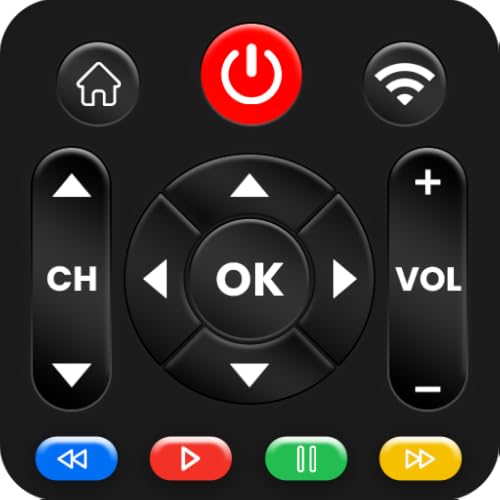
This app targets anyone who wants a single smartphone interface replacing multiple living-room remotes without purchasing hardware. Owner feedback highlights its broad brand library as a genuine convenience for households mixing older Samsung and newer TCL sets. The on-screen layout keeps navigation keys and volume together, reducing the thumb travel that plagues some competitors.
- Wide device-brand compatibility list
- Consolidated layout minimizes switching between screens
- Pairing reliability varies by brand and model year
Skip it if your TV requires Bluetooth-only control or if you already own a dedicated universal remote; the app’s value shrinks when hardware is available.
Apple TV Siri Remote (3rd Gen)
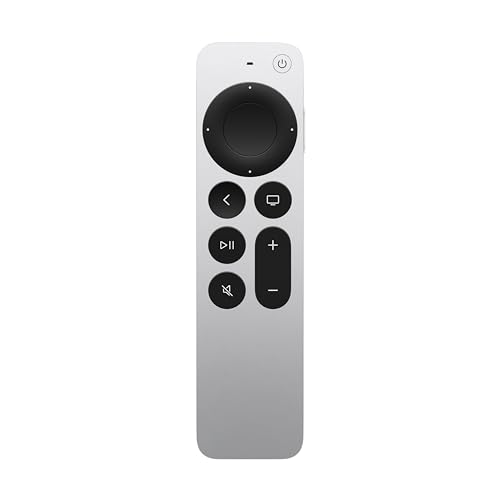
Priced at $58.62, this is the official replacement for Apple TV owners who lost or damaged their original remote. The 2026 lineup still ships this third-generation unit, and it pairs instantly with any Apple TV 4K. Aluminum construction gives it a weight and tactile feel that no software alternative matches.
- Seamless Bluetooth pairing with Apple TV without re-authentication
- Built-in microphone for Siri voice commands
- Pricey relative to third-party replacements that cover the same functions
Skip it if you do not own an Apple TV or if you prefer a smartphone-based tv remote app for hands-free convenience.
Remote for Roku, Fire TV, LG, Samsung, Android & VIZIO TV
Designed as a single hardware replacement for households with multiple streaming brands, this remote claims coverage across six popular ecosystems. Owner reviews confirm the button layout mirrors Roku’s official design closely, which helps muscle memory. It uses IR for TV power and volume while relying on Bluetooth for streaming-box navigation.
- Covers six major brands from one device
- IR plus Bluetooth means it handles both TV and box functions
- Some brands require a multi-step setup sequence that confuses first-time users
Skip it if your household uses only one brand; a cheaper single-purpose option delivers identical performance with less setup complexity.
Remote Control TV – TV Remote Control App
This software-only option routes commands over Wi-Fi, eliminating the need for an IR blaster that most modern phones lack. The interface prioritizes a simple numeric keypad and directional pad, which owner feedback describes as intuitive for guests who rarely touch the remote. No account creation is required for basic functions.
- No IR hardware needed on the phone side
- Guest-friendly layout with minimal learning curve
- Requires the TV and phone to share the same network, which fails on segmented Wi-Fi setups
Skip it if your router separates devices into different subnets or if you need reliable control while your phone is on mobile data.
Remote Control For TVs
A budget hardware replacement aimed at owners of a single TV brand who want a physical button experience without paying OEM prices. The build uses rubber buttons that resist sticking, a common complaint with cheaper alternatives. Owner feedback notes adequate range from across a small room.
- Low entry price for a dedicated physical remote
- Rubber buttons remain responsive over months of use
- Limited to one brand family, so it becomes useless if you switch TVs
Skip it if you manage more than one TV brand; the universal options above will serve you better long-term.
Fire TV Remote App
At $2.99, this official Amazon app turns any iOS or Android phone into a controller for Fire TV Stick, Stick 4K, and Fire TV Cube. The price is negligible, and it adds a full on-screen keyboard that physical Fire TV remotes handle poorly. Voice search works through the phone’s microphone.
- Lowest cost in this roundup at $2.99
- Full keyboard input simplifies text-heavy search queries
- Only works with Fire TV devices, so it cannot control the TV’s power or input
Skip it if you also need to toggle the TV’s power or switch HDMI inputs; pair it with a separate TV remote or universal option.
(2 Pack) Replacement Remote Control for Roku TV, TCL Roku / Onn Roku TVs
$8.97 buys two Bluetooth remotes compatible with Roku TV, TCL, and Onn-brand sets. The twin-pack model means you can keep one at the TV and one by the couch, or hand one to a guest. Owner reviews praise the consistent pairing without the re-linking cycles that plague single-pack replacements.
- Two working remotes for under nine dollars total
- Compatible across three popular Roku-based TV brands
- Does not support volume or power on the TV itself; only controls the Roku interface
Skip it if you need one remote to handle both the TV and the streaming box simultaneously; look at a combined IR-Bluetooth unit instead.
Universal TV Remote: All TV Remote App, Worldwide Remotes
This app markets itself on breadth, claiming compatibility with TVs sold across global markets rather than only US brands. Travelers and expats in regions with lesser-known TV manufacturers find it useful when no local remote option exists. The interface adapts the button layout based on the detected brand code.
- Covers international TV brands absent from US-focused competitors
- Dynamic layout adapts button placement per model
- Occasionally fails to find a working code for very new or obscure models
Skip it if your TV is a major US brand with native app support; a brand-specific option will pair more reliably.
Buying Guide
Protocol Compatibility Matters More Than Button Count
Before comparing how many buttons a remote or app offers, confirm which signal path it uses. IR works line-of-sight and covers older TVs but ignores Bluetooth-only streaming boxes. Wi-Fi-based tv remote app options require your phone and TV on the same subnet. Bluetooth remotes pair directly with the box but often cannot control the TV’s power or volume without a separate IR component.
Setup Friction Is the Top Complaint in Owner Reviews
Across every product in this category, the most frequent negative feedback involves pairing failure on the first attempt. Look for options that offer a guided setup flow or auto-detect the brand rather than requiring you to cycle through three-digit codes. Hardware replacements with a physical reset button also tend to recover faster from failed pairings.
Durability and Long-Term Availability
Physical remotes outlive software updates. Check whether the manufacturer provides a warranty or replacement parts for the battery cover and button membranes. For apps, verify the developer’s update cadence; a tv remote app that has not received a release in over a year may lose compatibility with the next OS or firmware update your device receives.
Our Verdict
Top pick: The (2 Pack) Replacement Remote at $8.97 offers the best value per device for the large Roku, TCL, and Onn install base—two working remotes, reliable Bluetooth pairing, and no ongoing app-update dependency. Budget pick: Fire TV Remote App at $2.99 eliminates hardware entirely for Amazon ecosystem owners. Conditional winner: If you own an Apple TV, the Siri Remote (3rd Gen) at $58.62 is the only option that pairs instantly without re-authentication and includes native Siri, making the higher price justified.
FAQ
Can a tv remote app control my TV’s power and input switching?
Only if the app communicates over IR or if the TV supports network-based CEC commands. Most Wi-Fi-based apps control the streaming box interface but cannot turn the TV on or off. Check the specific app’s feature list for power and input toggles before downloading.
Why does my phone-based remote stop working after a firmware update?
TV manufacturers occasionally change the authentication tokens or port mappings their companion apps rely on. When this happens, the app must ship a matching update. If the developer has gone inactive, the tv remote app will remain broken until the TV receives a rollback or you switch to a hardware solution.
Is Bluetooth or Wi-Fi better for a remote replacement?
Bluetooth provides a direct, low-latency link that does not depend on your home network, making it more consistent in congested apartment buildings. Wi-Fi works well in single-router households and enables control from anywhere on the local network, but it introduces the subnet-visibility caveat discussed above.
How many remotes does a household realistically need?
One dedicated device per streaming platform plus one that covers TV power and volume. Most single-brand households need only one replacement or one reliable tv remote app. Multi-brand setups with Roku, Fire TV, and an Apple TV benefit from a universal hardware unit or from pairing the Fire TV app with a Roku remote to cover both at minimal cost.









