
Our Short List of 3
All 5 Picks at a Glance
| Product | Specs | Action |
|---|---|---|
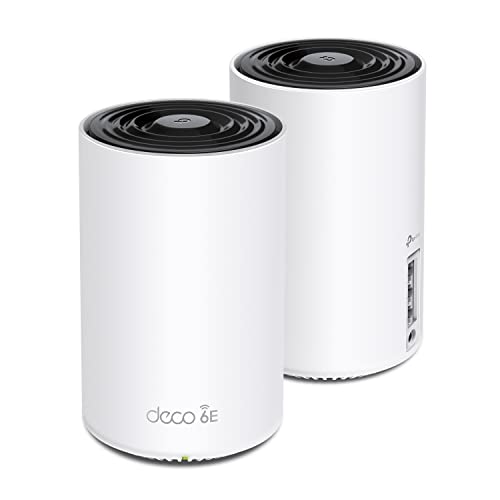 TP-Link Deco XE75 AXE5400 Mesh WiFi 6E System (2-Pack) | Check price on Amazon | |
 Amazon eero Pro 6E Mesh WiFi System (3-Pack) | Check price on Amazon | |
 NETGEAR Orbi RBK863S Tri-Band WiFi 6 Mesh System | Check price on Amazon | |
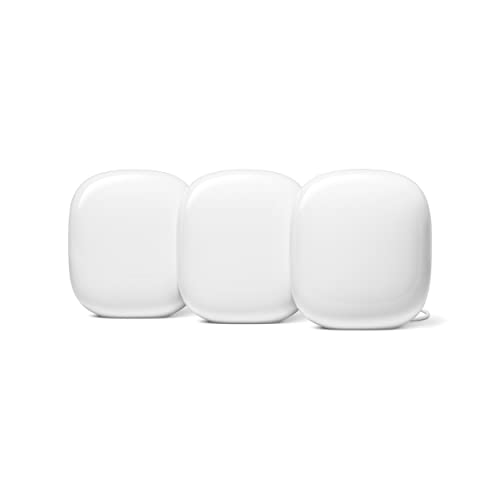 Google Nest Wifi Pro WiFi 6E System (3-Pack, Snow) | Check price on Amazon | |
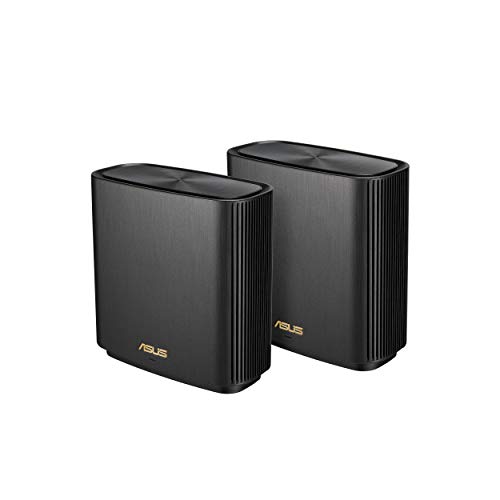 ASUS ZenWiFi AX XT8 Mesh WiFi 6 System (2-Pack) | Check price on Amazon |
Key takeaways
- Compare the best WiFi mesh routers for streaming, gaming, and work, with WiFi 6E and WiFi 6 systems matched to home size, coverage, and device count.
A single router placed next to a modem rarely covers a whole home evenly. Rooms at the far end of a hallway, upstairs bedrooms, and spaces behind brick, concrete, or metal framing often end up with weak signal, while the room beside the router gets more speed than it needs. A mesh system addresses that imbalance by spreading the work across several units that share one network name and hand devices from node to node as they move through the house.
This guide compares five mesh router systems built for that job, covering WiFi 6E and WiFi 6 options from TP-Link, eero, NETGEAR, Google, and ASUS. Each system below is a true mesh router system of the same type, not an extender or a standalone router, and each is matched to a different priority: broad coverage, simple app control, wired ports, smart home support, or advanced settings. The sections that follow explain how to size a system first, then work through the strengths and limits of each pick.
As an Amazon Associate, we earn from qualifying purchases.
How to Choose a WiFi Mesh Router
Start with coverage, and be honest about the layout rather than the headline square footage. Manufacturers rate coverage in open conditions, and real homes reduce that figure with walls, floors, chimneys, and appliances. A two-pack often suits an apartment or a compact single-story house, while a three-pack gives more placement flexibility in a larger or multi-story home. Adding a node later is possible within the same family on most of these systems, so buying the right family matters more than buying the largest pack on day one.
Next, look at the WiFi generation and the bands. WiFi 6E systems add the 6 GHz band, which gives compatible phones, laptops, and streaming devices a less crowded lane and can also serve as a clean link between nodes. WiFi 6 systems without that band can still perform very well, especially when they use a dedicated band for communication between units. Tri-band designs generally hold up better under heavy simultaneous use than dual-band designs, because node-to-node traffic does not have to compete as directly with device traffic.
Wired ports deserve attention on a streaming-focused site. A node with an Ethernet port lets a television, game console, desktop, or streaming box connect by cable, which removes that device from wireless contention entirely. Multi-gig ports matter only when the internet plan, modem, and wired devices can use them, so a 2.5 Gbps or 10 Gbps port is a future-proofing feature rather than an everyday speed gain for slower plans. Count the ports on the router unit and on the satellites separately, since they are not always identical.
Finally, consider controls and ongoing costs. App-based systems are easy to manage, but advanced users may prefer deeper settings such as separate network names per band or manual channel choices. Some security features are included for the life of the product, while others sit behind a subscription, so check before buying.
TP-Link Deco XE75 AXE5400 Mesh WiFi 6E System (2-Pack)
The Deco XE75 is a tri-band WiFi 6E system rated AXE5400, and the two-pack listing covers up to 5,500 square feet. Its 6 GHz band gives newer devices a less congested connection and can also work as backhaul between the two units, which helps keep the 5 GHz and 2.4 GHz bands available for everyday devices. For many households, that balance is the main appeal: modern WiFi 6E capability without moving to a larger or more specialized system.
Setup and management run through the Deco app, and TP-Link describes the system as AI-driven mesh, meaning the nodes coordinate placement and connection decisions inside the app experience. The system replaces a router and extender setup with a single network, so phones and streaming devices do not need to be switched manually between network names when moving between rooms. It works with major internet service providers, with a modem required for most services, as noted on the product listing.
The trade-off is that app-led systems give advanced users fewer manual controls than a traditional router interface. Households that want to fine-tune every radio setting may prefer the ASUS system further down this list, while households that want strong coverage and straightforward management will find the Deco XE75 easy to justify.
Who It Suits
The Deco XE75 suits households that want WiFi 6E coverage for a medium to large home without a complicated setup process. It is a sensible first mesh system for families replacing a single router, and a poor fit only for users who need extensive manual network controls or a large number of wired ports on every node.
Amazon eero Pro 6E Mesh WiFi System (3-Pack)
The eero Pro 6E is a tri-band WiFi 6E system, and the three-pack covers up to 6,000 square feet while supporting more than 100 connected devices, according to the product listing. Each unit can act as the router or as a satellite thanks to auto-sensing ports, which makes placement flexible during setup and when rearranging a room later. The system supports internet plans up to 2.5 Gbps, using the 2.5 Gbps Ethernet port for the faster wired connection.
A distinctive strength is smart home support. The eero Pro 6E works as a smart home hub with Thread and Zigbee support, allowing compatible devices to be controlled through Alexa-enabled devices, as described in retailer specifications. For a household that also runs lights, locks, and sensors, that hub role can remove the need for a separate bridge.
The limitation to keep in mind is the port count. Each unit provides a 2.5 Gbps port and a gigabit Ethernet port, which is enough for a modem and one wired device per node, but a home office with several wired machines may need a small network switch. Readers who value a calm app, automatic management, and broad coverage over deep manual settings are the natural audience for this system.
Who It Suits
The eero Pro 6E suits busy households that want wide coverage, support for many connected devices, and built-in smart home hub features with minimal day-to-day management. It is less suited to users who want many Ethernet ports on each node or who prefer a fully manual, browser-based router configuration.
NETGEAR Orbi RBK863S Tri-Band WiFi 6 Mesh System
The Orbi RBK863S pairs a router with two satellite extenders for coverage up to 8,000 square feet, the largest rated area in this guide. It is a tri-band WiFi 6 system rated AX6000, with speeds up to 6 Gbps and support for up to 100 devices, according to the product listing. A 10 Gig internet port on the router gives the system unusual headroom for very fast fiber plans and for wired backhaul arrangements in larger homes.
NETGEAR positions this Orbi set as a premium whole-home system, and the listing highlights security features through NETGEAR Armor. For households that stream in several rooms and keep many devices online at once, wide coverage and the tri-band design are the central argument. The satellites extend the same single network, so devices roam without separate extender names.
The clear trade-off is generation and focus. This is WiFi 6 rather than WiFi 6E, so it has no 6 GHz band for compatible devices, and it is aimed at larger properties rather than compact apartments where its coverage would be wasted. Buyers with a smaller home will get better value from a two-pack elsewhere in this guide, while owners of large or awkwardly shaped homes are the readers this Orbi system was built for.
Who It Suits
The Orbi RBK863S suits large homes, multi-story layouts, and households with very fast internet plans that want the widest rated coverage in this comparison. It is more system than a small apartment needs, and readers who specifically want a 6 GHz band should look at the WiFi 6E options instead.
Google Nest Wifi Pro WiFi 6E System (3-Pack, Snow)
Nest Wifi Pro is Google’s WiFi 6E mesh system, sold here as a three-pack in Snow with coverage up to 6,600 square feet, or up to 2,200 square feet per router. The listing gives combined speeds up to 5.4 Gbps across the tri-band design, which uses the 2.4 GHz, 5 GHz, and 6 GHz bands. Google states that the system automatically adjusts network performance, prioritizes activities such as video calls, and can monitor and diagnose common issues on its own.
Management happens in the Google Home app, and the approach is deliberately simple. Parental controls, guest access, and device prioritization are handled as household features rather than networking settings. The listing also notes WPA3 security, a one-year manufacturer warranty, and the model number G6ZUC.
Compatibility is the point to check carefully. Nest Wifi Pro is not compatible with previous generations of Nest Wifi and Google Wifi, as stated in the product information, so existing older Google points cannot be added to this network. Each unit also offers limited wired ports compared with the ASUS and NETGEAR systems. Readers starting fresh who value simple controls and self-managing behavior will appreciate it, while readers expanding an older Google network should plan on replacing those older points.
Who It Suits
Nest Wifi Pro suits households that want WiFi 6E coverage with the simplest possible management, automatic network adjustments, and a clean look in living spaces. It does not suit readers who need to reuse older Nest Wifi or Google Wifi points, or who need several wired connections at each node.
ASUS ZenWiFi AX XT8 Mesh WiFi 6 System (2-Pack)
The ZenWiFi AX XT8 is a tri-band WiFi 6 system rated AX6600, with total wireless speed of 6,600 Mbps and coverage up to 5,500 square feet or more than six rooms for the two-pack, according to the product listing. It includes a 2.5G port, support for three separate network names, and AiMesh compatibility, which lets compatible ASUS routers and nodes work together in one mesh network. That expandability is useful for readers who already own ASUS networking gear or expect to grow the system later.
ASUS includes lifetime free network security and parental controls with the XT8, a meaningful difference from systems that place comparable features behind a subscription. The system is managed through the ASUS Router app, and ASUS presents setup as a simple three-step process. ASUS platforms also generally expose more settings than app-only competitors, making this the most adjustable option in the guide.
The compromise is the WiFi generation. The XT8 is WiFi 6, not WiFi 6E, so there is no 6 GHz band, even though its AX6600 rating is higher than some WiFi 6E systems listed here. Readers whose phones and laptops already support 6 GHz and who want that extra band should weigh the Deco XE75 or eero Pro 6E more heavily. Readers who prioritize included security, AiMesh expansion, and control will find the XT8 easy to recommend.
Who It Suits
The XT8 suits readers who want strong tri-band performance, included security without a subscription, and a path to expand through AiMesh with other ASUS gear. It is a weaker match for buyers who consider the 6 GHz band essential, since this system does not offer one.
Frequently Asked Questions
How many mesh units does a home actually need?
Start with the layout rather than the marketing coverage figure alone. A two-pack suits many apartments and compact houses, while a three-pack helps in larger, multi-story, or long homes. Walls and floors reduce real coverage, so placement matters as much as pack size. Choose a family that allows an extra node later, then expand only if a room still struggles.
Is WiFi 6E worth choosing over WiFi 6 for mesh?
WiFi 6E adds the 6 GHz band, which helps compatible devices in crowded wireless environments and can provide a cleaner link between mesh nodes. That makes systems such as the Deco XE75, eero Pro 6E, and Nest Wifi Pro appealing for newer phones, laptops, and streaming hardware. WiFi 6 systems such as the Orbi RBK863S and ZenWiFi XT8 remain strong choices when coverage, ports, included security, or expansion matter more than the extra band. The internet plan itself does not get faster; the benefit is inside the home network.
Can a television or game console connect to a mesh node by cable?
Yes, when the node has an available Ethernet port, a wired connection is often the most stable option for a fixed device such as a television, streaming box, desktop, or game console. Wiring a stationary device also frees wireless capacity for phones and tablets that must move around. Check the port count on satellites as well as on the main router unit, because they can differ, and add a small network switch if one location needs several wired connections.
Will a mesh system work with an existing modem and internet provider?
These systems are designed to work with major internet service providers, and most services require a modem, as noted on the product listings. The main mesh unit connects to the modem, and the remaining units join that network as satellites. Readers with a combined modem and router from a provider should check whether that gateway needs bridge mode or whether its WiFi should be turned off, so the home does not run two competing wireless networks at the same time.
Final Verdict
For most households, the TP-Link Deco XE75 is the balanced starting point in this guide: WiFi 6E, tri-band operation, and generous two-pack coverage through a simple app. The eero Pro 6E is the better pick when smart home hub support and coverage for a very connected household matter most, while Nest Wifi Pro offers the simplest management style for readers starting a new Google-based network from scratch.
At the extremes, the choice becomes clearer. The NETGEAR Orbi RBK863S is the large-home option, with the widest rated coverage and a 10 Gig internet port. The ASUS ZenWiFi AX XT8 is the control option, trading the 6 GHz band for AiMesh expansion and lifetime included security. Match the pack size to the layout, and any of these five systems should be a clear step up from a single router.
Product and ASIN Reference
| Product | ASIN |
|---|---|
| TP-Link Deco XE75 AXE5400 Mesh WiFi 6E System (2-Pack) | B09VW5JHPH |
| Amazon eero Pro 6E Mesh WiFi System (3-Pack) | B091G64GVK |
| NETGEAR Orbi RBK863S Tri-Band WiFi 6 Mesh System | B0BF7PV6PK |
| Google Nest Wifi Pro WiFi 6E System (3-Pack, Snow) | B0BCQSYPZB |
| ASUS ZenWiFi AX XT8 Mesh WiFi 6 System (2-Pack) | B081GH8XRS |
More from Amazon
Programs that pair well with the guide above. Offers and eligibility are set by Amazon and may change.
Free shipping on eligible items, Prime Video and more. Eligible new members can start with a free trial.
Start a Prime free trialAd-free music streaming. Eligible new subscribers can start with a free trial.
Try Music Unlimited freeA Prime membership for ages 18-24 with a trial period. Eligibility is set by Amazon.
See Prime for Young AdultsAudiobooks and podcasts to listen to on the go. Eligible new members can start with a free trial.
Try Audible freeAs an Amazon Associate we earn from qualifying purchases.









