Key takeaways
- Compare the main types of gaming computers, from desktops and laptops to prebuilt and custom-built systems, and find the type that fits how you play.
As an Amazon Associate we earn from qualifying purchases.
Choosing a gaming computer is less about finding one perfect machine and more about matching a type of machine to the way you actually play. A desktop that stays on one desk, a laptop that travels between rooms, a ready-built tower, and a system assembled part by part can all run the same games, yet they differ in upgrade options, cooling, portability, and the amount of setup they demand. The right choice depends on where you play, how often you move, and how much control you want over the parts inside.
This guide is for first-time buyers who feel lost among the options, for players replacing an ageing machine, for students and renters with limited space, and for streamers and creators who need one computer for play and work. It walks through the main types of gaming computers, explains the decisions that matter most, and then matches each type to a realistic situation, so you can narrow the field before you compare any single machine in detail.
How to Choose
Desktop or Laptop
A gaming desktop usually gives you more performance for the same budget, because a tower has room for larger parts, stronger cooling, and a full-size power supply. That extra space also makes upgrades simpler: memory, storage, and graphics cards can often be replaced later without changing the whole machine. A desktop pairs naturally with a large monitor and full-size keyboard and mouse, which suits a fixed setup where the computer rarely moves and long sessions are the norm.
A gaming laptop trades some of that flexibility for portability. It combines the screen, keyboard, speakers, and battery into one device you can carry to another room, to class, or to a friend’s home. Memory and storage may be replaceable in some models, but laptop processors and graphics chips are usually fixed, and cooling and power limits mean a laptop graphics chip may perform differently from a desktop card with a similar name. When comparing laptops, look at the configured power level of the graphics chip, the screen resolution and refresh rate, the port selection, and the weight and charger size, because those details shape daily use as much as the headline specifications.
Prebuilt or Custom-Built
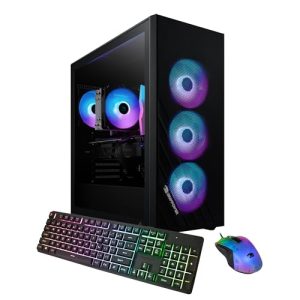
A prebuilt gaming computer arrives assembled, with an operating system installed and a system-level warranty covering the complete machine. That reduces setup work and gives you one support contact if something goes wrong. Established manufacturers and specialist system builders both sell prebuilt machines, but component transparency varies: some listings clearly identify the motherboard and power supply, while others list only the processor, graphics card, memory, and storage. Before choosing a prebuilt, check the exact processor and graphics models, the memory capacity and configuration, the storage type, and the case airflow.
Building a computer yourself gives you more control over component quality, appearance, noise, and upgrade paths. You choose each part, so you can spend more where it matters for your games and less where it does not. The trade-off is real: you must verify compatibility, assemble the system, install software, and troubleshoot individual parts. Each component may also carry a separate warranty rather than one warranty covering the entire computer. Building suits buyers who enjoy the process and want full control, while a prebuilt suits buyers who want to start playing quickly with less assembly work.
Match the Machine to Your Budget
A gaming computer is only part of the total setup, so plan the whole budget before you settle on a type. A desktop may also need a monitor, keyboard, mouse, headset or speakers, and an operating-system licence if one is not included. A laptop includes most of those items, which makes its total cost easier to judge at a glance, although a second monitor or a better mouse can still add to the spend. Thinking in terms of the complete setup prevents the common surprise of buying a tower and then realising the rest of the desk is still missing.
Within the machine itself, the graphics card usually matters most for gaming, followed by the processor, memory, and storage. An entry-level system can handle popular esports titles and many current games at modest settings, while a mid-range system copes better with demanding titles at higher resolutions and refresh rates. A high-end system is for players who want headroom for the most demanding games, streaming, and creative work at the same time. Decide which tier fits your games first, then choose the type of machine that delivers that tier in the form you prefer, rather than starting from the most powerful option and working backwards.
Match the Machine to the Games You Play
Different games place different demands on a computer, so the type that fits best depends on what you spend most of your time playing. Fast competitive titles reward a high refresh rate display and a system that holds steady frame rates, while story-driven single-player games reward stronger graphics and a larger, sharper screen. Simulation and strategy games often lean more on the processor and memory, especially with large maps or many units on screen. Streaming adds another load, because the same machine must run the game, encode the broadcast, and handle chat and overlays at the same time.
Think about your main games before you choose a form factor. A player who mostly plays competitive titles at a desk may value a desktop with a high-refresh monitor, while a player who switches between rooms or travels may value a laptop even if it gives up some raw performance. A streamer who broadcasts from one machine needs enough processor and memory headroom for the game and the broadcast software together. Writing down your top three games and whether you play alone, with friends online, or on stream makes the choice concrete instead of abstract.
Which One Fits Your Situation
You Want the Most Performance at a Fixed Desk
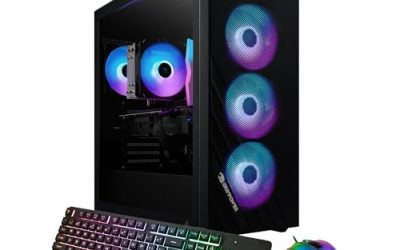
Choose a gaming desktop. A tower gives you the strongest performance for the budget, the best cooling, and the easiest upgrade path, which matters if you plan to keep the machine for several years and improve it piece by piece. It also lets you pick a large monitor and full-size peripherals that suit long sessions. The trade-off is that the machine stays where you put it, so this type fits players with a dedicated desk and no need to move the computer around.
You Play in Different Places
Choose a gaming laptop. A laptop lets you play in the living room, at a desk, at class, or at a friend’s home without rebuilding a setup each time. It is the practical choice when space is tight, when you share rooms, or when you travel and still want to play. Accept that upgrades will be limited and that a laptop with a similar-sounding graphics chip may not match a desktop exactly, and check the screen, weight, and charger size before you decide.
You Want to Start Playing Quickly
Choose a prebuilt desktop or a prebuilt gaming laptop. A prebuilt machine arrives assembled and ready to use, with a system warranty and one support contact. This type suits first-time buyers, players who do not want to assemble parts, and anyone who needs a working machine without delay. Check the full specification list first, because some prebuilt listings leave out the motherboard or power supply details, and those parts affect future upgrades.
You Want Full Control and a Machine That Grows With You
Choose a custom-built desktop. Building your own system lets you pick every component, balance the budget toward the parts your games need most, and upgrade the machine over time. This type suits buyers who enjoy researching parts and assembling hardware, and who want a clear upgrade path for memory, storage, and graphics. It demands more time and care than a prebuilt, so it fits players who see the build itself as part of the hobby rather than a chore.
Common Mistakes
- Judging a laptop only by its graphics card name: a laptop graphics chip may perform differently from a desktop card with a similar name, so check the configured power level, screen, and cooling as well.
- Forgetting the rest of the setup: a desktop often needs a monitor, keyboard, mouse, and headset on top of the tower, so budget for the complete desk rather than the computer alone.
- Buying more power than your games need: a high-end system is wasted if your main games are light esports titles, so match the tier to the games you actually play.
- Ignoring upgrade limits: some laptops and compact prebuilt desktops use proprietary parts that restrict future upgrades, so check what can be replaced before you buy.
- Overlooking the display: a powerful computer paired with a low refresh rate or low resolution screen cannot show what the hardware is capable of, so choose the screen with the same care as the machine.
Frequently Asked Questions
What is the best type of gaming computer for a beginner?
A prebuilt desktop or a prebuilt gaming laptop is usually the best starting point for a beginner. Both arrive assembled and ready to use, with a system warranty and one support contact, so you can focus on playing rather than assembly and troubleshooting. A desktop suits a fixed setup with more upgrade room, while a laptop suits players who need portability. Either way, check the exact processor, graphics card, memory, and storage before you buy, and make sure the specification list is complete.
Is a gaming laptop or a gaming desktop better?
Neither type is better in every situation. A desktop usually offers more performance for the budget, better cooling, and easier upgrades, which makes it the stronger choice for a fixed setup. A laptop offers portability, combining the screen, keyboard, and battery into one device you can carry anywhere. The better choice is the one that fits where and how you play: a desktop for a dedicated desk, a laptop for play in different places.
Should I build a gaming PC or buy a prebuilt one?
Build a gaming PC if you want full control over every component, a clear upgrade path, and the freedom to balance the budget toward the parts your games need most. Buy a prebuilt if you want to start playing quickly, with an assembled machine, an installed operating system, and a system-level warranty. Building demands compatibility checks, assembly, and troubleshooting, while a prebuilt trades some control for convenience and a single point of support.
How much memory and storage does a gaming computer need?
For most players in 2026, 16GB of memory is a sensible baseline, with more helping if you stream, record, or run other demanding software alongside a game. Storage should be a solid-state drive rather than a traditional hard drive, because it loads games and the operating system far more quickly. A drive of around one terabyte gives comfortable room for the operating system and a modest game library, while players with large libraries should look for more capacity or plan to add a second drive later.
More from Amazon
Programs that pair well with the guide above. Offers and eligibility are set by Amazon and may change.
Free shipping on eligible items, Prime Video and more. Eligible new members can start with a free trial.
Start a Prime free trialAd-free music streaming. Eligible new subscribers can start with a free trial.
Try Music Unlimited freeA Prime membership for ages 18-24 with a trial period. Eligibility is set by Amazon.
See Prime for Young AdultsAudiobooks and podcasts to listen to on the go. Eligible new members can start with a free trial.
Try Audible freeAs an Amazon Associate we earn from qualifying purchases.