Our Short List of 3

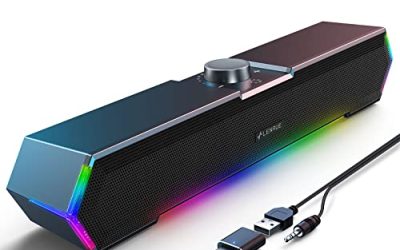
- Best for: Gamers with a small desk who want a single-cable soundbar with RGB lighting.
- Two full-range drivers and two passive radiators
- USB Type-C power and audio delivery
- Bluetooth 5.0
- Chroma RGB lighting with 14 zones
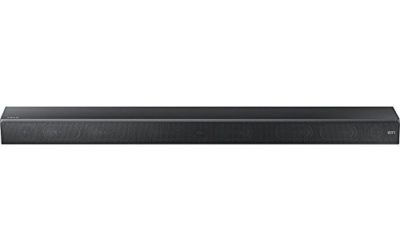
- Best for: Desktop gamers who want a subwoofer and virtual surround without a large speaker set.
- Two full-range drivers, two tweeters and two passive radiators
- Down-firing 5.5-inch wireless subwoofer
- THX Spatial Audio with 7.1 surround
- Bluetooth 5.2
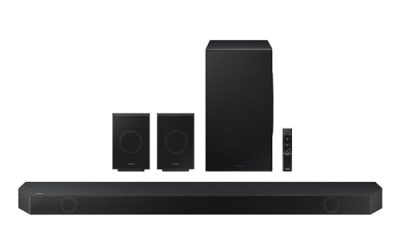
- Best for: Players who want true multi-channel sound and the widest connection list on a desk.
- Tri-amplified 5-driver design
- 5.1 multi-channel playback
- Compact subwoofer, smaller than the Katana V2 subwoofer
- 180W peak power
All 3 Picks at a Glance
| Product | Specs | Action |
|---|---|---|
| Razer Leviathan V2 X |
| Check price on Amazon |
| Razer Leviathan V2 |
| Check price on Amazon |
| Creative Sound Blaster Katana V2X |
| Check price on Amazon |
Key takeaways
- Compare the 3 best gaming soundbars for PC and console setups, with RGB lighting, subwoofers, surround sound and simple connections for immersive play.
A good gaming soundbar puts footsteps, dialogue and explosions in front of you without the clutter of a full speaker set or the isolation of a headset. The bar sits under the monitor or in front of the television, the subwoofer handles the low end, and the whole setup stays out of the way while the game fills the room. For players who share a space with family or roommates, that open-air sound is often more practical than wearing headphones for hours.
The three picks below cover the main ways gamers buy a soundbar. One is a compact USB-C bar for a crowded desk, one pairs a wider bar with a wireless subwoofer and virtual surround, and one brings a true multi-channel layout with a compact subwoofer for larger rooms. All three connect to a PC, and each also works with consoles and other devices over Bluetooth or a wired input.
Quick Picks
As an Amazon Associate we earn from qualifying purchases
| Product | Best for | Key spec from title |
|---|---|---|
| Razer Leviathan V2 X | Compact desks and USB-C setups | PC soundbar with full-range drivers |
| Razer Leviathan V2 | Desktop gaming with deep bass | Multi-driver PC gaming soundbar with subwoofer |
| Creative Sound Blaster Katana V2X | Multi-channel surround on a desk | 5.1 multi-channel gaming soundbar with compact subwoofer |
How to Choose
Match the bar to the desk or the television
Measure the space under the monitor or in front of the television before choosing a bar, because gaming soundbars range from short desktop units to wide bars that need a full media console. A compact bar fits neatly beneath a monitor and leaves room for a keyboard, while a wider bar suits a living room where the television is the centre of the setup. Check the width of the bar against the width of the screen stand, and leave a clear path for the sound to reach the listening position. A bar that is too wide for the desk will hang over the edges and look out of place, while a bar that is too small for a large television can look lost and leave the sound feeling thin.
Decide whether a subwoofer belongs in the setup
A separate subwoofer adds weight to explosions, engine notes and low-frequency effects that a slim bar alone cannot reproduce, and it matters most in action games and racing titles. A bar with a built-in low end keeps the desk tidy and is enough for competitive play where hearing footsteps matters more than feeling them. Wireless subwoofers are easier to place than wired ones, since they can sit on the floor beside the desk or under a side table. Think about neighbours and shared walls as well, because a subwoofer that sounds exciting at midnight can become a problem in an apartment.
Look at the connections the setup actually needs
The connection list decides whether the soundbar works with every device in the room or only with one of them. USB audio suits a PC and keeps the cable count low, optical input covers older consoles and televisions, HDMI ARC carries sound from a television with a single cable, and Bluetooth lets a phone or tablet stream music between sessions. A bar with several inputs is easier to live with when the setup includes a PC, a console and a television at the same time. Check that the bar has the input the main gaming device uses, and confirm that switching between inputs does not require reaching behind the unit.
Weigh surround processing against stereo clarity
Virtual surround processing widens the soundstage and helps place sounds around the player, which suits story-driven games and open worlds where direction matters. Stereo bars keep voices and effects clear and direct, which suits fast competitive games where a clean mix helps the player react quickly. Some bars add a dedicated surround mode for films and a separate mode for games, so the sound can change with the activity. Listen for how the bar handles dialogue, because a mode that makes effects dramatic can also bury voices under the action, and that trade-off becomes tiring over a long session.
The 3 Best Options
Razer Leviathan V2 X
- Best for: Gamers with a small desk who want a single-cable soundbar with RGB lighting.
- Two full-range drivers and two passive radiators
- USB Type-C power and audio delivery
- Bluetooth 5.0
- Chroma RGB lighting with 14 zones
Gamers with a small desk who want a single-cable soundbar with RGB lighting.
No separate subwoofer, so low-frequency effects stay lighter than on the other picks.
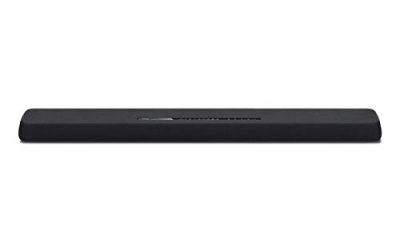
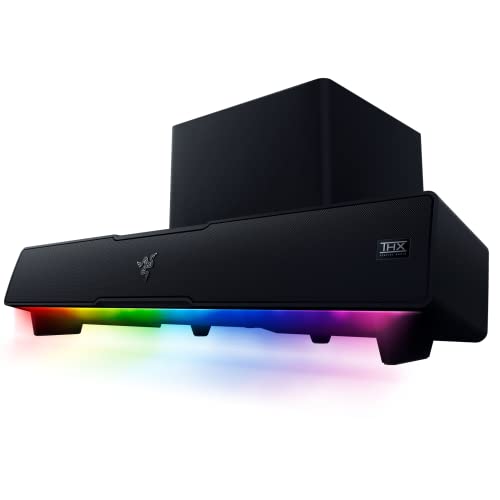
The Leviathan V2 X is the simplest way to add a gaming soundbar to a crowded desk. Two full-range drivers and two passive radiators produce a wide stereo image from a short bar, and a single USB-C cable carries both power and audio from the computer, which keeps the cable count to one. Bluetooth 5.0 connects phones, tablets and handheld consoles, and Chroma RGB lighting with fourteen zones ties the bar into the rest of a Razer setup. It is a bar for players who want better sound than monitor speakers without giving up desk space or adding a subwoofer.
Razer Leviathan V2
- Best for: Desktop gamers who want a subwoofer and virtual surround without a large speaker set.
- Two full-range drivers, two tweeters and two passive radiators
- Down-firing 5.5-inch wireless subwoofer
- THX Spatial Audio with 7.1 surround
- Bluetooth 5.2
Desktop gamers who want a subwoofer and virtual surround without a large speaker set.
The bar and subwoofer together take up more floor and desk space than a single-bar setup.
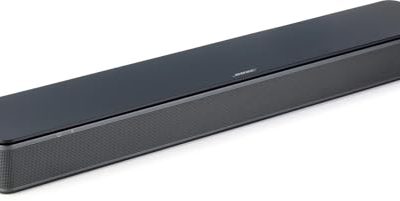
The Leviathan V2 steps up from the compact bar with a wider multi-driver design and a wireless down-firing subwoofer that adds real weight to the low end. Two full-range drivers, two tweeters and two passive radiators handle the mids and highs, while the 5.5-inch subwoofer fills in bass for explosions and engine sounds. THX Spatial Audio with 7.1 surround processing widens the soundstage around the player, and Bluetooth 5.2 connects phones and handheld consoles alongside the PC. Chroma RGB lighting runs along the bar, and the wireless subwoofer can sit on the floor without a cable running back to the desk.
Creative Sound Blaster Katana V2X
- Best for: Players who want true multi-channel sound and the widest connection list on a desk.
- Tri-amplified 5-driver design
- 5.1 multi-channel playback
- Compact subwoofer, smaller than the Katana V2 subwoofer
- 180W peak power
Players who want true multi-channel sound and the widest connection list on a desk.
The multi-channel layout and extra inputs add setup steps compared with a single-cable bar.
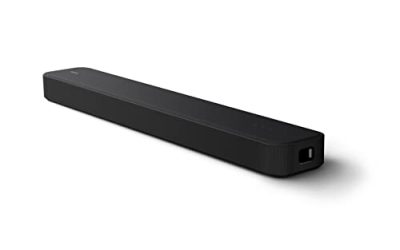
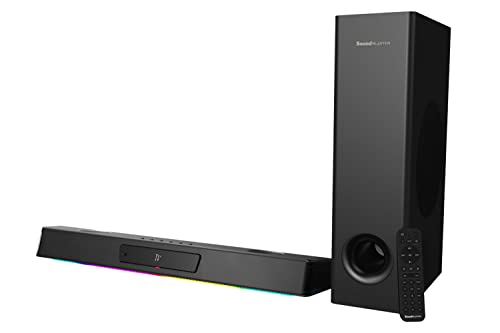
The Katana V2X is the multi-channel pick of the three, built around a tri-amplified five-driver design and a compact subwoofer that is smaller than the one on the earlier Katana V2. It plays back 5.1-channel audio, and Super X-Fi processing adds a wider surround effect for headphones and speakers alike. Peak power reaches 180 watts, and the connection list covers USB audio, HDMI ARC, optical input and Bluetooth 5.0, so the bar works with a PC, a television and a console. RGB lighting runs along the base, and the compact subwoofer fits beside a desk or under a side table in a smaller room.
Which One Fits Your Situation
A small desk with one monitor
Choose the Leviathan V2 X. Its short body fits under a monitor without crowding the keyboard, and the single USB-C cable keeps the desk tidy. The stereo sound is clear enough for competitive play, and the RGB lighting matches a gaming setup without needing extra software or hardware. It is the easiest of the three to set up and move.
A desktop setup where bass matters
Choose the Leviathan V2. The wireless subwoofer adds depth to explosions and engine notes, while THX Spatial Audio widens the soundstage for story-driven games. The bar is wider than the compact model, so measure the desk first and leave room for the subwoofer on the floor beside the desk, clear of cables and chair legs.
A room shared with a television and a console
Choose the Katana V2X. HDMI ARC and optical input connect it to a television, USB audio covers the PC, and Bluetooth handles a phone or tablet. The 5.1-channel layout suits films and open-world games, and the compact subwoofer fits a living room without dominating it. It is the most flexible of the three for a mixed setup.
A first gaming soundbar on a tight space budget
Choose the Leviathan V2 X for a desk or the Katana V2X for a room with a television, depending on where the bar will live. Both keep the setup to one bar and one small extra at most, and both connect to a PC and a console without extra adapters.
Common Mistakes
- Buying a bar wider than the desk or the television stand and having it overhang the edges.
- Placing the bar behind the monitor, where the screen blocks the sound from reaching the player.
- Putting the subwoofer in a corner or inside a closed cabinet, which makes the bass boomy and uneven.
- Choosing a bar with only one input, then finding the console or the television cannot connect to it.
- Leaving surround processing on for competitive games, where a wide soundstage can blur the direction of footsteps.
Frequently Asked Questions
Do gaming soundbars work with consoles as well as a PC?
Yes, most gaming soundbars connect to a console through HDMI ARC, optical input or Bluetooth, depending on the model. A bar with several inputs is the easiest choice for a setup that includes both a PC and a console, because it can switch between devices without moving cables. Check the connection list before buying.
Is a subwoofer necessary for gaming?
A subwoofer is not necessary, but it adds depth to explosions, engine notes and low-frequency effects that a slim bar cannot reproduce on its own. Players who focus on competitive games often prefer a clear stereo bar, while players who enjoy action and racing titles usually notice the extra bass. A compact subwoofer is a good middle ground.
What is the difference between virtual surround and true multi-channel sound?
Virtual surround uses processing to widen the sound from a small number of drivers, which can make a stereo bar feel larger than it is. True multi-channel sound uses separate channels for the front, centre and rear, which places effects more precisely. Both suit gaming, and the choice depends on the room size and how much setup the player wants.
Can a gaming soundbar replace a headset?
A soundbar can replace a headset for casual and story-driven play, and it keeps the ears free during long sessions. A headset still suits late-night play, shared rooms and competitive games where hearing quiet footsteps matters. Many players keep both and switch between them depending on the time of day and the game.
More from Amazon
Programs that pair well with the guide above. Offers and eligibility are set by Amazon and may change.
Free shipping on eligible items, Prime Video and more. Eligible new members can start with a free trial.
Start a Prime free trialAd-free music streaming. Eligible new subscribers can start with a free trial.
Try Music Unlimited freeA Prime membership for ages 18-24 with a trial period. Eligibility is set by Amazon.
See Prime for Young AdultsAudiobooks and podcasts to listen to on the go. Eligible new members can start with a free trial.
Try Audible freeAs an Amazon Associate we earn from qualifying purchases.