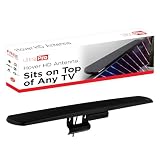
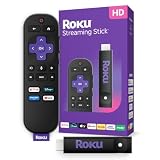
Our Top Picks

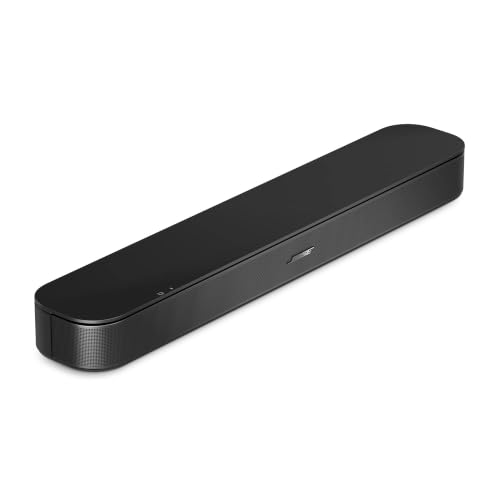
The Sonos Beam Gen 2 is the best overall pick here because it is the one true eARC soundbar in a set that also contains two cables and two Bose models limited to standard ARC. HDMI eARC (enhanced Audio Return Channel) is the TV port that sends high-bandwidth audio to a soundbar over a single HDMI cable, including lossless and object-based formats that older ARC cannot carry. The Westinghouse bar is the lower-commitment eARC alternative, the two Bose speakers suit dialogue-first listening, and the two cables are accessories that only make sense if you already own a soundbar.
Quick List
- Silkland 6.6 ft HDMI ARC/eARC Cable – best accessory for connecting a soundbar across a wider TV stand
- Westinghouse 2.0 Soundbar – best for a compact eARC bar on a limited setup
- Bose TV Speaker (2nd Gen) – best for clear dialogue on a standard ARC connection
- Bose TV Speaker (original) – best for a simple, small bar with HDMI-ARC and Bluetooth
- Silkland 3.3 ft HDMI 2.1 eARC/ARC Cable – best accessory for a short, tidy run between TV and bar
- Sonos Beam Gen 2 – best overall for a true eARC soundbar with Dolby Atmos support
Which One Is Right for You?
| If you… | Choose |
|---|---|
| want the most complete eARC soundbar with expansion options | Sonos Beam Gen 2 |
| want an eARC bar with a budget-friendly feature list and Roku-ready design | Westinghouse 2.0 Soundbar |
| mainly want to hear dialogue clearly and your TV has standard ARC | Bose TV Speaker (2nd Gen) |
| want the simplest compact Bose option | Bose TV Speaker (original) |
| already own a soundbar and need a longer cable run | Silkland 6.6 ft cable |
| need a short cable for a wall-mounted TV and a bar directly below it | Silkland 3.3 ft cable |
Check the back of your TV before you buy anything. If one HDMI port is labeled eARC, you can use any of the eARC-capable bars and get the full benefit. If the port says only ARC, an eARC soundbar still works but falls back to the standard ARC audio formats. Treat the cables as upgrades or replacements, not as substitutes for a speaker.
All 6 Picks in Detail
1. Silkland 6.6 ft HDMI ARC/eARC Cable – Best Accessory for a Wider TV Stand
As an Amazon Associate we earn from qualifying purchases at no extra cost to you.

This is an HDMI cable, not a soundbar, and it is included here because a lot of eARC problems come down to the cable. The listing names an HDMI 2.1 cable, 6.6 feet long, with 48 Gbps bandwidth, support for 8K at 60 Hz and 4K at 120 Hz, and compatibility with ARC and eARC, Dolby Atmos and DTS:X. Those headline numbers matter mostly for video; for eARC audio itself, a quality High Speed HDMI cable with Ethernet is generally sufficient.
The advantage of a longer cable is flexibility: if your soundbar sits to one side of the TV, or the TV is on a wall and the bar is on a console a few feet away, 6.6 feet avoids a taut run. The risk is that a long cable does nothing to fix a TV or bar that does not support eARC, so check your hardware first.
- Length: 6.6 feet
- HDMI 2.1, 48 Gbps per the listing
- ARC and eARC compatible
- 8K at 60 Hz and 4K at 120 Hz supported
- Dolby Atmos, DTS:X and HDCP details: confirm on listing
Pros:
- Extra length for flexible placement
- Headroom for 4K at 120 Hz passthrough
Cons:
- It is a cable only and produces no sound
- Bandwidth headline is more than eARC audio strictly requires
Compared with the shorter Silkland cable, it is the better fit when cable length is the problem and the worse fit when you want a tidy, minimal run.
2. Westinghouse 2.0 Soundbar – Best for a Compact eARC Bar

The Westinghouse is a compact two-channel soundbar that lists an HDMI eARC connection, which is the headline feature for this guide. The listing describes it as Roku Smart TV ready, with Bluetooth, Dolby Atmos and Dolby Digital Plus support, and a 120-watt maximum output with 60 watts RMS. A 2.0 bar has a left and right channel and no separate subwoofer, so the bass is limited by the cabinet size.
Treat the Dolby Atmos label with realistic expectations. A two-channel bar with no height drivers can accept an Atmos stream and process it into a wider virtual soundstage, but it cannot place sounds overhead the way a bar with upward-firing speakers can. What you gain from eARC here is a cleaner digital connection and compatibility with the newer formats your TV passes through.
- 2.0 channel design
- HDMI eARC input
- Bluetooth streaming
- Dolby Atmos and Dolby Digital Plus support per the listing
- 120 W maximum, 60 W RMS
Pros:
- eARC in a small footprint
- Stated RMS power makes it easy to compare
Cons:
- No subwoofer, so limited deep bass
- Atmos on two channels is virtual
It offers eARC on a smaller feature budget than the Sonos Beam, and the Sonos is the better choice for a fuller sound and expansion.
3. Bose TV Speaker (2nd Gen) – Best for Clear Dialogue on ARC
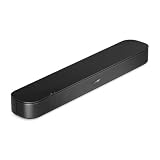
The second-generation Bose TV Speaker is a compact bar built to make speech easier to follow. The listing names Bluetooth, HDMI-ARC connectivity, clear dialogue processing, deep bass, a remote, and Dolby Atmos. It is important for this guide that the connection is described as HDMI-ARC, not eARC, so it works with any TV that has an ARC port but does not take advantage of eARC bandwidth.
Bose’s own specification information lists Dolby Digital for audio and does not confirm native Atmos, while the retailer text mentions Atmos, so confirm the formats on the product page. Bose describes a three-driver arrangement and a compact body that is just under two feet wide, with optical input for older televisions and an optional bass module. That makes it a sensible dialogue upgrade for a bedroom or small living room.
- HDMI-ARC connection (not eARC)
- Bluetooth
- Dialogue mode and bass adjustment
- Remote included
- Optical input and format details: confirm on listing
Pros:
- Dialogue-focused tuning
- Compact enough for small spaces
Cons:
- ARC only, so it does not use eARC
- Atmos claim should be verified before you buy
Next to the original Bose TV Speaker, it is the newer, more feature-rich model, and next to the Sonos Beam it is simpler but without eARC or room-wide expansion.
4. Bose TV Speaker (original) – Best for a Simple Compact Bar

The original Bose TV Speaker is an all-in-one compact soundbar with Bluetooth, HDMI-ARC, and a remote. The listing keeps its description short, and it does not mention eARC, Atmos or channel counts. That honesty is useful: this is a straightforward speaker designed to be easy to set up and to make TV audio fuller and clearer than built-in TV speakers.
It is the least relevant product for an eARC-focused shopper, because its listing states ARC, and the listing name makes no claim about Dolby formats or wattage. If you have a TV with an eARC port, this bar still works, but the connection runs as standard ARC. It makes sense mainly for someone who wants a plain Bose speaker for a small room and does not care about lossless or object-based audio.
- All-in-one compact soundbar
- HDMI-ARC (not eARC)
- Bluetooth
- Remote included
- Dimensions, optical input and bass options: confirm on listing
Pros:
- Easy setup
- Small footprint for desks and bedrooms
Cons:
- ARC only
- No Atmos claim in the listing
It is the simpler, older sibling of the 2nd Gen model, so choose the 2nd Gen if both are available and you want the listed Atmos and dialogue upgrades.
5. Silkland 3.3 ft HDMI 2.1 eARC/ARC Cable – Best Accessory for a Short Run

This is the second cable in the list, and like the first it is an accessory, not a speaker. The listing names a certified HDMI 2.1 eARC/ARC cable, 3.3 feet long, with 48 Gbps bandwidth, support for 8K at 60 Hz and 4K at 120 Hz, Dolby Atmos, Dolby Vision, HDR10 and HDCP 2.3. A 3.3-foot cable is the right length when the soundbar sits directly under a TV on a wall mount or a short console.
A short run keeps the cabling tidy, but it leaves little slack. If your TV swivels or the soundbar sits on a different shelf, you may find 3.3 feet too short. Also note that HDMI eARC depends on the TV port and the bar, not just the cable, so use it when you want a reliable replacement for a damaged or low-quality cable.
- Length: 3.3 feet
- HDMI 2.1 certification claimed in the listing
- eARC and ARC compatibility
- 48 Gbps, 8K at 60 Hz, 4K at 120 Hz
- Dolby Vision, HDR10 and HDCP 2.3 per the listing
Pros:
- Neat and compact for wall-mounted setups
- Broad video format support
Cons:
- Short length limits placement
- Not a speaker and does not improve sound by itself
Versus the 6.6-foot cable, it is the tidier pick for compact setups and the less forgiving pick for flexible furniture layouts.
6. Sonos Beam Gen 2 – Best Overall True eARC Soundbar

The Sonos Beam Gen 2 is the strongest answer to this guide’s question. The listing names a Dolby Atmos soundbar with a five-driver array, 3D surround, Alexa, Wi-Fi, Ethernet, AirPlay 2 and an HDMI eARC connection, and notes that it works with the Sonos Sub Mini and rear speakers. Sonos specifications describe a bar about 25.6 inches wide with four full-range drivers, a tweeter and three passive radiators, so it fits under most mid-size TVs.
Its Atmos effect is created through processing rather than up-firing speakers, which is a normal approach in compact bars. The practical advantage of eARC here is that the bar can receive the TV’s audio in the highest-quality formats over a single cable, and the Sonos system grows with a subwoofer and rear speakers if you want a larger room setup later. Confirm voice assistant and streaming service support on the product page.
- HDMI eARC
- Dolby Atmos support (virtualized)
- Five-driver array per the listing
- Wi-Fi, Ethernet and AirPlay 2
- Works with Sonos Sub Mini and rear speakers
Pros:
- True eARC with expansion path
- Strong feature set for a compact body
Cons:
- Needs an app and Wi-Fi network for full use
- Subwoofer and rears are separate purchases
It is a step up from the Westinghouse in build and expansion, and a clear step up from the Bose ARC models if you want eARC.
Specs Compared
| Product | Type | HDMI connection | Channels / drivers | Dolby Atmos | Wireless | Notes |
|---|---|---|---|---|---|---|
| Silkland 6.6 ft cable | Cable | ARC/eARC cable, HDMI 2.1 | Not applicable | Passes Atmos per the listing | None | 48 Gbps, 6.6 ft |
| Westinghouse 2.0 Soundbar | Soundbar | HDMI eARC | 2.0 channel | Listed | Bluetooth | 120 W max, 60 W RMS |
| Bose TV Speaker (2nd Gen) | Soundbar | HDMI-ARC | Confirm on listing | Listed; confirm on listing | Bluetooth | Remote included |
| Bose TV Speaker (original) | Soundbar | HDMI-ARC | Confirm on listing | Not stated | Bluetooth | Remote included |
| Silkland 3.3 ft cable | Cable | ARC/eARC cable, HDMI 2.1 | Not applicable | Passes Atmos per the listing | None | 48 Gbps, 3.3 ft |
| Sonos Beam Gen 2 | Soundbar | HDMI eARC | Five-driver array | Listed | Wi-Fi, Ethernet, AirPlay 2 | Works with Sonos Sub Mini and rears |
How We Chose These
We read each product listing to separate real soundbars from accessories, then checked whether each listing names HDMI eARC, plain ARC or neither. Because the ARC versus eARC distinction is the whole point of this page, we treated that as the main criterion and flagged the two Bose models as ARC-only and the two Silkland items as cables. We compared the remaining features that listings state, such as channel layout, Bluetooth, Dolby formats and wattage, and we used manufacturer specification information for Bose and Sonos to fill gaps. We did not run our own listening sessions or measurements, so sound quality is described by design class, and unclear details are marked “confirm on listing”.
What to Look For
ARC versus eARC in plain terms
ARC lets a TV send its own audio back to a soundbar over HDMI, which removes the extra optical cable. Standard ARC has limited bandwidth, roughly on the order of one megabit per second, so it carries compressed formats such as Dolby Digital and DTS. eARC raises that ceiling dramatically, to as much as about 37 megabits per second, which allows uncompressed multichannel PCM and lossless formats such as Dolby TrueHD and DTS-HD Master Audio. In practice, eARC matters most when you connect a Blu-ray player or console to the TV and want lossless audio passed on to the bar, or when you want the best Atmos signal your TV can send.
Your TV and your port
You need three things for eARC: an eARC-capable TV port (usually labeled eARC or ARC/eARC), an eARC-capable soundbar, and a cable that reliably carries the signal. Look at the back or side of the TV for the correct HDMI port, and plug the soundbar in there instead of a normal HDMI input. Then open the TV’s audio settings, choose HDMI eARC or digital passthrough, and enable HDMI-CEC so the TV remote controls bar volume. Many TVs ship with eARC disabled or buried in an audio menu, so this step solves a large share of “no sound” problems.
Do you actually need a certified Ultra High Speed cable?
For eARC audio alone, a good High Speed HDMI cable with Ethernet support is usually enough, because the audio data rate is far below the cable’s limit. The 48 Gbps Ultra High Speed label matters when the same cable carries 4K at 120 Hz or 8K video, for example if the soundbar is in the video path. If your soundbar is only connected to the TV’s eARC port, the cable that came with the bar is typically fine. Replace it if you hear dropouts, if the bar drops out when the TV wakes, or if the connector feels loose.
Size, channels and Atmos expectations
A 2.0 bar is a clear upgrade over TV speakers, but it relies on processing to widen the sound. Adding a subwoofer or rear speakers produces a bigger change than switching bars. For a TV in the 43 to 55 inch range, a bar roughly 24 to 30 inches wide balances well; the Sonos Beam is about 25.6 inches wide per Sonos specifications, and the Bose is under two feet. Measure the shelf and the TV stand, and leave room so the bar does not block the TV’s remote sensor.
Bluetooth, optical and other fallback connections
An HDMI connection is the best way to hear everything your TV does, but it is worth knowing the fallbacks. Bluetooth is convenient for streaming music from a phone, yet it is compressed and adds a small delay, so avoid it as the main path for movies. Optical (TOSLINK) works on older TVs without ARC, but it is limited to compressed Dolby Digital and standard stereo, so you lose lossless formats and, on most TVs, any CEC volume control. If your set is old enough to have only optical, the Bose bars list a path for that, and you should confirm it on the product page. Whatever you choose, keep one primary wired connection and use wireless only for convenience.
Room placement and setup tips
Place the bar centered below the TV, close to the front edge of the shelf so the speaker openings are not blocked. Leave a few inches of space on each side, because walls and cabinets create boomy reflections that muddy speech. If the TV sits on a wall mount, pick a bar short enough to fit under the screen without covering the infrared sensor. After connecting, run any room-tuning feature the bar offers, set the TV’s audio output to the external speaker, and then adjust the dialogue or night mode to taste. A small amount of EQ adjustment often matters more than a price jump to the next model.
A quick decision rule
If your TV has an eARC port and you watch lossless sources, buy an eARC bar. If the TV only has ARC, you will not lose anything by buying an ARC bar. As a worked example, a bedroom TV with a single ARC port and mostly streaming content is well served by a Bose dialogue-focused bar, while a living-room TV with an eARC port, a console and a disc player gets more value from the Sonos or Westinghouse.
Questions
What does HDMI eARC do that ARC does not?
eARC provides far more bandwidth, so it can carry uncompressed and lossless audio formats and the highest-quality object-based audio from your TV to the soundbar. Standard ARC is limited to compressed formats.
Will an eARC soundbar work with a TV that only has ARC?
Yes, it will work, but it falls back to ARC audio formats. You still get the benefit of one cable and TV remote control, just not lossless sound.
Do I need a new HDMI cable for eARC?
Often no, because a good High Speed HDMI cable with Ethernet handles eARC audio. Replace your cable if it is damaged, very old or causes dropouts, and choose a certified HDMI 2.1 cable if you want video headroom too.
Is the Bose TV Speaker an eARC soundbar?
The listings for both Bose models state HDMI-ARC, not eARC. They work with ARC ports and are best for dialogue clarity rather than lossless audio.
Why is my soundbar not producing sound over HDMI?
Check that you used the TV’s ARC or eARC port, that HDMI-CEC and eARC are enabled in the TV’s audio menu, and that the TV is set to output through HDMI instead of its internal speakers. Power-cycling the TV and the bar together often restores the handshake.
Do I need a subwoofer with a compact soundbar?
Not necessarily, but a compact bar cannot reproduce deep bass the way a separate subwoofer can. If you watch action films or play music at higher volume, adding a sub from the same ecosystem is usually the most noticeable upgrade, and it is why expandable systems such as the Sonos Beam appeal to growing setups.
Update History
- October 20, 2026 – Initial publication; product set drawn from current catalog listings.
- Check the product page for current specifications and availability before buying.
Sources
- Retailer listing titles and specification fields for each product
- Manufacturer product and specification information for Bose and Sonos