
Key takeaways
- Playing PS4 games: A portable SSD loads PS4 titles faster than a hard drive and is a good fit.
- Archiving PS5 games: Moving a large PS5 game to an external drive and back is much quicker with an SSD than with an HDD.
- Playing PS5 games from extra space: Install an internal M.2 SSD that meets Sony’s published requirements. A portable SSD will not do this job.
For a PS5, a portable SSD is best used to store PS5 games you are not playing and to run PS4 games, because Sony states that PS5 games must be played from the console’s internal storage or an internal M.2 expansion SSD, not from a USB drive; the Samsung T7 Shield or SanDisk Extreme Portable suits most people, the Samsung T9 or WD_BLACK P40 suits those who want maximum speed, and an M.2 drive is the better buy if you want to play PS5 games from extra space.
Our top picks



As an Amazon Associate we earn from qualifying purchases at no extra cost to you.
What a portable SSD can and cannot do on a PS5
This is the point that trips up many buyers, so it comes first. According to Sony’s support documentation, a USB extended storage device can hold PS4 games and run them directly, and can store PS5 games, but PS5 games cannot be played from it. To play them, you move them back to the console’s internal drive or an installed M.2 SSD. Sony also lists requirements for USB drives, including SuperSpeed USB (USB 3.0 or later) and a capacity range, and the console supports one USB drive as extended storage at a time. Check Sony’s page for the current figures.
That shapes what you should buy:
- Playing PS4 games: A portable SSD loads PS4 titles faster than a hard drive and is a good fit.
- Archiving PS5 games: Moving a large PS5 game to an external drive and back is much quicker with an SSD than with an HDD.
- Playing PS5 games from extra space: Install an internal M.2 SSD that meets Sony’s published requirements. A portable SSD will not do this job.
The console’s USB ports also limit speed. Sony lists SuperSpeed USB 10Gbps on certain ports, so even drives marketed at 2,000MB/s will run well below their top speed on the PS5. Paying for the fastest drive brings little benefit on this console, which is a reason to focus on reliability, size and durability instead.
Comparison at a glance
| Model | Best for | Key stated specs (per maker) | Limits |
|---|---|---|---|
| Samsung T7 Shield | Rugged everyday use | USB 3.2 Gen 2, rubberized casing, dust and water resistance rating, read speeds up to about 1,050MB/s | Heavier than the plain T7 |
| Samsung T7 | Slim, light travel | USB 3.2 Gen 2, metal body, read speeds up to about 1,050MB/s | No rubber protection |
| Samsung T9 | Speed headroom for PC and PS5 | USB 3.2 Gen 2×2, read speeds up to about 2,000MB/s | Extra speed is limited by PS5 ports |
| SanDisk Extreme Portable SSD | Compact, durable general use | USB 3.2 Gen 2, read speeds up to about 1,050MB/s, water and dust resistance rating | Not the fastest on paper |
| WD_BLACK P40 Game Drive | Gaming style, higher speed | USB 3.2 Gen 2×2, read speeds up to about 2,000MB/s, RGB light | Larger body; premium tier |
| Crucial X9 / X10 Pro | Value and fast options | USB 3.2 Gen 2 or Gen 2×2 depending on model | Check which variant you buy |
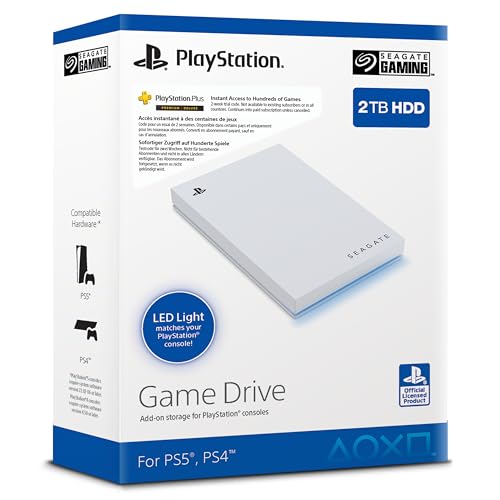
| Seagate Game Drive for PS5 | Console-themed design | Sold in PS5-themed styling with SSD and HDD options | Check whether the version is SSD |
Speeds quoted are the makers’ best-case figures on a computer; the PS5 will not match them. Compare with each maker’s product page for the exact version.
Best all-rounder: Samsung T7 Shield
The T7 Shield adds a rubberized shell and ingress protection to Samsung’s compact T7 line. Reviewers generally describe it as dependable, with strong sustained performance for its tier, and it is easy to find in capacities that fit PS4 libraries and archived PS5 titles. The rubber coating gives some drop and dust resistance according to the maker, which helps if the drive moves between rooms or in a bag. It runs on a standard USB 3.2 Gen 2 interface, which matches what the PS5 can use, so you are not paying for speed the console cannot take.
Best for lightweight carrying: Samsung T7
The standard T7 has a thin metal body and small footprint. It works the same as the Shield for console purposes. Choose it if you will keep the drive at home and prefer something lighter.
Best for speed headroom: Samsung T9 and WD_BLACK P40
Both use USB 3.2 Gen 2×2 and list read speeds around 2,000MB/s on a computer with a compatible port. If you also edit video, transfer big files on a PC or may want the drive to outlast your current console, the extra headroom makes sense. On a PS5, reviewers and Sony documentation indicate a limit to the port speed, so do not expect twice the loading speed. The P40 has a gaming style and lighting, while the T9 is more understated.
Best compact durable choice: SanDisk Extreme Portable SSD
SanDisk’s Extreme line is popular for outdoor and travel use, with a carabiner loop and a dust and water resistance rating stated by the maker. Performance is similar to the T7 class. It is a good option when you want a name-brand drive in a small, tough package.
Value alternatives: Crucial X9 and X10 Pro, Seagate Game Drive
Crucial’s portable SSDs are often competitive on price, and the X10 Pro targets higher speeds. Seagate’s PS5-themed Game Drive comes in different formats, so confirm whether the version you buy is solid state or a hard drive. A hard drive can store archived games but will transfer more slowly.
If you want to play PS5 games from extra storage
Sony supports installing an internal M.2 NVMe SSD in the console’s expansion bay. Sony publishes requirements for the interface, speed, size and heatsink. Many makers sell drives sold as compatible with the PS5 and some include a heatsink. Compatibility rules, slot size and installation steps are in Sony’s guide, and following them is the safest route. Consider this route if your main goal is more room for current PS5 games, not storage for PS4 titles or archives.
Buying tips
- Capacity: PS5 games are large, so choose a capacity that fits several titles. Sony states a minimum and maximum size for USB drives.
- Cable: Use the cable included, and plug into a port that supports the speed the drive needs.
- Format: The console will ask to format a new drive for extended storage; that erases the contents, so back up anything you need first.
- Heat: Drives can get warm during large transfers. Keep vents clear.
- Safe removal: Use the console’s menu to eject the drive before disconnecting.
Pick X if…
| Pick this | If you |
|---|---|
| Samsung T7 Shield | want a tough, reliable drive for PS4 games and PS5 archives |
| Samsung T7 | want a light, slim drive that stays mostly at home |
| Samsung T9 or WD_BLACK P40 | also use the drive on a fast PC and want speed headroom |
| SanDisk Extreme Portable | want a compact, travel-friendly drive |
| Crucial X9 / X10 Pro | are watching your budget tier |
| Internal M.2 SSD | want to play PS5 games from extra storage |
Alternatives to consider
- Internal M.2 NVMe SSD: The correct route for playing PS5 titles from added space.
- External hard drive: Lower cost per terabyte for archiving PS5 games and PS4 libraries, though loading is slower.
- Delete and re-download: Costs nothing, but depends on internet speed and data limits.
Care and longevity
Treat the drive like any storage device: avoid dropping it while it is active, keep the cable seated, and eject it through the console menu before unplugging. Keep a spare copy of save data using the console’s own backup options where available, because a drive failure should not cost you progress. Do not leave the drive in a hot, enclosed space behind the console, and keep the firmware current using the maker’s utility if one is provided. If transfers suddenly slow down, try a different cable or port first, since worn cables are a common cause.
Frequently Asked Questions
Can I play PS5 games from a portable SSD?
No. Sony states that PS5 games must run from the console’s internal storage or an installed M.2 SSD. A USB drive can store PS5 games, but you must move them back to play them.
Can I play PS4 games from an external SSD?
Yes. PS4 games can run directly from a supported USB drive, and an SSD usually loads them faster than a hard drive.
Is a faster 2,000MB/s drive worth it for PS5?
Usually not for the console alone. The PS5’s USB ports limit speed, so the extra headroom matters mainly if you use the drive with a fast computer.
Do I need to format the drive?
The console prompts you to format a new drive when you set it up as extended storage. This erases everything on it, so back up any files first.
Which USB port should I use?
Use the PS5 port that Sony lists as the fastest SuperSpeed port and the cable provided with the drive. The console manual shows which ports support which speeds.
Should I buy an M.2 SSD instead?
If you want to play PS5 games from extra space, yes. An internal M.2 SSD that meets Sony’s requirements is the supported way to expand storage for PS5 titles.





