
Key takeaways
- Budget: The standard Xbox pad, entry-level 8BitDo or GameSir models, and generic Bluetooth gamepads. Expect fewer extras and simpler hardware. Check that the pad supports XInput, the standard Windows gamepad protocol, so games read it correctly.
- Mid-range: The DualSense, the 8BitDo Ultimate 2, the GameSir Cyclone 2 and the Switch Pro Controller. This is where docks, back buttons and Hall effect sticks tend to appear.
- Premium: The Xbox Elite Series 2, the DualSense Edge and similar tournament-style controllers. You pay for modularity and customisation, so only buy if you will use those features.
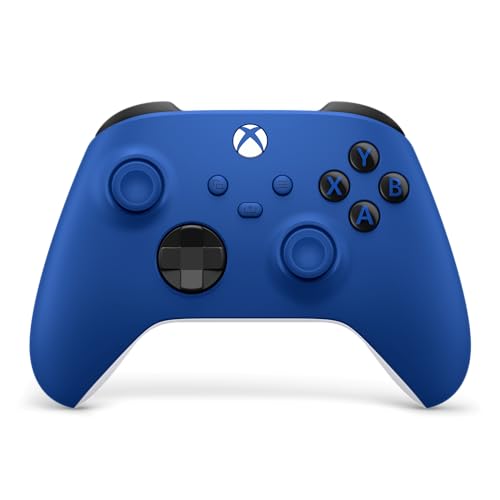
For most PC players, the Xbox Wireless Controller is the simplest wireless pad because Windows and most launchers recognise it without extra setup, while the 8BitDo Ultimate 2 and GameSir Cyclone 2 suit buyers who want a rechargeable dock, extra buttons or Hall effect sticks, and the DualSense suits anyone who wants adaptive triggers and haptics in supported games. This guide sorts current wireless options by the way people actually play on a PC: couch streaming, competitive shooters, retro and platformers, and travel.
Our top picks



As an Amazon Associate we earn from qualifying purchases at no extra cost to you.
Quick Comparison
| Controller | Best for | Connection (as listed by the maker) | Main limit |
|---|---|---|---|
| Xbox Wireless Controller (Series X|S generation) | Plug-and-play compatibility across PC games | Bluetooth, Xbox Wireless adapter, USB-C cable | Uses AA batteries unless a rechargeable pack is added |
| Sony DualSense | Haptics and adaptive triggers in supported titles | Bluetooth, USB-C cable | Some features depend on the game; battery life is shorter than AA-powered pads |
| 8BitDo Ultimate 2 Wireless | Rechargeable dock, extra back buttons, 2.4 GHz receiver | 2.4 GHz dongle, Bluetooth, USB-C | Software for remapping is separate; not every setting is available on every platform |
| GameSir Cyclone 2 | Hall effect sticks and triggers, multi-device switching | 2.4 GHz, Bluetooth, USB-C | Newer brand, so support documents are thinner than Microsoft or Sony |
| Nintendo Switch Pro Controller | Players who also own a Switch | Bluetooth, USB-C cable | Needs a Steam Input style layer for some non-Steam games |
| Xbox Elite Series 2 | Premium build, swappable parts, trigger stops | Bluetooth, Xbox Wireless adapter, USB-C | Premium tier; some owners report wear on rubberised parts over time |
Specifications change between hardware revisions, so treat the entries above as the maker-stated picture and read the product page for your region before buying.
How Wireless Works on a PC
There are three common wireless routes. Bluetooth is the most universal: any laptop or desktop with a Bluetooth adapter can pair a controller, but latency and range depend on the adapter and the interference in your room. A 2.4 GHz dongle gives a dedicated link, which makers such as 8BitDo and GameSir describe as lower latency than Bluetooth, and it avoids pairing menus. The Xbox Wireless adapter is Microsoft’s own dongle and supports Xbox controllers with the simplest Windows integration, including multiple controllers at once. A wired USB-C connection is always the fallback and also charges the pad.
If you play from a couch, check range first. Bluetooth is usually fine across a living room, but a PC tucked behind a metal desk can cut the signal. A short USB extension for the dongle often fixes dropouts without changing the controller.
Detailed Looks
Xbox Wireless Controller
Microsoft’s standard controller remains the baseline for PC play. Games and launchers on Windows treat it as the default layout, so on-screen button prompts usually match without remapping. The maker lists Bluetooth and the Xbox Wireless adapter as wireless options, and it takes AA batteries or a rechargeable pack sold by Microsoft and third parties. Reviewers often point to the textured grips and the hybrid D-pad as strengths, and to the lack of back paddles as the main reason enthusiasts step up. Pick it if you want the least troubleshooting.
Sony DualSense
The DualSense works on PC over Bluetooth or USB-C and is recognised by Steam through its input layer. Adaptive triggers and detailed haptics work in games that support them over a wired connection on PC, and support is uneven on other launchers, so check the specific title. The built-in battery is rechargeable through USB-C, which removes the AA question but means a flat controller needs a cable. Choose it if you play many Sony ports or like the touchpad and motion controls.
8BitDo Ultimate 2 Wireless
8BitDo positions this pad as a bridge between a standard controller and a pro model. The maker lists a 2.4 GHz connection with a charging dock, Bluetooth, additional back buttons and Hall effect sticks. A dongle connection is helpful if you do not want to pair each time you switch between a desktop and a laptop. Reviewers generally describe the build as solid and the app-based customisation as useful, though they also mention that software is a separate download. It suits players who want a premium feel without the highest tier.
GameSir Cyclone 2
The Cyclone 2 is aimed at players who move between a PC, a phone and a handheld. The maker lists 2.4 GHz and Bluetooth connectivity, Hall effect sticks and triggers, and a dock. Hall effect sensors use magnets instead of physical contact, which the makers say reduces drift over time; long-term reliability data for individual models is limited, so treat that as a design claim. Pick it if drift is your main worry and you want a feature set at a mid-range tier.
Switch Pro Controller
Nintendo’s pad is well liked for comfort and battery life. On PC it is recognised through Bluetooth, but the button layout differs from Xbox, so some games show the wrong icons. Steam can correct that with controller configuration, while other launchers may need extra tools. It is a practical choice if you already own one.
Xbox Elite Series 2
The premium option offers adjustable trigger stops, swappable thumbsticks and back paddles. The maker lists an internal battery with a charging case. It sits at the high end of the market, and reviewers say the feature depth is the reason to buy rather than raw compatibility, which is the same as the standard Xbox pad. Some owners report that rubber grips can wear after heavy use, so consider the warranty terms.
Budget Tiers
- Budget: The standard Xbox pad, entry-level 8BitDo or GameSir models, and generic Bluetooth gamepads. Expect fewer extras and simpler hardware. Check that the pad supports XInput, the standard Windows gamepad protocol, so games read it correctly.
- Mid-range: The DualSense, the 8BitDo Ultimate 2, the GameSir Cyclone 2 and the Switch Pro Controller. This is where docks, back buttons and Hall effect sticks tend to appear.
- Premium: The Xbox Elite Series 2, the DualSense Edge and similar tournament-style controllers. You pay for modularity and customisation, so only buy if you will use those features.
Compatibility and Setup Notes
- XInput versus DirectInput: XInput pads work in almost every modern PC game. Pads that default to DirectInput or Switch mode may need a mode switch or Steam Input to behave correctly.
- Steam Input: Steam can remap almost any pad and can add gyro support. Games launched outside Steam may need to be added as non-Steam shortcuts.
- Firmware updates: Several makers release updates through a companion app or website. Update on a trusted source from the maker.
- Batteries: Dock-based rechargeable pads are convenient but need desk space. AA-powered pads can be hot-swapped, which some players prefer for long sessions.
- Hand size: Large hands may prefer the Xbox shape, while smaller hands often find the Switch Pro Controller or the DualSense more compact.
Pick X If…
| Pick this | If you |
|---|---|
| Xbox Wireless Controller | want the smoothest Windows compatibility and familiar layout |
| DualSense | value haptics, adaptive triggers and play many console ports |
| 8BitDo Ultimate 2 Wireless | want a dock, 2.4 GHz link and back buttons at a mid-range tier |
| GameSir Cyclone 2 | want Hall effect sticks and switch between PC and phone |
| Switch Pro Controller | already own a Switch and want a comfortable second use |
| Xbox Elite Series 2 | want customisation and will use the paddles and trigger stops |
Alternatives Worth a Look
- Wired controllers: A wired pad removes battery and latency questions and often costs less. It suits a desk setup.
- Dedicated fight sticks and arcade pads: Better than any standard controller for fighting games, but not general purpose.
- Handheld PC gaming controllers: If you use a handheld PC, check whether its built-in controls are enough before buying a separate pad.
Care and Safety
Keep pads away from heat and direct sunlight. Rechargeable lithium batteries should be charged with the cable and charger the maker supplies or specifies, and a controller that swells, overheats or smells should be unplugged and replaced under warranty. Clean the exterior with a lightly damp cloth, and do not pour liquid into the sticks or triggers. If sticks begin to drift, check the maker’s recalibration steps before assuming the hardware has failed.
Frequently Asked Questions
Which wireless controller works best with PC games out of the box?
The Xbox Wireless Controller is generally the easiest because Windows uses its layout as a default. Games show matching button prompts, and pairing is straightforward over Bluetooth or the Xbox Wireless adapter.
Is Bluetooth good enough, or do I need a 2.4 GHz dongle?
Bluetooth is fine for most single-player and casual play. A 2.4 GHz dongle is described by makers as a lower latency link and is simpler to reconnect, so it can suit fast shooters or players who move between devices.
Can I use a PlayStation controller on PC?
Yes, the DualSense connects over Bluetooth or USB-C. Steam handles it very well, but adaptive trigger and haptic support depends on the game and launcher.
What does Hall effect mean on a controller?
Hall effect sticks use magnetic sensors instead of the physical contacts in standard potentiometers. Makers state that this reduces the wear that leads to stick drift, although independent long-term data is limited.
Do wireless controllers add noticeable input lag?
Reviewers report that a modern wireless link is close to wired in most games, with the dongle option sitting closest. If you play competitive titles, use the dongle or a USB-C cable.
How long do wireless controller batteries last?
Battery life varies by model, rumble use and connection type, so check the maker’s stated figure. AA-powered pads let you swap batteries, while built-in batteries need charging between sessions.
More from Amazon
Programs that pair well with the guide above. Offers and eligibility are set by Amazon and may change.
Free shipping on eligible items, Prime Video and more. Eligible new members can start with a free trial.
Start a Prime free trialAd-free music streaming. Eligible new subscribers can start with a free trial.
Try Music Unlimited freeA Prime membership for ages 18-24 with a trial period. Eligibility is set by Amazon.
See Prime for Young AdultsAudiobooks and podcasts to listen to on the go. Eligible new members can start with a free trial.
Try Audible freeAs an Amazon Associate we earn from qualifying purchases.








