
Key takeaways
- Load rating: Check the maximum watts or amps for each outlet or relay, and make sure your heater or fan is within the maker’s limit.
- Sensors: Look for temperature, humidity and, if needed, soil moisture or light. Probe cable length matters in larger structures.
- Connectivity: Wi-Fi, Bluetooth or Zigbee. Wi-Fi range inside a metal-framed greenhouse can be poor, so a mesh node or extender may help.
- Alerts: Notifications for high or low temperature give you time to react, which helps if a heater fails during a cold night.
- Power backup: Consider what happens during an outage, including whether the controller restarts with its settings.
- Weather resistance: Humid greenhouse air can damage electronics. Use only equipment rated by the maker for damp environments, and mount controllers outside the wettest area.
- Data logging: Charts of temperature and humidity help tune your setup over a season.
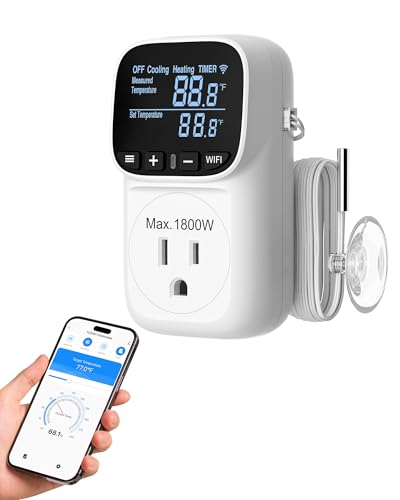
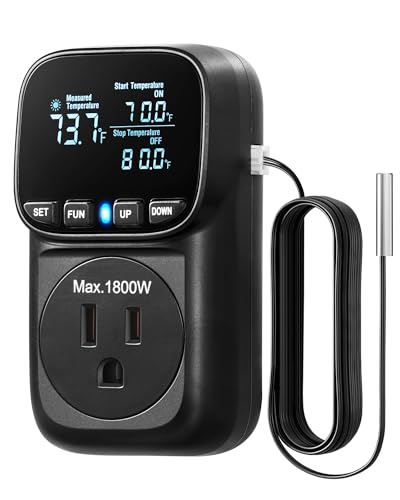
For a small hobby greenhouse, a Wi-Fi smart plug or thermostat such as the Inkbird ITC-308 family plus a simple sensor is the lowest-effort way to automate heat and cooling, while the AC Infinity Controller 69 Pro suits fan-and-vent setups and TrolMaster or Growlink systems suit larger greenhouses that need many sensors and relays. The right pick depends on which loads you need to control, how many zones you have, and whether you want a cloud app or local control.
Our top picks


As an Amazon Associate we earn from qualifying purchases at no extra cost to you.
At a Glance
| Option | Best for | Key stated features (makers) | Limits |
|---|---|---|---|
| Inkbird ITC-308 / Wi-Fi thermostat family | Simple heating or cooling control with one probe | Plug-in outlet controller, temperature probe, heating and cooling outlets | One zone, limited humidity logic on basic models |
| AC Infinity Controller 69 Pro and similar | Fans, vents and humidifiers in small spaces | Temperature, humidity and vapour pressure deficit modes, app control on some models | Designed for grow tents; check greenhouse suitability |
| TrolMaster Hydro-X and Tent-X lines | Multi-device control with sensors and modules | Modular controllers, optional sensors, software dashboard | Premium tier; setup complexity |
| Growlink and similar cloud platforms | Larger greenhouses and commercial growers | Multiple sensors, relays, alerts and data logging | Subscription and installation needs |
| Home Assistant with Shelly or Zigbee devices | DIY users who want custom automations | Local control, many sensor and relay options | Needs technical setup |
Product lines are updated often. Check the maker’s current specification, load ratings and supported regions before buying.
What a Greenhouse Controller Does
A greenhouse controller reads sensors and switches equipment. Typical inputs are air temperature, humidity, soil moisture and light level. Typical outputs are heaters, exhaust fans, circulation fans, vent openers, misters and grow lights. More advanced controllers add vapour pressure deficit, which combines temperature and humidity to indicate plant stress.
Controller Types
Plug-in thermostats
These are the simplest option. You plug the controller into a wall outlet, plug a heater or fan into the controller, and place the probe at plant height. They are inexpensive and easy to understand. Their limit is that each device has a fixed load rating and only one or two outlets.
Fan and environment controllers
Controllers like the AC Infinity line focus on fans, humidity and temperature, with programmable triggers. Makers list app control and data logging in some models. They suit smaller structures that need ventilation control.
Modular systems
TrolMaster and similar brands sell a central controller with additional modules for lights, climate and irrigation. Reviewers describe them as flexible but more involved to install.
Cloud-connected platforms
Growlink and similar services offer remote monitoring, alerts and logs across many sensors. They suit larger operations and often involve a subscription or professional installation.
DIY smart home
Home Assistant with Wi-Fi or Zigbee sensors lets you build custom logic, such as opening vents when temperature rises and sending an alert if power drops. It requires time and some technical skill.
Features to Compare
- Load rating: Check the maximum watts or amps for each outlet or relay, and make sure your heater or fan is within the maker’s limit.
- Sensors: Look for temperature, humidity and, if needed, soil moisture or light. Probe cable length matters in larger structures.
- Connectivity: Wi-Fi, Bluetooth or Zigbee. Wi-Fi range inside a metal-framed greenhouse can be poor, so a mesh node or extender may help.
- Alerts: Notifications for high or low temperature give you time to react, which helps if a heater fails during a cold night.
- Power backup: Consider what happens during an outage, including whether the controller restarts with its settings.
- Weather resistance: Humid greenhouse air can damage electronics. Use only equipment rated by the maker for damp environments, and mount controllers outside the wettest area.
- Data logging: Charts of temperature and humidity help tune your setup over a season.
Electrical and Fire Safety
Greenhouses combine moisture, electricity and often heat, so treat the electrical side conservatively. Use equipment that the maker says is suitable for the conditions, plug into outlets protected by a ground fault circuit interrupter, and keep connectors off the ground and out of water. Do not exceed the stated load of the controller, extension cord or outlet. Avoid daisy-chaining power strips. Keep heaters away from plastic films, curtains and dry plant material, and follow the heater maker’s clearance instructions. If you need new outdoor wiring or a dedicated circuit, hire a qualified electrician and follow local code. A controller is not a substitute for a heater’s own safety features, so use heaters that include tip-over and overheat protection if the maker lists them.
Sizing and Fit
- Small hobby greenhouse: One temperature controller, one heater and one fan are often enough.
- Medium greenhouse: Add humidity control, a second sensor and vent automation.
- Large or multiple zones: Choose a modular or cloud platform with several relays.
- Probe placement: Place sensors at plant height, shaded from direct sun, away from heater vents.
- Vent actuators: Automatic vent openers are separate devices, and some operate on wax-cylinder mechanisms without electricity. Check the compatibility of your vent with the controller.
Budget Tiers
- Budget: Plug-in thermostats and basic Wi-Fi smart plugs with a temperature probe.
- Mid-range: Fan and environment controllers with humidity and app support.
- Premium: Modular systems or cloud platforms with multi-zone control, many sensors and remote alerts.
Pick X If…
| Pick this | If you |
|---|---|
| Inkbird thermostat family | need simple heat or cooling control for one zone |
| AC Infinity Controller 69 Pro | need fan and humidity control for a small space |
| TrolMaster modular system | want multiple devices and sensors in one platform |
| Growlink or similar cloud platform | run a large greenhouse and want remote alerts |
| Home Assistant DIY | enjoy building custom automation |
Alternatives
- Wax-cylinder vent openers: Passive devices that open vents when it is warm, with no electricity.
- Standalone min-max thermometers with Wi-Fi alerts: Provide monitoring without control.
- Timer-based irrigation controllers: Handle watering when climate control is not needed.
Setup Tips
- Start with monitoring for a week to learn your temperature swings.
- Set a heating target a few degrees above your plants’ minimum and a cooling trigger below the stress point.
- Test fail-safe behaviour by briefly unplugging the controller.
- Keep a manual backup, such as a thermometer you can read directly.
- Follow the plant variety’s guidance for temperature and humidity ranges.
Choosing Sensors and Placement
Sensor quality decides how useful the automation will be. Temperature probes should be placed at plant height, shaded from direct sun, and away from heaters and fan outlets so they read the air your plants experience. Humidity sensors drift over time and are affected by condensation, so follow the maker’s guidance on replacement or recalibration. If you grow in several areas, a single reading can hide cold or hot spots, and a second sensor at a different height or bench is worth considering. For irrigation, soil moisture sensors need to be placed in representative pots or beds and checked occasionally against a manual reading. Keep data from a full season so you can adjust triggers as the weather changes.
Maintenance and Season Planning
Before winter, test heaters, fans and the controller on a mild day so you find problems before a frost. Clean fan blades and louvres, check cable insulation for cracks and make sure plugs are dry and secure. In summer, shading and ventilation matter as much as the controller, so confirm that fans and vents are sized for the space. Keep a written list of your trigger points and alert settings, and update the controller firmware only from the maker’s official source. If a plant crop is valuable, a second independent thermometer or alarm gives a backup in case the main controller fails.
Buying tip: write down your must-have features before comparing models, then rank the remaining items by how much each matters to you. Read the maker’s current specification sheet, compare the warranty terms, and keep the receipt and packaging until you are sure the product suits your setup. Independent reviewers can differ from maker claims, so read more than one source and look for reports that describe the same behaviour over a longer period. If two options look similar, choose the one with clearer support documentation and a simpler return policy.
Frequently Asked Questions
Do I need a smart controller for a small greenhouse?
Not always. A simple plug-in thermostat can handle heating or cooling. Smart features help if you travel or want alerts and logs.
Can a grow-tent controller run in a greenhouse?
Some can, but they are designed for enclosed tents. Check the maker’s stated operating range and environmental rating before using one in a humid or outdoor structure.
How do I protect the controller from moisture?
Mount it in the driest part of the structure, use equipment rated for damp locations and protect outlets with a ground fault device. Ask a qualified electrician if you are unsure.
Will Wi-Fi reach my greenhouse?
It depends on distance and construction materials. Metal frames and glass can weaken the signal, so a mesh node, extender or a Zigbee-based sensor network may be needed.
What happens if the power goes out?
Most controllers stop working with the power. Some restart with saved settings, and you may add a backup power source or a passive vent opener as a safeguard.
Can I control irrigation with the same device?
Some systems include irrigation modules or relays. Simpler thermostats focus on climate, so check the maker’s list of supported devices.
More from Amazon
Programs that pair well with the guide above. Offers and eligibility are set by Amazon and may change.
Free shipping on eligible items, Prime Video and more. Eligible new members can start with a free trial.
Start a Prime free trialAd-free music streaming. Eligible new subscribers can start with a free trial.
Try Music Unlimited freeA Prime membership for ages 18-24 with a trial period. Eligibility is set by Amazon.
See Prime for Young AdultsAudiobooks and podcasts to listen to on the go. Eligible new members can start with a free trial.
Try Audible freeAs an Amazon Associate we earn from qualifying purchases.








