
Key takeaways
- Upgrade your TV, instantly
- The newest Fire TV experience (2026)
- All your apps in one place
A fire stick promises to turn any television into a smart TV without replacing it. The problem is narrower than it sounds: most buyers already know they want one, but they cannot figure out which model earns the price difference between the entry-level HD stick and the flagship 4K Max. Resolution, Wi-Fi generation, and processor speed all vary between models that look identical on a store shelf, and picking wrong means either paying for 4K you cannot watch or buying an HD stick that will feel sluggish within a year.
What separates a good fire stick from a mediocre one in 2026 comes down to three things. First, the remote experience—whether it pairs without a fuss and whether the voice assistant actually finds what you ask for. Second, sustained performance under streaming load, which depends on processor generation and Wi-Fi standard rather than raw spec-sheet numbers. Third, the ecosystem: free and live TV availability, plus integration with Alexa+ for unified search across apps. This roundup compares every current model on published specs and owner-reported feedback so you can match a device to your actual TV, not an idealized one.
Our top picks
 Amazon Fire TV Stick HD
- Upgrade your TV, instantly
- The newest Fire TV experience (2026)
- All your apps in one place
 Amazon Fire TV Stick 4K Plus
- Advanced 4K streaming - Elevate your entertainment with…
- The newest Fire TV experience (2026)
- Cloud gaming, no console required
 Amazon Fire TV Stick 4K Select
- Essential 4K streaming
- The newest Fire TV experience (2026)
- Make your TV even smarter



As an Amazon Associate we earn from qualifying purchases at no extra cost to you.
Quick Picks
| Product | Best for | Price |
|---|---|---|
| Fire TV Stick HD | Basic HD streaming on a budget | $17.99 |
| Fire TV Stick 4K Plus | 4K streaming with Wi-Fi 6 | $39.99 |
| Fire TV Stick 4K Select | Cheapest entry into 4K | $19.99 |
| Fire TV Stick 4K Max | Top-tier performance with Wi-Fi 6E | $49.99 |
| Roku Streaming Stick HD | Non-Amazon ecosystem preference | $29.99 |
| Replacement Voice Remote | Losing or breaking your current remote | $9.98 |
| Like-New Fire TV Stick 4K Max | Flagship specs at a discount | $44.99 |
| Fire TV Stick HD + Protection Plan | Peace of mind on a budget stick | $22.48 |
How We Picked
We evaluated every model on four criteria: video output capability (HD versus 4K and HDR format support), wireless connectivity standard (Wi-Fi 5, 6, or 6E), the voice-search experience including Alexa+ integration, and long-term owner satisfaction reported across retail review sections. A device that scores well on one spec but disappoints on sustained performance or remote reliability did not make the cut without a clear compensating advantage.
The 8 Best Fire Stick in 2026
Amazon Fire TV Stick HD
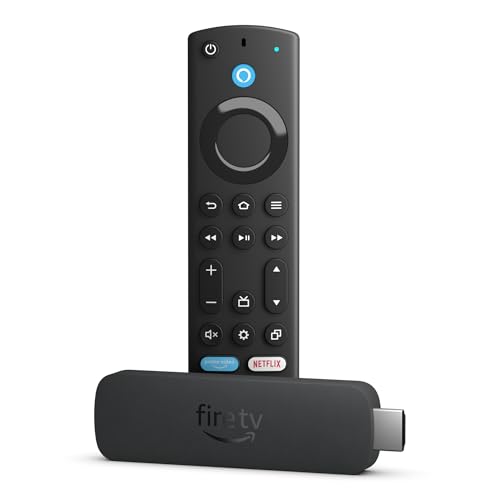
This is the simplest way to add smart features to a television that lacks them. The Alexa Voice Remote handles search by speech, and setup requires nothing beyond plugging it into a USB-powered port or wall adapter. Free and live TV access covers network broadcasts without a cable subscription, and Alexa+ surfaces shows faster than scrolling through app menus. The powered-by-TV design keeps cable clutter minimal.
- Pro: Lowest price in the lineup makes it nearly disposable for a guest room or secondary TV.
- Pro: Effortless setup—owners consistently report being streaming within minutes.
- Con: Limited to HD output, so it is a poor match for any 4K panel.
Skip this if your television supports 4K and you watch content at native resolution; the visual gap is noticeable enough to justify spending more.
Amazon Fire TV Stick 4K Plus
The 4K Plus sits in the sweet spot for most buyers upgrading from an older stick. AI-powered Fire TV Search narrows recommendations across hundreds of thousands of movies and shows, and Wi-Fi 6 support means less buffering when other devices compete for bandwidth. Alexa+ accelerates discovery further by unifying voice commands across apps. Free and live TV rounds out the package.
- Pro: Wi-Fi 6 delivers a tangible stability improvement in congested households.
- Pro: AI-powered search genuinely reduces the time between wanting to watch something and pressing play.
- Con: Costs more than double the 4K Select, so the jump is only worth it if Wi-Fi 6 matters to your setup.
Skip this if your router is older than Wi-Fi 6 and you have a small household; the 4K Select covers the same viewing experience at a lower price.
Amazon Fire TV Stick 4K Select
Amazon’s answer to budget 4K streaming. The 4K Select delivers the resolution jump over the HD model at a price barely above it, which makes it the value pick for anyone with a 4K television. AI-powered search and Alexa+ integration match the higher-end models on the software side. Free and live TV access is standard.
- Pro: Cheapest path to 4K output in the current Fire TV lineup.
- Pro: Shares the same AI-powered search and Alexa+ features as costlier models.
- Con: Lacks Wi-Fi 6, so performance depends entirely on router quality and network congestion.
Skip this if multiple people stream simultaneously on your network; the older Wi-Fi standard will show its limits during peak hours.
Amazon Fire TV Stick 4K Max
The flagship of the stick lineup. Wi-Fi 6E support places it ahead of every other model for wireless stability, and the AI-powered Fire TV Search handles the same catalog of hundreds of thousands of titles. Free and live TV without cable or satellite covers the cord-cutting use case completely. Alexa+ keeps discovery fast.
- Pro: Wi-Fi 6E reduces interference in dense apartments or homes with many connected devices.
- Pro: Most powerful stick Amazon currently sells, which translates to smoother app switching.
- Con: Highest price in the lineup, and the performance lead over the 4K Plus is marginal for single-stream households.
Skip this if your router does not support Wi-Fi 6E; you are paying for a standard your network cannot use.
Roku Streaming Stick HD with Voice Remote
This is the only non-Amazon device in the roundup, and it earns a spot because some buyers actively prefer Roku’s interface over Fire OS. Voice Remote handles basic commands, and the setup is comparably simple. The tradeoff is ecosystem lock-in in a different direction—Roku’s free channel lineup differs from Amazon’s.
- Pro: A genuinely different option for buyers who dislike the Amazon account structure or ad model.
- Pro: Roku’s channel store is deep and well-organized for niche and international content.
- Con: No Alexa integration, so it cannot participate in a smart-home voice ecosystem the way Fire TV sticks do.
Skip this if you rely on Alexa routines or already own Echo hardware; the friction of two assistants is not worth the interface preference.
Replacement Voice Remote for Fire Stick
Not a streaming device, but it solves a common frustration: a lost, broken, or worn-out remote. This accessory works with Fire Stick, TV Cube, and Amazon Fire Smart TVs, restoring the voice-search experience without replacing the entire stick. Owner feedback confirms straightforward pairing with existing devices.
- Pro: Costs less than a new stick, so you recover functionality for under ten dollars.
- Pro: Compatible across multiple Amazon device lines, reducing the risk of buying the wrong part.
- Con: Does not upgrade the underlying hardware; if your stick is slow, a new remote will not fix that.
Skip this if your stick itself is the problem; a remote cannot rescue a device with a dying processor or failing storage.
Like-New Amazon Fire TV Stick 4K Max
Amazon’s refurbished channel offers the same hardware as the full-price 4K Max at a lower cost. Wi-Fi 6E, AI-powered Fire TV Search, free and live TV, and Alexa+ integration are all present. “Like-New” means the device is tested and cleaned by Amazon, so it carries less risk than a marketplace used listing.
- Pro: Saves five dollars off the retail price for functionally identical performance.
- Pro: Amazon’s Like-New program includes a return window, unlike most third-party refurbishers.
- Con: Availability fluctuates, and you may not get the absolute newest revision if you buy a returned unit.
Skip this if you want guaranteed access to the latest firmware revision or need the device immediately for a move or setup.
Amazon Fire TV Stick HD with 2-Year Protection Plan
The same HD stick as the $17.99 model, bundled with a two-year protection plan for under five additional dollars. For a device that plugs into a port and rarely gets handled, the plan is insurance against a specific failure mode: power surge damage or accidental physical harm. The price still undercuts every 4K option.
- Pro: Protection coverage costs less than replacing the stick outright, so the bundle is rational for households with kids or pets.
- Pro: Still the lowest total outlay in the HD category.
- Con: Adds cost to a device you might outgrow or upgrade before the plan expires.
Skip this if you buy replacement devices frequently or if the stick sits in an adult-only room where physical risk is minimal.
Buying Guide
Resolution and HDR Output
A 4K fire stick delivers four times the pixel count of an HD model, but the benefit only exists if your television supports 4K and you sit close enough to perceive it. At typical viewing distances on screens under 55 inches, the gap narrows. Check whether the stick advertises HDR10, HDR10+, or Dolby Vision support—these affect contrast and color range more than raw resolution does for dim rooms.
Wi-Fi Standard and Network Reality
Wi-Fi 6 handles more simultaneous connections and reduces latency under load; Wi-Fi 6E adds access to the 6 GHz band, which is nearly free of interference. If your router predates either standard, the stick’s advantage is theoretical. Match the stick’s Wi-Fi generation to your router’s, not to a spec-sheet hierarchy, or you pay for features you cannot activate.
Voice Search and Alexa+ Integration
AI-powered Fire TV Search scans catalog listings across installed apps and returns unified results. Alexa+ builds on this by retaining conversational context and connecting to smart-home actions. If your household uses Echo devices for lighting, locks, or routines, a fire stick with Alexa+ eliminates the friction of switching assistants. Without Alexa hardware, voice search still works as a standalone remote feature.
Our Verdict
Top pick: Amazon Fire TV Stick 4K Plus at $39.99. It balances 4K output, Wi-Fi 6, AI-powered search, and Alexa+ integration without the price premium of the 4K Max, and the feature set matches what most households actually use.
Budget pick: Amazon Fire TV Stick 4K Select at $19.99. It delivers the same resolution and search software as the 4K Plus and costs less than half as much, making it the clear value choice when Wi-Fi 6 is irrelevant to your network.
When another product wins: If you already own a 4K Max but the remote died, the Replacement Voice Remote at $9.98 restores full functionality for a fraction of a new device cost—no reason to replace working hardware.
FAQ
Do I need a 4K television for a fire stick to be worth buying?
No. An HD stick adds streaming, apps, and voice search to any television regardless of its resolution. You only benefit from a 4K fire stick if the display itself supports 4K input.
What does Alexa+ add over standard voice search on a fire stick?
Alexa+ maintains conversational context across multiple queries, so you can refine searches (“only comedies from 2020”) without starting over. It also links the stick to other Alexa-enabled devices for unified smart-home control.
Can a fire stick replace a cable or satellite subscription?
Partially. Fire TV sticks provide free and live TV channels without a cable subscription, covering broadcast networks and ad-supported services. Premium cable channels and on-demand libraries still require separate app subscriptions.
Is the Like-New 4K Max identical to the brand-new model?
Yes in hardware and software. Amazon’s Like-New program tests, cleans, and certifies returned units. The main difference is packaging and the possibility that a returned unit carries a slightly older firmware revision that will update automatically on first boot.









