Our Short List of 3

- Tier: Premium
- Material: Thick neoprene, reversible black and white
- Length: 120 inches
- Width: About 4.9 inches when laid flat

- Tier: Mid-range
- Material: Flexible neoprene
- Length: 19 to 20 inches per sleeve
- Pack: 4 sleeves

- Tier: Budget
- Material: PET expandable braided sleeve
- Length: 10 feet
- Diameter: 1/2 inch
All 4 Picks at a Glance
| Product | Specs | Action |
|---|---|---|
| 1. ProMaster Premium Cable Management Sleeve 120 Inch |
| Check price on Amazon |
| 2. JOTO Cable Management Sleeve Four Pack |
| Check price on Amazon |
| 4. CableGeeker Cable Management Sleeve 10 Foot |
| Check price on Amazon |
 5. QCSIW Split Cable Sleeve 10 Foot |
| Check price on Amazon |
Key takeaways
- Five cable sleeves for streaming compared: neoprene, zipper, braided, and split-loom picks that bundle microphone, camera, and light cords into one run.
Quick answer: A streaming desk looks messy on camera long before the gear itself looks wrong, because every microphone, camera, key light, stream deck, monitor, headset, and phone charger adds a cord, and those cords tangle behind the desk, cross the frame, snag on elbows, and drag across the floor. A cable sleeve fixes that by gathering several cords into one covered bundle, so the viewer sees a single tidy run instead of a knot of loose wire. The premium pick is the ProMaster Premium Cable Management Sleeve in the 120 inch length, a thick reversible neoprene wrap that covers a long desk-to-floor run and can be cut to size. The first mid-range pick is the JOTO Cable Management Sleeve four pack, a set of zippered neoprene sleeves that each hold a short drop behind a monitor or television. The second mid-range pick is the AGPTEK Cable Sleeve Cover in the 10 foot length, a wide self-closing braided sleeve that wraps thick bundles without unplugging anything. The first budget pick is the CableGeeker Cable Management Sleeve in the 10 foot length, a half inch braided split sleeve that expands around a growing bundle. And the second budget pick is the QCSIW Split Cable Sleeve in the 10 foot length, a half inch braided sleeve in a black and red finish that protects cords from pets and everyday wear. Any of the five will tidy a streaming desk, and the right choice depends on run length, bundle thickness, and whether the cords need to exit along the way.
As an Amazon Associate, we earn from qualifying purchases.
Table of Contents
- Why Cable Sleeves Matter in a Streaming Setup
- How to Choose a Cable Sleeve
- Quick Comparison
- 1. ProMaster Premium Cable Management Sleeve 120 Inch
- 2. JOTO Cable Management Sleeve Four Pack
- 3. AGPTEK Cable Sleeve Cover 10 Foot
- 4. CableGeeker Cable Management Sleeve 10 Foot
- 5. QCSIW Split Cable Sleeve 10 Foot
- Setting Up a Sleeved Run Without Regrets
- Frequently Asked Questions
- Conclusion
- Product and ASIN Reference
Why Cable Sleeves Matter in a Streaming Setup
A streaming setup is a cable setup, and the cables multiply faster than the gear list suggests. A single streaming desk can hold a USB microphone on a boom arm, a camera on a tripod or mount, a key light on a stand, a monitor, a keyboard, a mouse, a headset, a stream deck, a powered hub, and a phone charger, and nearly every one of those needs power, a data connection, or both. The cords drop off the back of the desk in a bunch, they cross each other behind the monitor, they loop around the microphone arm, and they pool on the floor where the chair rolls over them. A viewer sees the mess in the frame, the streamer feels it every time a cable snags an elbow, and the gear suffers every time a pulled cable yanks a connector loose mid-stream.
The first reason a sleeve matters is the camera frame, and the camera frame is the whole point of a streaming setup. A stream camera sees the desk, the wall behind it, and the floor at the edges of the shot, and a tangle of black cords reads as clutter even when the rest of the room is tidy. A sleeve turns five or six separate cords into one covered run, and one covered run reads as intentional, so the shot shows the streamer and the desk instead of the wiring that powers them. The effect is strongest on the vertical drop from the desk to the floor, which is the run the camera catches most often, and a long neoprene or braided sleeve handles that drop in a single piece.
The second reason is the microphone arm, and the microphone arm is the piece of gear that cables fight with most. A boom arm swings across the desk to bring the microphone to the mouth, and every swing drags the microphone cable across the desk edge, the monitor stand, and the stream deck. A sleeve that bundles the microphone cable with the camera cable, or a short zippered sleeve that covers the drop from the arm to the desk, keeps the arm free to move without dragging a tail of loose wire behind it. The bundle also keeps the microphone cable from catching on the stream deck buttons, which is a small annoyance that becomes a real problem when a caught cable pulls the microphone out of position during a live session.
The third reason is the sit-stand desk, and the sit-stand desk is where loose cables do real damage. A fixed desk lets cables hang in one position forever, but a standing desk moves up and down several times a day, and every move changes the distance between the desktop and the floor outlet. A cable that is just long enough at sitting height goes taut at standing height, pulls on its connector, and eventually loosens the port or unplugs itself mid-stream. A sleeve does not solve the length problem on its own, and a streamer still needs slack in the run, but a sleeved bundle moves as one piece instead of five separate cords catching on different edges, so the whole run rises and falls together and the slack stays where it was planned.
The fourth reason is pets and feet, and pets and feet are the hazards that a sleeve is built to resist. A cat chews a thin cable, a dog steps on a floor run, a chair wheel rolls over a cord at the desk leg, and a vacuum cleaner catches a loop that escaped behind the desk. A braided PET sleeve or a thick neoprene wrap puts a tough layer between teeth, wheels, and the cords inside, and that layer also spreads the pressure of a footstep across the bundle instead of letting it crush one thin cable. A sleeve is not armor, and a determined chewer can still damage a cord, but the extra layer turns many small accidents into non-events.
The fifth reason is maintenance, and maintenance is where a sleeved setup pays for itself over time. Adding a new light, swapping a camera, or replacing a headset cable is simple when the bundle is held in a zippered or hook-and-loop sleeve that opens along its length, and it is miserable when the same cords are taped, tied, or threaded through a rigid channel. A split braided sleeve lets a streamer push a new cable into the bundle without unplugging the rest, and a zippered sleeve lets a streamer open one section, swap one cord, and close it again. The setup stays tidy because changing it is easy, and a setup that is hard to change drifts back into a tangle within a few weeks.
One boundary defines this guide. Every pick here is a cable sleeve that wraps around a bundle of cords: a neoprene wrap, a zippered sleeve, or a braided split sleeve. None is a tray that holds a power strip under a desk, none is a box that encloses a strip, none is a rigid raceway that mounts along a wall, and none is a small adhesive clip that holds one cord to a desk edge. Those classes have their own guides, and none of those products appears here. The five picks cover the sleeve class from short zippered drops to long braided runs, so a streamer can sleeve the whole desk from one guide.
How to Choose a Cable Sleeve
Start with the run length, because it decides which sleeve fits at all. The picks here run from the 120 inch ProMaster sleeve, which covers the longest desk-to-floor run in the guide in a single piece, to the 10 foot AGPTEK, CableGeeker, and QCSIW sleeves, which cover a standard desk drop with length to spare, to the JOTO four pack, where each sleeve covers a short 19 to 20 inch drop and the four sleeves together cover several separate drops. A streamer should measure the run before ordering, because a sleeve that is too short leaves the last stretch of cable bare, and a sleeve that is far too long leaves loose fabric pooling on the floor. A long sleeve that can be cut to size solves the second problem, and a pack of short sleeves solves the first problem by covering each drop separately.
Read the diameter next, because it decides whether the bundle fits or the sleeve stays empty. The picks here run from the wide AGPTEK sleeve at about four fifths of an inch in diameter, which swallows thick power bricks and HDMI cables, to the half inch CableGeeker and QCSIW sleeves, which fit a standard bundle of USB, HDMI, and power cords, to the wide flat ProMaster wrap at about four and nine tenths inches across when laid flat, which wraps a thick bundle into a broad flat run, to the JOTO sleeves at about one and two tenths inches in diameter when zipped, which each hold eight to ten cables. A streamer should count the cables and look at the thickest one, because a single thick power cord can fill a narrow sleeve on its own, and a sleeve that is too wide for a thin bundle leaves the cords rattling loose inside it.
Read the closure next, because it decides how easy the sleeve is to load and to change. The picks here run from the split braided design on the AGPTEK, CableGeeker, and QCSIW sleeves, where the braid opens along its length so a streamer can push cables in without unplugging them, to the zipper on the JOTO sleeves, which opens fully and closes into a neat tube, to the hook-and-loop strip on the ProMaster wrap, which opens along the whole length and closes with a firm press. A streamer who changes gear often should weigh the zipper or the hook-and-loop wrap, because both open and close repeatedly without wearing out the sleeve, while a streamer who sets the desk once and leaves it should weigh the split braid, because it stays closed on its own and needs no fastener at all.
Read the material next, because it decides how the sleeve survives heat, pets, and daily wear. The picks here run from thick neoprene on the ProMaster and JOTO sleeves, which cushions the bundle, resists water, and keeps its shape after repeated bending, to braided PET on the AGPTEK, CableGeeker, and QCSIW sleeves, which resists abrasion, resists chewing, and expands slightly to accept a thicker bundle. Neoprene gives a soft, fabric-like finish that suits a visible run behind a desk, and braided PET gives a tidy, technical finish that suits a run along a desk leg or behind a television stand. A streamer with a cat should weigh the braided PET sleeves, because the tight braid is harder to chew through than soft fabric, and a streamer with a visible camera-facing run should weigh the neoprene wraps, because the matte finish reads as clean on camera.
Read the exit points last, because they decide whether a cable can leave the bundle where it needs to. A microphone cable needs to leave the bundle at the boom arm, a monitor cable needs to leave at the monitor, and a light cable needs to leave at the light stand, and a sleeve that only opens at the ends forces every cable to run the full length of the bundle. A split sleeve lets a cable exit anywhere along the run by slipping it out through the split, and a zippered sleeve lets a cable exit by leaving the zipper partly open at the right point. A streamer should plan the exits before sleeving, because a bundle that is sleeved first and planned second ends up with cables doubled back on themselves at the ends.
Quick Comparison
| Pick | Type | Length | Best For |
|---|---|---|---|
| ProMaster Premium Cable Management Sleeve | Neoprene wrap | 120 inches | Long desk-to-floor runs |
| JOTO Cable Management Sleeve Four Pack | Zippered neoprene sleeves | 19 to 20 inches each | Short drops behind a monitor |
| AGPTEK Cable Sleeve Cover | Self-closing braided sleeve | 10 feet | Thick bundles, no unplugging |
| CableGeeker Cable Management Sleeve | Braided split sleeve | 10 feet | Standard bundles that may grow |
| QCSIW Split Cable Sleeve | Braided split sleeve | 10 feet | Pet-prone runs and home theater |
1. ProMaster Premium Cable Management Sleeve 120 Inch
- Tier: Premium
- Material: Thick neoprene, reversible black and white
- Length: 120 inches
- Width: About 4.9 inches when laid flat
The ProMaster Premium Cable Management Sleeve is the long-run pick, and it earns that place by doing one thing at a scale the other picks cannot match. At 120 inches long, a single sleeve covers the full path from a desktop, down the back of a desk, across the floor to the wall, and up to the outlet, with length left over for the slack a sit-stand desk needs. The sleeve is a thick neoprene sheet with a hook-and-loop strip down one edge, and the streamer wraps it around the bundle and presses the strip closed, so the finished run is a broad, soft, covered tube instead of a knot of separate cords. The neoprene is thick enough to cushion the cables inside, and it keeps its shape after repeated bending, so the run looks the same after months of daily use as it did on the day it was wrapped.
The reversible finish is the feature that sets this sleeve apart in a camera-facing room. One side is black and the other side is white, and the streamer chooses the side that matches the desk, the wall, or the lighting in the frame. A black run disappears against a dark desk leg and a dark monitor stand, while a white run blends into a light wall behind a streaming desk, and the choice costs nothing because the same sleeve serves both looks. The width is about four and nine tenths inches when the sheet is laid flat, which means the wrapped bundle can hold a substantial set of cords: a microphone cable, a camera cable, a light power cord, a monitor cable, and a headset cable together, with room for a charger cable as well. The listing describes the sleeve as able to wrap up to ten cords, and that capacity matches the width, because a flat sheet wraps a thicker bundle than a narrow tube of the same length.
Cutting the sleeve to size is straightforward, and that matters because few runs need the full 120 inches. The neoprene does not fray when cut, so a streamer can trim the sleeve to the exact length of the run and keep the offcut for a second, shorter run behind a monitor or a light stand. The hook-and-loop strip runs the full length of the sheet, so a cut piece still closes along its whole edge, and the trimmed sleeve still opens and closes for later cable changes. A streamer who measures twice and cuts once ends up with a sleeve that fits the run exactly, with no loose fabric pooling on the floor and no bare cable showing at the ends.
The hook-and-loop closure is also the reason this sleeve suits a setup that changes often. A zipper can jam, a split braid can lose its grip after many openings, and tape leaves residue, but a hook-and-loop strip opens with a pull and closes with a press, and it does that hundreds of times without wearing out. Adding a new light means opening the sleeve, laying the new cable inside, and pressing the strip closed again, and the whole job takes a minute. Removing a camera means the same in reverse. The sleeve also comes with zip ties in the pack, which help to anchor the bundle at the desk edge or the floor, although the sleeve itself does the main work of holding the bundle together.
The trade-offs are honest ones. A neoprene wrap is bulkier than a braided sleeve, so a streamer who wants the thinnest possible run behind a tight desk leg may prefer a half inch braid instead. The wrap also covers the whole bundle from end to end, so a cable that needs to exit halfway along the run has to slip out through the hook-and-loop edge, which works but leaves a small gap at that point. And the sleeve is a single long piece, so a streamer with four separate short drops may find the four pack below a better fit than cutting one long sleeve into four pieces. For the main desk-to-floor run, though, the length, the width, the reversible finish, and the cut-to-size neoprene make this the premium pick in the guide.
2. JOTO Cable Management Sleeve Four Pack
- Tier: Mid-range
- Material: Flexible neoprene
- Length: 19 to 20 inches per sleeve
- Pack: 4 sleeves
The JOTO Cable Management Sleeve four pack is the short-drop pick, and it earns that place by solving the most common streaming problem in the simplest way. Most streaming desks do not have one long cable run, they have several short ones: a drop from the monitor to the desk, a drop from the microphone arm to the desktop, a drop from the key light to the floor, and a drop from the television or second monitor to the console below. Each of those drops is about a foot and a half long, and each one looks messy on its own. The JOTO pack gives a streamer four sleeves, each 19 to 20 inches long, so each drop gets its own covered sleeve, and the whole desk looks tidy without a single long sleeve being cut into pieces.
The zipper is the feature that makes these sleeves easy to live with. Each sleeve opens fully along its length, the streamer lays the cables inside, and the zipper closes the sleeve into a neat tube about one and two tenths inches in diameter. The finished tube holds eight to ten cables, which is more than enough for a monitor drop or a microphone drop, and the zipper keeps the tube closed even when the bundle bends around a desk leg or a monitor stand. Two sleeves can also zip together to double the space for a thicker bundle, which is a useful trick when a power brick and several thick cables share one drop. The zipper opens and closes repeatedly, so swapping one cable means opening the sleeve, swapping the cable, and zipping it closed again, with no tape and no tools.
The neoprene material gives these sleeves a soft, flexible finish that suits a visible run. The sleeves bend easily behind a console leg or around a desk corner, and they keep their shape after bending, so the run stays straight where it should be straight and curved where it should be curved. The black finish blends into the shadow behind a monitor or a television, and the matte surface does not catch the light on camera the way a glossy plastic tube can. The sleeves are also easy to clean, because a wipe removes dust from the neoprene surface, and the zipper keeps dust out of the bundle inside.
The four pack format is also the reason this pick suits a streamer who is starting from a messy desk. One sleeve covers the monitor drop, one covers the microphone drop, one covers the light drop, and one is left over for the headset charger or the stream deck cables, and the whole desk is sleeved in a single session. A streamer who later adds a second monitor or a second light can order another pack, and the new sleeves match the old ones, so the setup stays consistent. The short length is a limit as well as a strength: a streamer with a long floor run will need a longer sleeve from elsewhere in this guide, and a streamer with a very thick bundle will need to zip two sleeves together or choose a wider pick.
The build is simple and durable, and the simplicity is the point. There is no adhesive, no drilling, and no mounting hardware, so the sleeves work on any desk, any monitor stand, and any television console, and they move with the gear when the setup is rearranged. A renter can use them without marking a wall or a desk, and a streamer who rearranges the room for a new backdrop can move the sleeves along with the cables. For short drops behind a monitor, a television, or a streaming desk, the JOTO four pack is the most flexible pick in the guide.
3. AGPTEK Cable Sleeve Cover 10 Foot
The AGPTEK Cable Sleeve Cover is the thick-bundle pick, and it earns that place with width. At about four fifths of an inch in diameter and 10 feet long, this self-closing braided sleeve swallows bundles that would fill a half inch sleeve on their own, including thick power cords, HDMI cables, and the bulky cables that come with a powered hub or a monitor. The braid is a self-closing split design, which means the sleeve opens along its length when the streamer pushes cables in and closes back around them on its own, so there is no zipper to jam and no hook-and-loop strip to press. A streamer can load the sleeve without unplugging anything, because the split opens around cables that are already connected, and that single feature saves a full rewire when the desk is already set up.
The wood-tone finish is the detail that makes this sleeve stand out in a room where black cables feel heavy. The warm wood color blends with a wooden desk, a wooden floor, or wooden shelving, and it reads as furniture rather than wiring, which suits a streaming room that is styled to look like a living space rather than a studio. The finish is part of the braid itself, not a coating that peels, so it keeps its look after the sleeve is bent, cut, and handled. A streamer with a dark desk can still use this sleeve, because the warm tone contrasts gently with a dark surface instead of disappearing into it, and the contrast can help the viewer read the desk as tidy rather than empty.
The braided PET material is tough, and toughness is what a floor run needs. The braid resists abrasion from chair wheels and feet, resists chewing from pets, and keeps its shape after being bent around a desk leg or a monitor stand. The sleeve can be cut to length, and the cut ends should be sealed with a flame to keep the braid from fraying, which is a small job that takes a few seconds and leaves a clean end. The 10 foot length covers a standard desk drop with length to spare, and the spare length can be trimmed off or left coiled behind the desk as slack for a sit-stand desk.
Loading a thick bundle is straightforward, and the self-closing split is what makes it work. The streamer gathers the cables, opens the split with a thumb, and pushes the bundle in a section at a time, and the braid closes behind each section as the streamer works along the length. A cable that needs to exit halfway along the run slips out through the split at the right point, and the braid closes around the remaining cables, so the exit does not leave the rest of the bundle exposed. Adding a cable later works the same way, and removing a cable means pulling it out through the split without disturbing the rest.
The trade-offs are modest. A self-closing braid does not lock as firmly as a zipper, so a very heavy bundle can push the split open slightly at a bend, and a streamer with a bundle that fills the sleeve completely may prefer the zippered pick above. The wood-tone finish is also a matter of taste, and a streamer who wants the sleeve to disappear against a black desk may prefer a black braid instead. For a thick bundle that needs to be sleeved without unplugging, and for a room where the sleeve itself is part of the look, the AGPTEK sleeve is the most capable mid-range pick in the guide.
Specs
- Tier: Mid-range
- Material: Braided PET, self-closing split design
- Length: 10 feet
- Diameter: About 4/5 inch
- Closure: Self-closing split, no zipper or fastener
- Color: Wood tone
- Load method: Push cables in without unplugging
- Cut to size: Yes, seal cut ends with a flame to prevent fraying
- Best for: Thick bundles and wood-toned streaming rooms
- ASIN: B0FCG13V3L
4. CableGeeker Cable Management Sleeve 10 Foot
- Tier: Budget
- Material: PET expandable braided sleeve
- Length: 10 feet
- Diameter: 1/2 inch
The CableGeeker Cable Management Sleeve is the growing-bundle pick, and it earns that place with an expandable braid. At 10 feet long and half an inch in diameter, this PET braided sleeve fits a standard streaming bundle today, and the braid expands slightly to accept a thicker bundle tomorrow, so a streamer who adds a second light, a second camera, or a powered hub does not need a wider sleeve right away. The expandable braid is a practical feature in a setup that changes, because streaming gear accumulates over time, and a sleeve that only fits the original bundle becomes useless after the first upgrade.
The split design is what makes this sleeve easy to load. The braid opens along its length, the streamer pushes the cables in without unplugging them, and the braid closes back around the bundle on its own. A cable that needs to exit at the microphone arm slips out through the split at that point, and a cable that needs to exit at the monitor slips out further along, so each cable leaves the bundle exactly where it is needed. The split also makes the sleeve reversible in a practical sense: the streamer can open the sleeve, rearrange the cables inside, and close it again, and the bundle stays tidy through each change. The reversible design the listing describes refers to the way the sleeve can be turned to suit the run, and the practical effect is a sleeve that adapts to the desk rather than forcing the desk to adapt to it.
The PET braid is the right material for a run that takes daily wear. It resists abrasion from desk edges and chair wheels, resists chewing from pets, and keeps its shape after repeated bending. The braid also protects the cables from dust and from the small knocks that happen behind a desk, and it does that without adding much bulk, because a half inch braid is slimmer than a neoprene wrap of the same capacity. The slim profile suits a run along a desk leg, behind a monitor stand, or down the back of a television console, where a bulky sleeve would stand out and a slim braid disappears.
The 10 foot length covers the standard streaming run with room to spare. A desk-to-floor drop is usually well under 10 feet, so the sleeve covers the drop and leaves length for the floor run to the outlet, and the spare length can be trimmed to fit. The sleeve can be cut to size, and the cut ends should be finished to keep the braid neat, which is a small job that leaves a clean end. A streamer who measures the run first and cuts second ends up with a sleeve that fits exactly, with no loose braid pooling on the floor.
The trade-offs are the trade-offs of any half inch sleeve. A bundle with several thick power cords can fill the sleeve quickly, and a streamer with a very thick bundle should weigh the wider AGPTEK pick above. The braid also does not lock as firmly as a zipper, so a bundle that is packed to the limit can push the split open slightly at a sharp bend. For a standard streaming bundle that may grow over time, and for a streamer who wants a slim, tough, easy-to-load sleeve, the CableGeeker sleeve is the most adaptable budget pick in the guide.
5. QCSIW Split Cable Sleeve 10 Foot
- Tier: Budget
- Material: Braided PET, abrasion resistant
- Length: 10 feet
- Diameter: 1/2 inch
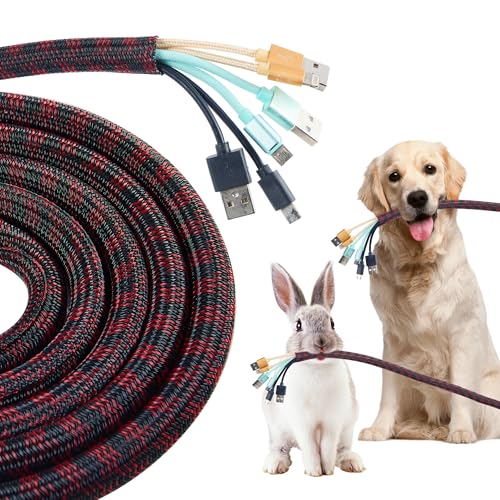
The QCSIW Split Cable Sleeve is the pet-proof pick, and it earns that place with a tough braid and a clear purpose. At 10 feet long and half an inch in diameter, this braided sleeve wraps a standard streaming bundle into one covered run, and the braid is built to resist chewing, abrasion, and everyday wear. The black and red finish gives the sleeve a distinct look that suits a gaming desk or a home theater, where a plain black sleeve can look dull and a colored sleeve reads as part of the setup. The finish is part of the braid, so it keeps its look after the sleeve is bent, cut, and handled.
The split-open design is what makes this sleeve practical for a desk that is already wired. The braid opens along its length, the streamer pushes the cables in without unplugging the microphone, the camera, or the lights, and the braid closes back around the bundle on its own. A cable that needs to exit at the stream deck slips out through the split at that point, and the braid closes around the remaining cables, so the exit does not leave the rest of the bundle exposed. Adding a cable later works the same way, and the whole job takes minutes rather than a full rewire.
Pet protection is the reason to choose this sleeve over a softer wrap. A cat chews a thin cable, and a braided PET sleeve puts a tough, tight layer between teeth and the cords inside. The braid is also abrasion resistant, so a chair wheel rolling over the run or a foot stepping on it spreads the pressure across the braid instead of crushing one thin cable. The sleeve is not armor, and a determined chewer can still damage a cord, but the extra layer turns many small accidents into non-events, and that is the difference between a stream that keeps running and a stream that stops for a cable repair.
The 10 foot length covers a standard desk drop and the floor run to the outlet, with length to spare for slack. The sleeve can be cut to size for a shorter run, and the spare length can be kept for a second run behind a monitor or a light stand. The half inch diameter fits a standard bundle of USB, HDMI, and power cords, and the braid expands slightly to accept a thicker cable when the bundle grows. A streamer with a very thick bundle should weigh the wider AGPTEK pick, because a half inch sleeve fills quickly when several thick power cords share one run.
The build is simple, and the simplicity keeps the sleeve affordable and easy to use. There is no zipper to jam, no hook-and-loop strip to wear out, and no adhesive to fail, so the sleeve works on any desk and moves with the gear when the setup is rearranged. The black and red finish is a matter of taste, and a streamer who wants the sleeve to disappear may prefer a plain black braid, but a streamer who wants the run to look intentional will find the two-tone braid a good fit. For a pet-prone home, a gaming desk, or a home theater run, the QCSIW sleeve is the most durable budget pick in the guide.
Setting Up a Sleeved Run Without Regrets
A sleeved run works best when the streamer plans it before loading the sleeve, and the plan takes five minutes. First, lay the cables out on the desk and group them by destination: microphone cables together, camera and light cables together, and monitor and hub cables together. Cables that share a destination should share a sleeve, and cables that go in different directions should not be forced into one bundle, because a bundle that splits in two directions at the end is harder to sleeve than two separate bundles. Second, measure the run from the desk edge to the floor and from the floor to the outlet, and add slack for a sit-stand desk, because a sleeve that is too short leaves bare cable at the end and a sleeve that is too long pools on the floor. Third, plug everything in and test it before sleeving, because finding a dead cable inside a closed sleeve means opening the whole run again.
Loading the sleeve is easier with a second pair of hands, but it works alone with a simple method. Start at one end of the run, gather the cables into a loose bundle, and push them into the sleeve a section at a time, working along the length instead of trying to thread the whole bundle through at once. A split braid opens as the streamer works along it, a zippered sleeve opens fully before loading, and a hook-and-loop wrap opens along its whole edge before the bundle is laid inside. Leave a little slack at each end, because a cable that is taut inside a sleeve pulls on its connector, and a cable with slack can move when the desk rises or the microphone arm swings. Anchor the sleeved run at the desk edge with a clip or a tie, so the weight of the bundle does not pull on the connectors at the top.
The common mistakes are easy to avoid once they are named. The first mistake is sleeving cables that are already tangled, because a sleeve preserves a tangle instead of fixing it, and the bundle inside stays knotted even when the outside looks tidy. The second mistake is packing a sleeve to its limit, because a full sleeve is hard to close, hard to change, and hard to bend around a corner, while a sleeve with a little room left inside stays flexible and easy to open. The third mistake is forgetting the exits, because a cable that needs to leave halfway along the run should exit through the split or the zipper at that point, not run the full length and double back. The fourth mistake is sleeving a power brick inside the bundle, because a brick belongs in a tray or a box where it can breathe, not inside a tight sleeve where heat builds up. The fifth mistake is cutting a sleeve before measuring, because a cut sleeve cannot be made longer, and a sleeve that is a foot short is a sleeve that has to be replaced.
A sleeved setup also needs a little upkeep. Once a month, open the sleeve, check the cables for wear, and remove any cable that is no longer used, because dead cables take up space that a live cable needs. Dust the outside of the sleeve, because dust on a black sleeve shows on camera, and a quick wipe keeps the run looking new. When new gear arrives, add its cable to the bundle the same day, because a cable that is left loose for a week becomes part of the tangle, and a cable that is sleeved at once never gets the chance to tangle.
Frequently Asked Questions
What size cable sleeve should I buy for a streaming desk?
Measure the longest run first, then match the sleeve to it. A desk-to-floor drop is usually covered by a 10 foot sleeve, a short drop behind a monitor is covered by a 19 to 20 inch sleeve, and a long run to a distant outlet needs a 120 inch sleeve or a sleeve that can be cut to the exact length. Match the diameter to the bundle as well: a half inch sleeve fits a standard bundle, a wider sleeve fits thick power cords, and a flat wrap fits a broad bundle that a narrow tube cannot hold.
Can I add a cable to a sleeve without unplugging everything?
Yes, with a split braid, a zippered sleeve, or a hook-and-loop wrap. A split braid opens along its length so a new cable can be pushed in, a zippered sleeve opens fully so a cable can be laid inside, and a hook-and-loop wrap opens along its edge so a cable can be added in seconds. A sleeve that only opens at the ends is the only kind that forces a full rewire, and none of the picks in this guide works that way.
Will a cable sleeve protect cords from a cat that chews cables?
A braided PET sleeve helps a lot, because the tight braid is harder to chew through than a bare cable or a soft fabric wrap, and it puts a tough layer between teeth and the cords inside. The QCSIW and CableGeeker sleeves in this guide are the strongest choices for a home with a chewing pet, and the AGPTEK sleeve is a good choice as well. No sleeve is chew-proof, so a streamer with a determined chewer should also route the sleeved run where the cat cannot reach it easily, and check the sleeve regularly for wear.
How many cables can one sleeve hold?
It depends on the diameter and the thickness of the cables. A half inch braided sleeve holds a standard bundle of USB, HDMI, and power cords, a zippered sleeve about one and two tenths inches across holds eight to ten cables, and a wide flat wrap holds up to ten cords in one bundle. Count the cables, look at the thickest one, and leave a little room inside the sleeve, because a sleeve that is packed to its limit is hard to close, hard to bend, and hard to change later.
Conclusion
A streaming desk does not need more gear to look better on camera, it needs fewer visible cables, and a cable sleeve is the simplest way to get there. The ProMaster sleeve covers the longest run in a single reversible wrap, the JOTO four pack covers the short drops that most desks actually have, the AGPTEK sleeve swallows the thickest bundles without unplugging anything, the CableGeeker sleeve grows with the setup, and the QCSIW sleeve stands up to pets and daily wear. Measure the run, count the cables, choose the closure that matches how often the setup changes, and sleeve the bundle before the next stream. The camera will show a tidy desk, the microphone arm will swing freely, and the cables will stay out of the way until the day they need to be changed, when the sleeve will open, accept the change, and close again.
Product and ASIN Reference
| Product | ASIN |
|---|---|
| ProMaster Premium Cable Management Sleeve 120 Inch | B01MR6QQLR |
| JOTO Cable Management Sleeve Four Pack | B015HWXG4M |
| AGPTEK Cable Sleeve Cover 10 Foot | B0FCG13V3L |
| CableGeeker Cable Management Sleeve 10 Foot | B0FBW2K99Z |
| QCSIW Split Cable Sleeve 10 Foot | B0FWB41YYP |
More from Amazon
Programs that pair well with the guide above. Offers and eligibility are set by Amazon and may change.
Free shipping on eligible items, Prime Video and more. Eligible new members can start with a free trial.
Start a Prime free trialAd-free music streaming. Eligible new subscribers can start with a free trial.
Try Music Unlimited freeA Prime membership for ages 18-24 with a trial period. Eligibility is set by Amazon.
See Prime for Young AdultsAudiobooks and podcasts to listen to on the go. Eligible new members can start with a free trial.
Try Audible freeAs an Amazon Associate we earn from qualifying purchases.