Our Top Picks


A streaming setup is a chain of USB-C connections: camera to capture device, capture device to laptop, laptop to dock, dock to monitor, microphone, storage, and charger. When one link underperforms, the symptom shows up on stream — a camera that drops frames, a monitor that flickers, or a laptop that loses charge mid-broadcast.
Most USB-C cables look identical, yet two cables with the same connectors and length can carry very different capabilities. One moves data at 40 gigabits per second, powers a laptop at 240 watts, and drives an 8K display. Another moves data at 480 megabits per second and charges a phone. Only the specifications separate them.
This guide covers five USB-C cables for streaming setups, from a full-featured USB4 dock link to a long charging pair, with a comparison table at the end.
Disclosure: As an Amazon Associate, I earn from qualifying purchases.
How to Choose the Right USB-C Cable for a Streaming Setup
Start with the job the cable has to do. A cable that only charges a phone needs almost nothing. A cable that links a laptop to a dock needs everything: fast data, high-wattage charging, and video. Match the cable to the job, or a basic cable ends up failing at a demanding task.
Data speed is the first specification to check. USB 2.0 cables top out at 480 megabits per second, enough for a microphone or a phone charger, and nothing else. A 10 gigabit per second cable handles external drives, a 4K webcam, and a monitor with room to spare. A 40 gigabit per second USB4 cable handles all of that at once, which is what a dock connection demands. For a streaming setup, 10 gigabits per second is the practical floor for video or storage, and 40 gigabits per second is the right choice for the main dock link.
Charging wattage is the second specification. A laptop that draws 100 watts will not stay charged through a long stream on a 60-watt cable, even if the charger itself is stronger, because the cable is the bottleneck. Modern USB Power Delivery 3.1 cables reach 240 watts at 48 volts and 5 amps, which covers even large laptops. A 100-watt cable suits most 13-inch and 14-inch laptops, while a 140-watt or 240-watt cable suits larger machines and docks that also power peripherals.
Video support is the specification most often assumed and least often checked. Not every USB-C cable carries video: charging-only cables have no video lanes at all, and some data cables carry video only at lower resolutions. A cable linking a laptop to a monitor or a dock to a display needs DisplayPort Alt Mode support: 4K at 60 hertz is the baseline for a streaming monitor, while 8K support matters for high-resolution production displays.
Length and build quality decide whether a cable survives daily use. A 3.3-foot cable is the standard desk length, and braided jackets with reinforced housings hold up better than smooth plastic under daily plugging and unplugging.
Certification is the last check. USB-IF certification means a cable has passed independent testing against the USB specification it claims. Thunderbolt compatibility is separate: a USB4 cable may work with Thunderbolt devices at reduced speed. For a streaming setup, a USB-IF-certified USB4 cable is the safe choice for the main dock link, while certified lower-speed cables are fine for charging and peripherals.
1. Cable Matters USB4 Cable — Best Overall USB4 Cable for Streaming Docks
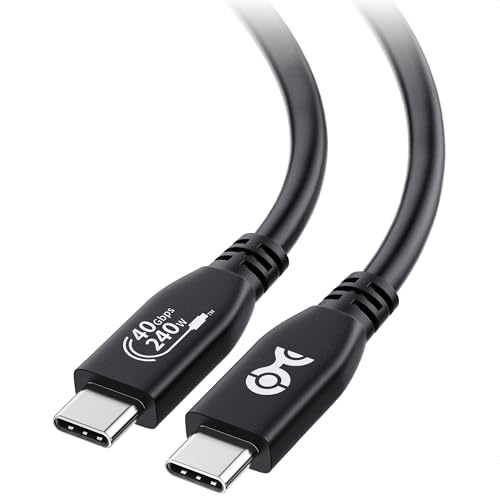
The Cable Matters USB4 cable is the most capable link in this guide, and the natural choice for the connection between a laptop and a dock. It is a USB-IF-certified USB4 cable rated for 40 gigabits per second, enough bandwidth for a 4K capture feed, an external drive, and a monitor to share one connection without slowing each other down. That single-cable dock link is the backbone of the desk.
Charging is equally strong. The cable supports USB Power Delivery 3.1 Extended Power Range up to 240 watts, at 48 volts and 5 amps, so a large laptop stays charged through a long broadcast while the dock also powers peripherals. Video support reaches 8K through DisplayPort Alt Mode, covering 4K streaming displays and high-resolution production monitors. The 3.3-foot length holds full speed without active circuitry, and the braided jacket stands up to daily use.
This is the cable to choose when one connection has to do everything.
Specs
- Connector: USB-C to USB-C
- Standard: USB-IF-certified USB4
- Data transfer: Up to 40 Gbps
- Charging: Up to 240W USB PD 3.1 EPR (48V/5A)
- Video: Up to 8K via DisplayPort Alt Mode
- Length: 3.3 ft (1 m)
- Jacket: Braided
- Model: 201304-BLK-1m
2. Amazon Basics USB-C to USB-C 4 Cable — Best Everyday USB4 Cable

The Amazon Basics USB-C 4 cable delivers the same headline specifications as the premium USB4 options in this guide. It is a USB-IF-certified USB4 cable rated for 40 gigabits per second and 240 watts of charging, with video support up to single 8K at 60 hertz, 4K at 120 hertz, or dual 4K at 60 hertz. For a streaming setup, that covers a laptop-to-dock link, a monitor connection, and fast external storage in one cable.
Compatibility is broad. The cable works with Thunderbolt 4 and Thunderbolt 3 devices as well as USB4, USB 3.2, and USB 2.0 equipment, so it fits a mixed setup without forcing a change of ports. The 3.3-foot length is the standard desk reach, and the TPE jacket is flexible enough to route neatly behind a monitor arm or along a desk edge. Amazon Basics backs the cable with a one-year limited warranty.
Both cables carry the same data, charging, and video figures, so this one suits a second station, a travel kit, or a backup dock link.
Specs
- Connector: USB-C to USB-C
- Standard: USB-IF-certified USB4
- Data transfer: Up to 40 Gbps
- Charging: Up to 240W (48V/5A)
- Video: Single 8K at 60Hz, 4K at 120Hz, or dual 4K at 60Hz
- Length: 3.3 ft (1 m)
- Jacket: TPE
- Model: U4-CC-5A1M-E
3. Anker 2-in-1 USB-C to USB-C Cable — Best Cable for Charging Two Devices
The Anker 2-in-1 cable solves a different problem from the rest of this guide: a streaming desk with more devices than outlets. One end plugs into a charger, and the other end splits into two USB-C connectors, so a laptop and a phone, or a camera battery charger and a tablet, can charge from a single port at the same time.
Charging capacity is strong for a splitter. A single connected device can draw up to 140 watts, which covers most laptops, and the split design keeps a second device topped up alongside it. The trade-off is data: this cable carries USB 2.0 data at up to 480 megabits per second, and it does not carry video. That makes it the wrong choice for a dock or a monitor, and the right choice for charging.
The physical design suits a desk that gets rearranged. A 3-foot base section leads to two 1-foot adjustable sections, for 4 feet of total reach, and the braided nylon jacket resists tangling and fraying. A streamer who runs a laptop, a phone, and a camera from one charging station can cut a cable or two from the tangle with this one.
Specs
- Connector: USB-C to dual USB-C (2-in-1 splitter)
- Standard: USB 2.0 data
- Data transfer: Up to 480 Mbps
- Charging: Up to 140W for a single device
- Video: No video support
- Length: 4 ft total (3 ft base plus two 1 ft sections)
- Jacket: Braided nylon
- Model: A8895
4. Belkin BoostCharge USB-C to USB-C Cable 2-Pack — Best Long Charging Cable Pair
The Belkin BoostCharge 2-pack is the long-reach charging option in this guide. Each cable measures 6.6 feet, long enough to run from a wall outlet or a power strip under a desk up to a laptop, a phone, or a camera on the desk surface, without pulling taut or dangling in mid-air. Two cables cover a laptop and a second device, or a desk setup and a travel bag.
Charging reaches the full 240-watt USB Power Delivery 3.1 ceiling, with dual e-marker chips and over-temperature protection managing the high-wattage connection. Data is USB 2.0 at up to 480 megabits per second, and there is no video support, so these cables belong on the charging side of a setup rather than between a laptop and a dock or monitor. For that job, length and durability matter more than bandwidth, and the double-braided nylon exterior is tested to survive over 100,000 bends.
Long charging cables keep chargers under the desk or behind a monitor, and this pack covers two runs at once.
Specs
- Connector: USB-C to USB-C
- Standard: USB 2.0 data, USB PD 3.1 charging
- Data transfer: Up to 480 Mbps
- Charging: Up to 240W
- Video: No video support
- Length: 6.6 ft (2 m) each, 2-pack
- Jacket: Double-braided nylon, tested to 100,000+ bends
- Safety: Dual e-marker chips with over-temperature protection
- Model: BBD009fq2MBK2PK
5. Cable Matters 10Gbps Gen 2 USB-C Cable — Best 10Gbps Cable for Monitors and Storage

The Cable Matters 10Gbps Gen 2 cable is the workhorse of this guide: a full-featured USB-C cable at the speed tier where most streaming peripherals actually live. It is USB-IF-certified and rated for 10 gigabits per second, enough for a 4K webcam, an external SSD used for recording, or a USB-C monitor, with bandwidth to spare.
Charging reaches 100 watts, which covers most 13-inch and 14-inch laptops and every phone, tablet, and camera in a typical streaming setup. Video support reaches 4K at 60 hertz through DisplayPort Alt Mode, matching the standard streaming monitor. The 3.3-foot length is the desk standard, in a straightforward design without extra bulk.
A setup that uses one 40-gigabit cable for the dock and several 10-gigabit cables for everything else gets full performance everywhere.
Specs
- Connector: USB-C to USB-C
- Standard: USB-IF-certified USB 3.2 Gen 2
- Data transfer: Up to 10 Gbps
- Charging: Up to 100W Power Delivery
- Video: Up to 4K at 60Hz via DisplayPort Alt Mode
- Length: 3.3 ft (1 m)
- Color: Black
- Model: 201025-BLK-1m
USB-C Cable Comparison
| Cable | Data Speed | Charging | Video | Length |
|---|---|---|---|---|
| Cable Matters USB4 | 40 Gbps | 240W | 8K | 3.3 ft |
| Amazon Basics USB-C 4 | 40 Gbps | 240W | 8K | 3.3 ft |
| Anker 2-in-1 | 480 Mbps | 140W | None | 4 ft |
| Belkin BoostCharge 2-Pack | 480 Mbps | 240W | None | 6.6 ft |
| Cable Matters 10Gbps Gen 2 | 10 Gbps | 100W | 4K at 60Hz | 3.3 ft |
Frequently Asked Questions
Can one USB-C cable carry video, data, and charging at the same time?
Yes. A full-featured USB-C cable carries all three at once, which is how a single cable links a laptop to a dock that drives a monitor, moves files to storage, and charges the laptop. Check the specifications for video and data support before using a cable as a dock link.
What data speed does a streaming setup actually need from a USB-C cable?
A cable that touches video or storage should support at least 10 gigabits per second. That covers a 4K webcam, an external SSD, and a monitor. The main dock link benefits from 40 gigabits per second, because it carries several of those streams at once. Cables used only for charging can be USB 2.0.
Does a 240W cable charge a laptop faster than a 100W cable?
Only if the laptop and the charger both support the higher wattage. A cable sets the ceiling, not the speed. The 240-watt cable matters for larger laptops that draw more than 100 watts, and for docks that power several devices at once.
How long should a USB-C cable be for a streaming desk?
A 3.3-foot cable suits most desk connections, from a laptop to a dock or a monitor. Longer cables are useful for charging runs from a wall outlet or a power strip, where a 6.6-foot cable keeps the charger out of the way. Very long high-speed cables are uncommon, because holding that speed over distance needs active circuitry.
Conclusion
A streaming setup does not need the most expensive cable for every connection. It needs the right cable for each connection. The dock link deserves a full-featured USB4 cable, because it carries video, data, and charging at once. The peripherals around it are well served by a 10-gigabit cable. The charging side of the desk needs length and durability more than bandwidth.
Match the cable to the job, check the data speed, charging wattage, and video support, and prefer USB-IF-certified cables for any link that carries a signal.
More from Amazon
Programs that pair well with the guide above. Offers and eligibility are set by Amazon and may change.
Free shipping on eligible items, Prime Video and more. Eligible new members can start with a free trial.
Start a Prime free trialAd-free music streaming. Eligible new subscribers can start with a free trial.
Try Music Unlimited freeA Prime membership for ages 18-24 with a trial period. Eligibility is set by Amazon.
See Prime for Young AdultsAudiobooks and podcasts to listen to on the go. Eligible new members can start with a free trial.
Try Audible freeAs an Amazon Associate we earn from qualifying purchases.