
Our Short List of 3
All 5 Picks at a Glance
| Product | Specs | Action |
|---|---|---|
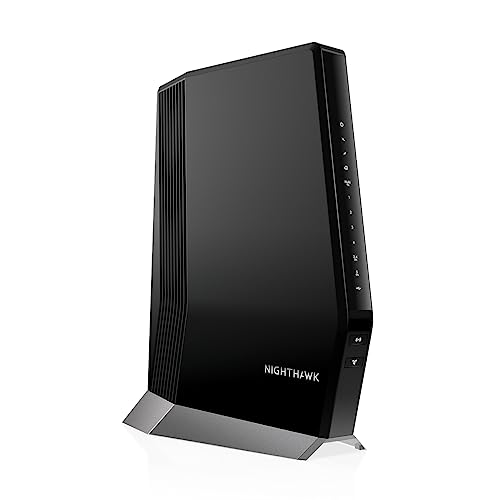 1. NETGEAR Nighthawk CAX80 | Check price on Amazon | |
 2. Motorola MG8725 | Check price on Amazon | |
 3. ARRIS SURFboard G36 | Check price on Amazon | |
 4. ARRIS SURFboard G34 | Check price on Amazon | |
 5. NETGEAR Nighthawk CAX30 | Check price on Amazon |
Key takeaways
- Compare the best cable modem routers with DOCSIS 3.1 and WiFi 6 in one box, matched to Xfinity, Spectrum and Cox plans, home size and wired ports.
A cable modem router combines two boxes into one: a DOCSIS cable modem that connects to your provider’s coaxial line, and a Wi-Fi router that spreads that connection around your home. Buying a combo unit ends the monthly equipment rental that cable companies add to the bill, removes one power brick and one set of cables from the shelf, and leaves a single device to set up, update, and troubleshoot. For streaming households, that single box is also the front door for every 4K stream, video call, and game download, so choosing the right one matters more than it might seem.
The five models below are all true modem router combos built around DOCSIS 3.1 and Wi-Fi 6, approved for the major United States cable providers such as Xfinity, Spectrum, and Cox. They differ in Wi-Fi speed class, coverage, wired ports, and the top cable plan each one can handle, which makes the right pick depend on your plan speed, the size of your home, and how many devices you connect over Ethernet. None of them works with fiber, DSL, or satellite service, and none replaces a provider-supplied voice modem for households that keep a cable landline, so check those two points before anything else.
As an Amazon Associate, we earn from qualifying purchases.
How to Choose a Cable Modem Router
Start with your provider’s approved device list. Cable companies certify specific modem models for their networks, and a combo that is not on the list for your plan tier may not activate at all. Every model in this guide is approved for Xfinity, Spectrum, and Cox, but smaller regional providers certify their own lists, so a quick check on the provider’s website or support line is worth doing before ordering. Keep the model number from the box handy during activation, because support staff usually ask for it along with the MAC address printed on the label.
Next, match the DOCSIS standard and speed class to your plan. DOCSIS 3.1 is the current standard for gigabit and multi-gigabit cable tiers, and it handles congestion better than older DOCSIS 3.0 hardware thanks to OFDM channels. If your plan is marketed at gigabit speed or above, a DOCSIS 3.1 combo is the sensible baseline. Also look at the modem’s rated plan ceiling: a unit approved for plans up to 1 Gbps is a poor match for a 2 Gbps tier, while a model rated for multi-gigabit plans gives headroom if you upgrade later.
Wi-Fi speed class comes next. The AX number describes combined theoretical throughput across both bands, so AX6000 models carry roughly double the wireless capacity of AX3000 models. That extra capacity shows up when many devices stream, download, and back up at the same time, not when a single laptop runs a speed test. Coverage ratings in square feet are a rough guide rather than a promise, since wall materials and placement matter, but they still separate apartment-sized models from whole-house ones. A combo placed in a central, open spot almost always outperforms a stronger unit hidden in a corner cabinet.
Count the wired ports before deciding. Most combos here offer four Gigabit Ethernet ports, which suits a television, a streaming box, a console, and a desktop. Models with a 2.5 Gbps port add a faster path for a network-attached storage drive, a high-end desktop, or a future switch, and link aggregation on some models lets two Gigabit ports feed one demanding device. A USB port, where fitted, can share a printer or a storage drive across the home network.
Finally, think about software and the trade-offs of an all-in-one box. Companion apps from NETGEAR, Motorola, and ARRIS handle setup, guest networks, parental controls, and firmware updates from a phone, and security services such as NETGEAR Armor or the motosync app add device protection for an extra subscription after any trial ends. The honest downside of a combo is that the modem and router age together: when Wi-Fi standards move on, the whole unit is replaced rather than just the router. Households that upgrade routers often may prefer separate devices, while everyone else gains simplicity.
1. NETGEAR Nighthawk CAX80
The Nighthawk CAX80 is the flagship option in this group, pairing a DOCSIS 3.1 modem rated for cable plans up to 6 Gbps with an eight-stream AX6000 Wi-Fi 6 router. That combination gives it the highest wireless capacity and the highest plan ceiling of any model here, which makes it the natural pick for large, device-heavy homes on the fastest cable tiers. NETGEAR rates coverage at up to 2,500 square feet with up to 30 devices, and the wired side is equally strong, with a 2.5 Gbps Ethernet port for link aggregation or a single fast connection alongside four Gigabit ports.
Setup and day-to-day management run through the Nighthawk app, and NETGEAR Armor security is included as a trial before it becomes a paid service. Smart parental controls, guest networks, and WPA3 support round out a feature set aimed at households that want the combo to behave like a premium standalone router rather than a basic gateway.
Who It Suits
The CAX80 suits large households on gigabit or multi-gigabit cable plans, especially homes where several people stream in 4K, play online games, and work from home at the same time. It is more hardware than a small apartment or a modest plan needs, and households expecting to stay on slower tiers can save by choosing a smaller model below.
2. Motorola MG8725
The Motorola MG8725 matches the CAX80 on headline Wi-Fi class, combining a multi-gigabit DOCSIS 3.1 modem with an AX6000 Wi-Fi 6 router in a single tower. Motorola adds a 2.5 Gbps Ethernet port among its four LAN ports, so a wired desktop, console, or storage drive can move data faster than a standard Gigabit link allows. The model also carries Low Latency DOCSIS readiness, a CableLabs-certified feature aimed at reducing delay on supported networks once providers enable it.
Management runs through the motosync app, which covers setup, parental controls, network monitoring, and security alerts, with advanced features tied to an optional subscription. For households that prefer the Motorola ecosystem or want multi-gigabit wired speed without the NETGEAR software bundle, the MG8725 is the closest alternative at the top of this category.
Who It Suits
The MG8725 suits busy homes on fast cable plans that want AX6000 Wi-Fi, a multi-gigabit wired port, and app-based controls in one unit. It fits gamers and remote workers who care about latency as well as raw speed, while smaller households on basic plans will not use much of its capacity.
3. ARRIS SURFboard G36
The SURFboard G36 steps the Wi-Fi class down to AX3000 while keeping the wired side unusually strong for its tier. Alongside four Gigabit Ethernet ports, it includes a dedicated 2.5 Gbps port, so a single wired device can use more than a gigabit of a fast plan even though the wireless side is a mid-range dual-band system. ARRIS lists maximum internet speeds of 1.2 Gbps, which lines up with the gigabit and slightly-above tiers most cable households actually buy.
The SURFboard Central app handles activation guidance, setup, and network management, and the G36 is CableLabs certified for the major United States providers. For a household that streams mostly over Wi-Fi but keeps one serious wired workstation or gaming setup, the G36 balances its budget between the two sides of the network better than most combos in its class.
Who It Suits
The G36 suits mid-sized homes on gigabit-class plans that want a future-friendly 2.5 Gbps wired port without paying for AX6000 wireless capacity they will not use. Households with very large numbers of simultaneous wireless devices should look at the AX6000 models above instead.
4. ARRIS SURFboard G34
The SURFboard G34 is the straightforward gigabit option in the ARRIS line: a DOCSIS 3.1 modem and an AX3000 Wi-Fi 6 router approved for cable plans up to 1 Gbps. It covers homes up to around 2,500 square feet on paper, offers four Gigabit Ethernet ports for televisions, streaming boxes, and consoles, and skips the multi-gigabit extras that push prices up on the models above it.
Setup runs through the SURFboard Central app, and like the rest of the SURFboard range it is CableLabs certified across the major providers. Nothing about the G34 is exotic, and that is its appeal: it covers the most common cable scenario, a gigabit or slower plan in an average home, with current DOCSIS and Wi-Fi standards and no rented hardware.
Who It Suits
The G34 suits apartments and family homes on plans at or below gigabit speed that want a simple, current-standard combo from a long-running modem brand. Anyone already paying for a plan above 1 Gbps, or expecting to upgrade soon, should choose a model with a higher plan ceiling.
5. NETGEAR Nighthawk CAX30
The Nighthawk CAX30 is the compact entry point in NETGEAR’s modem router line, pairing a DOCSIS 3.1 modem with an AX2700 Wi-Fi 6 router rated for coverage up to 2,000 square feet and up to 25 devices. It is built for gigabit-class cable plans, with four Gigabit Ethernet ports and a USB 3.0 port for sharing a printer or storage drive across the network.
The Nighthawk app covers setup and management, and NETGEAR Armor is included on a trial basis for households that want automatic protection for connected devices. For smaller homes that still want Wi-Fi 6, DOCSIS 3.1, and a proper app experience, the CAX30 delivers the same basic formula as the CAX80 at a size and capacity matched to everyday use.
Who It Suits
The CAX30 suits apartments, condos, and smaller houses on gigabit or slower cable plans, where 2,000 square feet of rated coverage is enough and the device count stays moderate. Larger homes, or households planning a multi-gigabit upgrade, will outgrow it sooner than the models above.
Frequently Asked Questions
Will a cable modem router work with any cable provider?
Not automatically. Each provider certifies specific models for its network and plan tiers, so a combo must appear on that provider’s approved list before it will activate. All five models in this guide are approved for Xfinity, Spectrum, and Cox, but customers of smaller regional providers should confirm the exact model number against their provider’s list before buying.
Can a modem router combo replace a rented gateway completely?
For internet service, yes, as long as the model is approved for the plan. The rented gateway goes back to the provider and the rental charge comes off the bill. The main exception is voice service: households that keep a cable landline usually need a provider gateway or a separate voice-capable modem, because standard retail combos do not include telephone ports.
Is DOCSIS 3.1 worth choosing over DOCSIS 3.0?
For most households buying today, yes. DOCSIS 3.1 supports gigabit and multi-gigabit plans, handles busy neighborhood networks more efficiently, and matches the direction providers are moving their networks. A DOCSIS 3.0 combo can still serve slower plans, but it caps future upgrades and is increasingly absent from provider lists for faster tiers.
What should be done if the new combo will not activate?
Start with the physical checks: the coaxial cable should be finger-tight, splitters between the wall outlet and the modem should be removed where possible, and the unit should be powered on long enough to finish its startup lights. Then run the provider’s activation page or app, or call support with the model number and MAC address from the label. If activation still fails, the most common cause is a model that is not approved for that specific plan tier.
Final Verdict
For most cable households, the ARRIS SURFboard G34 is the balanced default: current DOCSIS 3.1 and Wi-Fi 6 standards, a gigabit plan ceiling that matches the most common tiers, and four wired ports in a simple package. Homes on faster plans or with heavier wireless loads should step up to the NETGEAR Nighthawk CAX80 or the Motorola MG8725, both of which pair AX6000 Wi-Fi with multi-gigabit wired ports and higher plan ceilings. The ARRIS SURFboard G36 sits between those camps for buyers who want the 2.5 Gbps wired port more than extra wireless capacity, while the NETGEAR Nighthawk CAX30 covers smaller homes on everyday plans. Whichever model makes the shortlist, confirm it against the provider’s approved list for the exact plan tier first, because that single check decides whether any combo works at all.
Product and ASIN Reference
| Product | ASIN |
|---|---|
| NETGEAR Nighthawk CAX80 | B082XW53G3 |
| Motorola MG8725 | B09M968C9Z |
| ARRIS SURFboard G36 | B096W6X41Y |
| ARRIS SURFboard G34 | B096W716BY |
| NETGEAR Nighthawk CAX30 | B0D6GZDYS3 |
More from Amazon
Programs that pair well with the guide above. Offers and eligibility are set by Amazon and may change.
Free shipping on eligible items, Prime Video and more. Eligible new members can start with a free trial.
Start a Prime free trialAd-free music streaming. Eligible new subscribers can start with a free trial.
Try Music Unlimited freeA Prime membership for ages 18-24 with a trial period. Eligibility is set by Amazon.
See Prime for Young AdultsAudiobooks and podcasts to listen to on the go. Eligible new members can start with a free trial.
Try Audible freeAs an Amazon Associate we earn from qualifying purchases.









