
Our Short List of 3
All 5 Picks at a Glance
| Product | Specs | Action |
|---|---|---|
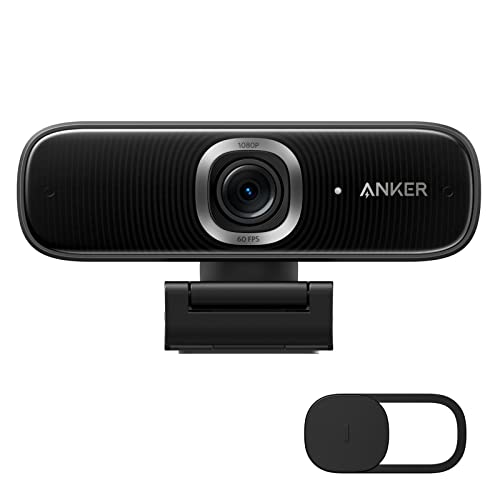 Anker PowerConf C300 Smart Full HD Webcam | Check price on Amazon | |
 Anker PowerConf C200 2K Webcam | Check price on Amazon | |
 Logitech Brio 4K Webcam | Check price on Amazon | |
 NexiGo N940P 2K Zoomable Webcam | Check price on Amazon | |
 OBSBOT Tiny 2 4K PTZ Webcam | Check price on Amazon |
Our Top Picks
Sharing a camera changes what a good webcam needs to do. A narrow lens that frames one face neatly will often cut off a second person at the shoulder, or force both of you to lean toward the center. For family video calls, couples streaming together, joint vlogging, and lessons taken as a pair, the goal is different: both people should sit naturally side by side, stay in frame without constant adjusting, and still look and sound clear.
That is why field of view matters more here than for a solo desk setup. A wider diagonal view, sensible framing controls, and microphones that pick up two voices are the features that make a shared camera feel relaxed instead of cramped. The five webcams in this guide were chosen for exactly that job, from a small apartment desk to a living room couch placed farther from the screen.
As an Amazon Associate, we earn from qualifying purchases.
How to Choose a Webcam for Two People
Start with field of view, usually shortened to FOV and measured in degrees. A view in the mid-60s is a solo head-and-shoulders framing. A view around 90 degrees can hold two people sitting close together at a desk, while a view above 100 degrees helps on a couch or when you want some of the room in a vlog-style shot. The widest settings can make faces look smaller, so an adjustable view is often more useful than a fixed ultra-wide lens: one camera can then cover both two-person and solo calls.
Distance and placement come next. A monitor-top clip works well at a shared desk, while a tripod thread helps in a living room, where a camera placed at eye level a bit farther away frames a couch far better than a laptop camera can. Sitting too close to a wide lens exaggerates edge distortion, while sitting too far away makes even a sharp sensor look soft once the platform compresses the picture.
Resolution should match how you will use the camera. A clean 1080p picture at 60 frames per second looks smooth for streaming, while 2K and 4K sensors give extra detail that helps when software crops into the wide view to frame two faces. Several cameras here use digital zoom or AI framing to tighten a wide shot, and a higher-resolution sensor keeps that tightened shot clearer. Check what resolution your calling platform accepts, since many services cap incoming video below what the camera can capture.
Audio deserves equal attention. Two voices rarely sit the same distance from the microphone, so dual microphones and noise reduction help keep the farther voice intelligible. Built-in microphones keep a shared setup simple for family calls and casual streams, and a separate USB microphone placed between you remains an easy later upgrade for recorded vlogs.
Finally, look at framing help. AI framing that widens when a second person joins saves constant adjusting, and a remote or clear software app matters because neither person wants to lean across the other mid-call. Autofocus should handle two faces at slightly different depths, a privacy cover suits a camera living in a shared room, and low-light correction matters because couples often call in the evening under ordinary room light.
Anker PowerConf C300 Smart Full HD Webcam
The PowerConf C300 is the widest camera in this guide, and that width is the main reason it leads the list for two people. Its adjustable field of view reaches 115 degrees, which is a genuinely roomy frame that can hold two people side by side at a desk or on a couch without either person squeezing toward the middle. When only one of you is on the call, the view can be narrowed to 90 or 78 degrees in the software, so the same camera does not leave a solo caller looking small in a wide room shot.
Anker also built AI framing into this model, which adjusts the framing based on the people in view. One person can start a family call alone, and when the second person sits down, the framing can widen to include them. The camera records Full HD video at up to 60 frames per second, so movement stays smooth, and dual noise-canceling microphones aim to keep two voices clear. HDR and low-light correction support evening calls, and privacy covers are included in the box.
Who It Suits
This camera suits couples who want the most forgiving two-person frame and who often switch between solo and shared calls. The 115-degree setting is especially helpful in small rooms where you cannot move farther back from the camera.
Anker PowerConf C200 2K Webcam
The PowerConf C200 takes a similar adjustable approach but records at a higher resolution. Its field of view can be set to 65, 78, or 95 degrees through the AnkerWork software. The 95-degree setting is the one couples will use most, since it widens the frame enough for two people at a desk while keeping faces reasonably large in the picture. The narrower settings then cover solo calls, presentations, or moments when one person wants to show less of the room behind them.
Video is captured in 2K, which the listing describes as 2560 by 1440 at 30 frames per second, from a 5-megapixel sensor. That extra detail over standard 1080p helps a shared shot, because two faces divide the available pixels between them. Stereo microphones with AI noise canceling are built in, along with low-light correction for calls after dark. A built-in privacy cover closes over the lens when the camera is not in use, which suits a webcam that stays on a shared family computer.
The C200 is a fixed camera, so it frames two people best when both of you stay roughly in place at a desk.
Who It Suits
The C200 suits couples who share a desk and want a sharper picture than 1080p without moving up to 4K, and who switch between solo work calls and two-person family calls on the same computer. Couples who sit well back on a couch may prefer the wider 115-degree view of the C300 above.
Logitech Brio 4K Webcam
The Logitech Brio is a long-running premium webcam that pairs 4K capture with three diagonal field of view presets: 65, 78, and 90 degrees. For two people, the 90-degree preset is the working setting, and it frames a pair sitting close together at a desk well. The real advantage of the Brio for a shared shot is what happens when the framing tightens: with a 4K sensor behind the lens and up to 5x HD zoom, a cropped or zoomed view holds more detail than a cropped 1080p view would.
The Brio records 4K at 30 frames per second, 1080p at up to 60 frames per second, and 720p at up to 90 frames per second, so streamers can trade resolution for smoother motion depending on the platform. Autofocus, HDR, and RightLight 3 light correction help faces stay clear when the lighting in the room is mixed, which is common when two people sit at slightly different angles to a window or lamp. Dual microphones with noise canceling handle the audio side, and the camera supports Windows Hello sign-in on compatible Windows computers.
Settings are adjusted through Logitech software, and the camera connects by USB. Centered on the monitor at eye level, it gives a couple a stable, sharp frame for calls, recordings, and streams.
Who It Suits
The Brio suits couples who record or stream together and want the sharpest picture in this guide, with the flexibility to crop into a wide shot without giving up much clarity. If your calls are casual and capped well below 4K by the app, a simpler 1080p or 2K model may cover the same needs.
NexiGo N940P 2K Zoomable Webcam
The NexiGo N940P approaches the two-person problem with a remote control, which turns out to be a genuinely useful idea for a shared camera. Its field of view is 90 degrees diagonally, wide enough for two people at a desk, and the included remote can apply up to 3x digital zoom at 1080p to tighten the framing without either person getting up, leaning in, or reaching across the keyboard mid-call. The remote also handles functions such as muting and flipping the image, which suits a couch or living room setup where the computer is out of easy reach.
The camera uses a Sony Starvis sensor, listed as a 1/2.8-inch 5-megapixel CMOS, and records 2K video at 2560 by 1440 at 30 frames per second or 1080p at up to 60 frames per second. The listing highlights brighter, more natural images in dimmer rooms. Autofocus keeps faces sharp as people shift, and dual stereo microphones with noise reduction carry both voices. The N940P is Zoom certified according to its listing, works over USB, and has a built-in privacy cover. Note one detail from the manual: digital zoom is not available at full 2K resolution, so couples who want to zoom during a call should use the 1080p mode.
Who It Suits
The N940P suits couples whose camera sits farther away than a normal desk setup, such as a living room where the computer stays across the room. The remote makes framing changes easy from where you sit, including moving between a wide two-person view and a closer single-person view during the same stream. Anyone who wants maximum resolution and zoom at the same time should look at the 4K Brio instead.
OBSBOT Tiny 2 4K PTZ Webcam
The OBSBOT Tiny 2 is the different kind of camera in this guide. Instead of a fixed lens, it sits on a two-axis gimbal that can pan and tilt, and its AI tracking can follow a subject and adjust the zoom automatically. Its diagonal field of view is 85.5 degrees, which is wide enough for two people sitting together, and the camera offers a group mode among its preset modes, designed for framing more than one person rather than locking onto a single face.
For couples who move around on camera, this design solves a problem fixed cameras cannot. If you stand up to demonstrate something during a joint stream or teach and present as a pair, the gimbal can keep the action framed. Gesture and voice control let you change modes without returning to the computer. The sensor is a large 1/1.5-inch CMOS paired with all-pixel autofocus and HDR. Video reaches 4K at 30 frames per second and 1080p at up to 60 frames per second over USB 3.0. For a quiet seated family call, however, a fixed wide camera is simpler.
Who It Suits
The Tiny 2 suits couples who stream, teach, or present together while moving, rather than sitting still at a desk. Couples who only make seated calls will likely be happier with a fixed camera such as the PowerConf C300, which gives a wider view with a simpler setup.
Frequently Asked Questions
How wide a field of view do two people actually need?
For two people sitting side by side at a desk, a diagonal field of view around 90 degrees is a practical starting point, as long as the camera sits centered and a little distance away on top of the monitor. A view of 100 degrees or more, such as the 115-degree setting on the Anker PowerConf C300, is more forgiving on a couch or in a small room where you cannot move back. Adjustable models are the safest choice because you can widen the frame when both of you are on camera and narrow it for solo calls.
Will a wide-angle webcam make two people look distorted?
Some stretching near the edges is normal with wide lenses, most noticeably when a face sits close to the camera at the edge of the frame. Sitting a little farther back, keeping both people nearer the center, and using a mid-range setting when the widest one is not needed all reduce the effect. Cameras that crop from a 2K or 4K sensor can also tighten the frame while keeping the picture clear.
Can one webcam microphone pick up two voices clearly?
Yes, for ordinary family calls and casual streams, especially with the dual-microphone models listed here, which capture voices from more than one position and reduce room noise. Sit at roughly similar distances from the camera where you can. If you record vlogs often, a separate USB microphone placed between you is the natural next upgrade.
Where should a couple place the webcam for the best shared frame?
Place the camera centered between the two of you, at about eye level, and far enough back that both shoulders fit inside the frame with a small margin on each side. A monitor-top mount works at a desk, while a small tripod helps in a living room. Check the preview together before an important call, and adjust the field of view or zoom first.
Final Verdict
For most couples, the Anker PowerConf C300 is the easiest recommendation: its 115-degree maximum view is the most forgiving frame for two people, and its AI framing adjusts when a second person joins. The PowerConf C200 is the sharper desk alternative, with 2K detail and a 95-degree setting. The Logitech Brio suits couples who record or stream and want 4K detail to crop into, the NexiGo N940P adds a remote for framing changes from a couch, and the OBSBOT Tiny 2 stands apart for active pairs who move while presenting. Prioritize the adjustable wide view first, since comfortable framing for two is the whole point of a couple webcam.
Product and ASIN Reference
| Product | ASIN |
|---|---|
| Anker PowerConf C300 Smart Full HD Webcam | B08RNHCZ3K |
| Anker PowerConf C200 2K Webcam | B09MFMTMPD |
| Logitech Brio 4K Webcam | B09NBWWP79 |
| NexiGo N940P 2K Zoomable Webcam | B0937338DY |
| OBSBOT Tiny 2 4K PTZ Webcam | B0C3B6ZR1V |
More from Amazon
Programs that pair well with the guide above. Offers and eligibility are set by Amazon and may change.
Free shipping on eligible items, Prime Video and more. Eligible new members can start with a free trial.
Start a Prime free trialAd-free music streaming. Eligible new subscribers can start with a free trial.
Try Music Unlimited freeA Prime membership for ages 18-24 with a trial period. Eligibility is set by Amazon.
See Prime for Young AdultsAudiobooks and podcasts to listen to on the go. Eligible new members can start with a free trial.
Try Audible freeAs an Amazon Associate we earn from qualifying purchases.









