
Our Short List of 3
All 5 Picks at a Glance
| Product | Specs | Action |
|---|---|---|
 Logitech C920s HD Pro Webcam | Check price on Amazon | |
 Anker PowerConf C200 2K Webcam | Check price on Amazon | |
 NexiGo N60 1080P Webcam | Check price on Amazon | |
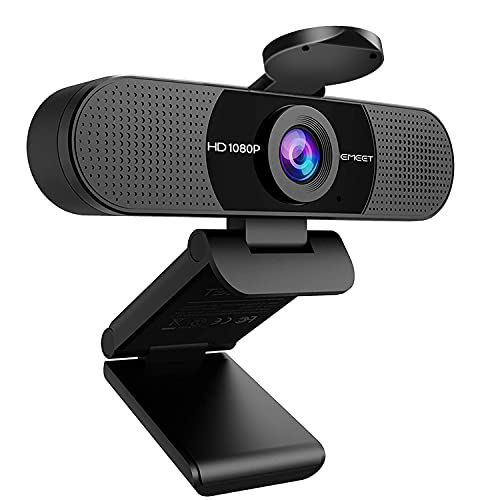 EMEET C960 1080P Webcam | Check price on Amazon | |
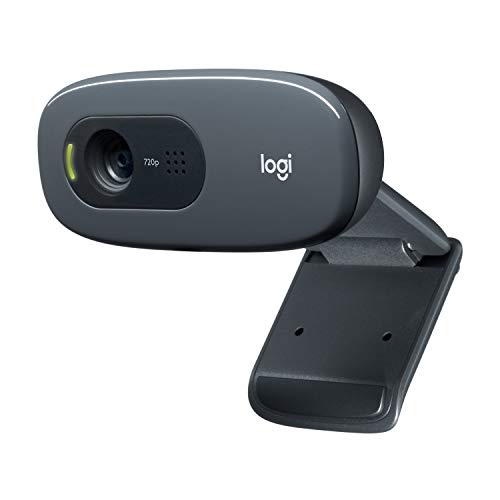 Logitech C270 HD Webcam | Check price on Amazon |
Our Top Picks
A built-in laptop camera is often the weakest part of an otherwise capable setup. The picture can look soft and washed out, the angle is rarely flattering, and the microphone picks up every keyboard tap in the room. An inexpensive external webcam fixes most of that in minutes. It sits higher on a monitor, frames a face more naturally, and brings a sharper lens and a better microphone to work calls, online classes, and casual streaming without turning a desk into a studio.
The good news is that this category is mature. The five webcams in this guide are established, widely sold models rather than no-name listings with inflated claims. They cover the main choices a careful buyer actually faces: a proven 1080p all-rounder, a sharper 2K option for readers who present on screen, a wide-angle model for small rooms and shared frames, a simple 1080p camera with a wide view for everyday meetings, and a basic 720p option for a spare desk or a first camera. None of them needs a capture card, a lighting rig, or complicated software to do its job well.
As an Amazon Associate, we earn from qualifying purchases.
How to Choose
Start with resolution, and be honest about how the camera will be used. For most video calls, 1080p is the sensible target. Meeting apps compress video heavily, but a 1080p sensor still gives a cleaner starting image, holds up better when a platform crops or zooms the frame, and doubles as a decent recording camera for short videos. A 720p camera remains workable for routine calls on a smaller screen, especially as a second or spare camera, but it is the first compromise to feel dated. A 2K camera adds detail that helps when slides, documents, or products share the screen, even if a given app sends a lower resolution to other participants.
Field of view decides how much of the room appears behind a speaker. A view in the high seventies is the classic desk framing: head, shoulders, and a little context, with minimal distortion. A wider view near ninety degrees suits a tighter desk where the camera sits close, or two people sharing a frame briefly. A very wide view past one hundred degrees can make a single speaker look small and can bend straight lines near the edges, so it works best when the extra width is genuinely needed or when companion software can narrow the frame. The narrowest views in this guide suit a single seated speaker who wants the background kept out of the shot.
Focus and light handling matter more than headline resolution on a dull day. Autofocus helps readers who move, lean in, or hold objects up to the camera, while fixed-focus models are tuned for a typical desk distance and stay predictable as long as the chair does not move far. Light correction cannot replace a window or a desk lamp, but it does even out a dim room and keeps a face readable when overhead lighting is uneven. The simplest improvement for any camera here costs nothing: face the main light source, raise the camera to eye level, and keep a bright window behind the chair rather than in front of it.
Microphones are the other half of a call. A dual microphone arrangement generally sounds fuller and handles a normal speaking voice at desk distance more evenly than a single basic microphone. Noise reduction helps in a shared home, though it is a helper rather than a substitute for a quiet room. Readers who record narration, teach long sessions, or stream regularly may still prefer a separate USB microphone later; every camera in this guide is good enough for meetings and classes on its own, which is the point of an inexpensive upgrade.
Finally, check the practical details. A privacy cover or shutter is worth having on a camera that stays plugged in all day. A flexible clip that folds flat works on most monitors and laptops, and a tripod thread adds options for readers who want the camera off the monitor entirely. Connection type matters on newer laptops: a USB-A camera may need a simple adapter on a machine with only USB-C ports, so check the ports on the computer before ordering. Compatibility with Windows, macOS, and ChromeOS is standard across this list, and all five work with the major meeting and streaming apps without drivers in normal use.
Logitech C920s HD Pro Webcam
The C920s is the reference point in this category, and it earns that position by doing the everyday things consistently well. Its 1080p picture is clean at a normal desk distance, autofocus keeps the image steady when a speaker shifts in the chair, and the glass lens and light correction handle ordinary room lighting without fuss. For readers who want one inexpensive camera for work calls in the week and casual streaming or recording at the weekend, this is the most balanced starting point on the list.
The dual stereo microphones are a practical strength for a camera at this level. Voices come through clearly from a seated position, and the camera copes well with the mix of speech and room sound found in a typical home office. The included privacy shutter is a small detail that matters on an always-connected desk: it covers the lens physically when the camera is not in use, so there is no need to unplug the cable or drape anything over the monitor between meetings.
Who It Suits
The C920s suits remote workers, teachers, and beginner streamers who want a single dependable camera for almost everything. Readers who mainly join calls from a large monitor and want a wider room view may prefer the NexiGo below, and readers on the tightest possible budget for a spare desk can look at the C270 at the end of this guide instead.
Anker PowerConf C200 2K Webcam
The PowerConf C200 is the sharpest camera in this guide. Its 2K resolution gives presenters extra detail when they share documents, demonstrate a product on a desk, or record a short walkthrough, and the adjustable field of view is genuinely useful rather than a novelty. A narrower setting keeps a single speaker framed tightly, the middle setting matches a standard desk setup, and the widest setting opens the frame up for a shared shot or a whiteboard behind the chair.
Audio is the other reason to pick this model. The dual microphones use noise cancelling processing aimed at exactly the sounds that plague home offices: fans, distant traffic, and household activity in the next room. Low-light correction helps in evening calls, and the built-in privacy cover slides over the lens without a separate part to lose. It is still an inexpensive camera in design and setup, with no drivers to install for normal use, but it covers more situations than the basic 1080p models around it.
Who It Suits
The C200 suits readers who present, teach, or record as well as attend meetings, and anyone whose desk faces variable light through the day. Readers who only join routine calls and never record may not use the extra resolution, in which case the C920s or the EMEET below covers the need in a simpler package.
NexiGo N60 1080P Webcam
The N60 is built around one clear idea: a wide view at an entry-level specification. Its 110-degree field of view is by far the widest in this guide, which makes it the natural pick for a small room where the camera sits close to the speaker, for two people joining a family call from one chair, or for a desk setup where showing a workbench or instrument is part of the point. Companion software can narrow the framing and apply digital zoom, which softens the fisheye feel that a very wide lens can produce around the edges.
Away from the lens, the N60 keeps things simple in the right ways. It is a plug-and-play USB camera with a built-in microphone and noise cancelling for everyday calls, a privacy cover in the box, and a flexible mount that works on a monitor or stands on a desk. Its fixed focus is set for typical desk distances, so a seated speaker stays sharp without the small focus hunting that autofocus cameras sometimes show when hands move in front of the lens.
Who It Suits
The N60 suits readers in small spaces, families sharing one camera, and tutors or hobbyists who want their desk surface in the frame. A solo speaker in a normal-sized room who dislikes wide-angle distortion should choose the C920s or the C200 instead, since both frame a single person more naturally by default.
EMEET C960 1080P Webcam
The C960 is the straightforward meeting camera in this group. It pairs 1080p video with a 90-degree field of view, a combination that frames one speaker generously or fits two people at a desk without pushing the camera back. That wider-than-standard view is handy in a spare room or kitchen-table office where the monitor sits close and a narrower camera would crop too tightly.
Two built-in microphones handle voice pickup for calls and classes, and the camera is designed to work as soon as it is plugged in, with no driver installation for standard use on Windows and macOS computers. The design is light and unobtrusive on a laptop lid or monitor bezel, which makes the C960 an easy camera to move between a home desk and a bag for hybrid work. As with every fixed-position camera, it rewards a stable seating distance: set it at eye level once, and it stays consistent from call to call.
Who It Suits
The C960 suits hybrid workers and students who want a wide, simple 1080p picture for meetings without adjusting settings. Readers who present detailed material on camera or want adjustable framing should step up to the Anker C200, while readers who want autofocus for a more active on-camera style should consider the C920s.
Logitech C270 HD Webcam
The C270 is the honest basic option. It gives up 1080p resolution, and it does not pretend otherwise: what it offers is a dependable 720p picture, a noise-reducing microphone, and Logitech RightLight 2 light correction in a camera that has been a default recommendation for simple setups for years. For a desktop computer with no camera at all, a child joining online classes, or a spare camera for a second desk, that combination still covers the actual job.
Its narrower field of view keeps the frame focused on one speaker, which can be an advantage in a busy room where a wide lens would show more background than anyone wants. The universal clip fits laptops, LCD screens, and CRT monitors in the manufacturer’s description, the cable is long enough for a tower under a desk, and setup is a single USB connection. The limits are equally clear: on a large monitor, or in a recording that will be watched full screen, the 720p ceiling is visible, and low light is where this older design works hardest.
Who It Suits
The C270 suits readers equipping a basic desktop, a family computer, or a backup setup where dependable calls matter more than picture detail. Anyone who records content, streams, or spends the whole workday on camera should choose one of the 1080p models above instead; the step up in clarity is the most noticeable upgrade in this entire category.
FAQ
Is 1080p worth it over 720p for video calls?
For most readers, yes. Meeting software compresses the picture, but a 1080p camera starts from a sharper image, handles digital zoom and cropping better, and records noticeably cleaner video for classes, interviews, and short clips. A 720p camera like the C270 remains fine for routine calls on a modest screen, which is why it appears here as the basic option rather than the main recommendation.
Do these webcams work with Zoom, Microsoft Teams, and Google Meet?
Yes. All five cameras in this guide are standard USB webcams that work with Zoom, Microsoft Teams, Google Meet, Skype, and FaceTime on compatible computers, as well as streaming tools that accept a USB camera source. In normal use they need no separate driver: plug the camera in, then select it as the video and microphone source inside the app’s settings.
Which field of view is best for a home office desk?
A view in the range covered by the C920s and the middle setting of the Anker C200 suits most single-person desks, showing head and shoulders with a little background. Choose a wider camera such as the EMEET C960 or the NexiGo N60 when the desk is shallow, the camera sits close, or two people share the frame. Choose the narrower C270 when the goal is to keep a busy background out of the picture.
Can an inexpensive webcam replace a separate microphone?
For meetings, classes, and casual streaming, the built-in microphones on these cameras are sufficient, and the dual microphone models in this guide are the stronger choices for voice clarity. A separate USB microphone becomes worthwhile when a reader records narration, podcasts, or long teaching sessions where voice quality is the product. It is an upgrade to add later, not a requirement for getting started.
Final Verdict
For most readers, the Logitech C920s is the inexpensive webcam to buy first: its 1080p picture, autofocus, stereo microphones, and privacy shutter cover work calls and casual streaming in one proven package. The Anker PowerConf C200 is the pick for presenters and teachers who will use the extra 2K detail and adjustable framing, while the NexiGo N60 serves small rooms and shared frames better than anything else here. The EMEET C960 is a simple, wide 1080p choice for hybrid workers, and the Logitech C270 remains the sensible basic camera for a spare or family computer. Match the camera to the desk and the job, set it at eye level facing the light, and any of these five is a clear step up from a built-in laptop camera.
Product and ASIN Reference
| Product | ASIN |
|---|---|
| Logitech C920s HD Pro Webcam | B07K986YLL |
| Anker PowerConf C200 2K Webcam | B09MFMTMPD |
| NexiGo N60 1080P Webcam | B088TSR6YJ |
| EMEET C960 1080P Webcam | B07M6Y7355 |
| Logitech C270 HD Webcam | B004FHO5Y6 |
More from Amazon
Programs that pair well with the guide above. Offers and eligibility are set by Amazon and may change.
Free shipping on eligible items, Prime Video and more. Eligible new members can start with a free trial.
Start a Prime free trialAd-free music streaming. Eligible new subscribers can start with a free trial.
Try Music Unlimited freeA Prime membership for ages 18-24 with a trial period. Eligibility is set by Amazon.
See Prime for Young AdultsAudiobooks and podcasts to listen to on the go. Eligible new members can start with a free trial.
Try Audible freeAs an Amazon Associate we earn from qualifying purchases.









