
Our Short List of 3

- 75-percent layout, wired connection
- QMK/VIA programmable
- Hot-swappable sockets for 3-pin and 5-pin MX switches, no soldering required
- Keychron K Pro Brown switches

- 75-percent layout, 81 keys
- Tri-mode Bluetooth 5.0, 2.4 GHz and USB-C, up to five devices
- Hot-swappable base for 3-pin or 5-pin switches, no soldering
- Pre-lubricated LEOBOG Graywood V3 switches
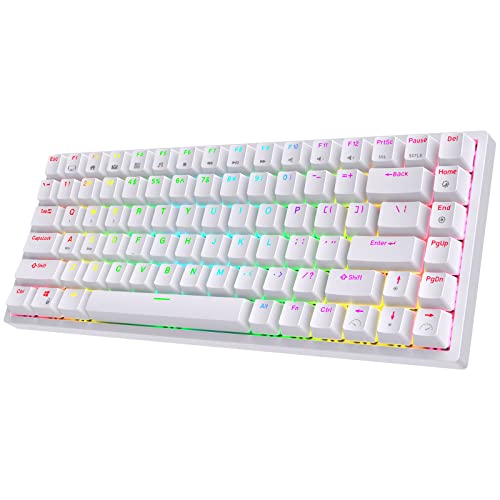
- 75-percent layout, 84 keys
- Triple mode Bluetooth 5.0, 2.4 GHz and USB-C wired
- Hot-swap PCB for 3-pin and 5-pin switches, no soldering
- Battery life up to 200 hours with backlight off, full charge in 6–7 hours
All 3 Picks at a Glance
| Product | Specs | Action |
|---|---|---|
| Keychron V1 |
| Check price on Amazon |
| AULA F75 |
| Check price on Amazon |
| RK Royal Kludge RK84 |
| Check price on Amazon |
Key takeaways
- Four mechanical keyboards whose listings state hot-swappable sockets, compared on switch models, connection modes, mounting and battery notes by desk type.
A hot-swappable keyboard changes the most personal part of typing — the switch under each key — from a fixed factory decision into something you can revise in minutes, with no soldering iron involved. The real decision is what surrounds that socket: a wired board with deep remapping for a permanent desk, or a tri-mode wireless model that follows you between machines. The switches fitted on day one still matter, because they set the feel you live with while you decide what to try next.
The four boards below cover dedicated tinkerers, Mac and Windows users who hop between computers, and anyone who wants a softer, quieter stock feel. Each one earned its place because its Amazon listing explicitly states hot-swappable sockets for MX-style switches, and the details compared here — switch models, connection modes, mounting style and battery notes — come from those product pages.
Quick Picks
As an Amazon Associate we earn from qualifying purchases
| Product | Best for | Key spec from title |
|---|---|---|
| Keychron V1 | Tinkerers at a fixed desk | Hot-swappable K Pro Brown switches, QMK/VIA |
| Keychron V1 Max | Multi-machine Mac and Windows users | Tri-mode wireless, Gateron Jupiter Brown |
| AULA F75 | A soft, quiet stock feel across devices | Pre-lubed Graywood V3 switches, 4000mAh battery |
| RK Royal Kludge RK84 | Clicky typing with long battery stretches | Up to 200-hour battery, triple-mode wireless |
How to Choose
Socket compatibility decides which switches you can try
Hot-swappable only helps if the switches you want physically fit the board. All four listings here state support for both 3-pin and 5-pin MX-style switches, which covers the vast majority of aftermarket switch sets without clipping or modification. That shared baseline is worth confirming on any board you consider elsewhere, because some sockets accept only 3-pin switches and narrow your options. With compatibility settled, you can shop switches by feel and sound instead of worrying whether they will seat in the board at all.
Wired-only or tri-mode: match the board to your desk
The Keychron V1 connects by cable only, which keeps its setup foolproof at a fixed desk and removes charging from your routine entirely. The other three boards each offer wired, 2.4 GHz and Bluetooth modes, so they can pair with a desktop, a laptop and a tablet in the same day. Wireless freedom costs you battery management and, on the AULA F75, lets one board serve up to five devices. Decide by how often your keyboard actually moves; a stationary setup gains little from radios it never uses.
The switches fitted at the factory set the starting feel
You will type on the stock switches first, whatever your swapping plans are. The two Keychron boards arrive with tactile brown switches — K Pro Brown in the V1, Gateron Jupiter Brown in the V1 Max — while the AULA F75 ships with pre-lubricated Graywood V3 switches aimed at a smooth, soft sound. The RK84 takes the opposite route with clicky blue switches that announce every press. Match the factory set to your office or household before counting on a future swap to fix the feel.
Mounting, layers and programmability shape daily comfort
Three of these boards build in flex and sound control: the V1 Max uses a gasket mount, and the AULA F75 combines a gasket structure with five layers of silencer filling and a slotted PCB. The Keychron pair adds QMK/VIA support, so every key and macro can be remapped in software — a deeper change than any switch swap. The RK84 keeps its design simpler, putting its emphasis on triple-mode wireless and RGB backlighting instead. Prioritise the quality you notice hourly: sound, feel, or control over the layout.
The 4 Best Options
Keychron V1
- 75-percent layout, wired connection
- QMK/VIA programmable
- Hot-swappable sockets for 3-pin and 5-pin MX switches, no soldering required
- Keychron K Pro Brown switches
The original V1 is the tinker’s board in this group. It stays wired, which keeps latency and setup simple, and spends its feature set on QMK/VIA programmability and hot-swappable sockets that accept 3-pin and 5-pin MX switches with no soldering. The fitted K Pro Brown switches give a tactile starting point, this listing is the knob version in Carbon Black, and every key can be remapped to match your workflow. Choose it if your keyboard lives on one desk and you expect to experiment with switches and layouts for years.
Keychron V1 Max
The V1 Max answers the obvious objection to the wired V1: it keeps QMK/VIA programmability and hot-swappable sockets, then adds 2.4 GHz, Bluetooth 5.1 and wired modes plus a gasket mount for a softer typing feel. Its Gateron Jupiter Brown switches keep the tactile character of the range while the wireless modes let one board cover a desktop and a laptop. Pick it if you like the V1’s customisation depth but your setup spans more than one machine, or your desk simply looks better without a cable crossing it.
Specs
- 75-percent layout
- Tri-mode 2.4 GHz, Bluetooth 5.1 and wired connection
- QMK/VIA programmable
- Hot-swappable, compatible with most 3-pin and 5-pin MX switches
- Gateron Jupiter Brown switches
- Gasket mount
- Item model number Keychron V1 Max
- Best for: Mac and Windows users who want wireless freedom without losing deep remapping.
- Watch out for: Confirm a live buy option before ordering, and check the ASIN matches this US listing, since a Canadian variant and a second ASIN circulate under the same model name.
AULA F75
- 75-percent layout, 81 keys
- Tri-mode Bluetooth 5.0, 2.4 GHz and USB-C, up to five devices
- Hot-swappable base for 3-pin or 5-pin switches, no soldering
- Pre-lubricated LEOBOG Graywood V3 switches
The AULA F75 arrives tuned for sound and softness rather than customisation depth. Its pre-lubricated Graywood V3 switches sit in a gasket structure with five layers of silencer filling and a slotted PCB, a combination the listing clearly aims at a muted, cushioned keystroke. It connects to up to five devices across Bluetooth, 2.4 GHz and USB-C, carries a 4000mAh battery and 16.8 million-colour RGB with a control knob, and still leaves the sockets hot-swappable for later experiments. This Salt White Blue version suits buyers who want the pleasant feel first and the tweaking second.
RK Royal Kludge RK84
- 75-percent layout, 84 keys
- Triple mode Bluetooth 5.0, 2.4 GHz and USB-C wired
- Hot-swap PCB for 3-pin and 5-pin switches, no soldering
- Battery life up to 200 hours with backlight off, full charge in 6–7 hours
The RK84 is the traditionalist of the group: 84 keys, triple-mode wireless and clicky blue switches that give every keystroke an audible snap. Its hot-swap PCB accepts 3-pin and 5-pin switches without soldering, so the click is a starting point rather than a life sentence. The listing states battery life of up to 200 hours with the backlight off and a full charge in six to seven hours, figures frequent travellers will appreciate. Choose it if you work across rooms or machines, enjoy a decisive click, and want switch swapping kept available for later.
Which One Fits Your Situation
Your keyboard never leaves one desk
The wired Keychron V1 was made for a permanent setup. With no battery to manage and QMK/VIA remapping on tap, it rewards the time you spend tailoring layouts and trying switches, and its knob version adds a small daily convenience for volume or scrolling. Wireless hardware would simply sit unused here.
You split the day between two or three computers
Both tri-mode boards move between machines without a cable swap. The V1 Max suits you if remapping matters as much as mobility, while the AULA F75 stretches further, connecting to up to five devices and favouring a softer stock feel. Either way, the 2.4 GHz mode keeps a responsive link for your main machine.
You want the calmest typing sound straight from the box
The AULA F75 stacks the odds in your favour: pre-lubricated switches, a gasket structure and five layers of silencer filling all work on noise and harshness before you change a thing. If your keyboard shares a room with calls, family or a microphone, that factory tuning saves you a round of modifications.
You enjoy a loud, decisive click
The RK84’s blue switches deliver the classic clicky response the other three boards deliberately avoid, and its stated 200-hour battery life with the backlight off suits people who type for days between charges. If the click ever wears thin, the hot-swap sockets let you quieten the board without replacing it.
Common Mistakes
- Assuming every mechanical keyboard is hot-swappable: many boards are soldered, so the listing has to state swappable sockets, as all four here do.
- Buying replacement switches without checking pin type: confirm whether a board takes 3-pin, 5-pin or both before ordering a switch set.
- Ordering from a variant listing: colours and switch options carry separate ASINs on the F75 and RK84, and the V1’s Red-switch and barebone pages are different products.
- Expecting a battery capacity the listing never states: the RK84 lists hours of use rather than a mAh figure, so do not shop for a replacement cell by capacity.
- Planning to fix the feel later: a swap is easy on these boards, but the stock switches still decide whether the first month of typing pleases you.
Frequently Asked Questions
What does hot-swappable actually let me change?
It lets you pull the mechanical switch under any key and press in a different one, changing the board’s feel and sound without soldering or opening the case. All four listings here state sockets for 3-pin and 5-pin MX-style switches, so most aftermarket switch sets fit. Keycaps were already removable on most boards; the switches are the new part.
Which of these boards work with Mac and Windows?
The Keychron V1 and V1 Max listings state compatibility with Mac, Windows and Linux outright, which matches their QMK/VIA remapping support. The AULA F75 and RK84 pages retrieved for this guide do not state operating-system support, so if you type on a Mac, confirm compatibility on the live listing before ordering either wireless board.
How is the V1 Max different from the regular V1?
The V1 is wired only, while the V1 Max adds 2.4 GHz and Bluetooth 5.1 modes for multi-machine desks. The Max also moves to a gasket mount and Gateron Jupiter Brown switches, where the V1 uses K Pro Brown switches in a knob-equipped Carbon Black listing. Both keep QMK/VIA programmability and hot-swappable sockets.
How long do the wireless boards last between charges?
The figures are stated differently, which is why they cannot be ranked directly. The RK84 lists up to 200 hours with the backlight off, the AULA F75 lists a 4000mAh battery without an hour rating, and the V1 Max’s retrieved listing copy states no battery figure at all. Treat each number on its own terms.
More from Amazon
Programs that pair well with the guide above. Offers and eligibility are set by Amazon and may change.
Free shipping on eligible items, Prime Video and more. Eligible new members can start with a free trial.
Start a Prime free trialAd-free music streaming. Eligible new subscribers can start with a free trial.
Try Music Unlimited freeA Prime membership for ages 18-24 with a trial period. Eligibility is set by Amazon.
See Prime for Young AdultsAudiobooks and podcasts to listen to on the go. Eligible new members can start with a free trial.
Try Audible freeAs an Amazon Associate we earn from qualifying purchases.









