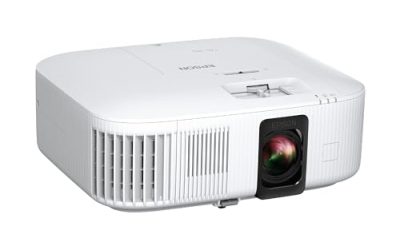
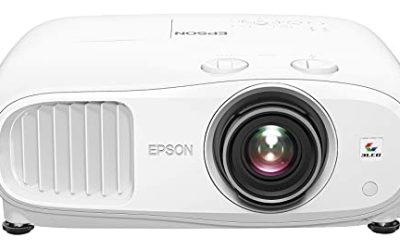
Our Short List of 3

- Best for: classrooms where color brightness and wireless presenting matter Watch out for: the 6,000-hour lamp life is the shortest here, so plan for a replacement sooner
- Specs:
- Resolution: SVGA 800 x 600 native
- Brightness: 3,200 lumens color and white
- Technology: 3LCD

- Best for: bright meeting rooms and halls where maximum brightness and a long lamp life count Watch out for: the DLP design can show rainbow artifacts to sensitive viewers, so test it first
- Specs:
- Resolution: SVGA 800 x 600 native
- Brightness: 3,800 lumens
- Color: SuperColor

- Best for: meeting rooms where two HDMI sources and strong contrast matter Watch out for: a single HDMI cable cannot carry two sources at once, so use both inputs when switching presenters
- Specs:
- Resolution: SVGA 800 x 600 native
- Brightness: 3,600 lumens
- Contrast: 15,000 to 1
All 3 Picks at a Glance
| Product | Specs | Action |
|---|---|---|
| Epson VS250 |
| Check price on Amazon |
| ViewSonic PA503S |
| Check price on Amazon |
| BenQ MS535A |
| Check price on Amazon |
Key takeaways
- The best svga projectors deliver a bright, affordable picture for classrooms and meeting rooms. Compare three SVGA models built for slides and presentations.
SVGA projectors are the workhorses of classrooms, meeting rooms, and community halls: bright, affordable, and simple to set up. Their 800 by 600 resolution is modest by modern standards, but it is enough for slides, simple graphics, and video where the audience sits back from the screen. What matters most in this class is brightness — a projector that holds its picture with the lights on — plus a lamp that lasts for years and ports that accept whatever laptop the presenter brings.
This guide compares three SVGA projectors that cover the same job from slightly different angles. One is a bright 3LCD model for classrooms, one is a high-brightness DLP with a long lamp life, and one is a balanced DLP with dual HDMI and a strong contrast ratio. All three were chosen from the names and specifications on their Amazon product pages, and the sections below match each one to a classroom, a small business meeting room, or a community hall.
Quick Picks
As an Amazon Associate we earn from qualifying purchases
| Product | Best for | Key spec from title |
|---|---|---|
| Epson VS250 | Classrooms where color brightness matters | 3,200 lumens, SVGA 3LCD |
| ViewSonic PA503S | Brightest picture and longest lamp life | 3,800 lumens, SVGA DLP |
| BenQ MS535A | Meeting rooms with dual HDMI inputs | 3,600 lumens, SVGA DLP |
How to Choose
SVGA resolution and when it is enough
SVGA means 800 by 600 pixels, a 4-to-3 picture that suits slides, bullet points, and simple diagrams viewed from a few rows back. It is not the resolution for dense spreadsheets, detailed CAD drawings, or HD video, where small text turns soft. For a classroom or a meeting room where the content is mostly headlines and images, SVGA is enough — and the savings against a higher-resolution model can go toward a screen or a sound system. Be honest about the content before choosing. A 4-to-3 picture also suits older content and standard presentation templates.
Brightness for lit rooms
Brightness is the most important figure for an SVGA projector, because these models live in rooms where the lights stay on. A rating of 3,200 to 3,800 lumens keeps slides readable with the lights up, and color brightness matters as much as white brightness — a projector that is bright only in white will wash out colored charts. The Epson’s 3LCD design delivers equal color and white brightness, while the DLP models here rely on high lumen ratings to cut through ambient light. Match the brightness to the room, not to the resolution. A screen with a little gain can help a dimmer projector, but it narrows the viewing angle.
Lamp life and running costs
A projector’s lamp is a running cost, so its rated life matters. The ViewSonic and BenQ models here stretch to 15,000 hours in eco mode, and the Epson runs to 6,000 hours, which still covers years of classroom use at a few hours a day. Eco modes dim the picture slightly but extend the lamp, which suits a room where maximum brightness is not always needed. Check the lamp replacement cost as well as the life, since a cheap projector with an expensive lamp can cost more over time. Keep a spare lamp on hand when the projector serves a classroom.
Ports and setup
A presentation projector should accept whatever device the presenter brings. HDMI covers modern laptops and streaming sticks, VGA covers older machines that still circulate in schools, and a mobile app like Epson’s iProjection lets a phone or tablet present wirelessly. Vertical keystone correction straightens a picture when the projector sits below or above the screen, which is common on a cart. Check the throw distance too, so the projector can sit far enough back for the screen size you need. A remote control helps when the projector sits on a high shelf, and a carrying case protects it on the way between rooms. Check that the power cable is long enough for the outlet nearest the mount.
The 3 Best Options
Epson VS250
- Best for: classrooms where color brightness and wireless presenting matter Watch out for: the 6,000-hour lamp life is the shortest here, so plan for a replacement sooner
- Specs:
- Resolution: SVGA 800 x 600 native
- Brightness: 3,200 lumens color and white
- Technology: 3LCD
classrooms where color brightness and wireless presenting matter Watch out for: the 6,000-hour lamp life is the shortest here, so plan for a replacement sooner
the 6,000-hour lamp life is the shortest here, so plan for a replacement sooner
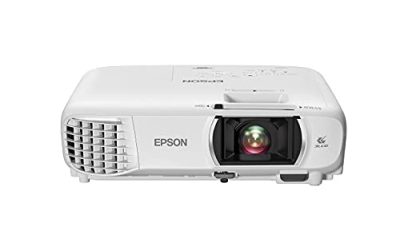
The Epson VS250 is the classroom pick, with a 3LCD design that delivers 3,200 lumens of color brightness and 3,200 lumens of white brightness, so colored charts stay vivid with the lights on. Its SVGA 800 by 600 picture suits slides and simple graphics, HDMI takes modern laptops, and the iProjection app lets a phone or tablet present wirelessly. The lamp lasts 6,000 hours, the projector weighs 5.3 pounds for easy cart duty, and the 3LCD design avoids the rainbow artifacts some viewers notice on single-chip DLP models. Equal color and white brightness keep charts vivid, which matters for color-coded diagrams.
ViewSonic PA503S
- Best for: bright meeting rooms and halls where maximum brightness and a long lamp life count Watch out for: the DLP design can show rainbow artifacts to sensitive viewers, so test it first
- Specs:
- Resolution: SVGA 800 x 600 native
- Brightness: 3,800 lumens
- Color: SuperColor
bright meeting rooms and halls where maximum brightness and a long lamp life count Watch out for: the DLP design can show rainbow artifacts to sensitive viewers, so test it first
the DLP design can show rainbow artifacts to sensitive viewers, so test it first
The ViewSonic PA503S is the brightest projector here, with 3,800 lumens that cut through ambient light in a meeting room or a hall. Its SVGA 800 by 600 picture uses SuperColor technology for vivid images, the SuperEco lamp mode stretches lamp life to 15,000 hours, and vertical keystone correction straightens the picture from a cart or a shelf. HDMI and two VGA inputs cover new and old laptops alike, and the 5.5-pound body moves easily between rooms. It is the pick when brightness and lamp life matter more than anything else. The two VGA inputs mean an older laptop and a document camera can stay connected at once.
BenQ MS535A
- Best for: meeting rooms where two HDMI sources and strong contrast matter Watch out for: a single HDMI cable cannot carry two sources at once, so use both inputs when switching presenters
- Specs:
- Resolution: SVGA 800 x 600 native
- Brightness: 3,600 lumens
- Contrast: 15,000 to 1
meeting rooms where two HDMI sources and strong contrast matter Watch out for: a single HDMI cable cannot carry two sources at once, so use both inputs when switching presenters
a single HDMI cable cannot carry two sources at once, so use both inputs when switching presenters
The BenQ MS535A is the balanced meeting-room pick, with 3,600 lumens, a 15,000-to-1 contrast ratio, and dual HDMI inputs that take a laptop and a streaming device at once. Its SVGA 800 by 600 picture suits slides and video in a small room, the lamp lasts up to 15,000 hours, and the 5.24-pound body is easy to carry between offices. The contrast ratio is the strongest here, which helps text stand out against the background on a bright screen. Dual HDMI means no cable swapping when the next presenter takes over. Strong contrast also helps in a room with some ambient light.
Which One Fits Your Situation
Classroom on a tight plan
The Epson VS250 suits a classroom best, because its 3LCD color brightness keeps charts vivid with the lights on, and the iProjection app lets a teacher present from a phone or tablet. The 6,000-hour lamp covers years of school days, and the 5.3-pound body moves between rooms on a cart. The ViewSonic is the alternative when the room is brighter and needs more lumens.
Small business meeting room
The BenQ MS535A fits a meeting room, with dual HDMI inputs for a laptop and a streaming device, a 15,000-to-1 contrast ratio that keeps text sharp, and a 15,000-hour lamp that rarely needs attention. Its 3,600 lumens hold the picture with the lights on, and the light body moves between offices without a fuss. The dual HDMI inputs take a laptop and a streaming device at once. A 15,000-hour lamp rarely needs attention.
Church hall and community room
The ViewSonic PA503S suits a large community room, because its 3,800 lumens are the brightest here and its 15,000-hour SuperEco lamp life keeps running costs low. HDMI and two VGA inputs cover whatever device a volunteer brings, and vertical keystone correction straightens the picture from a table or a shelf at the back of the hall. The long lamp life keeps running costs low for a volunteer-run hall. Keystone correction straightens the picture.
Trainers who move between rooms
Trainers who carry a projector from room to room need a light body, quick setup, and ports that accept any laptop. The ViewSonic PA503S fits that job, with HDMI and two VGA inputs, vertical keystone correction, and a 5.5-pound body that moves easily on a cart. The BenQ MS535A is the lighter alternative when two HDMI sources are enough, and its 15,000-hour lamp rarely needs attention. A carrying case protects the projector between rooms.
Common Mistakes
- Buying SVGA for detailed spreadsheets or HD video, where small text turns soft and hard to read from the back of the room in a large hall
- Ignoring lamp replacement cost, which can erase the savings of a cheap projector over time and surprise the budget
- Mounting the projector without checking throw distance, so the picture is too large or too small for the screen and the mount must be moved
- Using a 4-to-3 projector on a 16-to-9 screen without adjusting, which leaves black bars or a cropped image that wastes screen space
- Skipping keystone correction when the projector sits on a cart below the screen line and the picture lands crooked
Frequently Asked Questions
What does SVGA mean?
SVGA stands for Super Video Graphics Array, a resolution of 800 by 600 pixels in a 4-to-3 aspect ratio. It is an older standard that still suits slides, bullet points, and simple graphics viewed from a distance. It is not an HD resolution, so it suits content where fine detail is not the point.
Is SVGA good enough for presentations?
Yes, for slides, charts, and simple graphics in a classroom or meeting room. Text at headline and body sizes reads clearly from a few rows back, and the high brightness of these models matters more than resolution in a lit room. Choose a higher resolution only when the content includes dense spreadsheets, detailed diagrams, or HD video.
How bright should an SVGA projector be?
For a room with the lights on, look for 3,000 lumens or more. All three projectors here clear 3,200 lumens, with the ViewSonic reaching 3,800. Color brightness matters too — the Epson’s 3LCD design delivers equal color and white brightness, which keeps charts vivid. A dimmer projector needs the lights off, which is rarely practical in a classroom.
How long does the lamp last on an SVGA projector?
Lamp life runs from 6,000 hours for the Epson to 15,000 hours in eco mode for the ViewSonic and BenQ. At a few hours of use per school day, that is years before a replacement is needed. Eco modes extend the life further by dimming the picture slightly, which suits rooms where maximum brightness is not required.
More from Amazon
Programs that pair well with the guide above. Offers and eligibility are set by Amazon and may change.
Free shipping on eligible items, Prime Video and more. Eligible new members can start with a free trial.
Start a Prime free trialAd-free music streaming. Eligible new subscribers can start with a free trial.
Try Music Unlimited freeA Prime membership for ages 18-24 with a trial period. Eligibility is set by Amazon.
See Prime for Young AdultsAudiobooks and podcasts to listen to on the go. Eligible new members can start with a free trial.
Try Audible freeAs an Amazon Associate we earn from qualifying purchases.