Our Top Picks

A webcam clipped to the top of a monitor almost always sits too high, and a webcam balanced on a stack of books slides the moment the desk gets bumped. A dedicated desk stand fixes both problems at once: it puts the lens at eye level, holds it steady through a whole stream, and lets the camera move to a second angle without rebuilding the setup. The five stands below all sit on a desk surface with no clamp and no monitor mount, so they work on glass tops, thick slabs, rented desks, and shared tables alike.
The short answer is that the InnoGear Webcam Stand is the best all-round desk webcam stand for most streamers, because its weighted metal base stays put, its gooseneck bends to eye level, and its ball head turns the camera without moving the base. Streamers who want the tallest reach should look at the JCWINY 28-inch stand, while the Nycetek tripod is the most packable choice for a desk that doubles as a workspace. The KDD 22-inch stand suits a second camera or a phone beside the main webcam, and the OXENDURE scissor-arm stand suits a fixed overhead-style angle on a crowded desk.
As an Amazon Associate, we earn from qualifying purchases.
Table of Contents
- Why a Desk Stand Beats a Monitor Clip
- How to Choose a Webcam Stand
- InnoGear Webcam Stand for Desk
- Nycetek Webcam Tripod Stand
- KDD Webcam Stand 22 Inch
- JCWINY Webcam Stand 28 Inch
- OXENDURE OX-WCA01 Webcam Stand
- Which Stand Fits Which Setup
- Who Should Skip a Desk Stand
- Frequently Asked Questions
- Final Verdict
- Product and ASIN Reference
Why a Desk Stand Beats a Monitor Clip
A monitor clip gives the camera whatever angle the monitor gives. On a tall monitor the lens looks down at the top of the head, on a laptop the lens looks up from below, and on an ultrawide display the camera ends up far to one side of the face. Viewers notice the angle before they notice the resolution, because eye contact is what makes a stream feel like a conversation. A desk stand breaks that link between the screen and the camera: the lens goes where the face is, and the monitor goes where the eyes need it.
Stability is the second reason to move the camera off the monitor. Every keystroke, every lean on the desk, and every nudge of the monitor travels straight into a clipped webcam as a small shake. A stand with a weighted base or a wide tripod footprint absorbs that movement instead, because the camera is tied to the desk surface rather than to a screen that moves. The difference shows up most in long sessions, where a clip slowly drifts and a stand holds the same frame from the opening minute to the last.
A desk stand also changes how a setup grows. A second camera for a top-down shot, a phone running a chat overlay, or a small light all need the same thing: a threaded mount at a chosen height. A stand supplies that mount without drilling, clamping, or borrowing space from the monitor. When the stream ends, the stand lifts off the desk and the workspace returns to normal, which matters for streamers who share a desk with work, study, or family use.
There is a real trade-off, and it is desk space. A stand occupies a patch of surface that a clip does not, and a tripod footprint is wider than a weighted round base. Measure the free space beside the keyboard before ordering, and remember that a stand placed behind the keyboard needs less depth than one placed to the side. The stands in this guide range from a compact round base to a folding tripod, so a small desk and a deep desk both have an option.
How to Choose a Webcam Stand
Start with the thread on the bottom of the camera. Almost every webcam stand uses a standard 1/4-inch screw, and most webcams with a mounting hole use the same size. Logitech models such as the C920, C922, C930e, and Brio all carry that thread, as do NexiGo cameras, the Elgato Facecam, and the Razer Kiyo range. If the camera has no threaded hole at all, a stand cannot hold it directly, and the choice becomes an adapter or a different camera. Check the base of the camera before ordering, because a stand without a matching thread is a paperweight.
Height decides the shot more than any other number. Eye level for a seated streamer is usually between 15 and 22 inches above the desk surface, depending on chair height and monitor position. A stand that tops out below that range forces the camera to look up, which is the same problem as a laptop webcam. A stand that reaches well above eye level gives room to angle down slightly, which flatters most faces and keeps the background tidy. Look for the maximum height in the listing, then subtract a little for the ball head and the camera body itself.
The base decides whether the stand stays put. A weighted metal base resists tipping when the gooseneck leans forward, and non-slip pads keep it from sliding when the desk is bumped. A tripod base spreads the load across three legs and folds flat for travel, but it needs a wider patch of desk and can wobble if one leg hangs off the edge. A round base with a turntable adds a useful trick: the whole stand can spin to face a second person or a different corner of the room without lifting it.
Load capacity matters once the camera grows beyond a basic webcam. A light webcam weighs very little, but a webcam with a ring light, a phone in a holder, or a compact camera adds up fast. A stand rated for 0.8 kg holds a heavy webcam with margin, while a stand built for half a kilogram suits light webcams only. Overloading a gooseneck is the fastest way to get a slow droop during a stream, so match the rating to the full weight of the camera plus anything attached to it.
The head is where framing happens. A ball head that turns a full circle horizontally and tilts well past vertical lets the camera switch from a face shot to a desk shot without touching the stand. A locking knob that holds firmly matters more than a smooth feel, because a head that slips ruins a take. Check whether the head is detachable, too: a removable head turns the stand into a light mount or a phone holder when the camera is elsewhere.
Finally, think about what else the stand will hold. Many streamers use the same stand for a phone running chat, a small LED panel, or a compact camera on alternate days. A stand that ships with a phone holder covers two jobs at once, and a stand with a cold shoe or a second thread point covers three. The five stands below cover that range, from a single-purpose webcam post to a flexible arm that holds a camera, a phone, and a light in turn.
InnoGear Webcam Stand for Desk

The InnoGear stand is the most complete desk webcam stand in this guide, and it is the pick that fits the most desks without a compromise. Its weighted all-metal round base sits flat on the desk, its detachable gooseneck bends to eye level, and its swivel ball head turns the camera to face the streamer or the room. Nothing about it needs a clamp, a screw, or a free monitor edge, so it works on a glass desk, a thick wooden slab, and a folding table with equal ease.
The height range is the first thing that sets it apart. The listing gives an adjustable range of 8.7 to 20.9 inches, which covers a low angle for a desk-level product shot and a full eye-level height for a seated streamer. The gooseneck does the fine work inside that range: bend it forward for a close framing, bend it back for a wider shot that shows more of the room, and the base stays where it was put. That flexibility matters during a stream, because reframing takes a single hand and no tools.
Stability comes from the base rather than from grip. The weighted round base lowers the center of gravity, and four non-slip pads underneath keep the stand from sliding when the desk is bumped and protect the surface from scratches. The listing describes the base as a deliberate answer to tripod stands that tip, and in practice a round weighted base is the most forgiving shape on a crowded desk: it needs only a small round patch of surface, and it does not care whether a leg hangs over an edge. Keep the gooseneck near vertical for the heaviest cameras, and the stand holds its angle through long sessions.
The ball head is the other half of the design. It turns a full 360 degrees horizontally and tilts 140 degrees vertically, which is enough to point the camera at a keyboard, a whiteboard, or a second person without moving the base. The adjustment knob locks the head in place, and the head is detachable, so the stand can hold a ring light or a small recorder when the webcam is elsewhere. A phone mount ships in the box, which turns the same stand into a chat monitor or a second-angle phone camera on days when the webcam stays in its case.
Compatibility is broad. The stand uses a standard 1/4-inch thread with a 3/8-inch to 1/4-inch fitting, and the listing names the Logitech C920, C920S, C922, C922x, C930e, C615, C960, and Brio, plus the NexiGo N60 and GoPro cameras. Any webcam or small device with a 1/4-inch mounting hole fits, including ring lights and compact recorders. The one hard limit is a webcam with no mounting hole at all: that camera needs an adapter or a different mount, because there is nothing for the screw to bite into.
This is the stand to buy when the desk is shared, the camera changes, or the framing changes mid-stream. It is a mid-range pick in this guide, and the extra cost over a bare tripod buys the weighted base and the gooseneck rather than height alone. Streamers who want the tallest possible reach should look at the JCWINY stand below, and streamers who travel should look at the folding Nycetek tripod, but for a fixed desk that does everything, the InnoGear is the safest first choice.
Specs
- Height range: 8.7 to 20.9 inches
- Base: weighted all-metal round base with four non-slip pads
- Arm: detachable gooseneck with adjustment knob
- Head: swivel ball head, 360-degree horizontal rotation, 140-degree vertical tilt
- Thread: standard 1/4-inch screw with 3/8-inch to 1/4-inch fitting
- Fits: Logitech C920, C920S, C922, C922x, C930e, C615, C960, Brio, NexiGo N60, GoPro
- In the box: webcam stand, gooseneck, metal base, swivel ball head, phone mount
Nycetek Webcam Tripod Stand

The Nycetek stand is the most portable pick in this guide, and it is the one to choose when the desk is also a workspace, a dining table, or a bag. It is a folding aluminum tripod with an extension arm, a ball head, a phone holder, and a remote, and it packs down small enough to carry. On the desk it behaves like a small camera tripod; off the desk it behaves like a travel stand for calls from anywhere.
Height is generous for a folding tripod. The listing gives a minimum height of 11 inches and a maximum height of 29 inches, with three leg sections and an extension arm that lifts the camera well above eye level for a seated streamer. That range covers a low product shot, a face-level call, and a high angle that looks down at a desk or a keyboard. The fast-locking leg sections hold the chosen height, and the ball head turns a full circle to frame the shot without moving the legs.
The build is aluminum, and the whole stand weighs 15.8 ounces, which is light enough to carry in a bag with a laptop. The extension arm is the part that makes it a webcam stand rather than a phone tripod: it lifts the camera clear of the legs so the lens is not staring at its own feet, and the phone holder clamps a phone beside or below the camera for a second angle. A remote ships in the box for phones, which suits streamers who use a phone as a second camera and want to trigger it without touching the desk.
Compatibility follows the same standard as the rest of this guide. The stand uses a universal 1/4-inch screw with a 3/8-inch to 1/4-inch convertible nut, and the listing names Logitech models from the C920 family through the Brio, NexiGo cameras, the Elgato Facecam, Anker webcams, and the Razer Kiyo range, plus action cameras and ring lights with a 1/4-inch thread. The phone holder covers common phones, and the listing notes that the remote works with phones only. As with every stand here, a webcam with no threaded mounting hole cannot attach directly.
The trade-off is footprint. Three legs need a wider patch of desk than a round weighted base, and the stand is at its steadiest when all three legs sit flat on the surface. Keep it away from the desk edge, and do not hang a heavy camera far off center on the extension arm. Used inside those limits, it is a budget pick that covers more ground than its size suggests: a desk tripod at home, a travel stand on the road, and a phone holder when the webcam stays home.
Specs
- Height range: 11 to 29 inches
- Legs: 3-section aluminum tripod with extension arm and fast locking
- Weight: 15.8 ounces
- Head: ball head with 360-degree rotation
- Thread: universal 1/4-inch screw with 3/8-inch to 1/4-inch convertible nut
- Fits: Logitech C920 family, C930e, C615, Brio, NexiGo, Elgato Facecam, Anker, Razer Kiyo, action cameras, ring lights
- In the box: tripod extension arm, tripod base, phone holder, remote, carry bag, manual
KDD Webcam Stand 22 Inch
The KDD stand is the flexible arm of this guide, and it is the pick for a streamer who wants the camera to move during a session rather than sit in one fixed spot. Its long gooseneck bends to any angle, its ball joint turns a full circle, and its phone holder keeps a second device in the same frame. It is a simple design done well: a flexible arm, a stable base, and a head that stays where it is put.
The headline number is the reach. The stand rises to 21.7 inches at full extension, with about 15.7 inches of sideways reach when the arm bends out from the base. That is enough to put the camera at eye level beside a monitor, then swing it over the keyboard for a top-down look at a controller, a sketchbook, or a product. Each section of the arm bends independently, so the camera can sit high and close, low and far, or anywhere between, and the 360-degree ball joint handles the final framing.
The phone holder is more useful than it sounds. A phone mounted beside the webcam can run chat, a timer, or a second camera angle, and the holder keeps it at the same height as the main camera instead of flat on the desk. The stand also lists a 5/8-inch screw fitting alongside its camera mount, so check the thread on the camera and the holder before ordering and keep the right adapter in the drawer. The flexible arm suits light webcams best: a heavy camera at full extension will lean, so keep the arm closer to vertical when the load grows.
Compatibility covers the usual Logitech range, including the C922, C930e, C920, C615, C960, and Brio, plus GoPro cameras and the Blue Yeti microphone family when the stand doubles as a mic holder. That last use is worth noting: a flexible arm that holds a webcam on Monday can hold a microphone on Tuesday, which makes the KDD a good second stand for a desk that already has a main camera mount. The build is aluminum alloy, and the folding design packs down for storage when the desk needs to clear.
This is a budget pick, and it earns that place by doing one job better than the others: movement. Streamers with a fixed framing should buy the InnoGear or the OXENDURE instead, but streamers who reframe often, run a second device, or switch between a camera and a microphone will get more use out of the KDD arm than out of a taller or heavier stand.
Specs
- Height: 21.7 inches maximum, 22-inch class flexible arm
- Reach: about 15.7 inches sideways from the base
- Arm: flexible gooseneck, each section bends independently
- Head: 360-degree rotation ball joint
- Mount: phone holder included, 5/8-inch screw fitting listed
- Fits: Logitech C922, C930e, C920, C615, C960, Brio, GoPro, Blue Yeti microphones
- Material: aluminum alloy, foldable design
JCWINY Webcam Stand 28 Inch

The JCWINY stand is the tallest desk stand in this guide, and it is the pick for a streamer whose eye level sits high above the desk or whose camera needs to clear a tall monitor. Its extendable pole rises to 28 inches, its round base sits flat without a clamp, and its metal ball head turns the camera to any angle. It is a straightforward pole stand, and its strength is that it does the simple job at a height the others cannot reach.
Five height levels divide the pole, so the camera can sit low for a desk shot, mid-range for a normal call, or at full extension for a high eye-level frame. The round base carries an anti-slip foam pad that keeps the stand from sliding and protects the desk surface, and the pole grip is rubberized for a steady hold when the height changes. At full extension the stand is tall enough to look slightly down at a seated streamer, which keeps the background behind the head tidy and the framing direct.
The metal ball head is the part that makes the height usable. It turns a full 360 degrees and tilts up to 90 degrees, so the camera can face forward for a stream, tilt down for a desk shot, or turn to face a second person without lifting the base. A phone holder ships in the box and fits phones in the common sizes, which covers a chat screen or a second camera beside the main webcam. The whole stand folds down and packs small, and the pole doubles as a selfie stick or a GoPro handle when the base stays home, which suits streamers who record away from the desk as well as on it.
Compatibility is wide but has a hard edge worth stating plainly. The stand fits Logitech webcams including the C922, C930e, C920S, C920, C615, C960, and Brio, plus the NexiGo N60, the Elgato Facecam, and the Razer Kiyo range, and any LED light or device with a 1/4-inch female thread. The listing states clearly that it is not suitable for a webcam without a 1/4-inch mounting hole, so check the camera base before ordering. The stand weighs 1.34 pounds as listed, which is light enough to move around the room but heavy enough to stay put on a flat desk.
This is a mid-range pick for tall setups. Streamers with a standard chair and monitor will not need the extra height and should save the desk space with the InnoGear, but streamers with a high chair, a tall monitor, or a standing desk will find the JCWINY is the only stand here that reaches their eye level without a clamp or a wall mount.
Specs
- Height: 28 inches maximum, five height levels
- Base: round base with anti-slip foam pad
- Pole: extendable pole with rubberized grip, doubles as selfie stick and GoPro handle
- Head: metal ball head, 360-degree rotation, up to 90-degree tilt
- Thread: standard 1/4-inch mounting hole required
- Fits: Logitech C922, C930e, C920S, C920, C615, C960, Brio, NexiGo N60, Elgato Facecam, Razer Kiyo
- In the box: round base, extendable pole, metal ball head, phone holder
OXENDURE OX-WCA01 Webcam Stand
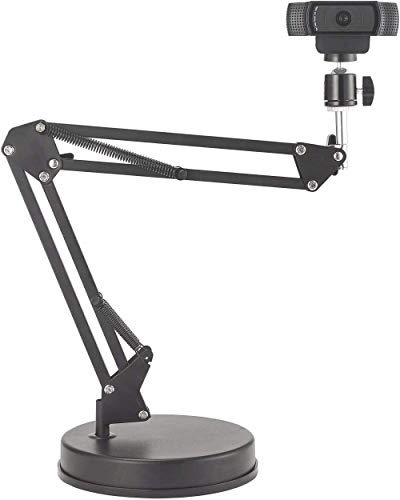
The OXENDURE stand is the most mechanical pick in this guide, and it suits a streamer who wants a fixed overhead-style angle without drilling anything or clamping anything. Its scissor-style suspension arm folds out from a round base, its turntable spins a full circle, and its load rating covers the heavier webcams in this guide. It looks like a small boom arm, and it behaves like one, minus the clamp.
The numbers are simple: a maximum height of 22 inches and a maximum load of 0.8 kg, which the listing also gives as 1.76 pounds. That load rating is the highest stated figure among the flexible arms here, and it is the reason to choose this stand for a heavier webcam such as the Brio or a webcam with a small light attached. The arm is built from metal with plastic joints, the whole stand weighs 1.76 pounds, and the round base sits flat on the desk with no fasteners.
The turntable is the feature that sets it apart. The base includes a built-in 1/4-inch threaded turntable that rotates 360 degrees, so the camera can spin to face a different part of the room without lifting the stand or loosening the head. The suspension arm adds a second layer of movement: it folds and extends to change the height and the reach, and the double-braced arms hold the chosen angle. Together the two movements cover a face shot, a side shot, and a top-down look at the desk, which is more range than a fixed pole offers.
Compatibility covers Logitech webcams including the C925e, C922x, C922, C930e, C930, C920, and C615, plus the Brio, GoPro Hero cameras, and Arlo Ultra cameras. Any device with a 1/4-inch screw hole fits the turntable, which makes the stand a reasonable home for a compact camera or a small light on days when the webcam is elsewhere. Keep the load inside the stated 0.8 kg limit and the arm near its braced positions, and the stand holds its angle; push past the limit and the arm will sag, as any suspension arm will.
This is the premium pick in this guide by build rather than by height: the scissor arm and the turntable cost more than a plain pole, and they earn that cost when the framing changes often or the camera is heavy. Streamers who want the simplest possible stand should buy the InnoGear, and streamers who travel should buy the Nycetek, but streamers who want a boom-arm feel on a desk that cannot take a clamp will find the OXENDURE is the closest match.
Specs
- Height: 22 inches maximum
- Load capacity: 0.8 kg
- Arm: suspension scissor arm with double-braced sections
- Base: round base with built-in 1/4-inch threaded turntable, 360-degree rotation
- Material: metal and plastic
- Weight: 1.76 pounds
- Fits: Logitech C925e, C922x, C922, C930e, C930, C920, C615, Brio, GoPro Hero, Arlo Ultra
Which Stand Fits Which Setup
The fastest way to choose is to match the stand to the desk, not to the camera. A small desk with a keyboard, a monitor, and a microphone already crowded onto it needs the smallest footprint, and that is the InnoGear with its round weighted base or the OXENDURE with its compact round base and folding arm. Both occupy a single round patch of surface and leave the rest of the desk free. A deep desk with room to spare can take the Nycetek tripod, whose three legs need more width but reward it with the tallest reach of any folding stand here.
Height is the second filter. Measure from the desk surface to the eyes while seated in the streaming chair, then add a little for the ball head and the camera body. If that number is under 21 inches, the InnoGear, the KDD, and the OXENDURE all reach it. If the number is between 22 and 28 inches, only the JCWINY and the Nycetek reach it, and the JCWINY is the steadier of the two at full extension because its pole stands on a solid round base rather than on three legs. If the desk is a standing desk used at full height, none of these stands is tall enough on its own, and the right answer is a floor stand or a wall mount rather than a taller desk stand.
Movement is the third filter. Streamers who set the camera once and leave it alone should favor a pole or a weighted base, because a fixed stand drifts less over a long session. Streamers who reframe between segments, switch between a face shot and a desk shot, or share the desk with a second person should favor a gooseneck or a scissor arm, because the KDD and the OXENDURE change angles without moving the base. Streamers who record in more than one place should favor the Nycetek or the JCWINY, because both fold down and travel.
A second device changes the answer again. The InnoGear, KDD, and JCWINY all ship with a phone holder, so a phone running chat or a second angle costs nothing extra. The Nycetek ships with a phone holder and a remote, which suits a phone used as a second camera. The OXENDURE has no phone holder in its listing, so a streamer who needs one should add it separately or choose a different stand. Count the devices before counting the stands, and the choice usually makes itself.
Load is the last check, and it is the one most often skipped. Add the weight of the camera, the light, and the phone holder together, then compare the total with the stand rating. The OXENDURE states 0.8 kg, which covers a heavy webcam with margin. The other stands in this guide state no single load figure in their listings, so keep heavy cameras close to vertical on a gooseneck and avoid hanging a load far off center on an extension arm. When in doubt, choose the weighted base over the flexible arm, because a base that stays put forgives more than an arm that leans.
Who Should Skip a Desk Stand
A desk stand is the wrong tool when the desk has no free surface at all. A laptop on a small tray, a keyboard that fills the width of the desk, and a monitor on a low stand can leave no patch of surface for even a round base, and in that case a monitor clip or a wall mount is the honest answer. Measure the free space before ordering: a round base needs a clear circle a little wider than the base itself, and a tripod needs a clear triangle wider still.
A heavy camera is the second reason to skip. A full-size mirrorless camera with a lens, a cage, and a light weighs far more than any webcam, and it belongs on a proper tripod or a clamp mount rated for its weight. These stands are built for webcams, compact cameras, phones, and small lights, and overloading one risks a slow droop at best and a fall at worst. Check the weight of the full rig, including the lens and the light, before trusting a desk stand with it.
A shared desk with small children or pets is a third case to think about. A tall stand with a camera on top is a lever, and a pull on the cable can bring the whole thing down. A weighted base resists a bump better than a tripod, and routing the webcam cable behind the stand helps, but a clamp mount or a wall mount is steadier when the desk is not under the streamer’s control. The same logic applies to a desk on wheels or a folding table that moves during use.
Finally, a streamer who never moves the camera and whose monitor clip already gives a true eye-level angle does not need a stand. If the monitor is at the right height, the clip is steady, and the framing never changes, a stand adds surface clutter without adding a better shot. Spend the effort on light and audio instead, and revisit a stand only when the setup changes.
Frequently Asked Questions
What thread size do most webcam stands use?
Most webcam stands use a standard 1/4-inch screw, and most webcams with a mounting hole use the same size. Check the bottom of the camera before ordering, because a webcam with no threaded hole cannot attach to a stand directly and needs an adapter or a different mount.
How tall should a webcam stand be for streaming?
Eye level for a seated streamer is usually between 15 and 22 inches above the desk surface, depending on chair height and monitor position. Choose a stand whose maximum height clears that number with room for the ball head and the camera body, and prefer a taller stand when the chair or the monitor sits high.
Can a desk webcam stand hold a phone as well as a webcam?
Many desk stands ship with a phone holder, including the InnoGear, KDD, JCWINY, and Nycetek stands in this guide, so a phone can run chat or a second angle beside the main camera. Check that the holder fits the phone with its case on, and keep the combined load inside the stand rating.
Do I need a clamp if my desk is made of glass?
No. Every stand in this guide sits on the desk surface with a weighted base or a tripod footprint, and none of them needs a clamp or a monitor edge. A weighted round base with non-slip pads is the steadiest choice on glass, because it spreads the load and resists sliding without gripping the edge.
Final Verdict
A desk webcam stand is a small purchase that fixes the most visible problem in a stream: the angle of the camera. A monitor clip gives the camera the monitor angle, and a stack of books gives it a wobble, while a stand gives it eye level and a steady frame. The five stands in this guide all do that without a clamp, a screw, or a permanent change to the desk, and they cover the range from a folding travel tripod to a tall pole and a scissor arm.
Buy the InnoGear Webcam Stand when the desk is shared, the camera changes, or the framing changes mid-stream, because its weighted base and gooseneck cover the most situations with the fewest compromises. Buy the Nycetek tripod when the desk doubles as a workspace or the camera travels, because it folds flat and reaches 29 inches. Buy the KDD arm when the camera moves during a session or a second device needs a home, because its flexible arm and phone holder reframe in seconds. Buy the JCWINY pole when eye level sits high above the desk, because its 28-inch reach clears monitors and chairs the others cannot. Buy the OXENDURE scissor arm when the camera is heavy or the framing needs a boom-arm feel without a clamp, because its turntable and braced arm hold angles the simpler stands cannot.
Whichever stand fits the desk, check the thread on the camera, measure eye level from the desk surface, and keep the load inside the stand rating. Do those three checks before ordering, and the stand will hold the same frame from the first minute of the stream to the last.
Product and ASIN Reference
| Product | ASIN |
|---|---|
| InnoGear Webcam Stand for Desk | B07WNJ2CJC |
| Nycetek Webcam Tripod Stand | B0BJP4K8S4 |
| KDD Webcam Stand 22 Inch | B08RB2LYM9 |
| JCWINY Webcam Stand 28 Inch | B0DF7GSPF2 |
| OXENDURE OX-WCA01 Webcam Stand | B07RNHZYGW |
More from Amazon
Programs that pair well with the guide above. Offers and eligibility are set by Amazon and may change.
Free shipping on eligible items, Prime Video and more. Eligible new members can start with a free trial.
Start a Prime free trialAd-free music streaming. Eligible new subscribers can start with a free trial.
Try Music Unlimited freeA Prime membership for ages 18-24 with a trial period. Eligibility is set by Amazon.
See Prime for Young AdultsAudiobooks and podcasts to listen to on the go. Eligible new members can start with a free trial.
Try Audible freeAs an Amazon Associate we earn from qualifying purchases.