
Key takeaways
- Upgrade your TV, instantly
- The newest Fire TV experience (2026)
- All your apps in one place
The streaming stick market is crowded, and the difference between a good purchase and a frustrating one often comes down to a few practical questions: does it output the resolution your TV actually uses, can it handle your Wi-Fi environment without buffering, and does the interface get out of your way when you just want to find something to watch? The Amazon Fire TV Stick line spans from under twenty dollars to fifty, and Roku’s competing sticks add another layer of choice, so the real problem for most buyers is not “should I get a Fire TV Stick” but “which Fire TV Stick model matches my setup and budget.”
What separates a strong pick from a mediocre one in this category is less about raw specs on paper and more about how those specs translate to daily use. A stick without 4K output on a 4K television leaves picture quality on the table. A stick limited to older Wi-Fi standards will struggle in dense apartment buildings or homes with many connected devices. And an interface that buries free or live TV content behind multiple menus is a real cost over the lifetime of the product. Owner feedback consistently highlights these friction points, which is why our comparison below weighs published specs alongside what long-term users actually report.
Our top picks
 Amazon Fire TV Stick HD
- Upgrade your TV, instantly
- The newest Fire TV experience (2026)
- All your apps in one place
 Amazon Fire TV Stick 4K Plus
- Advanced 4K streaming - Elevate your entertainment with…
- The newest Fire TV experience (2026)
- Cloud gaming, no console required
 Amazon Fire TV Stick 4K Select
- Essential 4K streaming
- The newest Fire TV experience (2026)
- Make your TV even smarter


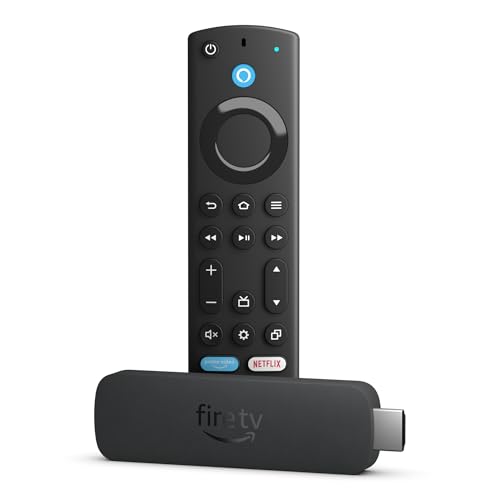


As an Amazon Associate we earn from qualifying purchases at no extra cost to you.
Quick Picks
| Product | Best for | Price |
|---|---|---|
| Fire TV Stick HD | Budget buyers with HD TVs | $17.99 |
| Fire TV Stick 4K Plus | Wi-Fi 6 homes wanting 4K | $39.99 |
| Fire TV Stick 4K Select | Value-focused 4K streaming | $19.99 |
| Fire TV Stick 4K Max | Peak performance with Wi-Fi 6E | $49.99 |
| Roku Streaming Stick HD | Roku ecosystem loyalists | $29.99 |
| Fire TV Stick 4K Max (Like-New) | Same flagship, lower price | $44.99 |
| Roku Streaming Stick Plus | 4K plus HDR10+ on Roku | $36.47 |
| Fire TV Stick 4K (Like-New) | Certified refurb with Wi-Fi 6 | n/a |
How We Picked
We evaluated every product in this roundup on four criteria: resolution and HDR support relative to the price, wireless connectivity standard (Wi-Fi 5, 6, or 6E) as a proxy for real-world streaming reliability, the depth of the search and discovery experience, and access to free and live TV content without extra hardware. We cross-referenced published specifications with aggregated owner feedback to flag where a product’s feature set does not translate smoothly into daily use. The result is a short list that covers genuinely different buyer scenarios rather than minor spec bumps.
The 8 Best Firetv Stick in 2026
Amazon Fire TV Stick HD (newest model)
If your television is 1080p and you want the simplest path to streaming without cable, this is the most affordable entry into the Fire TV ecosystem. It draws power directly from the TV, which means one fewer adapter cluttering your outlet, and setup takes minutes out of the box.
- Pro: Lowest price in the lineup at $17.99, making it essentially disposable if you upgrade your TV later.
- Pro: Free and live TV content is accessible through the same interface, removing the need for a separate antenna tuner on supported channels.
- Con: No 4K or HDR output, so pairing it with a modern 4K TV wastes the panel’s resolution capability.
Skip this one if your television supports 4K, because even the 4K Select at only two dollars more unlocks significantly better picture quality.
Amazon Fire TV Stick 4K Plus (newest model)
This model targets buyers who have a 4K television and a Wi-Fi 6 router. The combination matters because 4K streams demand sustained bandwidth, and older Wi-Fi standards often throttle high-bitrate content even when your internet plan provides enough raw speed.
- Pro: AI-powered Fire TV Search surfaces results faster than the older keyword-only approach, a point owners mention repeatedly in reviews.
- Pro: Hundreds of thousands of movies and shows available through the platform, plus free and live TV at no extra cost.
- Con: At $39.99 it sits close to the 4K Max, and if your router lacks Wi-Fi 6 you lose the headline advantage over the cheaper 4K Select.
Skip this if your home network is still on Wi-Fi 5, because the 4K Select delivers a similar experience for twenty dollars less in that environment.
Amazon Fire TV Stick 4K Select (newest model)
The 4K Select exists in a strange and appealing spot: it gives you genuine 4K output and AI-powered search at a price that barely exceeds the HD stick. For buyers upgrading a 4K television who do not care about Wi-Fi 6 or 6E, this is arguably the best value in the entire Fire TV Stick range.
- Pro: Start streaming in 4K for $19.99, a fraction of what 4K streaming hardware cost even a few years ago.
- Pro: AI-powered search and Alexa+ integration mean discovery is comparable to models twice its price.
- Con: Lacks Wi-Fi 6 or 6E, so performance in congested networks depends heavily on your router and placement.
Skip this if you already own a Wi-Fi 6 or 6E router and stream 4K content often, because buffering will be more noticeable here than on the 4K Plus or Max.
Amazon Fire TV Stick 4K Max (newest model)
The 4K Max is the flagship of the current Fire TV Stick lineup, and its headline feature is Wi-Fi 6E support. That tri-band standard opens a clear lane to your router, reducing interference that causes stuttering during high-bitrate streams. It also runs the fastest processor in the family, which translates to snappier menu navigation and quicker app launches.
- Pro: Wi-Fi 6E support provides the most reliable wireless streaming experience available from any Fire TV Stick.
- Pro: Free and live TV without cable or satellite is fully integrated, and AI-powered Fire TV Search makes finding content straightforward.
- Con: At $49.99 it is the priciest new stick here, and buyers with older routers will not see a meaningful advantage over the 4K Plus.
Skip this if your router predates Wi-Fi 6E, because you are paying a premium for a feature you cannot use.
Roku Streaming Stick HD with Voice Remote
Roku continues to compete in the entry-level HD segment with a stick that pairs well with non-Amazon ecosystems. The Voice Remote is a tangible convenience for users who prefer spoken search over typing, and Roku’s channel lineup remains one of the broadest in streaming.
- Pro: Voice Remote included, reducing friction for households where typing a remote is inconvenient.
- Pro: Roku’s platform offers extensive app availability, including many free ad-supported channels.
- Con: At $29.99 it costs more than the Fire TV Stick HD without offering any resolution or connectivity advantage over that model.
Skip this if you are already embedded in the Alexa ecosystem or if your primary use case is finding free content quickly, where Fire TV’s integrated approach has a clearer edge.
Like-New Amazon Fire TV Stick 4K Max streaming device
For buyers who want the 4K Max experience without paying full retail, the Like-New option saves five dollars and retains every spec that matters: Wi-Fi 6E, AI-powered search, and the fastest processor in the lineup. The “Like-New” designation means the unit has been inspected and restored to working order.
- Pro: Identical hardware and feature set to the $49.99 new 4K Max, including Wi-Fi 6E and free live TV.
- Pro: AI-powered Fire TV Search and Alexa+ integration are fully functional.
- Con: Availability fluctuates, and Like-New inventory can disappear before you are ready to buy.
Skip this if you need guaranteed stock or prefer the psychological comfort of an entirely new device, since the small savings may not offset that concern for some buyers.
Roku Streaming Stick Plus with Voice Remote – 4K & HDR10+
The Roku Stick Plus is the company’s 4K offering, and HDR10+ support means it can deliver expanded dynamic range on compatible televisions. At $36.47 it undercuts the Fire TV Stick 4K Plus while remaining competitive on picture quality for 4K content.
- Pro: HDR10+ support provides high dynamic range playback on TVs that adopt that standard rather than Dolby Vision.
- Pro: Voice Remote with Roku’s broad channel ecosystem gives flexible content access.
- Con: Lacks Wi-Fi 6 or 6E, so 4K streaming reliability depends entirely on your router and signal conditions.
Skip this if you want future-proof wireless connectivity, because Roku’s stick lineup here does not match the Wi-Fi standards available on comparable Fire TV models.
Like-New Amazon Fire TV Stick 4K (newest model)
This Like-New unit carries the same AI-powered Fire TV Search, Wi-Fi 6, and access to over 1.8 million movies and shows that define the current 4K Plus generation. The free and live TV integration and Alexa+ search work identically to their new counterparts.
- Pro: Wi-Fi 6 support and AI-powered search match the current-generation 4K Plus at a potential discount when stock is available.
- Pro: Over 1.8 million movies and shows in the catalog, plus free and live TV content.
- Con: Pricing is listed as n/a in available data, making it impossible to confirm value without checking live inventory.
Skip this if pricing uncertainty stops you from buying confidently, or if Like-New availability in your region is unreliable.
Buying Guide
Resolution and HDR Output
The single most consequential spec on a streaming stick is the maximum resolution it outputs. If your television is 4K and supports HDR, a stick limited to 1080p will never take advantage of the panel’s native detail or color range. Conversely, buying a 4K stick for a 1080p TV adds no picture benefit. Within HDR, the distinction between HDR10+, Dolby Vision, and plain HDR10 matters if your television favors one standard. Check your TV’s supported HDR formats before selecting a stick, because mismatched standards can mean no dynamic range benefit at all.
Wi-Fi Standard and Network Congestion
Wi-Fi generation determines how well a stick handles simultaneous network traffic. Wi-Fi 6 supports a broader channel width and improved scheduling, which reduces buffering when other devices are active. Wi-Fi 6E adds access to the 6 GHz band, which is often completely clear of legacy interference. If you stream 4K content and share your network with laptops, phones, and other smart devices, the Wi-Fi standard is as important as the processor inside the stick. Pair a Wi-Fi 6 stick with a Wi-Fi 6 router to actually benefit.
Search, Discovery, and Free Content
The best picture quality means little if you spend more time searching than watching. AI-powered search and Alexa+ integration on newer Fire TV models surface relevant results across apps in a single query, while older interfaces force you to navigate each app separately. For free and live TV, check whether the platform aggregates available channels into one guide or scatters them across apps. Owner feedback consistently identifies discovery friction as the most annoying long-term issue with budget streaming hardware.
Our Verdict
The Amazon Fire TV Stick 4K Select at $19.99 is our top pick for most buyers, because it delivers 4K output, AI-powered search, and free live TV at a price that is hard to argue with. If your Wi-Fi environment is congested or your router supports 6E, the 4K Max at $49.99 justifies its premium through measurably smoother streaming. Our budget pick is the Fire TV Stick HD at $17.99, which makes sense only for 1080p televisions. The one condition under which a non-Fire product wins clearly: if you already own a Roku TV or are deeply invested in the Roku channel ecosystem, the Roku Streaming Stick Plus at $36.47 keeps your setup unified without a learning curve.
FAQ
Do I need a 4K Fire TV Stick if my TV is not 4K?
No. A 4K stick on a 1080p television will output at the TV’s native resolution, so you gain no picture benefit. Save the money and choose the HD model unless you plan to upgrade your TV within a year or two.
What does “Like-New” mean and is it worth it?
Like-New indicates the device has been inspected, restored to full working order, and resold at a discount. Functionally it performs identically to a new unit, though the physical item may show minor cosmetic signs of prior handling.
Can I use a Fire TV Stick without an internet connection?
No. The Fire TV platform requires an active internet connection for nearly all content, including free and live TV channels, which are delivered over the internet rather than traditional broadcast signals.
Does the Alexa Voice Remote work for searching across all apps?
The Alexa Voice Remote searches across most major streaming apps through Fire TV’s integration layer, which aggregates results into a unified list. A small number of apps have limited or no search API support, so those results may require opening the app manually.









