
Key takeaways
- Upgrade your TV, instantly
- The newest Fire TV experience (2026)
- All your apps in one place
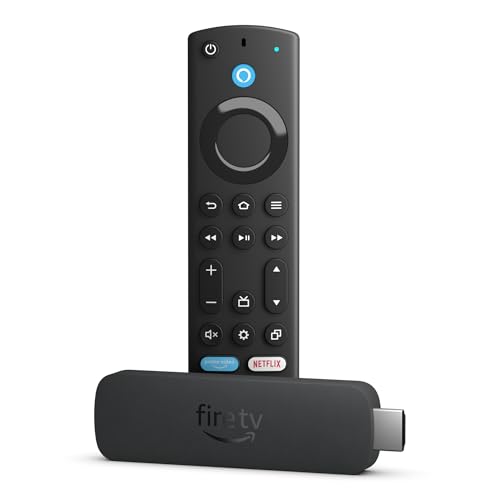
What is a Fire Stick, exactly? It is a small streaming device that plugs into an HDMI port on your television and turns any screen into a portal for movies, shows, live broadcasts, and apps without requiring a cable or satellite subscription. For a buyer, the concrete problem is straightforward: you want to stop paying for channels you barely watch while keeping access to the content you actually stream, and you want the whole setup to take minutes rather than an afternoon. The Fire TV Stick line from Amazon solves this by combining a compact hardware dongle with a voice remote and an interface that surfaces free and live television alongside subscription services.
What separates the best options in this category from mediocre ones comes down to a few factors. Resolution capability matters because a device that outputs only HD on a 4K panel leaves quality on the table. Wi-Fi generation determines whether streaming stays smooth when other devices share your network. And the software layer—search quality, voice assistant integration, and interface responsiveness—shapes the daily experience more than raw hardware does. Owner feedback consistently highlights setup friction, remote reliability, and whether the interface feels snappy or sluggish after months of use. This roundup compares the current lineup of Fire TV Sticks, a leading alternative from Roku, a replacement accessory, and a bundled protection option, all based on published specifications, listed prices, and aggregated owner reports.
Our top picks
 Amazon Fire TV Stick HD
- Upgrade your TV, instantly
- The newest Fire TV experience (2026)
- All your apps in one place
 Amazon Fire TV Stick 4K Plus
- Advanced 4K streaming - Elevate your entertainment with…
- The newest Fire TV experience (2026)
- Cloud gaming, no console required
 Amazon Fire TV Stick 4K Select
- Essential 4K streaming
- The newest Fire TV experience (2026)
- Make your TV even smarter



As an Amazon Associate we earn from qualifying purchases at no extra cost to you.
Quick Picks
| Product | Best for | Price |
|---|---|---|
| Fire TV Stick HD | First-time streamers on a tight budget | $17.99 |
| Fire TV Stick 4K Plus | 4K TV owners who want Wi-Fi 6 | $39.99 |
| Fire TV Stick 4K Select | 4K streaming at the lowest price | $19.99 |
| Fire TV Stick 4K Max | Power users on Wi-Fi 6E networks | $49.99 |
| Roku Streaming Stick HD | Viewers outside the Alexa ecosystem | $29.99 |
| Replacement Voice Remote | Lost or broken Fire TV remotes | $9.98 |
| Like-New Fire TV Stick 4K Max | Budget-conscious buyers wanting top specs | $44.99 |
| Fire TV Stick HD + 2-Year Protection | Anyone wanting coverage beyond the warranty | $22.48 |
How We Picked
We evaluated each product against four criteria drawn from published specs and recurring owner feedback patterns. First, resolution ceiling: does the device match or exceed the typical panel it will connect to? Second, wireless capability: which Wi-Fi generation does it support, and does that align with modern router standards? Third, software quality: how effective is the search and discovery layer, and does it reduce time spent hunting for something to watch? Fourth, value relative to price: does each successive tier justify its cost with a meaningful upgrade, or does it deliver marginal gains?
The 8 Best What Is A Fire Stick in 2026
Fire TV Stick HD
Amazon’s newest entry-level stick is the most accessible answer to “what is a Fire Stick” for someone who has never owned a streaming device. It is powered directly by the television through its HDMI connection, eliminating a separate wall adapter. Setup is described as effortless by owners, and the Alexa Voice Remote lets you speak commands to find shows faster using Alexa+. Free and live TV access means you can cut a cable subscription without losing broadcast channels. The price is remarkably low for a new-model device.
- Powered by the TV, no extra adapter clutter
- Alexa+ makes content discovery genuinely faster
- Resolution caps at HD, not 4K
Skip it if your television supports 4K and you care about picture sharpness on large screens.
Fire TV Stick 4K Plus
The 4K Plus is the middle child that punches above its weight. It streams hundreds of thousands of movies and shows across apps, supports Wi-Fi 6 for noticeably better performance in homes with many connected devices, and includes AI-powered Fire TV Search that surfaces content based on natural language queries. Free and live TV is available without any cable or satellite subscription, and Alexa+ helps you find shows faster through voice commands.
- Wi-Fi 6 keeps streams stable during network congestion
- AI-powered search reduces friction in content discovery
- Costs twice as much as the 4K Select for a modest spec bump
Skip it if your router only supports Wi-Fi 5 and you do not need the Plus’s specific upgrade path.
Fire TV Stick 4K Select
At this price point, the 4K Select is the best value in the entire lineup for anyone who owns a 4K television. It delivers the headline benefit—4K streaming—alongside AI-powered search and free live TV, all for less than twenty dollars. Alexa+ integration means voice discovery works here too. For buyers who simply want to understand what a Fire Stick does without paying for wireless features they may not use, this model strips away the extras while keeping the core experience intact.
- 4K output at a price that rivals HD-only competitors
- AI-powered search included, not just on premium models
- No Wi-Fi 6 support limits future-proofing on busy networks
Skip it if you live in a household with heavy simultaneous streaming and need Wi-Fi 6 or 6E.
Fire TV Stick 4K Max
The top of the Fire TV Stick range is built for households where every room streams simultaneously and the router supports Wi-Fi 6E. The AI-powered Fire TV Search, free and live TV without cable or satellite, and Alexa+ content discovery round out a package aimed at buyers who want no compromises in wireless performance. This is the model to choose if you want the best available hardware and already own a Wi-Fi 6E-capable router.
- Wi-Fi 6E support for the least congested wireless band
- AI-powered search handles complex, conversational queries
- Highest price in the lineup by a significant margin
Skip it unless your network actually uses 6E; on older routers you pay a premium for capability you cannot access.
Roku Streaming Stick HD with Voice Remote
Roku’s alternative occupies a different philosophical space. It delivers HD streaming with a dedicated voice remote, giving buyers a straightforward option outside the Amazon ecosystem. For households where Alexa devices are absent or unwanted, this represents the simplest path to free and paid content without tying your TV experience to one company’s assistant. Owners appreciate the no-nonsense interface and broad app catalog.
- Voice remote works without an Alexa-compatible household
- Interface is familiar to anyone who has owned a Roku product
- HD resolution only—no 4K path at this price tier
Skip it if you already own multiple Alexa devices and want unified voice control across your home.
Replacement Voice Remote for Fire Stick, TV Cube, Amazon Fire Smart TV
This is not a streaming device but a critical accessory. Owners report losing or damaging remotes is the single most common failure point in a Fire TV setup. At this price, a replacement remote restores full Alexa voice functionality to a Fire Stick, TV Cube, or Amazon Fire Smart TV without buying an entirely new unit. It is the cheapest way to extend the life of an existing device.
- Compatible with three different Amazon hardware lines
- Restores voice search and Alexa+ on a working stick
- Not a standalone solution if your actual device has failed
Skip it if your problem is the stick itself rather than the remote, since pairing requires a functioning device.
Like-New Fire TV Stick 4K Max
The like-new 4K Max delivers the identical Wi-Fi 6E support, AI-powered Fire TV Search, free live TV, and Alexa+ experience as the full-price version. The distinction is condition: these are inspected, cleaned, and repackaged units sold at a discount. For buyers who want top-tier specs without paying the premium, this is the most cost-effective path to the Max experience.
- Same Wi-Fi 6E and AI search as the new model
- Meaningful savings over the retail price
- Packaging and cosmetic condition may vary
Skip it if you need a sealed-box purchase for a gift or plan to resell the unit.
Fire TV Stick HD Bundle with 2-Year Protection Plan
The HD stick bundled with a 2-year protection plan is a pragmatic option for cautious buyers. For just a few dollars more than the stick alone, you gain coverage that addresses the most common long-term concern: a device that fails after the standard warranty expires. The bundle does not upgrade hardware specs but extends financial peace of mind.
- Protection adds meaningful value for minimal extra cost
- Same effortless setup and Alexa Voice Remote as the standalone
- Still HD only—resolution ceiling unchanged from the base model
Skip it if your TV is 4K; spend the difference on the 4K Select instead and forgo the plan.
Buying Guide
Resolution: HD vs. 4K
The single most consequential spec in this category is output resolution. If your television is 4K, an HD-only stick like the Fire TV Stick HD or the Roku Streaming Stick HD will deliver a soft, upscaled image on a large panel. The difference is most visible on screens 55 inches and above, where the eye can detect the gap between native 4K and upscaled content. Owners who report dissatisfaction with picture quality almost always used an HD stick on a 4K TV, a mismatch that is entirely avoidable given the minimal price difference between tiers.
Wi-Fi Generation and Network Congestion
Wi-Fi 6 and Wi-Fi 6E are not marketing fluff. On a busy home network with multiple streaming devices, phones, and smart appliances, an older Wi-Fi 5 stick will compete for bandwidth and may cause buffering or quality drops. The 4K Plus handles Wi-Fi 6, and the 4K Max handles 6E. If your router is newer than three years old, upgrading your stick’s wireless generation is a real improvement rather than a theoretical one. The 4K Select and HD models do not list Wi-Fi 6 support, making them better fits for lighter-usage households.
Software Experience: Search and Discovery
The AI-powered Fire TV Search and Alexa+ voice discovery are the features that most directly affect how much time you spend looking for something to watch rather than watching it. Owner feedback consistently praises the speed of voice-driven search compared to scrolling through app menus. The 4K Select includes AI-powered search at its low price, so you do not need to reach for the Max to benefit from this layer.
Our Verdict
Top pick: the Fire TV Stick 4K Plus offers the best balance of resolution, wireless capability, and smart search for the majority of 4K TV owners in 2026. Budget pick: the Fire TV Stick 4K Select delivers 4K output and AI-powered search for the price of a movie ticket, making it the value champion. Conditional winner: the Like-New 4K Max beats every new model if your router supports Wi-Fi 6E and you want maximum performance without paying the premium for sealed packaging.
FAQ
What is a Fire Stick and how does it work?
A Fire Stick is a small streaming device that connects to your television’s HDMI port and provides access to apps, streaming services, and live TV channels over a Wi-Fi connection. It is powered through the TV’s HDMI port or a USB adapter and controlled with a bundled voice remote.
Do I need a separate internet subscription for a Fire Stick?
You need an active internet connection to stream content, but you do not need a cable or satellite subscription. The Fire Stick accesses free live TV and on-demand content through your existing home Wi-Fi network.
Can a Fire Stick work on any television?
Any television with an available HDMI port can use a Fire Stick. Older TVs without HDMI require an adapter, which adds complexity and may limit resolution. Owners of very old sets should verify their input options before purchasing.
Is the Alexa Voice Remote included with every model?
Every Fire TV Stick model includes an Alexa Voice Remote in the box. The replacement remote listed separately is for buyers who have lost or damaged the original unit and need a new one to restore full functionality.









