
Key takeaways
- Pro: Reliable 4K video playback with robust digital signage looping and auto-start functions.
- Pro: Supports high-bitrate files via USB drives and microSD cards with broad file system compatibility.
- Con: User interface appearance feels somewhat dated despite its functional reliability.
Smart TVs and streaming sticks dominate living rooms, but they often fail when you need simple, reliable playback from local storage without an internet connection. Whether you are running a continuous video loop for digital signage, playing vintage family home movies from an external hard drive, or setting up a dedicated audio library, a classic media player bypasses the clutter of app updates, account logins, and mandatory Wi-Fi networks. These compact hardware units turn any standard monitor, projector, or older television into a standalone media station that boots up instantly and plays your files directly from flash drives and memory cards.
What separates a dependable classic media player from a frustrating one comes down to format decoding, navigation speed, and automated playback reliability. Inexpensive models frequently struggle with modern video codecs like H.265 or freeze when handling large storage volumes. Top-tier standalone players, by contrast, offer robust auto-resume features, seamless looping, broad file container support, and versatile outputs for both modern HDMI displays and older composite televisions. Based on published manufacturer specifications and long-term user feedback, we evaluated the leading options available in 2026 to help you select the right hardware for your setup.
Our top picks






As an Amazon Associate we earn from qualifying purchases at no extra cost to you.
Quick Picks
| Product | Best for | Price |
|---|---|---|
| Micca 4K Ultra-HD Media Player | Overall Video Playback & Signage | $54.99 |
| NEUMI Atom 4K Lite | Interactive Triggered Displays | $45.99 |
| HDMI Black Mini 1080p Player | Basic Legacy 1080p TVs | $39.99 |
| 4K Media Player with Auto Resume | Continuous TV Video Playback | $49.99 |
| Innioasis Y2 Classic Audio Player | Dedicated Lossless Hi-Fi Audio | $65.99 |
| HDMI 4K Ultra HD Advertising Player | Budget Commercial Looping | $42.99 |
| NEUMI Atom 1080P Full-HD | Low-Cost 1080p Video Playback | $37.99 |
| 4K USB/microSD Digital Signage Player | Entry-Level 4K Display Boards | $43.99 |
How We Picked
To identify the best classic media player models, we analyzed manufacturer spec sheets alongside verified owner feedback, focusing on four primary criteria: codec support, storage interface versatility, automation features, and output compatibility. We evaluated how effectively each unit decodes essential formats like H.265, H.264, and lossless audio without stuttering, alongside support for high-capacity USB drives and SD cards. We also prioritized continuous playback capabilities—such as power-on auto-play, seamless looping, and auto-resume—as well as hardware connections ranging from 4K HDMI ports to legacy analog AV jacks.
The 8 Best Classic Media Player in 2026
Micca 4K Ultra-HD Media Player
The Micca 4K Ultra-HD player is built for users who demand smooth video playback from portable drives alongside reliable automatic digital signage features. It excels in commercial kiosks and home home-theater shelves where consistent performance is mandatory. User feedback frequently praises its reliable automatic playback on startup and clear menu organization, making it exceptionally user-friendly.
- Pro: Reliable 4K video playback with robust digital signage looping and auto-start functions.
- Pro: Supports high-bitrate files via USB drives and microSD cards with broad file system compatibility.
- Con: User interface appearance feels somewhat dated despite its functional reliability.
Skip it if you only need basic 1080p playback on an older television and want to spend less.
NEUMI Atom 4K Lite
Designed with specialized interactive installations in mind, the NEUMI Atom 4K Lite is tailored for users managing exhibits, trade shows, and interactive retail displays. It supports digital triggers alongside high-resolution playback, allowing connected hardware to trigger specific media clips seamlessly. Reviews highlight its dependable responsiveness when switching between idle video loops and triggered content.
- Pro: Built-in digital trigger functionality ideal for interactive museum or retail displays.
- Pro: Smooth 4K decoding from both standard USB thumb drives and SD flash cards.
- Con: Advanced trigger setups require careful file naming and specific wiring configurations.
Skip it if you simply want a basic living room player for movie nights without automated or triggered controls.
HDMI Black Mini 1080p Player
The Black Mini 1080p HDMI Media Player is an ultra-compact, entry-level option suited for secondary displays, workshops, and legacy setups. It offers simple plug-and-play operation for standard-definition and 1080p Full-HD video files without complicated configuration. Owner feedback notes that its tiny footprint makes it simple to tuck behind mounted screens.
- Pro: Extremely compact chassis that mounts easily in cramped spaces.
- Pro: Straightforward setup for playing standard 1080p video, photos, and music.
- Con: Lacks modern 4K video decoding and struggles with newer H.265 encoded media files.
Skip it if your video library contains modern 4K rips or high-efficiency video codec files.
4K Media Player with Auto Resume
This 4K Media Player is aimed at viewers who watch long-form video content and episodic files from removable drives. It features HDMI and analog AV outputs along with a dependable auto-resume feature that picks up precisely where playback stopped. Customer sentiment emphasizes its solid build and convenience for continuous TV entertainment without network dependencies.
- Pro: Convenient auto-resume memory makes watching long movies and multi-part videos effortless.
- Pro: Flexible output options include both modern HDMI and legacy analog AV connections.
- Con: Remote control requires a direct line of sight to register button presses consistently.
Skip it if you are looking for advanced commercial trigger inputs rather than standard media viewing.
Innioasis Y2 Classic Audio Player
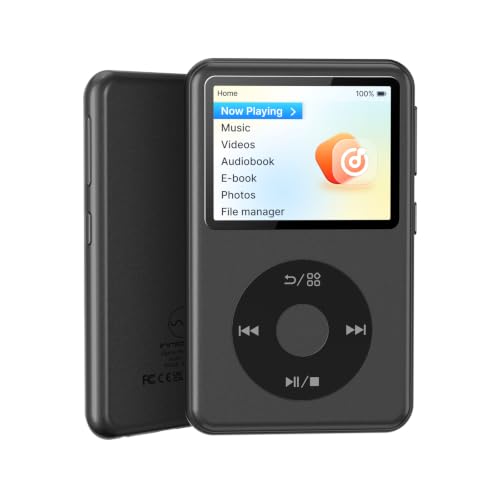
The Innioasis Y2 is tailored specifically for music enthusiasts who desire a dedicated, portable classic media player for audiophile-grade sound. It features a built-in DAC supporting lossless DSD and FLAC files, along with modern Bluetooth convenience and massive storage expansion up to 2TB. Reviews praise its sound clarity, playlist handling, and distraction-free offline listening experience.
- Pro: High-resolution DAC delivers outstanding fidelity for lossless DSD, FLAC, and MP3 files.
- Pro: Exceptional storage expansion supporting microSD cards up to 2TB in size.
- Con: Dedicated exclusively to music playback; does not output video to television screens.
Skip it if you are seeking a traditional stationary video player to hook up to an external television.
HDMI 4K Ultra HD Advertising Player
Aimed squarely at small businesses and promotional kiosks, this HDMI 4K player decodes an extensive variety of formats, including H.265, H.264, MP4, MKV, and ISO files. It outputs 4K at 30Hz, making it an economical choice for looping visual advertisements and photo slideshows. Owner reports highlight its comprehensive codec compatibility across diverse legacy and modern file types.
- Pro: Decodes an extensive list of video, audio, and image formats including H.265 and ISO.
- Pro: Excellent value for commercial advertising loops and continuous photo displays.
- Con: HDMI output is limited to a maximum refresh rate of 30Hz at 4K resolution.
Skip it if you require fast 60Hz 4K frame rates for high-motion sports or gaming captures.
NEUMI Atom 1080P Full-HD
The NEUMI Atom 1080P is a streamlined, budget-friendly media box designed for anyone looking to play standard HD video collections without overspending. It reads seamlessly from USB hard drives and SD cards, providing reliable video and photo playback for older HDTVs and analog sets. User feedback frequently mentions its ease of setup and reliable looping capabilities.
- Pro: Highly affordable price point for a dependable, brand-name media box.
- Pro: Simple menu system and reliable file looping for basic display applications.
- Con: Cannot decode modern 4K files or newer high-efficiency video encodings.
Skip it if you have a 4K television or plan to play files encoded with modern 4K codecs.
4K USB/microSD Digital Signage Player
This dedicated 4K signage player is engineered for users running video walls, menu boards, and storefront presentations from removable media. It combines high-definition 4K output with USB and microSD interfaces, ensuring straightforward content delivery without internet reliance. Owner reviews note its stability when left running continuously across long business shifts.
- Pro: Designed for continuous operation in menu boards and promotional display boards.
- Pro: Compact form factor with responsive USB and microSD card media reading.
- Con: Basic remote control layout requires time to master navigation settings.
Skip it if your primary goal is an interactive system that requires external physical sensor triggers.
Buying Guide
Video Codecs and Resolution Support
The most critical specification when shopping for a classic media player is decoding capability. Older players often support only MPEG-2, MPEG-4, and H.264 up to 1080p, which causes playback errors or stuttering when attempting to open modern files. If you manage a library of recently encoded video files, ensure the hardware explicitly lists H.265 (HEVC) decoding and 4K output capabilities. Choosing a unit with broad container support (such as MKV, MP4, and AVI) prevents the need to re-encode your files prior to viewing.
Automation, Looping, and Power-On Playback
For digital signage, art displays, or background ambient video, automated playback features are essential. Look for units that offer automatic play upon receiving power, which ensures the device resumes playing content immediately after a power outage without requiring remote control interaction. Seamless looping capabilities prevent black screen flashes between video repetitions, while an auto-resume memory function is crucial for home movie viewing, allowing you to stop playback and return to the exact timestamp later.
Storage Compatibility and Output Interfaces
Hardware connectivity determines how easily the media player integrates into your existing setup. Check the supported file system formats on USB ports and memory card slots; top units easily read FAT32, exFAT, and NTFS drives. Output flexibility is equally important. While HDMI is standard for modern displays, having an analog 3.5mm AV composite output allows you to connect the player to older CRT televisions, legacy projectors, or external stereo amplifiers.
Our Verdict
The Micca 4K Ultra-HD Media Player earns our top overall recommendation thanks to its rock-solid format support, dependable digital signage features, and high user satisfaction across diverse setups. If you are shopping on a strict budget for standard 1080p displays, the NEUMI Atom 1080P Full-HD is the best value choice, delivering hassle-free playback at an entry-level price. However, if your primary goal is high-fidelity, distraction-free music playback rather than TV video, the Innioasis Y2 Classic Audio Player wins with its dedicated DAC and massive storage capacity.
FAQ
Will a classic media player work on an older television without HDMI?
Yes, many classic media players include a composite 3.5mm AV output jack in addition to HDMI. By using a standard 3.5mm-to-RCA cable, you can connect these players directly to older CRT televisions or analog monitors without needing active signal converters.
Do classic media players require an active internet connection to work?
No, these devices are designed to operate entirely offline without Wi-Fi, Ethernet, or account logins. You simply load your media onto a standard USB flash drive, external hard drive, or SD card, plug it directly into the player, and navigate using the included remote control.
Can classic media players play video continuously on a loop for signage?
Most dedicated media players feature built-in auto-looping options that replay a single video or cycle through an entire folder endlessly. Many units also support auto-start on power-up, meaning the content begins playing automatically as soon as the device receives electrical power.
What drive format should I use for my USB storage device?
Most modern classic media players support FAT32, exFAT, and NTFS file systems. If you plan to play high-definition video files larger than 4GB, formatting your USB drive or memory card as exFAT or NTFS is recommended to bypass standard FAT32 file size limits.









