
Our Short List of 3
All 5 Picks at a Glance
| Product | Specs | Action |
|---|---|---|
 Logitech Brio 4K Webcam | Check price on Amazon | |
 Logitech C920x HD Pro Webcam | Check price on Amazon | |
 Anker PowerConf C200 2K Webcam | Check price on Amazon | |
 NexiGo N60 1080P Webcam | Check price on Amazon | |
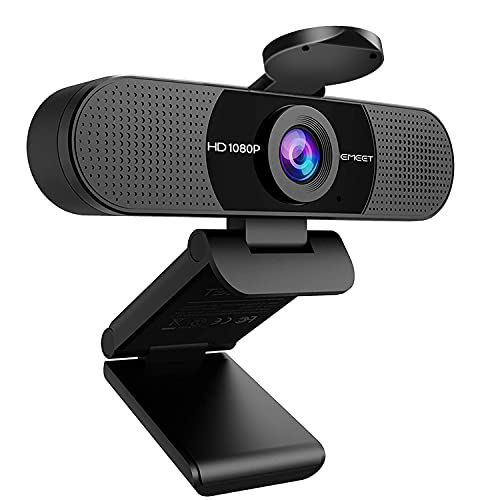 EMEET C960 1080P Webcam | Check price on Amazon |
Our Top Picks
- Logitech C920x HD Pro PC Webcam Full 1080p/30fps1 Pack2.8 x 1.7 x 3.7 inches0.4 poundsCheck on Amazon
Most built-in laptop cameras still top out at grainy 720p video, with a fixed lens, weak low-light handling, and a microphone that sits too far from your voice. An external webcam fixes all three problems at once. It raises resolution, adds autofocus or a wider field of view, and places better microphones closer to your face, so meetings, classes, interviews, and streams look deliberate instead of accidental.
This guide compares five laptop webcams that cover the main buying paths: a flagship 4K model for the sharpest image, a 2K model that balances detail and simplicity, and three proven 1080p models at the simpler end of the range. Every pick clips onto a laptop lid, connects over USB, and works with the major video platforms without extra hardware. The sections below explain how to choose, then break down each camera by its listed specifications and the type of user it suits best.
As an Amazon Associate, we earn from qualifying purchases.
How to Choose a Webcam for a Laptop
Start with resolution, because it decides how much detail the camera can deliver before software compression takes its share. A 1080p camera is the sensible baseline for work calls and classes, and it holds up well on the small windows most meeting platforms use. A 2K camera adds headroom for cropping and digital zoom while staying easy on bandwidth. A 4K camera goes further, keeping the picture sharp when the image is enlarged, recorded, or streamed at a larger size. Higher resolution only helps if your lighting and connection can support it, so match the camera to the calls you actually make.
Frame rate matters next, especially if you move while you talk. Most laptop webcams record calls at 30 frames per second, which looks natural for seated conversation. Models that offer 60 frames per second at 1080p or 720p produce smoother motion, which presenters, teachers, and streamers tend to prefer. For a static desk setup, 30 frames per second is rarely a limitation.
Field of view controls how much of the room appears in frame. A view around 65 to 78 degrees keeps the shot tight on your head and shoulders and limits background distractions. A view near 90 degrees fits a second person or shows more of a workspace, while very wide views past 100 degrees suit group calls around a table but can make a solo speaker look small and distant. Adjustable field of view is valuable on a laptop because desk distance changes from place to place.
Focus type shapes day-to-day convenience. Autofocus keeps you sharp as you lean in or back, and it helps when you hold an object up to the lens. Fixed-focus cameras are simpler and work well at a normal desk distance, but they cannot adapt when you move closer. If you present products, documents, or whiteboard notes on calls, autofocus is worth prioritizing.
Microphones are easy to overlook and hard to fix later. Dual microphones with noise reduction generally sound fuller and clearer than a single basic microphone, and they help when a laptop fan or air conditioner runs nearby. If you already use a headset or a separate microphone, camera audio matters less. If you rely on the camera alone, treat the microphone setup as a deciding factor rather than a bonus.
Finally, check the practical details. Confirm the connector matches your laptop ports, or that an adapter is included, since many current laptops ship with USB-C only. A privacy cover or shutter protects the lens and gives a physical off switch for peace of mind. A flexible clip that folds flat travels better, and a tripod thread adds options for desk stands. Software support also counts, because companion apps are where field of view presets, zoom, and image adjustments usually live.
Logitech Brio 4K Webcam
The Logitech Brio 4K is the flagship option in this group and the pick for anyone who wants the most detail a laptop webcam can offer. It records in 4K at 30 frames per second, with autofocus and a 5x digital zoom, and its RightLight 3 technology with high dynamic range adjusts exposure and contrast automatically when a window or bright lamp sits behind you. Three field of view presets let you choose a tight 65-degree framing, a middle 78-degree view, or a wider 90-degree view from the same camera.
It also handles sign-in and privacy unusually well. Optical and infrared sensors support Windows Hello facial recognition, so a look at the lens can unlock a compatible laptop. An attachable privacy shutter flips down when the camera is off duty. Dual omnidirectional microphones with noise canceling capture audio from up to about four feet away, and the Logi Options+ app provides zoom, color presets, and focus controls on Windows and Mac.
Who It Suits
The Brio 4K suits professionals who present on camera often, creators who record or stream from a laptop, and anyone whose lighting is difficult to control. Buyers who only join occasional calls will not use its full resolution, but for frequent on-camera work it is the most complete camera in this guide.
Logitech C920x HD Pro Webcam
The Logitech C920x HD Pro is the long-running 1080p standard that many laptop setups are still measured against. It delivers Full HD 1080p video at 30 frames per second, with autofocus and RightLight 2 light correction that brightens dim rooms and balances contrast. Its 78-degree field of view frames head and shoulders comfortably at a normal desk distance without pulling in too much of the room behind you.
Stereo audio comes from two omnidirectional microphones, and the camera connects by USB-A with plug-and-play setup on Windows, Mac, and ChromeOS. It works with Microsoft Teams, Google Meet, and Zoom, and the mounting clip fits laptop lids as well as external monitors. There is no built-in privacy shutter in the listed feature set, so buyers who want a physical lens cover should factor that in.
Who It Suits
The C920x suits remote workers, students, and first-time webcam buyers who want a proven 1080p camera with autofocus and stereo microphones, without paying for 4K. It is a strong default choice for everyday meetings and classes on almost any laptop.
Anker PowerConf C200 2K Webcam
The Anker PowerConf C200 sits between the 1080p models and the 4K flagship, offering 2K resolution for extra sharpness and cropping room. Its field of view adjusts between narrower and wider settings, listed at 78 and 95 degrees, so the same camera can frame a solo speaker tightly or include more of a desk and background. Low-light correction helps in evening rooms and shaded home offices where laptop cameras usually struggle most.
Audio is a clear priority here. The C200 uses stereo microphones with AI noise canceling, aimed at reducing keyboard clatter and room noise during meetings. A built-in privacy cover slides over the lens when the call ends, which is simpler than a separate cap that can be lost. The compact body clips onto a laptop lid and connects over USB, and the AnkerWork software provides image adjustments and field of view control.
Who It Suits
The PowerConf C200 suits meeting-heavy professionals who want sharper-than-1080p video, adjustable framing, and a built-in privacy cover in a compact camera. It also fits buyers whose rooms are often dim, thanks to its low-light correction and noise-focused microphone setup.
NexiGo N60 1080P Webcam
The NexiGo N60 takes the opposite approach to the C920x: instead of a tight frame, it uses a very wide 110-degree field of view that can show a whole desk, a small group, or a classroom corner from a laptop. That width is adjustable in the companion software, along with zoom and other image controls, so the framing can be narrowed when the full view is too much. Video is Full HD 1080p, and a built-in microphone covers everyday call audio.
A sliding privacy cover is built into the design, and setup is plug and play over USB with no drivers to install for basic use. The N60 works with Zoom, Skype, Teams, and other common platforms on laptop and desktop systems. Because the lens is fixed in its wide configuration, solo speakers who sit close to the screen may prefer one of the narrower cameras above, but for shared spaces the width is the whole point.
Who It Suits
The N60 suits teachers, families, and small teams who need more than one person in frame, plus anyone who wants a simple 1080p camera with a privacy cover and software framing control. It is the wide-angle pick of this guide.
EMEET C960 1080P Webcam
The EMEET C960 is the straightforward plug-and-play option in this group. It provides Full HD 1080p video with a 90-degree field of view, wide enough for a natural desk shot with some background context. Two built-in microphones handle call audio, and the listing highlights noise reduction so voices stay clear when a room is not perfectly quiet. Low-light correction is also part of the feature set, helping the image stay usable in dimmer rooms.
The C960 connects over USB Type-A, with an A-to-C adapter included in current listings, which makes it easier to use with newer laptops that have dropped USB-A ports. It works with Zoom, Teams, FaceTime, YouTube, and Google Meet, and current versions add a privacy cover. The focus is fixed, so it performs best at a typical seated desk distance rather than for close-up demonstrations.
Who It Suits
The C960 suits buyers who want the simplest possible upgrade from a built-in laptop camera: plug it in, clip it on, and join the call with better video and audio. It fits students, casual streamers, and home workers who sit at a consistent distance from the screen.
Frequently Asked Questions
Is 1080p enough for laptop video calls, or is 4K worth it?
For standard meetings and classes, 1080p is enough, because most platforms display your video in a small window and compress the feed. A 4K camera becomes worthwhile when you record video, stream at a larger size, or want room to zoom and crop while keeping the picture sharp, as with the Logitech Brio 4K in this guide.
Will these webcams work with a USB-C only laptop?
Most of them can, but the connection detail matters. The Logitech Brio 4K lists USB-A and USB-C support, and the EMEET C960 includes a USB-A to USB-C adapter in current listings. Cameras that connect by USB-A alone, such as the Logitech C920x, need a separate adapter or hub on a USB-C only laptop, so check the port situation before ordering.
How wide should the field of view be for one person?
For a single speaker at a desk, a field of view between about 65 and 90 degrees usually works best. The narrower end keeps the frame on your head and shoulders, while the wider end adds background context. Very wide views such as the 110-degree lens on the NexiGo N60 are designed for groups or shared spaces and can make a solo speaker look distant.
Do I still need a separate microphone with one of these webcams?
Not for most calls. Every camera in this guide includes built-in microphones, and the dual-microphone models with noise canceling or noise reduction are designed to carry a meeting on their own. A separate microphone or headset still helps in a loud room or for recorded content, but it is an upgrade rather than a requirement for everyday laptop calls.
Final Verdict
For most laptop owners, the Logitech C920x HD Pro remains the balanced choice: reliable 1080p video, autofocus, and stereo microphones in a plug-and-play camera. Buyers who want more should step up deliberately. The Logitech Brio 4K is the pick for maximum detail, adjustable framing, and Windows Hello sign-in, while the Anker PowerConf C200 offers a middle path with 2K resolution, adjustable field of view, and a built-in privacy cover. Choose the NexiGo N60 when a wide 110-degree view matters more than a tight frame, and the EMEET C960 when simplicity is the priority. Match the camera to your lighting, your ports, and how many people need to be in frame, and any of these five will be a clear step up from a built-in laptop camera.
Product and ASIN Reference
| Product | ASIN |
|---|---|
| Logitech Brio 4K Webcam | B09NBWWP79 |
| Logitech C920x HD Pro Webcam | B085TFF7M1 |
| Anker PowerConf C200 2K Webcam | B09MFMTMPD |
| NexiGo N60 1080P Webcam | B088TSR6YJ |
| EMEET C960 1080P Webcam | B07M6Y7355 |
More from Amazon
Programs that pair well with the guide above. Offers and eligibility are set by Amazon and may change.
Free shipping on eligible items, Prime Video and more. Eligible new members can start with a free trial.
Start a Prime free trialAd-free music streaming. Eligible new subscribers can start with a free trial.
Try Music Unlimited freeA Prime membership for ages 18-24 with a trial period. Eligibility is set by Amazon.
See Prime for Young AdultsAudiobooks and podcasts to listen to on the go. Eligible new members can start with a free trial.
Try Audible freeAs an Amazon Associate we earn from qualifying purchases.









