Key takeaways
- Our guide to the best workstation graphics cards compares professional GPUs for CAD, 3D rendering and video editing, with certified drivers and ECC memory.
As an Amazon Associate I earn from qualifying purchases.
The Short Answer
The best workstation graphics cards are professional GPUs built for CAD, 3D rendering, video editing and engineering simulation, not for gaming. A workstation card earns its place through certified professional drivers, error-correcting ECC memory, application certifications for tools such as AutoCAD, SolidWorks and Maya, and long-term driver support.
If you want one straightforward recommendation, start with the PNY NVIDIA RTX A2000 12GB. It brings 12GB of GDDR6 ECC memory and ray tracing hardware to a wide range of professional workloads, and it draws its power from the PCIe slot alone, so it fits many prebuilt workstations without a power-supply upgrade. For heavier rendering and larger assemblies, the PNY NVIDIA RTX A4000 with 16GB of ECC memory is the stronger step up. For small-form-factor builds and entry-level professional work, the PNY NVIDIA RTX A1000 delivers certified drivers and 8GB of memory in a single-slot card that draws just 50W.
Workstation GPUs and gaming GPUs are different tools for different jobs. A gaming card is tuned for frame rates and ships with game-ready drivers. A workstation card is tuned for accuracy and stability, ships with drivers validated and certified against professional applications, and carries ECC memory that corrects single-bit errors before they can corrupt a render. That distinction matters most when a crashed viewport costs hours of billable work.
This guide compares five workstation-class cards from the professional NVIDIA RTX line and explains how to match one to your software, your chassis and your workload.
Our Top Picks
- Best overall workstation GPU: PNY NVIDIA RTX A2000 12GB — 12GB GDDR6 ECC memory, ray tracing and AI acceleration in a slot-powered card.
- Best for heavy rendering and large assemblies: PNY NVIDIA RTX A4000 — 16GB GDDR6 ECC memory in a single-slot design for demanding professional scenes.
- Best compact workstation GPU: PNY NVIDIA RTX A1000 — 8GB GDDR6 memory, 50W power draw and four display outputs in a single-slot low-profile card.
- Best value entry-level workstation GPU: PNY NVIDIA RTX A2000 6GB — the same professional feature set as its 12GB sibling with a smaller memory pool for lighter CAD work.
- Best modern Ada-generation workstation GPU: NVIDIA RTX 2000 Ada Generation — 16GB GDDR6 memory on the newer Ada architecture.
Quick Comparison
| Card | Memory | Memory type | Outputs | Power draw | Form factor |
|---|---|---|---|---|---|
| PNY NVIDIA RTX A2000 12GB | 12GB GDDR6 | ECC | 4x mini DisplayPort | 70W | Low-profile, dual-slot |
| PNY NVIDIA RTX A4000 | 16GB GDDR6 | ECC | 4x DisplayPort | 140W | Single-slot |
| PNY NVIDIA RTX A1000 | 8GB GDDR6 | GDDR6 | 4x mini DisplayPort | 50W | Low-profile, single-slot |
| PNY NVIDIA RTX A2000 6GB | 6GB GDDR6 | ECC | 4x mini DisplayPort | 70W | Low-profile, dual-slot |
| NVIDIA RTX 2000 Ada Generation | 16GB GDDR6 | GDDR6 | 4x mini DisplayPort | 70W | Low-profile, dual-slot |
How to Choose a Workstation Graphics Card
Match the card to your software first
Every professional application has a different appetite for GPU resources. CAD tools such as AutoCAD and SolidWorks lean on driver certification and viewport stability, so a certified driver matters more than raw compute. Rendering engines such as V-Ray, OctaneRender and Blender Cycles lean on CUDA cores, RT cores and memory capacity, so VRAM size becomes the deciding factor. Video editing in Premiere Pro and DaVinci Resolve leans on hardware encoding and multi-display support. Before you compare cards, check your software vendor’s certified hardware list.
VRAM capacity decides what fits in memory
VRAM is the working space where your model, textures and render buffers live. When a scene exceeds VRAM, the application spills data to system memory and performance falls off sharply. As a working rule, 8GB covers light CAD and 1080p editing; 12GB covers medium assemblies, 4K timelines and moderate rendering; 16GB covers large assemblies and complex scenes. Buying more VRAM than you need is wasted budget, but buying too little is a bottleneck you will feel every day.
Certified drivers and ECC memory are the point
A workstation card’s headline feature is not speed. It is trust. Professional drivers go through certification checks against specific application versions, so a driver update is far less likely to break a viewport or introduce rendering artifacts. ECC memory detects and corrects single-bit errors in VRAM, which matters for long renders and simulations where one flipped bit can ruin an overnight job. Gaming cards lack both.
Check the physical fit and the power supply
Workstation cards come in low-profile and full-height variants, single-slot and dual-slot widths, and a wide range of power draws. A low-profile card such as the RTX A1000 or RTX A2000 fits small-form-factor workstations that a full-height card cannot enter. A 50W or 70W card draws all its power from the PCIe slot and needs no auxiliary connector, which makes it a drop-in upgrade for most prebuilt workstations. A 140W card such as the RTX A4000 needs a 6-pin connector and a power supply with headroom to spare.
Multi-display support matters more than you think
Professional work is multi-monitor work: a reference view on one screen, a timeline on another. Every card in this guide drives four displays from a single card. Check the connector type before you buy: several of these cards use mini DisplayPort outputs, so confirm you have the right cables for your monitors.
The Picks in Detail
1. PNY NVIDIA RTX A2000 12GB — Best Overall Workstation GPU
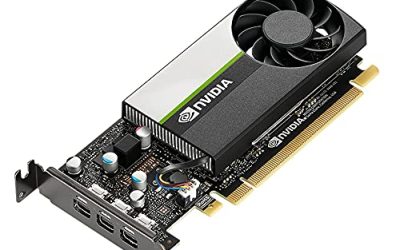
The RTX A2000 12GB is the sweet spot of the professional Ampere lineup, pairing 3,328 CUDA cores with 12GB of GDDR6 ECC memory, 26 second-generation RT cores and 104 third-generation Tensor cores. The low-profile, dual-slot card draws 70W from the PCIe slot, so it installs in a wide range of workstations without a power connector. Four mini DisplayPort outputs drive four displays.
For most professional users this is the right balance: the 12GB memory pool covers medium assemblies, 4K timelines and moderate rendering scenes, while the certified drivers and ECC memory keep long sessions stable.
Pros:
– 12GB of ECC memory covers a wide range of workloads
– Slot-powered 70W design fits most prebuilt workstations
– Ray tracing and Tensor cores accelerate rendering and AI-assisted work
– Low-profile form factor suits small and mid-tower builds
– Four mini DisplayPort outputs support multi-monitor desks
Cons:
– 12GB can be tight for very large assemblies and heavy texture scenes
– Dual-slot width blocks the adjacent PCIe slot
– Mini DisplayPort outputs need adapters for standard DisplayPort monitors
2. PNY NVIDIA RTX A4000 — Best for Heavy Rendering and Large Assemblies
The RTX A4000 steps up to 6,144 CUDA cores, 192 Tensor cores and 48 RT cores, with 16GB of GDDR6 ECC memory on a 256-bit interface. It is the most powerful single-slot professional GPU in its generation. Its four full-size DisplayPort outputs connect directly to standard monitors without adapters.
This card is built for large scenes and long renders: the 16GB memory pool holds bigger assemblies and heavier texture sets than the 12GB cards in this guide, and the higher core count shortens render times. The 140W board power means you need a 6-pin connector and a power supply with headroom, so confirm both before you buy.
Pros:
– 16GB of ECC memory handles large assemblies and complex scenes
– Single-slot design leaves adjacent slots free
– Full-size DisplayPort outputs connect directly to monitors
– Higher core count shortens rendering times
– Certified drivers for major CAD and engineering applications
Cons:
– 140W power draw requires a 6-pin connector and adequate power-supply headroom
– Full-height design does not fit low-profile or small-form-factor chassis
– More capability than light CAD and 2D drafting workloads need
3. PNY NVIDIA RTX A1000 — Best Compact Workstation GPU
The RTX A1000 is the entry point into the professional Ampere lineup, built for small machines. It carries 2,304 CUDA cores, 72 Tensor cores and 18 RT cores, with 8GB of GDDR6 memory on a 128-bit interface, in a low-profile single-slot card that draws just 50W. Four mini DisplayPort outputs drive up to four 5K displays, and the card ships with both full-height and low-profile brackets.
This is the card for compact workstations and small-form-factor builds where a second card needs the neighboring slot. The 8GB memory pool suits 2D CAD, light 3D modeling, BIM work and 1080p video editing. It is not the card for heavy rendering or large assemblies, but for its intended workload it delivers certified drivers and professional features in a package that fits almost anywhere.
Pros:
– Single-slot, low-profile design fits the smallest workstation chassis
– 50W power draw needs no auxiliary connector and adds little heat
– Certified professional drivers for CAD, BIM and 3D modeling tools
– Four display outputs support multi-monitor professional desks
– Ships with both full-height and low-profile brackets
Cons:
– 8GB of memory limits large assemblies and heavy rendering
– Lower core count means slower GPU rendering than the A2000 and A4000
– Mini DisplayPort outputs need adapters for standard monitors
4. PNY NVIDIA RTX A2000 6GB — Best Value Entry-Level Workstation GPU

The 6GB version of the RTX A2000 carries the same 3,328 CUDA cores, 104 Tensor cores and 26 RT cores as its 12GB sibling, with the same 192-bit interface and 288 GB/s of bandwidth, in the same low-profile dual-slot design drawing 70W from the slot. The difference is the memory pool: 6GB of GDDR6 ECC memory instead of 12GB.
That makes it a focused tool. For 2D drafting, light 3D CAD, BIM coordination and 1080p editing, 6GB is enough, and the card delivers the full professional feature set in a compact, slot-powered package. Where it falls short is in scenes that need more memory: large assemblies and texture-rich renders will push past 6GB. If your work is light today but growing, the 12GB version is the safer buy.
Pros:
– Same core count and feature set as the 12GB A2000
– ECC memory and certified drivers at an entry-level tier
– Slot-powered 70W design with no auxiliary connector needed
– Low-profile form factor fits compact workstations
– Four mini DisplayPort outputs for multi-monitor desks
Cons:
– 6GB of memory is a hard ceiling for larger scenes and 4K timelines
– Dual-slot width blocks the adjacent PCIe slot
– Mini DisplayPort outputs need adapters for standard monitors
5. NVIDIA RTX 2000 Ada Generation — Best Modern Ada-Generation Workstation GPU

NVIDIA RTX 2000 Ada Generation
The RTX 2000 Ada Generation brings the newer Ada Lovelace architecture to the compact workstation segment, with 16GB of GDDR6 memory, four mini DisplayPort outputs and a low-profile dual-slot design that draws 70W from the PCIe slot. It is the current-generation successor to the Ampere cards above, with the newer architecture’s improvements to ray tracing, AI acceleration and power efficiency.
For buyers refreshing a workstation now, the Ada generation is the forward-looking choice. The 16GB memory pool matches the A4000 for scene capacity while keeping the slot-powered 70W profile of the A2000: large memory and no auxiliary power connector. The newer architecture also means a longer runway of driver support ahead of it. Confirm your applications are certified for the Ada-generation drivers before you commit, since certification lists lag new hardware by a version or two.
Pros:
– 16GB of memory in a slot-powered 70W card
– Newer Ada architecture with improved ray tracing and AI features
– Low-profile design fits compact and prebuilt workstations
– Four mini DisplayPort outputs for multi-monitor desks
– Longer driver-support runway than the previous generation
Cons:
– Application certification lists can lag behind new-generation hardware
– Dual-slot width blocks the adjacent PCIe slot
– Mini DisplayPort outputs need adapters for standard monitors
Who Should Choose What
- The everyday CAD professional should start with the RTX A2000 12GB. Its memory, certified drivers and slot-powered design cover the widest range of daily professional work.
- The renderer and the large-assembly engineer should choose the RTX A4000. Its 16GB of ECC memory and higher core count are built for scenes that punish smaller cards.
- The small-form-factor builder should choose the RTX A1000. Its single-slot, 50W profile fits chassis that nothing else here can enter.
- The 2D drafter and light 3D modeler should consider the RTX A2000 6GB. It delivers the full professional feature set for workloads that will never need more than 6GB.
- The buyer refreshing a workstation now should look at the RTX 2000 Ada Generation. Its newer architecture and 16GB memory pool give it the longest useful life of the five cards here.
Common Mistakes
Buying a gaming card for professional work. A gaming GPU may look faster on paper and cost less per unit of raw performance, but it ships without certified professional drivers and without ECC memory. When a driver update breaks a viewport or a memory error corrupts a render, the savings disappear. Match the card class to the work, not to the benchmark chart.
Undersizing VRAM. Memory capacity is a hard ceiling. A card with too little VRAM forces the application to spill data to system memory, which can turn a smooth viewport into a stuttering one. Estimate the largest scene you will open, add headroom, and then choose.
Ignoring the chassis and the power supply. A full-height card will not fit a low-profile chassis, a dual-slot card blocks its neighbor, and a 140W card needs a connector and headroom that a compact prebuilt may not have. Measure the chassis and check the power supply before you order.
Skipping the certification list. Professional drivers are certified against specific application versions. A card that is not on your software vendor’s certified list may still work, but you lose the vendor’s support for graphics-related problems. Check the list first, especially for newer-generation cards.
Forgetting the display connectors. Several workstation cards use mini DisplayPort outputs. If your monitors use full-size DisplayPort or HDMI, budget for adapters or cables before the card arrives, or choose a card with full-size outputs such as the RTX A4000.
FAQ
What is the difference between a workstation graphics card and a gaming graphics card?
A workstation card ships with professional drivers validated and certified against CAD, DCC and engineering applications, and it carries ECC memory that corrects single-bit errors. A gaming card is tuned for frame rates and ships with game-ready drivers. For paid professional work, the certified driver and the ECC memory matter most.
How much VRAM do I need for CAD work?
For 2D drafting and light 3D modeling, 6GB to 8GB is enough. For medium assemblies and 4K timelines, 12GB is a comfortable target. For large assemblies and complex scenes, 16GB gives you the headroom to work without memory pressure.
Do workstation graphics cards need extra power connectors?
It depends on the card. The RTX A1000 at 50W, the RTX A2000 at 70W and the RTX 2000 Ada at 70W all draw their power from the PCIe slot and need no auxiliary connector. The RTX A4000 at 140W needs a 6-pin connector and a power supply with headroom to spare.
Can a workstation graphics card run games?
Yes, but it is not built for them. Its drivers are optimized for professional applications rather than game performance, so it will generally trail a gaming card built on similar silicon in game frame rates. If gaming is the priority, buy a gaming card; if professional work is the priority, buy a workstation card.
What does ECC memory do in a graphics card?
ECC memory detects and corrects single-bit errors in VRAM as they occur. In long renders and simulations, a single corrupted bit can produce a visible artifact or a crashed application. ECC memory catches that error before it reaches your work.
Is a single-slot workstation card better than a dual-slot one?
Neither is better in absolute terms. A single-slot card leaves the adjacent PCIe slot free for a second card or a capture card, which matters in compact builds. A dual-slot card usually has a larger cooler, which can run quieter under sustained load. Choose based on your chassis and on what else needs to live in it.
Conclusion
The best workstation graphics cards are the ones that match your software, your scene sizes and your chassis. For most professional users, the PNY NVIDIA RTX A2000 12GB is the balanced choice: 12GB of ECC memory, certified drivers and a slot-powered design that fits a wide range of workstations. Step up to the RTX A4000 when your scenes are large and your renders are long. Choose the RTX A1000 when your chassis is small and your workload is light. Pick the RTX A2000 6GB when your work is modest and settled. Look at the RTX 2000 Ada Generation when you want the newest architecture and the longest support runway.
Whatever you choose, check your software vendor’s certification list, measure your chassis, confirm your power supply, and size the memory for the largest scene you will open, not the average one.
More from Amazon
Programs that pair well with the guide above. Offers and eligibility are set by Amazon and may change.
Free shipping on eligible items, Prime Video and more. Eligible new members can start with a free trial.
Start a Prime free trialAd-free music streaming. Eligible new subscribers can start with a free trial.
Try Music Unlimited freeA Prime membership for ages 18-24 with a trial period. Eligibility is set by Amazon.
See Prime for Young AdultsAudiobooks and podcasts to listen to on the go. Eligible new members can start with a free trial.
Try Audible freeAs an Amazon Associate we earn from qualifying purchases.