Our Short List of 3

- Best for: NVIDIA players who find a fairly priced listing from a reputable seller.
- Screen size: 27 inches
- Resolution: 2560 x 1440 QHD
- Panel: Fast IPS
- Refresh rate: 240Hz

- Best for: Buyers who want the Alienware 240Hz QHD recipe with current production and warranty support.
- Screen size: 27 inches
- Resolution: 2560 x 1440 QHD Wide 1440p
- Panel: Fast IPS
- Refresh rate: 240Hz native, up to 280Hz overclocked over DisplayPort 1.4

- Best for: Mixed GPU and console setups that value color coverage and flexibility over the highest refresh rate.
- Screen size: 27 inches
- Resolution: 2560 x 1440 QHD
- Panel: Nano IPS
- Refresh rate: 165Hz, 180Hz overclocked
All 4 Picks at a Glance
| Product | Specs | Action |
|---|---|---|
| Alienware 27 Gaming Monitor AW2721D |
| Check price on Amazon |
| Alienware AW2723DF Gaming Monitor |
| Check price on Amazon |
| LG 27GP850-B UltraGear |
| Check price on Amazon |
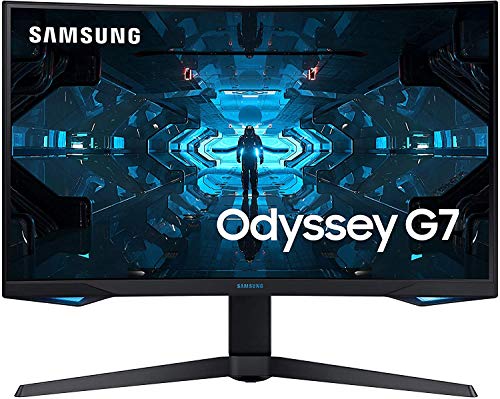 Samsung 27-inch Odyssey G7 |
| Check price on Amazon |
Key takeaways
- The Alienware AW2721D pairs a 27-inch QHD Fast IPS panel with 240Hz and G-Sync Ultimate. See how it stacks up against three current 27-inch QHD rivals.
The Alienware AW2721D poses an unusual buying question. On paper it is still one of the most complete 27-inch gaming monitors ever listed: a QHD Fast IPS panel at 240Hz, a hardware NVIDIA G-Sync Ultimate module, and VESA DisplayHDR 600. The catch is that Dell has discontinued it, so the real decision is whether a remaining marketplace listing makes sense against newer monitors with a full warranty and predictable stock.
Buyers fall into a few camps. Competitive players on NVIDIA cards are drawn to the AW2721D and its successor, the Alienware AW2723DF, which keeps the 240Hz QHD formula with overclock headroom. Players who switch hardware brands often land on the LG 27GP850-B, a Nano IPS model with G-Sync Compatible and FreeSync Premium badges. Fans of curved screens look at the Samsung Odyssey G7, a 240Hz QHD VA panel with a tight 1000R curve. The four picks below cover each path.
Quick Picks
As an Amazon Associate we earn from qualifying purchases.
| Product | Best for | Key spec from title |
|---|---|---|
| Alienware 27 Gaming Monitor AW2721D | Hardware G-Sync Ultimate at 240Hz | 27-inch QHD Fast IPS, 240Hz |
| Alienware AW2723DF Gaming Monitor | The current Alienware successor | 27-inch QHD, 240Hz native and 280Hz overclock |
| LG 27GP850-B UltraGear | Mixed PC and console desks | 27-inch QHD Nano IPS, 165Hz |
| Samsung 27-inch Odyssey G7 | Curved-screen immersion | 27-inch WQHD, 240Hz, 1000R curve |
How to Choose
Refresh Rate and the Cable That Unlocks It
A 240Hz badge only matters if your connection can carry it. On this class of monitor, the full QHD 240Hz signal runs over DisplayPort, while the HDMI inputs are capped lower, which surprises buyers who plug in a console-style cable and never see the top rate. Check what your graphics card offers, confirm the monitor’s DisplayPort version, and treat the headline refresh rate as a DisplayPort figure unless the listing says otherwise. Overclocked rates, such as 280Hz on the AW2723DF, also live on DisplayPort and may need a menu toggle before they appear.
Adaptive Sync: Hardware Module Versus Compatible
The AW2721D carries NVIDIA G-Sync Ultimate, a hardware module inside the monitor that also drives its HDR tone mapping. Most rivals here use G-Sync Compatible or FreeSync Premium validation instead, which runs over a standard scaler and works across a wider mix of graphics cards. If you run an NVIDIA card and want the module’s variable overdrive and certified HDR behavior, the hardware route has real value. If you swap between NVIDIA and AMD hardware, a dual-validated model such as the LG or Samsung avoids locking your monitor choice to one GPU brand.
Panel Type and HDR Tier
Fast IPS panels, used by both Alienware models and the LG, give wide viewing angles and fast gray-to-gray response, which suits shared desks and mixed gaming and work. The Samsung Odyssey G7 takes the other path with a curved VA panel whose native contrast is far deeper, so dark scenes look richer, though viewing angles are narrower. HDR follows a similar split: the AW2721D, AW2723DF, and Odyssey G7 carry VESA DisplayHDR 600, a step above the DisplayHDR 400 tier on the LG, and that difference shows in highlight detail more than in raw brightness numbers.
Stand Adjustment, Ports, and Desk Fit
These are large monitors with substantial stands, so measure your desk depth before ordering. Height, tilt, swivel, and pivot adjustment appears across this group, and the AW2723DF and LG add full pivot-to-portrait stands that help with second-screen layouts. Port mix matters too: the AW2721D includes a USB hub for peripherals, which keeps a keyboard and mouse dongle off your PC’s rear panel. If you plan a monitor arm instead, confirm the VESA mount pattern on the listing and remember that curved screens like the Odyssey G7 sit deeper on an arm than flat panels do.
The 4 Best Options
Alienware 27 Gaming Monitor AW2721D
- Best for: NVIDIA players who find a fairly priced listing from a reputable seller.
- Screen size: 27 inches
- Resolution: 2560 x 1440 QHD
- Panel: Fast IPS
- Refresh rate: 240Hz
NVIDIA players who find a fairly priced listing from a reputable seller.
This model is discontinued by Dell, so Amazon offers are third-party and stock is intermittent. Check the seller, the condition, and the return terms before ordering.
The AW2721D remains the reference point for this category because its specification combines things rivals still split apart: a Fast IPS QHD panel at a native 240Hz, a hardware G-Sync Ultimate module, and DisplayHDR 600 in a white Lunar Light chassis with a height-adjustable stand and USB hub. For an NVIDIA-based competitive setup, that mix is exactly what made it a flagship. The honest caveat is availability. Dell has ended production, so the Amazon listing now depends on marketplace sellers, and condition and warranty coverage vary by offer. Treat any listing as a used-market style purchase decision.
Alienware AW2723DF Gaming Monitor
- Best for: Buyers who want the Alienware 240Hz QHD recipe with current production and warranty support.
- Screen size: 27 inches
- Resolution: 2560 x 1440 QHD Wide 1440p
- Panel: Fast IPS
- Refresh rate: 240Hz native, up to 280Hz overclocked over DisplayPort 1.4
Buyers who want the Alienware 240Hz QHD recipe with current production and warranty support.
The 280Hz figure is an overclock over DisplayPort; the native rate is 240Hz, and HDMI connections run lower.
The AW2723DF is Dell’s own answer for buyers who like the AW2721D formula but want a monitor that is still in production. It keeps the 27-inch QHD Fast IPS panel and 240Hz native rate, then adds an overclock path to 280Hz over DisplayPort for players chasing the highest frame rates their card can hold. It trades the hardware G-Sync Ultimate module for G-Sync Compatible and AMD FreeSync Premium Pro validation, which widens GPU compatibility, and it keeps DisplayHDR 600 plus a full ergonomic stand with height, tilt, swivel, and pivot adjustment in the same Lunar Light styling.
LG 27GP850-B UltraGear
- Best for: Mixed GPU and console setups that value color coverage and flexibility over the highest refresh rate.
- Screen size: 27 inches
- Resolution: 2560 x 1440 QHD
- Panel: Nano IPS
- Refresh rate: 165Hz, 180Hz overclocked
Mixed GPU and console setups that value color coverage and flexibility over the highest refresh rate.
At 165Hz native it gives up a clear speed margin to the 240Hz models in this roundup.
LG’s 27GP850-B takes a slightly different balance. Its Nano IPS panel runs at 165Hz with an overclock to 180Hz, which is a step down from the 240Hz Alienware pair, but it covers a wider DCI-P3 color gamut and carries both NVIDIA G-Sync Compatible and AMD FreeSync Premium certification, so it pairs happily with either GPU brand or a console. The stand adjusts for tilt, height, and pivot, and the DisplayHDR 400 tier keeps HDR modest rather than showy. For a mixed desk that splits time between fast shooters, story games, and everyday work, that flexibility is the appeal.
Samsung 27-inch Odyssey G7
- Best for: Single-player and sim fans who want a deep curve and strong contrast at 240Hz.
- Screen size: 27 inches
- Resolution: 2560 x 1440 WQHD
- Panel: Curved VA, 1000R
- Refresh rate: 240Hz
Single-player and sim fans who want a deep curve and strong contrast at 240Hz.
The 1000R curve and large stand need real desk depth, and VA viewing angles are tighter than the IPS models here.
The Odyssey G7 is the curved alternative in this group. Its 27-inch VA panel wraps at a pronounced 1000R radius, the tightest curve in this class, and still delivers a 240Hz refresh rate at QHD with a 1ms response claim, G-Sync Compatible and FreeSync Premium Pro support, and DisplayHDR 600. VA contrast gives it the deepest blacks here, which flatters dark single-player scenes, while the curve pulls peripheral detail into view. The trade-offs are the stand’s footprint, narrower viewing angles than IPS, and a design that commits you to the curved format for work as well as play.
Which One Fits Your Situation
You Found an AW2721D Listing and Play on NVIDIA
If your setup is built around an NVIDIA card and a marketplace listing for the AW2721D shows a fair price from a seller with strong feedback, the hardware G-Sync Ultimate module and DisplayHDR 600 panel still justify it. Confirm the condition in writing, keep the return window in mind, and budget for the possibility that Dell warranty support has already run its course on a discontinued model.
You Want Alienware Speed Without the Marketplace Gamble
Choose the AW2723DF. It preserves the essentials of the older flagship, the 27-inch QHD Fast IPS panel, 240Hz native speed, and DisplayHDR 600, while adding a 280Hz overclock and current retail availability. You give up the hardware G-Sync module, but you gain a standard warranty, fresh stock, and dual adaptive-sync validation that also covers AMD cards if you change teams later.
Your Desk Serves a PC and a Console
The LG 27GP850-B fits a shared desk best. Its dual G-Sync Compatible and FreeSync Premium badges cover both GPU brands, the Nano IPS panel’s wide color gamut suits creative work, and the height and pivot stand makes long mixed sessions easier to arrange. The 165Hz ceiling is the compromise, and for most mixed libraries it is a reasonable one.
You Mostly Play Immersive Single-Player Games
The Samsung Odyssey G7’s 1000R curve and VA contrast were designed for exactly this use. Dark scenes hold their depth, the wrap fills peripheral vision in racing and flight titles, and 240Hz keeps fast camera moves clean. Just confirm your desk can take the stand’s depth and that you are comfortable reading text on a strongly curved screen during the day.
Common Mistakes
- Paying collector-level marketplace prices for the discontinued AW2721D when the current AW2723DF sells through normal retail channels.
- Connecting with HDMI and assuming the monitor is faulty when the 240Hz option never appears; use DisplayPort for the full QHD high-refresh signal.
- Skipping the seller and condition check on third-party listings for out-of-production models, where warranty coverage differs by offer.
- Treating G-Sync Compatible and G-Sync Ultimate as the same thing; only the AW2721D here has the hardware module.
- Ignoring stand depth and VESA mount details until the monitor is on the desk and crowding the keyboard.
Frequently Asked Questions
Is the Alienware AW2721D still being made?
No. Dell has discontinued the AW2721D, and its successor is the AW2723DF. The Amazon listing for the older model remains live through marketplace sellers, so availability, condition, and warranty terms depend on the individual offer. Buyers who want standard retail stock and a fresh manufacturer warranty should look at the AW2723DF instead.
Does the AW2721D work with AMD graphics cards?
The AW2721D’s adaptive sync is built around NVIDIA’s G-Sync Ultimate hardware module, and the listing does not carry a FreeSync certification. An AMD card will still drive the panel at fixed refresh rates, but variable refresh is an NVIDIA-side feature here. Players who switch GPU brands are better served by the dual-validated AW2723DF, LG 27GP850-B, or Odyssey G7.
Which cable do I need for 240Hz at QHD?
Use the DisplayPort connection. On this generation of 27-inch QHD monitors, DisplayPort carries the full 240Hz signal, and the AW2723DF’s 280Hz overclock also runs over DisplayPort 1.4. The HDMI inputs on these models are capped at lower refresh rates at this resolution, which is the most common reason the top rate goes missing in the settings menu.
Should I buy the AW2721D or the AW2723DF in 2026?
For most buyers, the AW2723DF is the safer purchase: it is in production, widely stocked, and adds a 280Hz overclock. The AW2721D still appeals to NVIDIA owners who specifically want the hardware G-Sync Ultimate module and find a well-priced listing from a trusted seller. Decide based on how much that module is worth against warranty and availability.
More from Amazon
Programs that pair well with the guide above. Offers and eligibility are set by Amazon and may change.
Free shipping on eligible items, Prime Video and more. Eligible new members can start with a free trial.
Start a Prime free trialAd-free music streaming. Eligible new subscribers can start with a free trial.
Try Music Unlimited freeA Prime membership for ages 18-24 with a trial period. Eligibility is set by Amazon.
See Prime for Young AdultsAudiobooks and podcasts to listen to on the go. Eligible new members can start with a free trial.
Try Audible freeAs an Amazon Associate we earn from qualifying purchases.