Key takeaways
- Our roku streaming stick review 2086.html covers picture quality, Wi-Fi range, remote, apps, and setup to help you pick the right Roku stick for your TV.
Roku Streaming Stick Review 2086.html: A Simple Stick That Makes Almost Any TV Smart
This roku streaming stick review 2086.html looks at what the Roku Streaming Stick line actually does in a living room, which version fits which television, and where the limits sit. The short answer is that the Roku Streaming Stick 4K is the version most households should start with, because it pairs 4K picture quality with Dolby Vision and HDR10+ support, long-range Wi-Fi, and the familiar Roku home screen in a device that hides behind the television. If your television is not a 4K model, or if you want the lowest-cost way into the Roku system, the standard Roku Streaming Stick covers the same interface and app library in high definition. The newer Roku Streaming Stick Plus sits between those two ideas, bringing 4K and HDR10+ to buyers who do not need Dolby Vision.
A streaming stick matters because many televisions age faster as smart televisions than they do as screens. The panel may still look fine, while the built-in apps grow slow, lose updates, or miss a service you want. A stick replaces the software side of the television without replacing the television itself. It plugs into an HDMI port, draws power from a USB connection or a wall adapter, connects to your home Wi-Fi network, and presents a single home screen with your apps in rows. Roku has kept that home screen deliberately plain, with no folders to manage and a remote most people learn in a single evening.
This review focuses on the Roku Streaming Stick family as a whole, with the Streaming Stick 4K as the central model. The three sticks share the same Roku operating system, the same broad app catalogue, and the same basic setup path. They differ in resolution, high dynamic range support, Wi-Fi hardware, remote features, and the televisions they suit best. Understanding those differences is more useful than memorising a specification sheet, because the right choice depends on your television, your router location, and how you watch.
Quick Picks
| Product | Best For | Key Spec |
|---|---|---|
| Roku Streaming Stick 4K | Most 4K televisions | 4K resolution, Dolby Vision, HDR10+, long-range Wi-Fi |
| Roku Streaming Stick Plus | 4K televisions without Dolby Vision | 4K resolution, HDR10+, voice remote |
| Roku Streaming Stick | High-definition televisions and second rooms | High-definition resolution, HDR10+, voice remote |
How to Choose a Roku Streaming Stick
Match the Stick to Your Television Resolution
Resolution is the first filter, and it is the simplest. A 4K stick on a high-definition television still works, but it cannot show more detail than the panel can display, so the extra capability goes unused. A high-definition stick on a 4K television works too, yet it leaves the sharper panel underused and can make the upgrade feel incomplete. Check the television specification or the label on the back of the set before you choose. If the set is 4K, choose a 4K stick. If it is a 1080p set in a bedroom, a kitchen, or a guest room, the standard stick is a sensible fit. If you plan to replace the television within a year, buying the 4K stick now avoids buying twice.
Check High Dynamic Range Support
High dynamic range matters as much as resolution once you sit down to watch. Dolby Vision and HDR10+ adjust brightness and colour scene by scene, which can make a dark drama easier to follow and a bright nature programme look more natural. The Streaming Stick 4K supports Dolby Vision, HDR10+, HDR10, and HLG. The Streaming Stick Plus supports HDR10+ and HDR10. The standard stick supports HDR10+. Your television must also support the same format for the benefit to appear, so check the television manual or the picture settings menu. A television that supports Dolby Vision pairs best with the Streaming Stick 4K. A television that supports HDR10+ but not Dolby Vision pairs well with the Streaming Stick Plus.
Consider Wi-Fi Range and Router Location
Wi-Fi range is where the Streaming Stick 4K earns its keep in many homes. It uses a long-range Wi-Fi receiver built into the power cable, which places the antenna away from the back of the television and closer to open air. That design helps in rooms far from the router, in homes with thick walls, and in setups where the television sits inside a cabinet. The other sticks use standard Wi-Fi built into the stick body. If your router sits in the same room as the television, standard Wi-Fi is usually enough. If the signal must cross two rooms, a floor, or a brick wall, the long-range receiver is worth prioritising. A wired connection is not available on these sticks, so Wi-Fi quality is part of the purchase decision rather than an afterthought.
Look at the Remote in the Box
Every current Roku Streaming Stick ships with a voice remote, but the details differ by model and by bundle. The standard voice remote includes a microphone button for spoken search, shortcuts to popular services, and television power and volume controls. Some bundles include a rechargeable voice remote with a lost-remote finder, hands-free voice control, and a headphone jack for private listening. Think about how you watch at night, whether you often misplace the remote, and whether private listening matters to you. A household that watches late at night may value the headphone jack more than a household that watches together in the evening. The remote is the part of the stick you touch every day, so it deserves as much attention as the picture specification.
Count the Apps and Channels You Actually Use
Roku carries the major subscription services, free ad-supported channels, live television apps, sports apps, music apps, and the Roku Channel itself. Before choosing, list the services your household uses every week. Confirm that each one has a Roku app, and check whether any service you rely on is tied to a particular platform. Most households find the Roku catalogue complete, but a household that depends on a single niche app should confirm its presence first. The Roku home screen also lets you move apps into your preferred order and hide apps you never open, which keeps the interface tidy as the list grows.
Think About Speed and Storage
A stick needs enough memory and storage to open apps quickly, keep the home screen responsive, and hold the apps you install. The Streaming Stick 4K carries more memory and storage than the earliest Roku sticks, which shows in faster app launches and smoother navigation between services. The newer sticks also benefit from recent Roku operating system updates that tighten up the interface. If your current smart television feels slow, almost any current stick will feel faster, but the 4K models give you the most headroom for future app updates. Households that install many apps should favour the models with larger storage.
Plan the Setup and Power Source
Setup is straightforward, yet a little planning avoids frustration. The stick needs a spare HDMI port, a power source, and a Wi-Fi password. Some televisions supply enough power through a USB port, while others need the included wall adapter. The long-range Wi-Fi receiver on the Streaming Stick 4K sits inline on the power cable, so it needs a little space behind the television. Measure the gap between the television and the wall, especially for wall-mounted sets, and keep the remote batteries or charging cable within reach during setup.
The Best Roku Streaming Stick Review 2086.html Reviewed
Roku Streaming Stick 4K
The Roku Streaming Stick 4K is the flagship stick in this review and the model most buyers should consider first. It streams in 4K resolution at up to 60 frames per second, supports Dolby Vision, HDR10+, HDR10, and HLG, and passes Dolby Atmos audio through to a compatible soundbar or receiver. Its long-range Wi-Fi receiver is the practical difference in everyday use, because it keeps the connection steady in rooms where a standard stick might buffer or drop to a lower resolution. The voice remote includes television power and volume controls, and the Roku operating system presents the same clean grid of apps found on every Roku device.
This stick suits a household with a 4K television, a household with a router in another room, and anyone who wants the fullest picture quality Roku currently puts in a stick. It also suits a household replacing a slow built-in smart platform, and viewers who watch films and prestige drama, where Dolby Vision and Atmos support make a visible and audible difference.
Who should skip it: owners of high-definition televisions who do not plan to upgrade the set, and buyers who want the lowest-cost Roku stick for a rarely used second television. In those cases the extra picture capability goes unused, and a simpler stick covers the same apps for less. It is also worth skipping if your television already has a fast, complete smart platform that you are happy with, since a stick adds a second interface rather than a new screen.
Roku Streaming Stick Plus
The Roku Streaming Stick Plus is the newer middle model in the Roku stick range, aimed at buyers who want 4K and HDR10+ without paying for Dolby Vision. It streams in 4K resolution, supports HDR10+ and HDR10, and ships with a voice remote. Its design follows the same slim stick shape as the rest of the family, so it tucks behind the television and stays out of sight. The Roku operating system, app library, and setup path are the same as on the Streaming Stick 4K, which means the daily experience feels familiar from the first evening.
This stick suits a household with a 4K television that supports HDR10+ but not Dolby Vision, and a household that wants a current 4K stick at a step below the flagship. It suits a second 4K television in a bedroom or a home office, where the main television already has the top model. It also suits buyers who are upgrading from an older high-definition stick and want a visible step up in sharpness without changing the interface they already know.
Who should skip it: owners of Dolby Vision televisions who watch a lot of films, since the Streaming Stick 4K unlocks the format their panel already supports. Owners of high-definition televisions should also skip it for now, because the 4K resolution cannot show on a 1080p panel. If your router sits far from the television and your connection is already marginal, the long-range Wi-Fi receiver on the Streaming Stick 4K may be the better fit.
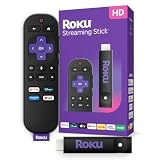
Roku Streaming Stick
The standard Roku Streaming Stick is the entry point to the current Roku stick range, and it is the right choice for high-definition televisions. It streams in high-definition resolution, supports HDR10+, and ships with a voice remote. It runs the same Roku operating system as its larger siblings, so it carries the same app library, the same search, and the same simple home screen. Its compact shape fits easily behind a wall-mounted set, and its setup takes the same few minutes as the other models.
This stick suits a bedroom television, a kitchen television, a guest room, a student flat, or any high-definition set that needs a faster smart platform. It suits a household that wants Roku in a second room without duplicating the top specification everywhere. It also suits a buyer who is new to streaming sticks and wants to learn the Roku system before deciding whether a 4K upgrade is worth it later.
Who should skip it: anyone with a 4K television as their main set, since the high-definition output leaves the panel underused. Anyone who watches a lot of Dolby Vision content should also look at the Streaming Stick 4K instead. If your main television is 4K and you watch films most evenings, the standard stick will feel like a compromise from the first night.
What to Check Before You Buy
Check the television first. Confirm the resolution, the high dynamic range formats it supports, and the number of spare HDMI ports. A television with one HDMI port already used by a soundbar or a games console may need a switch or a rearrangement before a stick can join the setup. Check the audio path as well: if you use a soundbar, confirm that it accepts audio from the television HDMI input, so that Dolby Atmos can reach it when the content supports it.
Check the network next. Run a speed check on a phone in the room where the television sits, at the time of day you usually watch. If the result is weak, move the router, add an access point, or favour the Streaming Stick 4K with its long-range receiver. A stick cannot fix a network that is already struggling, and a weak signal shows up as buffering or lower resolution rather than as a fault in the stick itself.
Check the power situation. Some television USB ports cut power when the set is switched off, which forces the stick to restart each time. The included wall adapter avoids that behaviour and gives the stick a stable supply. If you use the wall adapter, confirm that a spare socket sits near the television, and that the cable run stays tidy behind the set.
Check the remote and the account. You will need a Roku account to finish setup, and you will sign into each streaming service separately. Gather the passwords before you start, and decide whether to use a single Roku account across several sticks in the same home. A shared account keeps the app layout consistent from room to room, while separate accounts let each room keep its own layout.
Check the return and support terms at the retailer you buy from, and keep the box until the stick has run for a few days. Most setup problems appear in the first week: a Wi-Fi password typed wrong, an app that needs an update, or an HDMI port that needs reseating. Keeping the packaging makes an exchange straightforward if the stick does not suit your television after all.
FAQ
Is the Roku Streaming Stick 4K good for a 4K television?
Yes, it is the strongest match in the Roku stick range for a 4K television. It streams in 4K resolution, supports Dolby Vision and HDR10+, and includes long-range Wi-Fi for rooms far from the router. Pair it with a 4K television that supports Dolby Vision to get the full benefit, and check that your subscription plan for each service includes 4K streaming where that matters to you.
What is the difference between the Roku Streaming Stick and the Streaming Stick 4K?
The standard stick streams in high definition and supports HDR10+, while the Streaming Stick 4K streams in 4K resolution and adds Dolby Vision, HDR10+, and a long-range Wi-Fi receiver. Both run the same Roku operating system and carry the same app library. Choose the standard stick for a high-definition television and the 4K stick for a 4K television.
Does the Roku Streaming Stick need Wi-Fi?
Yes, it connects to your home Wi-Fi network to stream content, download apps, and receive software updates. It does not have an Ethernet port, so the quality of your Wi-Fi connection shapes the viewing experience. If the signal in the television room is weak, improve the network or choose the Streaming Stick 4K with its long-range receiver.
Can I use a Roku Streaming Stick on an older television?
Yes, as long as the television has a spare HDMI port and a power source for the stick. Older high-definition televisions pair well with the standard Roku Streaming Stick, which can make a slow or outdated smart platform feel new again. The stick handles the apps and the interface, while the television continues to handle the picture and the sound.
Does Roku charge a monthly fee for the stick itself?
No, Roku does not charge a monthly fee for using the stick or the Roku operating system. You pay for the device once, and then you pay only for the subscription services you choose to use. Many free channels and the Roku Channel are available without a subscription, alongside the paid services you may already use.
Bottom Line
This roku streaming stick review 2086.html points to a simple conclusion: choose the stick that matches your television, and the rest of the decision falls into place. The Roku Streaming Stick 4K is the best fit for most 4K televisions, thanks to its Dolby Vision support, HDR10+ support, and long-range Wi-Fi. The Roku Streaming Stick Plus is a sensible 4K choice for televisions that support HDR10+ without Dolby Vision. The standard Roku Streaming Stick is the right fit for high-definition televisions and second rooms. All three share the same plain home screen, the same broad catalogue, and the same short setup, so the choice is about resolution, high dynamic range, and Wi-Fi range. Match those three factors to your room, and the stick should serve the television well for years.
Disclosure: As an Amazon Associate, we may earn from qualifying purchases.
More from Amazon
Programs that pair well with the guide above. Offers and eligibility are set by Amazon and may change.
Free shipping on eligible items, Prime Video and more. Eligible new members can start with a free trial.
Start a Prime free trialAd-free music streaming. Eligible new subscribers can start with a free trial.
Try Music Unlimited freeA Prime membership for ages 18-24 with a trial period. Eligibility is set by Amazon.
See Prime for Young AdultsAudiobooks and podcasts to listen to on the go. Eligible new members can start with a free trial.
Try Audible freeAs an Amazon Associate we earn from qualifying purchases.