
Our Short List of 3

- Best for: Hardcore gaming in a house full of connected devices.
- Tri-band WiFi 6, AX11000
- 1.8 GHz quad-core processor
- 2.5G Ethernet port
- WTFast game acceleration

- Best for: Competitive play where choosing the closest server matters.
- Dual-band WiFi 6, AX5400
- DumaOS 3.0 with geo-filtering
- 1.5 GHz triple-core processor
- 4 x 1G Ethernet ports

- Best for: Best value gaming router with a dedicated gaming port.
- Dual-band WiFi 6, up to 5,700 Mbps
- 2.5G Ethernet port
- Dedicated gaming port
- Mobile Game Mode
All 4 Picks at a Glance
| Product | Specs | Action |
|---|---|---|
| ASUS ROG Rapture GT-AX11000 Gaming Router |
| Check price on Amazon |
| NETGEAR Nighthawk Pro Gaming XR1000 Router |
| Check price on Amazon |
| ASUS RT-AX86U Pro (AX5700) Gaming Router |
| Check price on Amazon |
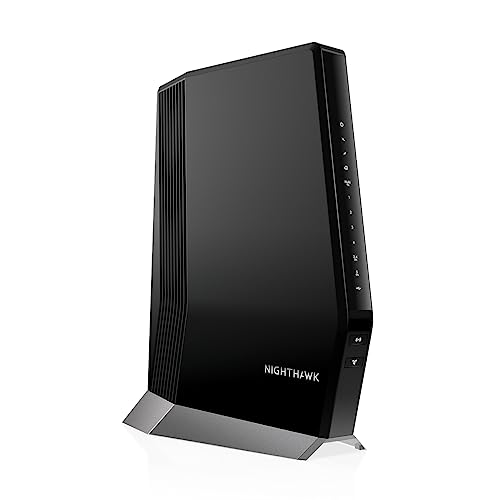 NETGEAR Nighthawk CAX80 Modem-Router Combo |
| Check price on Amazon |
Key takeaways
- Compare the 5 best routers and modems for gaming in 2026: ASUS ROG and NETGEAR Nighthawk models built for low ping, fast WiFi 6 and stable online play
Online gaming punishes a weak network in a way streaming video never does. A video buffers ahead and hides a slow connection, but a game sends every input to a server and waits for the answer, so a spike in ping shows up immediately as a shot that misses or a character that teleports. A gaming router attacks that problem with traffic prioritisation that puts game packets first, a fast processor that handles many devices at once, and a stable connection that holds up when the rest of the household starts streaming.
This guide is for gamers who want lower ping and fewer dropouts, whether they play on a console, a PC or a phone. The five picks below come from the Amazon listings themselves — ASUS ROG and NETGEAR Nighthawk routers plus one modem-router combo — chosen for gaming features, WiFi 6 speed and the ability to keep a connection steady under load.
Quick Picks
As an Amazon Associate we earn from qualifying purchases
| Product | Best for | Key spec from title |
|---|---|---|
| ASUS ROG Rapture GT-AX11000 | Hardcore gaming with many devices | Tri-band WiFi 6, AX11000 |
| NETGEAR Nighthawk XR1000 | Competitive play with DumaOS | Dual-band WiFi 6, AX5400 |
| NETGEAR Nighthawk RAX120 | Fast WiFi 6 for a large home | AX6000, 12 streams |
| ASUS RT-AX86U Pro | Best value gaming router | AX5700, dedicated gaming port |
| NETGEAR Nighthawk CAX80 | Cable internet plus gaming router | DOCSIS 3.1 modem plus AX6000 |
How to Choose
Gaming traffic needs priority, not just speed
Raw internet speed matters less for gaming than how the router treats game traffic, because a game uses very little bandwidth but needs every packet to arrive quickly and in order. A gaming router with quality-of-service controls can put game packets ahead of a video stream or a cloud backup, so your ping stays low even when someone else in the house starts a download. Look for a dedicated gaming port or a gaming mode in the listing, and check that the router lets you prioritise a specific device, such as your console or PC, over everything else on the network.
The processor inside the router matters
A router is a small computer, and its processor decides how many devices it can serve at once without slowing down. A modern home has phones, laptops, consoles, smart TVs and smart home gadgets all connected at the same time, and a weak processor will choke when they all talk at once. Look for a quad-core processor running at 1.8 GHz or faster, and treat a router with a triple-core or slower chip as a budget choice. More RAM helps too, since the router keeps a table of every connected device.
WiFi 6 is the baseline for a new gaming router
WiFi 6 brings faster speeds, lower latency and better handling of many devices at once, and it is the standard to buy in 2026. A WiFi 6 router with a 5 GHz band gives a gaming PC or console a cleaner, faster connection than the crowded 2.4 GHz band, and features like OFDMA and MU-MIMO let the router talk to several devices at the same time instead of one after another. Tri-band routers add a second 5 GHz band, which helps in a house full of devices, but a good dual-band WiFi 6 router is enough for most gamers.
Modem-router combos save a box and a cable
If your internet comes over cable, a modem-router combo replaces two boxes with one, which means one less power cable, one less Ethernet cable and one less device to configure. The trade-off is flexibility: you cannot upgrade the router without replacing the modem, and the combo must be approved by your internet provider. Check the listing for your provider’s name before ordering, and confirm the DOCSIS version matches your plan, since an older DOCSIS 3.0 combo will cap a fast gigabit plan.
The 5 Best Options
ASUS ROG Rapture GT-AX11000 Gaming Router
- Best for: Hardcore gaming in a house full of connected devices.
- Tri-band WiFi 6, AX11000
- 1.8 GHz quad-core processor
- 2.5G Ethernet port
- WTFast game acceleration
Hardcore gaming in a house full of connected devices.
This is a standalone router only, so it needs a separate modem; it does not replace your cable modem.
The ASUS ROG Rapture GT-AX11000 is the flagship gaming router in this guide, built for a household where gaming traffic competes with streaming, downloads and smart home devices all at once. Its tri-band WiFi 6 radio gives games a band of their own, the 1.8 GHz quad-core processor keeps dozens of devices moving, and the 2.5G port gives a wired PC or console a faster link than standard gigabit. WTFast game acceleration and AiMesh support round out a router that suits a serious gamer who wants every advantage the network can offer.
Watch out for: This is a standalone router only, so it needs a separate modem; it does not replace your cable modem.
NETGEAR Nighthawk Pro Gaming XR1000 Router
- Best for: Competitive play where choosing the closest server matters.
- Dual-band WiFi 6, AX5400
- DumaOS 3.0 with geo-filtering
- 1.5 GHz triple-core processor
- 4 x 1G Ethernet ports
Competitive play where choosing the closest server matters.
The listing states reduced ping as a claim rather than a measured figure, so treat it as a feature description, not a guarantee.
The NETGEAR Nighthawk XR1000 is built around DumaOS 3.0, the gaming operating system that lets you see your ping to each game server and choose the closest one before you play. That geo-filtering is the feature competitive players actually notice, because it cuts the random high-ping matches that ruin a ranked session. The dual-band WiFi 6 radio and 1.5 GHz triple-core processor handle a normal household easily, and the four gigabit Ethernet ports give wired consoles and PCs a stable connection that WiFi cannot match.
Watch out for: The listing states reduced ping as a claim rather than a measured figure, so treat it as a feature description, not a guarantee.
NETGEAR Nighthawk RAX120 (AX12) Router
The NETGEAR Nighthawk RAX120 is a fast all-round WiFi 6 router that suits a large home as well as a gaming setup, with twelve streams and coverage rated for 3,500 square feet and 30 devices. Its 2.2 GHz quad-core processor is the fastest in this guide, which shows when many devices are active at once, and the multi-gig port gives a wired device a link faster than gigabit. It is the pick for a gamer whose router also has to serve a whole household, and who would rather have one strong router than a gaming-only box.
Specs
- Dual-band WiFi 6, AX6000
- 12 streams
- Coverage up to 3,500 square feet, 30 devices
- 2.2 GHz quad-core processor
- 5G multi-gig Ethernet port
Best for: Fast WiFi 6 across a large home with many devices.
Watch out for: It has no gaming-specific operating system like DumaOS, so server selection and ping controls are more basic than the XR1000.
ASUS RT-AX86U Pro (AX5700) Gaming Router
- Best for: Best value gaming router with a dedicated gaming port.
- Dual-band WiFi 6, up to 5,700 Mbps
- 2.5G Ethernet port
- Dedicated gaming port
- Mobile Game Mode
Best value gaming router with a dedicated gaming port.
It is dual-band rather than tri-band, so a house with many devices may benefit from a tri-band model instead.
The ASUS RT-AX86U Pro is the value pick in this guide, giving a gamer the features that matter — a dedicated gaming port, a 2.5G port, Mobile Game Mode and AiMesh — at a lower tier than the flagship ROG model. Its dual-band WiFi 6 radio reaches AX5700 speeds, and the 2.0 GHz quad-core processor with 1 GB of RAM handles a busy household without slowing down. It suits a gamer who wants a proper gaming router without paying flagship money, and who plays on one main device that benefits from the dedicated gaming port.
Watch out for: It is dual-band rather than tri-band, so a house with many devices may benefit from a tri-band model instead.
NETGEAR Nighthawk CAX80 Modem-Router Combo
- Best for: Cable internet households that want one box for modem and gaming router.
- Built-in DOCSIS 3.1 cable modem plus WiFi 6 router
- AX6000 WiFi speed
- Plans up to 6 Gbps
- Coverage up to 2,500 square feet, 30 devices
Cable internet households that want one box for modem and gaming router.
Confirm your provider and plan before ordering, since a combo cannot be split if you later want a separate router.
The NETGEAR Nighthawk CAX80 is the only modem-router combo in this guide, combining a DOCSIS 3.1 cable modem with a WiFi 6 AX6000 router in a single box. That means one device to set up, one power cable and no separate modem to buy, while still giving gaming traffic a fast WiFi 6 radio and a 2.5 Gbps Ethernet port for a wired console or PC. It supports cable plans up to 6 Gbps and covers 2,500 square feet and 30 devices, and it is certified for Xfinity, Spectrum and Cox, which covers most cable households.
Watch out for: Confirm your provider and plan before ordering, since a combo cannot be split if you later want a separate router.
Which One Fits Your Situation
You play competitive ranked matches
Pick the NETGEAR XR1000, whose DumaOS geo-filtering lets you choose the closest game server before a match starts. The ROG GT-AX11000 is the stronger all-round router, but the XR1000’s server control is the feature that shows up in your rank. Wire your console or PC to the router for the most stable connection.
You have a large house full of devices
Pick the NETGEAR RAX120, with twelve streams, 3,500 square feet of coverage and a 2.2 GHz quad-core processor that keeps many devices moving at once. The GT-AX11000 is the tri-band alternative if you want a second 5 GHz band, but the RAX120 covers more space for a household that games and streams everywhere.
You want the best gaming router for the money
Pick the ASUS RT-AX86U Pro, which gives you a dedicated gaming port, a 2.5G port and Mobile Game Mode without the flagship price. It handles one main gaming device brilliantly, and AiMesh lets you add a node later if coverage becomes a problem. It also covers a typical home with WiFi 6, so most rooms get a strong signal without extra hardware.
Your internet comes over cable and you hate extra boxes
Pick the NETGEAR CAX80, which replaces your modem and router with one device. Confirm your provider approves it and your plan fits its DOCSIS 3.1 modem, then enjoy a single box, a single setup and a fast WiFi 6 network for gaming. The single box also frees a power outlet and a shelf, which matters on a crowded desk.
Common Mistakes
- Buying a fast router and connecting the console over crowded 2.4 GHz WiFi instead of 5 GHz or Ethernet.
- Ignoring quality-of-service settings, then wondering why ping spikes when someone starts a download.
- Ordering a modem-router combo without checking that your provider approves it.
- Choosing a router by its headline speed number instead of its processor and gaming features.
- Placing the router behind a TV or in a cabinet, where the signal is blocked before it reaches your console.
Frequently Asked Questions
Does a gaming router actually lower ping?
It can, but not by magic. A gaming router lowers ping by prioritising game traffic over downloads and streams, by letting you pick closer servers, and by handling many devices without choking. It cannot fix a slow internet plan or a distant server, so check your plan and your wired connection first.
Should I use WiFi or Ethernet for gaming?
Ethernet is more stable, with lower and steadier ping, so wire your main console or PC if you can. WiFi 6 on the 5 GHz band is a good second choice, especially with a gaming router nearby, but it will always vary more than a cable. Avoid the 2.4 GHz band for gaming when a 5 GHz network is available.
What is the difference between a router and a modem-router combo?
A router creates your home WiFi network and manages traffic, while a modem connects that network to your internet provider. A combo does both jobs in one box, which saves space and setup time, but you cannot upgrade the router without replacing the modem. Standalone routers give you more choice.
Is WiFi 6 enough, or do I need WiFi 7?
WiFi 6 is enough for gaming in 2026, since games use little bandwidth and care more about latency and stability than raw speed. WiFi 7 adds speed and features that help future devices, but no pick in this guide needs it, and a good WiFi 6 gaming router will serve a gaming household well for years.
More from Amazon
Programs that pair well with the guide above. Offers and eligibility are set by Amazon and may change.
Free shipping on eligible items, Prime Video and more. Eligible new members can start with a free trial.
Start a Prime free trialAd-free music streaming. Eligible new subscribers can start with a free trial.
Try Music Unlimited freeA Prime membership for ages 18-24 with a trial period. Eligibility is set by Amazon.
See Prime for Young AdultsAudiobooks and podcasts to listen to on the go. Eligible new members can start with a free trial.
Try Audible freeAs an Amazon Associate we earn from qualifying purchases.









