Our Short List of 3
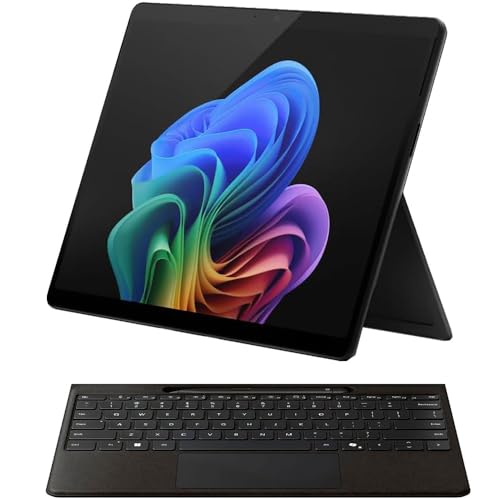
- Display: 13-inch PixelSense Flow OLED touchscreen, 2880 x 1920
- Processor: Qualcomm Snapdragon X Elite (12-core)
- Memory: 16GB LPDDR5x RAM
- Storage: 1TB SSD

- Display: 14-inch 2.8K OLED touchscreen (2880 x 1800)
- Processor: Intel Core Ultra 7 258V
- Memory: 32GB LPDDR5X RAM
- Storage: 1TB SSD

- Display: 14-inch OLED touchscreen, 2880 x 1800, 120Hz
- Processor: Intel Core Ultra 7 155H
- Graphics: Intel Arc integrated graphics
- Memory: 32GB LPDDR5 RAM
All 5 Picks at a Glance
| Product | Specs | Action |
|---|---|---|
| Microsoft Surface Pro 11 |
| Check price on Amazon |
| Lenovo Yoga 9i 2-in-1 Aura Edition |
| Check price on Amazon |
| HP Spectre x360 14 |
| Check price on Amazon |
 Samsung Galaxy Book4 Pro 360 |
| Check price on Amazon |
 Acer Chromebook Spin 714 |
| Check price on Amazon |
Key takeaways
- Compare the best hybrid laptop tablets, from detachable Surface Pro models to 360-degree convertibles, with pen, battery and display buying tips.
A hybrid laptop tablet does the job of two devices: it types like a laptop when there is work to finish, then folds, flips or detaches into a tablet when the work turns into reading, sketching, streaming or presenting. That flexibility is exactly why the category keeps growing, but it also makes shopping harder. Some hybrids are true tablets with a snap-on keyboard, others are full laptops with a 360-degree hinge, and the difference matters for lap typing, pen work, battery life and how the machine feels after a year of daily use.
This guide compares five hybrid laptop tablets that cover the main ways people actually use these machines. The Microsoft Surface Pro 11 leads the detachable camp, with a built-in kickstand and a keyboard bundled in this listing. The Lenovo Yoga 9i 2-in-1 Aura Edition and HP Spectre x360 14 represent the premium convertible end, with OLED touchscreens and pens in the box. The Samsung Galaxy Book4 Pro 360 brings the biggest screen of the group plus an included S Pen, and the Acer Chromebook Spin 714 covers the budget tier with ChromeOS simplicity. If you are also considering a gaming-focused 2-in-1, that is a separate category with different trade-offs; every pick here is chosen for everyday work, study, media and light creative tasks.
As an Amazon Associate, we earn from qualifying purchases.
Microsoft Surface Pro 11
- Display: 13-inch PixelSense Flow OLED touchscreen, 2880 x 1920
- Processor: Qualcomm Snapdragon X Elite (12-core)
- Memory: 16GB LPDDR5x RAM
- Storage: 1TB SSD
The Surface Pro 11 is the purest expression of the hybrid idea: a 13-inch tablet first, with a kickstand built into the back and a proper keyboard that attaches magnetically. This listing bundles the Surface Pro Keyboard, which matters, because the keyboard is what turns the Pro from a media tablet into a machine you can write reports on. The Snapdragon X Elite processor is an ARM chip, and it gives the Pro its two signature strengths: silent, fanless-feeling operation in light work and long battery life for a Windows device. The 13-inch PixelSense Flow OLED display runs at 2880 x 1920, which is sharp enough that text stays crisp at tablet reading distance, and the 120Hz-class refresh keeps pen strokes and scrolling feeling fluid.
The trade-offs are the familiar Surface ones. The keyboard works well on a desk but flexes more on a lap than a rigid laptop hinge, and the port selection leans entirely on USB-C, so older accessories need adapters. ARM compatibility has improved a great deal, and mainstream Windows apps run well, but a small number of niche programs and older peripherals still expect an Intel or AMD chip. For travellers, students and anyone who wants one device for notes, documents and streaming, the Pro 11 remains the detachable benchmark.
Lenovo Yoga 9i 2-in-1 Aura Edition
- Display: 14-inch 2.8K OLED touchscreen (2880 x 1800)
- Processor: Intel Core Ultra 7 258V
- Memory: 32GB LPDDR5X RAM
- Storage: 1TB SSD
The Yoga 9i Aura Edition is Lenovo’s flagship convertible, and it is built around the screen. The 14-inch 2.8K OLED touchscreen is bright, colour-rich and well suited to photo work, presentations and long reading sessions, and the 360-degree hinge moves through laptop, tent, stand and tablet modes without any detachable parts to lose. A Yoga Pen is included, and the pen pairs naturally with the high-resolution panel for marking up documents, sketching diagrams and signing forms. Inside, the Intel Core Ultra 7 258V is an efficiency-focused chip, so the Yoga 9i favours battery life and quiet running over raw multi-core muscle, while 32GB of memory is generous headroom for heavy browser and office multitasking.
Because it is a convertible rather than a detachable, the Yoga 9i always carries its keyboard with it, which makes it heavier in the hand as a tablet but far better on a lap or a train tray table. The rotating soundbar hinge is a thoughtful touch for media: in tent or stand mode the speakers face the viewer, which suits streaming and video calls. Buyers who want the most polished Windows convertible experience, and who will use the pen regularly, will find this the most complete package in the group.
HP Spectre x360 14
- Display: 14-inch OLED touchscreen, 2880 x 1800, 120Hz
- Processor: Intel Core Ultra 7 155H
- Graphics: Intel Arc integrated graphics
- Memory: 32GB LPDDR5 RAM
The Spectre x360 14 has been a reference point for premium convertibles for years, and this configuration pairs the Intel Core Ultra 7 155H with 32GB of memory and a large 2TB SSD, which makes it the storage heavyweight of this roundup. The 14-inch OLED touchscreen at 2880 x 1800 is equally at home with spreadsheets and streamed video, and the 155H chip brings stronger sustained performance than the efficiency-class processors in the Yoga 9i, which suits heavier multitasking, light photo editing and bigger documents. HP also pays attention to the video-call details that hybrid buyers actually live with: a high-resolution webcam, a fingerprint reader and a backlit keyboard are all standard here.
As with most convertibles, the Spectre is a laptop first and a tablet second; folded back, it is thicker and heavier than a dedicated tablet, so it suits shorter pen and reading sessions rather than hours of handheld use. The two Thunderbolt 4 ports handle charging, displays and docks through a single cable, which makes the Spectre an easy desk-and-travel companion. For buyers who want one premium Windows hybrid with room to grow into, this is the balanced choice.
Samsung Galaxy Book4 Pro 360
- Display: 16-inch AMOLED touchscreen, 2880 x 1800
- Processor: Intel Core Ultra 7 155H
- Memory: 16GB LPDDR5 RAM
- Storage: 1TB SSD
The Galaxy Book4 Pro 360 is the big-screen option. Its 16-inch AMOLED touchscreen gives split-screen work and media far more room than the 13- and 14-inch models here, and the 360-degree hinge still folds it into tent, stand and tablet modes when the desk work is done. Samsung includes the S Pen, and the pen experience is a strength of the Galaxy line: low-latency inking for notes and mark-ups, with the pen drawing power from the screen rather than a battery you have to remember to charge. The Intel Core Ultra 7 155H, 16GB of memory and 1TB of storage cover demanding office work, and owners of Galaxy phones get extra ecosystem conveniences such as using the laptop alongside the phone as a second screen or shared clipboard.
The honest caveat is size. A 16-inch convertible is a desk-and-sofa machine; in tablet mode it is a two-handed device, and it is the least bag-friendly pick in this guide. Battery expectations should also be set by the large, bright AMOLED panel rather than by smaller hybrids. If your hybrid time splits between a desk, presentations and media on the biggest screen you can carry, the Book4 Pro 360 earns its place.
Acer Chromebook Spin 714
- Display: 14-inch IPS touchscreen, 1920 x 1200
- Processor: Intel Core i5-1235U
- Memory: 8GB LPDDR4X RAM
- Storage: 256GB SSD
The Spin 714 is the budget pick and the only ChromeOS machine here, and that is its appeal. ChromeOS boots fast, updates itself quietly in the background and shrugs off most of the maintenance and malware worries that come with a full desktop operating system. For buyers whose computing lives in the browser, Google Docs, Android apps and streaming services, that simplicity is worth more than extra horsepower. The hardware itself is a step above typical budget Chromebooks: an Intel Core i5-1235U, a 14-inch 1920 x 1200 IPS touchscreen with a taller 16:10 shape that suits documents, a backlit keyboard and an aluminium-feeling build that holds up to daily commuting.
The 360-degree hinge gives laptop, tent and tablet modes, and the display supports stylus input for notes and signatures. Storage and memory are modest at 256GB and 8GB, which is fine for cloud-first work but limiting for large offline libraries or heavy Linux development. Check the update support window before buying any Chromebook, since ChromeOS devices stop receiving updates after a set date; this model remains a sensible, low-cost way into the hybrid category for students and light-duty home use.
How to Choose
Start with the form factor. Detachables like the Surface Pro 11 are the lightest way to carry a hybrid and the best pure tablets, but their keyboards are happiest on a desk. Convertibles like the Yoga 9i, Spectre x360, Galaxy Book4 Pro 360 and Spin 714 keep a rigid, lap-friendly keyboard and simply fold back when you want a tablet, at the cost of extra weight in hand. Decide where you will type most, and the shortlist usually narrows itself.
Match the operating system to your software. Windows hybrids run the full desktop catalogue, including Office, creative suites and company tools. ChromeOS covers browser-based work, Google services and Android apps with far less upkeep, but it cannot run Windows programs. Also check processor type on Windows machines: ARM chips such as the Snapdragon X Elite prioritise battery life and quiet running, while Intel Core Ultra models maximise compatibility with older software and peripherals.
Treat the pen and keyboard as part of the price of admission. A hybrid earns its keep when the pen is actually used, so confirm whether a stylus is included, as it is with the Yoga 9i and Galaxy Book4 Pro 360, or sold separately. The same goes for detachable keyboards: a bundle that includes the keyboard, like the Surface Pro 11 listing here, is a different proposition from a tablet-only box.
Size the screen to the job. Thirteen- and fourteen-inch hybrids balance portability and working room, and suit travel and study. A 16-inch panel transforms split-screen work and media but turns tablet mode into a two-handed affair. Whatever the size, an OLED or AMOLED panel delivers the contrast that makes reading and streaming more comfortable, while a taller 16:10 screen shows more of a document at once.
Do not skimp on memory and storage. Sixteen gigabytes of memory is the comfortable floor for a Windows hybrid you plan to keep for years, and 512GB of storage fills faster than most buyers expect once photos, offline media and work files accumulate. ChromeOS machines can live happily with less of both because so much stays in the cloud.
Frequently Asked Questions
What is the difference between a detachable and a convertible hybrid?
A detachable hybrid is a tablet with a removable keyboard, so the screen works on its own and the whole package stays light; the Surface Pro 11 is the classic example. A convertible keeps the keyboard permanently attached on a 360-degree hinge that folds behind the screen. Convertibles type better on a lap and feel sturdier, while detachables win on weight and pure tablet comfort.
Can a hybrid laptop tablet replace both a laptop and a tablet?
For most everyday work, yes. A good hybrid covers typing, browsing, documents, video calls, streaming and pen notes in one device, which is why the category exists. The compromises appear at the extremes: heavy gaming, professional video editing and all-day handheld reading are still better served by a dedicated gaming laptop or a lightweight standalone tablet.
Is a pen included with these hybrids?
It depends on the model, and it is worth checking before you buy. The Lenovo Yoga 9i 2-in-1 Aura Edition and Samsung Galaxy Book4 Pro 360 include a pen in the box, the Surface Pro 11 listing here bundles the keyboard while its pen is a separate accessory, and the Acer Chromebook Spin 714 supports stylus input with the pen sold separately. Pen support matters most if you plan to take handwritten notes, mark up PDFs or sketch.
Should I choose Windows or ChromeOS for a hybrid?
Choose Windows if you need desktop programs, company software, offline creative tools or the widest accessory support. Choose ChromeOS if your work lives in the browser and Google services, and you value fast startup, simple updates and lower cost. Students and home users are often well served by ChromeOS, while professionals with specific software requirements should stay with Windows.
Final Verdict
The best hybrid laptop tablet depends on which half of the hybrid you will use more. If the tablet side leads, the Microsoft Surface Pro 11 is the standout: it is the lightest full Windows experience here, and this bundle includes the keyboard that makes it a real laptop. If the laptop side leads, the Lenovo Yoga 9i 2-in-1 Aura Edition is the most polished convertible in the group, with a superb OLED screen and a pen in the box, while the HP Spectre x360 14 counters with stronger sustained performance and the largest storage of the five. The Samsung Galaxy Book4 Pro 360 is the pick for buyers who want the biggest canvas and an excellent included pen, and the Acer Chromebook Spin 714 proves the hybrid idea works on a budget when your computing lives in the cloud. Pick the form factor first, then the operating system, and any of these five will serve as a genuine two-in-one daily machine.
Product and ASIN Reference
| Product | ASIN |
|---|---|
| Microsoft Surface Pro 11 (Snapdragon X Elite, 16GB, 1TB, Keyboard Bundle) | B0DN2YY381 |
| Lenovo Yoga 9i 2-in-1 Aura Edition (Core Ultra 7 258V, 32GB, 1TB) | B0FTCGYXTM |
| HP Spectre x360 14 (Core Ultra 7 155H, 32GB, 2TB) | B0DM576K21 |
| Samsung Galaxy Book4 Pro 360 16-inch (Core Ultra 7 155H, 16GB, 1TB) | B0FL7BLK6Q |
| Acer Chromebook Spin 714 CP714-1WN-53M9 (Core i5-1235U, 8GB, 256GB) | B0BJH9LGK8 |
More from Amazon
Programs that pair well with the guide above. Offers and eligibility are set by Amazon and may change.
Free shipping on eligible items, Prime Video and more. Eligible new members can start with a free trial.
Start a Prime free trialAd-free music streaming. Eligible new subscribers can start with a free trial.
Try Music Unlimited freeA Prime membership for ages 18-24 with a trial period. Eligibility is set by Amazon.
See Prime for Young AdultsAudiobooks and podcasts to listen to on the go. Eligible new members can start with a free trial.
Try Audible freeAs an Amazon Associate we earn from qualifying purchases.