
Our Short List of 3
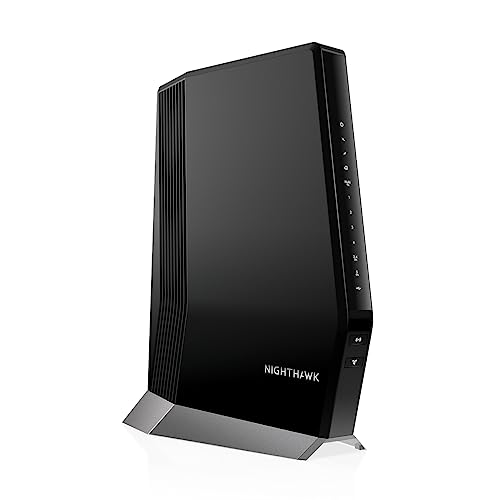
- Best for: Gigabit and multi-gigabit Xfinity plans with many devices.
- DOCSIS 3.1 cable modem
- AX6000 WiFi 6
- Approved for Comcast Xfinity, Spectrum, and Cox
- Model CAX80-100NAS

- Best for: Mid-tier Xfinity plans that want WiFi 6 without a flagship unit.
- DOCSIS 3.1 cable modem
- AX3000 WiFi 6
- 1.2 Gbps maximum speeds as listed
- Approved for Comcast Xfinity
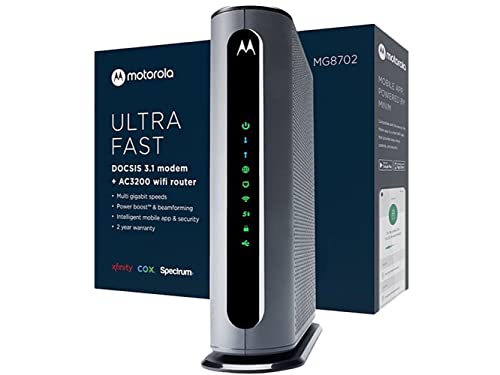
- Best for: Larger homes that need tri-band WiFi coverage.
- DOCSIS 3.1 cable modem
- AC3200 tri-band WiFi
- Intelligent Power Boost
- Approved for Comcast Xfinity
All 5 Picks at a Glance
| Product | Specs | Action |
|---|---|---|
| NETGEAR Nighthawk CAX80 |
| Check price on Amazon |
| ARRIS SURFboard G36 |
| Check price on Amazon |
| Motorola MG8702 |
| Check price on Amazon |
 NETGEAR Nighthawk C7000 |
| Check price on Amazon |
 Motorola MG8725 |
| Check price on Amazon |
Key takeaways
- Compare the best modem routers for xfinity to replace rental gear. See DOCSIS versions, WiFi speeds, and Xfinity approval to pick the right combo unit.
A modem router combo replaces the rented Xfinity gateway with one box that handles both the cable connection and your home WiFi. That single device cuts the monthly rental fee, removes a point of failure between two boxes, and gives you control over firmware updates and settings. The right combo matches your internet plan speed, covers your home with reliable WiFi, and carries the Xfinity approval that lets it activate without a support call.
This guide covers Xfinity subscribers who want to stop renting equipment, households upgrading to faster plans, and anyone setting up a first home network. Every modem router below was chosen from the name and specifications shown on its Amazon product page, with attention to DOCSIS version, WiFi standard, plan compatibility, and Xfinity approval. Read the sections in order, or jump to the model that matches your plan speed and home size.
Quick Picks
As an Amazon Associate we earn from qualifying purchases
| Product | Best for | Key spec from title |
|---|---|---|
| NETGEAR Nighthawk CAX80 | Fastest plans | DOCSIS 3.1, AX6000 WiFi 6 |
| ARRIS SURFboard G36 | Mid-tier plans | DOCSIS 3.1, AX3000 WiFi 6 |
| Motorola MG8702 | Reliable tri-band WiFi | DOCSIS 3.1, AC3200 tri-band |
| NETGEAR Nighthawk C7000 | Modest plans | DOCSIS 3.0, AC1900 WiFi |
| Motorola MG8725 | High-speed WiFi 6 | DOCSIS 3.1, AX6000 WiFi 6 |
How to Choose
DOCSIS Version and Plan Speed
DOCSIS version decides the fastest plan a modem can handle, so match it to your Xfinity subscription. DOCSIS 3.1 supports gigabit and multi-gigabit plans, while DOCSIS 3.0 tops out near 800 Mbps on most models. Check your plan speed first: a gigabit subscriber needs DOCSIS 3.1, while a 400 Mbps plan runs fine on DOCSIS 3.0. Buying a faster modem than your plan wastes money, but buying a slower one caps your speed the day you upgrade. Choose the version that fits your plan today with room for one upgrade.
WiFi Standard and Coverage
WiFi standard shapes speed and capacity across your home, and WiFi 6 handles many devices better than older standards. AX6000 and AX3000 ratings describe combined throughput across bands, not the speed of any single device, so treat them as capacity guides rather than promises. Tri-band models add a second 5 GHz band that separates gaming and streaming traffic from everything else. Place the combo centrally and high up, since a modem router hidden in a basement corner cannot cover a two-story home well.
Xfinity Approval and Activation
Xfinity approval matters because an unapproved modem may fail activation or lose support when plans change. Every model in this guide is approved for Comcast Xfinity, which means activation usually takes minutes through the Xfinity app or website. Keep your account details and the modem MAC address nearby during setup, since the app asks for both. If activation stalls, a quick call with the model number and MAC address usually resolves it. Never buy a modem listed for another provider and assume it works on Xfinity.
Placement and Electrical Safety
A modem router runs around the clock, so safe placement protects both the device and your home. Set it on a hard, flat surface with open air around it, since blocked vents cause heat buildup that shortens the life of the electronics. Keep it away from water, radiators, and direct sunlight, and plug it into a surge protector rather than a bare wall outlet. Use only the power adapter that ships with the unit, and unplug it during severe electrical storms if your area loses power often.
The 5 Best Options
NETGEAR Nighthawk CAX80
- Best for: Gigabit and multi-gigabit Xfinity plans with many devices.
- DOCSIS 3.1 cable modem
- AX6000 WiFi 6
- Approved for Comcast Xfinity, Spectrum, and Cox
- Model CAX80-100NAS
Gigabit and multi-gigabit Xfinity plans with many devices.
One source lists a different plan-speed figure for this model, so confirm your plan fits.
The NETGEAR Nighthawk CAX80 is the fastest modem router in this guide, pairing DOCSIS 3.1 with AX6000 WiFi 6 for gigabit and multi-gigabit Xfinity plans. Its model number CAX80-100NAS appears on Xfinity approval lists, and it works with Spectrum and Cox as well. WiFi 6 handles dozens of connected devices without slowing down, and the combo design replaces both a modem and a router with one unit. It suits households with fast plans, many devices, and heavy streaming or gaming traffic.
ARRIS SURFboard G36
- Best for: Mid-tier Xfinity plans that want WiFi 6 without a flagship unit.
- DOCSIS 3.1 cable modem
- AX3000 WiFi 6
- 1.2 Gbps maximum speeds as listed
- Approved for Comcast Xfinity
Mid-tier Xfinity plans that want WiFi 6 without a flagship unit.
The box and the listing state different maximum speeds, so confirm the plan fit.
The ARRIS SURFboard G36 balances speed and simplicity for mid-tier Xfinity plans, with DOCSIS 3.1 and AX3000 WiFi 6 in a compact combo. Its Amazon listing states maximum speeds of 1.2 Gbps, which covers most current Xfinity plans with headroom. The unit is approved for Comcast Xfinity, so activation runs through the standard app process. WiFi 6 keeps phones, laptops, and smart home devices connected smoothly, and the single-box design frees an outlet and a shelf compared with separate modem and router units.
Motorola MG8702
- Best for: Larger homes that need tri-band WiFi coverage.
- DOCSIS 3.1 cable modem
- AC3200 tri-band WiFi
- Intelligent Power Boost
- Approved for Comcast Xfinity
Larger homes that need tri-band WiFi coverage.
One retailer shows low stock and third-party sellers, so confirm the seller before ordering.
The Motorola MG8702 brings tri-band WiFi to a DOCSIS 3.1 combo, with an AC3200 rating spread across one 2.4 GHz band and two 5 GHz bands. Its Intelligent Power Boost feature adjusts signal strength to improve coverage through walls, and the unit is approved for Comcast Xfinity. The three bands keep gaming, streaming, and smart home traffic separated, which reduces congestion during busy evenings. It suits larger homes where a dual-band router struggles to reach every room.
NETGEAR Nighthawk C7000
- Best for: Xfinity plans up to 800 Mbps on a sensible budget.
- DOCSIS 3.0 cable modem
- AC1900 WiFi
- Supports plans up to 800 Mbps
- 24×8 channel bonding
Xfinity plans up to 800 Mbps on a sensible budget.
Renewed listings use different ASINs, and one source wrongly labels this model DOCSIS 3.1.
The NETGEAR Nighthawk C7000 is the DOCSIS 3.0 pick in this guide, built for Xfinity plans up to 800 Mbps. Its AC1900 WiFi covers a typical home well, and 24×8 channel bonding keeps the cable connection stable during peak hours. Model C7000-100NAS is approved for Xfinity, and the combo design replaces a rented gateway with a single unit. It suits households on modest plans who want to stop paying rental fees without buying speed they cannot use.
Motorola MG8725
- Best for: Fast Xfinity plans with wired devices that need a 2.5 Gbps port.
- DOCSIS 3.1 cable modem
- AX6000 WiFi 6 with speeds up to 6000 Mbps
- Approved for Comcast Xfinity
- 4 Ethernet LAN ports including one 2.5 Gbps port
Fast Xfinity plans with wired devices that need a 2.5 Gbps port.
This model replaces the older ARRIS SBG8300, which appears discontinued.
The Motorola MG8725 pairs DOCSIS 3.1 with AX6000 WiFi 6, giving it the same wireless class as the Nighthawk CAX80 in a Motorola package. Its listing states speeds up to 6000 Mbps, which covers the fastest Xfinity plans, and the unit is approved for Comcast Xfinity. Four Ethernet LAN ports include one 2.5 Gbps port for a wired gaming PC or network storage, and the Moto Sync app simplifies setup and management from a phone. It is a strong alternative for households that prefer Motorola hardware.
Which One Fits Your Situation
You Have a Gigabit Plan
Choose the NETGEAR Nighthawk CAX80 or the Motorola MG8725, since both pair DOCSIS 3.1 with AX6000 WiFi 6. The Nighthawk suits households that want the best-known brand, while the Motorola suits those who need the 2.5 Gbps wired port. Activate through the Xfinity app, then run a speed test at the modem and over WiFi to confirm the plan speed reaches your devices. Keep the modem in the open, since closed cabinets block WiFi.
You Have a Mid-Tier Plan
Pick the ARRIS SURFboard G36 or the Motorola MG8702, depending on whether you value WiFi 6 or tri-band coverage more. The ARRIS suits modern device-heavy homes, while the Motorola suits larger homes where a third band reduces congestion. Both activate easily on Xfinity, and both cover typical plan speeds with room to spare. Run a speed test after setup to confirm the plan speed reaches your devices.
You Want to Stop Paying Rental Fees Cheaply
Go with the NETGEAR Nighthawk C7000 if your plan runs at 800 Mbps or below, since it replaces the rented gateway at the lowest cost in this guide. Check your plan speed first, because a faster plan needs a DOCSIS 3.1 model instead. Keep the old gateway until the new unit activates, then return it promptly to stop the rental charge. Note the return deadline so the rental charge stops promptly.
You Have Many Devices and a Big Home
Take the Motorola MG8702 for tri-band WiFi or the Nighthawk CAX80 for AX6000 capacity, since both handle dozens of devices without slowing down. Place the unit centrally on the main living floor, keep it out of a closed cabinet, and use the 2.5 Gbps port for a wired gaming PC or media server. Test coverage in far rooms after setup, and move the unit if a corner stays weak.
Common Mistakes
- Buying a DOCSIS 3.0 modem for a gigabit plan, then wondering why speeds cap out.
- Hiding the modem router in a basement corner, then blaming the WiFi for dead zones.
- Skipping the Xfinity approval check, then failing activation with an unapproved model.
- Using a bare wall outlet instead of a surge protector for always-on equipment.
- Keeping the rented gateway after the new modem activates, and paying rental fees twice.
Frequently Asked Questions
Do I need to call Xfinity to activate a new modem router?
Usually not, since most activations run through the Xfinity app or website in a few minutes. The app asks for the modem MAC address, which sits on a label on the unit. If the app stalls, a short call with the model number and MAC address usually finishes the job. Keep the label handy for the app.
Will a modem router combo work with Xfinity voice service?
Most modem router combos do not include the telephone port that Xfinity Voice needs, so check the specifications before buying. If your plan includes home phone service, you need a telephony modem or a separate voice adapter. The models in this guide suit internet-only plans best. Check the specifications before buying if your plan includes phone service.
What is the difference between DOCSIS 3.0 and 3.1?
DOCSIS 3.1 supports gigabit and multi-gigabit speeds with better efficiency, while DOCSIS 3.0 tops out near 800 Mbps on most modems. A 3.1 modem also handles congested networks better during peak hours. Choose 3.1 for any plan above 800 Mbps, and 3.0 only when your plan stays below that speed. A 3.1 modem also handles peak-hour congestion better.
How do I return my rented Xfinity gateway?
Return the gateway to an Xfinity store or through a prepaid return kit after your new modem activates and your internet works. Keep the return receipt until the rental charge disappears from your bill, which usually takes one billing cycle. Do not return the old gateway before the new one works. Keep the receipt until the rental charge disappears.
More from Amazon
Programs that pair well with the guide above. Offers and eligibility are set by Amazon and may change.
Free shipping on eligible items, Prime Video and more. Eligible new members can start with a free trial.
Start a Prime free trialAd-free music streaming. Eligible new subscribers can start with a free trial.
Try Music Unlimited freeA Prime membership for ages 18-24 with a trial period. Eligibility is set by Amazon.
See Prime for Young AdultsAudiobooks and podcasts to listen to on the go. Eligible new members can start with a free trial.
Try Audible freeAs an Amazon Associate we earn from qualifying purchases.









