
Our Short List of 3
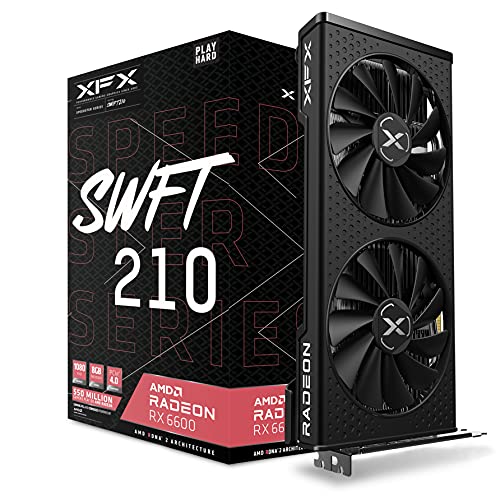
- Specs:
- Memory: 8GB GDDR6
- Boost clock: up to 2491 MHz
- Memory speed: 14 Gbps

- Specs:
- Memory: 8GB GDDR6
- Game clock: up to 2044 MHz
- Boost clock: up to 2491 MHz

- Specs:
- Memory: 8GB GDDR6
- Memory interface: 128-bit
- Boost clock: 1792 MHz
All 4 Picks at a Glance
| Product | Specs | Action |
|---|---|---|
| XFX Speedster SWFT 210 RX 6600 CORE |
| Check price on Amazon |
| Sapphire Pulse RX 6600 |
| Check price on Amazon |
| MSI RX 6600 MECH 2X 8G |
| Check price on Amazon |
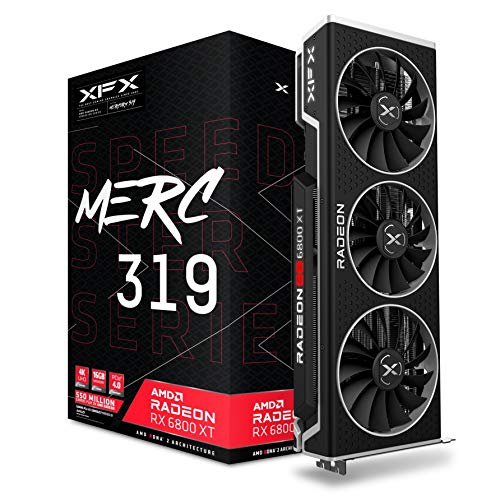 XFX Speedster MERC319 RX 6800 XT CORE |
| Check price on Amazon |
Key takeaways
- We compare the best amd graphics cards for mining, covering efficient RX 6600 models and a 16GB RX 6800 XT, with power, cooling and multi-GPU setup notes.
A graphics card for mining is judged differently from a card for gaming. Gaming rewards the highest frame rate, while mining rewards steady efficiency over long hours: a card that draws modest power, stays cool under a constant load, and keeps running without crashing is worth more in a rig than a card that is fast for an hour and throttles after that. Memory size and memory speed matter too, since mining workloads lean heavily on memory bandwidth. The four cards in this guide are all AMD RDNA 2 models, which are known for their efficiency in mining workloads. Three are RX 6600 cards from different board partners, each with 8GB of GDDR6 memory and a single 8-pin power connector, and one is an RX 6800 XT with 16GB of GDDR6 memory for heavier workloads. This guide compares their power draw, cooling, size, and memory, using only the details from each product page. Three RX 6600 cards and one RX 6800 XT cover efficient rigs and heavier workloads.
Quick Picks
As an Amazon Associate we earn from qualifying purchases
| Product | Best for | Key spec from title |
|---|---|---|
| XFX Speedster SWFT 210 RX 6600 CORE | An efficient first mining card | 8GB GDDR6 card with dual-fan cooling |
| Sapphire Pulse RX 6600 | A compact card for multi-GPU rigs | 8GB GDDR6 card with boost up to 2491 MHz |
| MSI RX 6600 MECH 2X 8G | Dual Torx fan cooling on a budget board | 8GB GDDR6 card with dual Torx fans |
| XFX Speedster MERC319 RX 6800 XT CORE | Heavier workloads with 16GB of memory | 16GB GDDR6 card with 16 Gbps memory speed |
How to Choose
Power Draw and Power Supply
Power is the running cost of a mining rig, so a card that does its work on less electricity is worth more over months of operation. The RX 6600 cards in this guide are built around a 132-watt board power, which is modest for a mining card, and each one needs a single 8-pin power connector. The XFX SWFT 210 lists a 550-watt power supply minimum for a single-card system, which gives you a starting point for sizing. The RX 6800 XT is a different class at 300 watts, with two 8-pin connectors, so it needs a larger power supply and more headroom.
Memory Size and Memory Speed
Mining workloads read and write memory constantly, so memory size and speed shape how a card performs. All three RX 6600 cards here carry 8GB of GDDR6 memory on a 128-bit interface, which is a proven combination for efficiency-focused rigs. The XFX SWFT 210 lists a 14 Gbps memory speed, which is the pace its memory runs at. The RX 6800 XT doubles the memory to 16GB of GDDR6 on a 256-bit interface with a 16 Gbps memory speed, which suits heavier workloads and larger datasets. More memory does not automatically mean better results, but it does give the card more room to work with.
Cooling for Continuous Operation
A mining card runs at a steady load for hours at a time, which is harder on cooling than the bursts of a gaming session. Dual-fan coolers, like those on the XFX SWFT 210, the Sapphire Pulse, and the MSI MECH 2X, keep the card cool in an open rig with airflow. The RX 6800 XT uses a triple-fan cooler, which suits its higher power draw. Airflow around the rig matters as much as the cooler itself: space the cards apart, keep intake air cool, and watch the temperatures during the first days of operation. A card that runs hot will throttle and wear faster.
Size, Slots, and Multi-GPU Fit
A rig holds several cards, so size and slot spacing decide how many fit. The RX 6600 cards are compact dual-fan models that fit well on risers with room between them for air. The RX 6800 XT is 320 mm long and takes three PCIe slots, so it needs more space and a sturdier mount. Check the length of each card against your frame or case before you buy, and plan the riser layout so the cards do not block each other’s airflow. A card that fits loosely and breathes will outlast one that is crammed against its neighbor.
The 4 Best Options
XFX Speedster SWFT 210 RX 6600 CORE
- Specs:
- Memory: 8GB GDDR6
- Boost clock: up to 2491 MHz
- Memory speed: 14 Gbps
The XFX Speedster SWFT 210 is the efficiency pick in this group, built around the RX 6600 with 8GB of GDDR6 memory and a dual-fan cooler. Its boost clock runs up to 2491 MHz, and its memory speed is 14 Gbps, which gives it the pace for steady mining workloads. The listing calls for a 550-watt power supply minimum, which suits a single-card system with room to spare. Its HDMI and three DisplayPort outputs cover display needs, and its compact dual-fan design fits well on a riser in a multi-card rig. It earns its place here as an efficient first mining card with modest power draw.
Sapphire Pulse RX 6600
- Specs:
- Memory: 8GB GDDR6
- Game clock: up to 2044 MHz
- Boost clock: up to 2491 MHz
The Sapphire Pulse RX 6600 is the compact pick, with a short dual-fan design that fits easily into a crowded rig. Its game clock runs up to 2044 MHz with a boost up to 2491 MHz, and its 8GB of GDDR6 memory sits on a 128-bit interface. A single 8-pin power connector keeps the wiring simple, and the card carries 1,792 stream processors across 28 compute units. HDMI and three DisplayPort outputs cover the display, and the compact length leaves room for airflow between cards on risers.
MSI RX 6600 MECH 2X 8G
- Specs:
- Memory: 8GB GDDR6
- Memory interface: 128-bit
- Boost clock: 1792 MHz
The MSI RX 6600 MECH 2X 8G brings dual Torx fans to the RX 6600, which is a cooling design built for steady airflow over long sessions. Its 8GB of GDDR6 memory sits on a 128-bit interface, and its boost clock is listed at 1792 MHz. Three DisplayPort 1.4a outputs and one HDMI 2.1 port give it four display connections, and it supports FreeSync and DirectX 12 for gaming use between mining runs. The dual-fan layout keeps the card cool in an open frame, and its standard size fits common riser setups without fuss. Its dual Torx fan cooling earns it a place on an efficiency-focused board.
XFX Speedster MERC319 RX 6800 XT CORE
- Specs:
- Memory: 16GB GDDR6
- Memory speed: 16 Gbps
- Memory interface: 256-bit
The XFX Speedster MERC319 RX 6800 XT CORE is the heavy lifter in this group, with 16GB of GDDR6 memory on a 256-bit interface and a 16 Gbps memory speed. Its GPU clock runs at 2250 MHz, and its triple-fan cooler handles the 300-watt power draw that comes with the bigger chip. Two 8-pin power connectors feed the card, and its HDMI and three DisplayPort outputs cover multi-monitor setups. At 320 mm long and three slots wide, it needs a frame with room to spare, but it gives a rig far more memory headroom than the RX 6600 cards.
Which One Fits Your Situation
You Are Building Your First Mining Rig
The XFX Speedster SWFT 210 RX 6600 CORE is the right first card. Its modest power draw keeps the electricity cost down while you learn, its single 8-pin connector keeps the wiring simple, and its dual-fan cooler handles steady loads. Start with one card, learn the software and the cooling needs, and add more of the same model later so the rig stays uniform.
You Want the Most Efficient Rig Possible
Three RX 6600 cards are the efficient path. The Sapphire Pulse is the most compact, which helps airflow in a crowded frame, while the MSI MECH 2X adds dual Torx fans for steady cooling. All three run on a single 8-pin connector and a 132-watt board power, so a rig of several cards stays manageable on power.
You Need More Memory for Heavier Workloads
The XFX Speedster MERC319 RX 6800 XT CORE suits a rig where memory headroom matters. Its 16GB of GDDR6 on a 256-bit interface gives it twice the memory of the RX 6600 cards, and its 16 Gbps memory speed keeps the data moving. Its 16GB of memory gives heavier workloads more room to work.
Your Rig Runs in a Warm Room
Cooling is the priority in a warm space, so pick the card with the strongest cooler for its power class. The MSI MECH 2X uses dual Torx fans on a modest 132-watt card, which leaves cooling headroom. The RX 6800 XT uses a triple-fan cooler for its higher draw. Spacing cards apart keeps air moving around each one.
Common Mistakes
- Sizing a power supply for one card and then adding three more without upgrading it, and the fix is to check that detail against the listing before ordering.
- Buying a renewed graphics card for a rig that needs to run around the clock, which usually shows up only after the order has arrived.
- Cramming cards together so tightly that no air reaches the fans, so confirm it while you can still change the order.
- Ignoring memory size and choosing a card that cannot handle the workload, and a quick check of the listing would have caught it.
- Expecting a fixed return from mining, when rewards vary with network difficulty and electricity costs, which wastes time that a short read of the listing would have saved.
Frequently Asked Questions
Is the RX 6600 good for mining?
The RX 6600 is known for efficiency in mining workloads, thanks to its 8GB of GDDR6 memory, its modest 132-watt board power, and its single 8-pin power connector. Three different RX 6600 models appear in this guide, each with dual-fan cooling and the same memory size, which makes the card easy to scale across a rig.
How much power does a mining rig need?
Power needs depend on how many cards the rig holds and which cards they are. The XFX SWFT 210 RX 6600 lists a 550-watt power supply minimum for a single-card system, and each RX 6600 card draws around 132 watts. The RX 6800 XT draws 300 watts and needs two 8-pin connectors.
Do I need a special motherboard for a mining rig?
A mining rig uses risers to connect several graphics cards to one motherboard, so the board needs enough PCIe slots or riser connections for the cards you plan to run. The cards in this guide connect over PCIe 4.0, and risers let you space them apart for airflow.
Can I use these cards for gaming too?
Yes. All four cards in this guide are gaming graphics cards built on AMD RDNA 2, and they support gaming features such as DirectX 12, FreeSync, and ray tracing. The RX 6600 cards handle 1080p gaming well, while the RX 6800 XT with 16GB of memory suits higher resolutions.
More from Amazon
Programs that pair well with the guide above. Offers and eligibility are set by Amazon and may change.
Free shipping on eligible items, Prime Video and more. Eligible new members can start with a free trial.
Start a Prime free trialAd-free music streaming. Eligible new subscribers can start with a free trial.
Try Music Unlimited freeA Prime membership for ages 18-24 with a trial period. Eligibility is set by Amazon.
See Prime for Young AdultsAudiobooks and podcasts to listen to on the go. Eligible new members can start with a free trial.
Try Audible freeAs an Amazon Associate we earn from qualifying purchases.









