
Our Short List of 3

- Processor: AMD Ryzen 5 7600, 6 cores and 12 threads
- Graphics: NVIDIA GeForce RTX 4060, 8GB GDDR6
- Memory: 16GB DDR5, 5200MHz
- Storage: 500GB NVMe SSD

- Processor: AMD Ryzen 7 9700X, 3.8GHz base with boost up to 5.5GHz
- Graphics: NVIDIA GeForce RTX 4060, 8GB GDDR6
- Memory: 16GB DDR5, 6000MHz, with heat spreader
- Storage: 1TB NVMe M.2 SSD
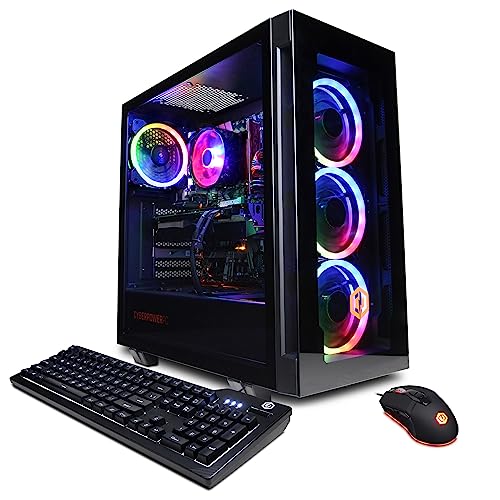
- Processor: Intel Core i7-13700F, 2.1GHz base, 8 performance cores plus 8 efficiency cores
- Chipset: Intel B760
- Graphics: NVIDIA GeForce RTX 4060 Ti, 16GB
- Memory: 16GB DDR5
All 5 Picks at a Glance
| Product | Specs | Action |
|---|---|---|
| 1. iBUYPOWER SlateMesh Gaming PC (SlateMeshA5N4601) |
| Check price on Amazon |
| 2. Skytech Gaming Azure 3 Desktop PC (ST-AZURE3-1564-W-AM) |
| Check price on Amazon |
| 3. CyberPowerPC Gamer Xtreme VR Gaming PC (GXiVR8040A14) |
| Check price on Amazon |
 4. Skytech Gaming King 95 Desktop PC (ST-KING95-1605-B-AM) |
| Check price on Amazon |
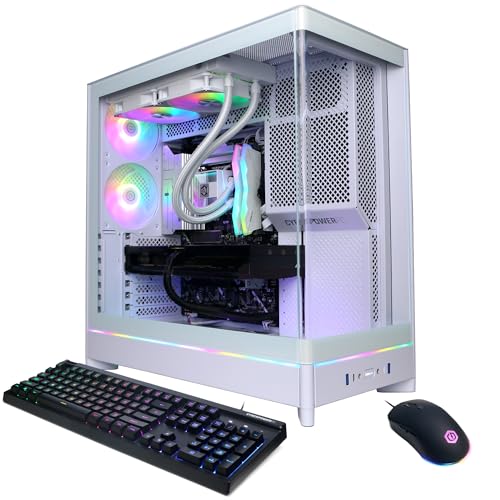 5. CyberPowerPC Gamer Xtreme VR Gaming PC (GXiVR8680A12) |
| Check price on Amazon |
Key takeaways
- Compare the best prebuilt PC options for gaming, from an RTX 4060 starter desktop to an RTX 5070 Ti flagship, with specs, storage and upgrade advice.
A prebuilt PC is the fastest route from an empty desk to a working gaming setup. Instead of ordering a processor, graphics card, motherboard, memory, storage, case, and power supply separately and hoping they all arrive compatible, a prebuilt gaming desktop arrives assembled, with Windows installed and the main drivers already in place. Connect a monitor, keyboard, and mouse, sign in, install a game launcher, and the machine is ready to use. That simplicity is the main reason prebuilt systems now serve everyone from first-time buyers to experienced players who would rather spend their time playing than building.
The challenge is choosing well, because the prebuilt market mixes excellent balanced systems with machines that pair a strong-sounding processor with a weak graphics card or a drive that is too small for a modern library. This guide focuses only on complete prebuilt gaming desktops and arranges five of them as a clear performance ladder. The first systems use RTX 4060 graphics for smooth 1080p play, the middle adds extra video memory for heavier textures at 1440p, and the strongest systems move to RTX 5070 and RTX 5070 Ti graphics with more memory and storage for high-refresh play and demanding work alongside games.
As an Amazon Associate, we earn from qualifying purchases.
How to Choose a Prebuilt PC for Gaming
Start with the graphics card and the monitor it will drive, because those two choices decide most of the gaming experience. A system built around an RTX 4060 with 8GB of video memory is a sensible partner for a 1080p display, and it can also handle 1440p in many games when settings are adjusted with care. Stepping up to a card with 16GB of video memory helps most in large open-world titles and in games that load high-resolution textures, where memory capacity can matter as much as raw speed. The RTX 5070 class and above is aimed at high-refresh 1440p monitors, where higher frame rates and higher detail settings are expected at the same time.
Look at the processor next, but judge it as part of a balance rather than as a headline number. Every system in this guide uses a modern multi-core AMD or Intel processor that is strong enough for its graphics card, so none of them should hold gaming performance back in an obvious way. Extra cores and higher clock speeds still matter for players who stream, record gameplay, edit video, or keep voice chat and a browser open during a session.
Memory and storage are simpler to judge and easier to get wrong by buying too little. A capacity of 16GB of DDR5 memory is the practical floor for a new gaming desktop, and it covers most current games comfortably on its own. A capacity of 32GB is the safer long-term choice for heavy multitasking and for players who dislike closing applications before launching a game. For storage, 1TB of NVMe solid-state capacity is the comfortable starting point, since a few large releases can fill a smaller drive surprisingly quickly. A 2TB drive simply postpones storage management for much longer.
Finish by checking the parts that shape ownership over several years. Effective cooling, whether air or liquid, helps a system sustain its performance through long sessions without becoming distracting. A Gold-rated power supply with generous capacity supports the installed hardware properly and leaves room for a stronger graphics card later. A standard tower case with accessible slots and bays makes adding storage or memory a short job rather than a rebuild.
1. iBUYPOWER SlateMesh Gaming PC (SlateMeshA5N4601)
- Processor: AMD Ryzen 5 7600, 6 cores and 12 threads
- Graphics: NVIDIA GeForce RTX 4060, 8GB GDDR6
- Memory: 16GB DDR5, 5200MHz
- Storage: 500GB NVMe SSD
The iBUYPOWER SlateMesh is the starting point in this guide, and its strength is that it starts from a current platform instead of discounted older parts. An AMD Ryzen 5 7600 processor with six cores and twelve threads works alongside an RTX 4060 graphics card, a pairing that is well matched for 1080p gaming at high settings. Many games will also run well at 1440p when detail levels are set sensibly, which gives a buyer with a modest monitor today some room to improve the display later without replacing the computer at the same time.
The Slate Mesh case uses a mesh front panel for airflow, a tempered glass side panel, and RGB fans, and the package includes an RGB gaming keyboard and mouse, so a new buyer needs little beyond a monitor to complete the desk. Memory is 16GB of DDR5 running at 5200MHz, which meets the sensible minimum for current games.
Storage is the one specification to plan around. The 500GB NVMe solid-state drive is fast, but modern game installs are large, and a small collection can fill it faster than expected. Treat a second drive as a likely early addition rather than a distant upgrade. The encouraging part is that the AM5 platform, DDR5 memory, and standard tower layout make that addition, and later memory or processor upgrades, straightforward. As a first prebuilt gaming PC that can grow in stages, the SlateMesh is a coherent and honest starting point.
Who It Suits
The SlateMesh suits first-time desktop buyers, esports players focused on fast 1080p play, and anyone who wants a modern platform with a clear upgrade path. Buyers who already own a large game library should expect to add storage early, and players who want high-refresh 1440p performance in the newest releases should move further up this guide.
2. Skytech Gaming Azure 3 Desktop PC (ST-AZURE3-1564-W-AM)
- Processor: AMD Ryzen 7 9700X, 3.8GHz base with boost up to 5.5GHz
- Graphics: NVIDIA GeForce RTX 4060, 8GB GDDR6
- Memory: 16GB DDR5, 6000MHz, with heat spreader
- Storage: 1TB NVMe M.2 SSD
The Skytech Azure 3 uses the same RTX 4060 graphics class as the SlateMesh but spends more of its budget on the processor, and that changes who should buy it. Its AMD Ryzen 7 9700X runs at a 3.8GHz base clock with boost up to 5.5GHz, giving the system noticeably more headroom for streaming, recording, and busy multitasking while a game is running. A 360mm ARGB liquid cooler manages processor heat, and the white Azure case with tempered glass presents the build cleanly on a desk.
The supporting specifications are well judged. Storage rises to a 1TB NVMe M.2 solid-state drive, which holds a reasonable library without immediate file juggling, and memory is 16GB of DDR5 at 6000MHz with a heat spreader, a faster kit than the entry system above. A 650W Gold power supply fits the installed hardware, and Wi-Fi is included for desks where a wired connection is impractical.
Read this system as a platform purchase as much as a graphics purchase. Today it is a strong 1080p machine with capable 1440p performance at adjusted settings. Later, its processor, cooling, and modern platform will support a stronger graphics card without the rest of the computer becoming the limiting factor.
Who It Suits
The Azure 3 suits players at 1080p and 1440p who also stream, record, or run several applications at once, and buyers planning a future graphics card upgrade. Players who want the strongest graphics performance available today for the money, rather than processor headroom for tomorrow, should compare it directly with the RTX 5070 systems below.
3. CyberPowerPC Gamer Xtreme VR Gaming PC (GXiVR8040A14)
- Processor: Intel Core i7-13700F, 2.1GHz base, 8 performance cores plus 8 efficiency cores
- Chipset: Intel B760
- Graphics: NVIDIA GeForce RTX 4060 Ti, 16GB
- Memory: 16GB DDR5
The CyberPowerPC Gamer Xtreme VR in this configuration takes the opposite middle path from the Azure 3: instead of a newer processor platform, it offers more video memory. Its RTX 4060 Ti carries 16GB of graphics memory, double the capacity of the RTX 4060 systems above. That extra capacity is most useful at 1440p and in games with heavy texture loads, where running short of video memory can force settings down even when the graphics processor itself still has speed in reserve.
The processor is an Intel Core i7-13700F running from a 2.1GHz base, built with eight performance cores and eight efficiency cores on an Intel B760 chipset. That core mix is a strong fit for a desk that combines gaming with everyday productivity, because background work can sit on the efficiency cores while the game uses the performance cores. Memory is 16GB of DDR5, and storage is a 1TB PCIe Gen4 NVMe solid-state drive, both sensible matches for the class.
Wi-Fi readiness covers flexible placement, and the graphics card provides one HDMI and two DisplayPort outputs, enough for a typical one or two monitor setup. The case measures 18.5 by 8.2 by 18.7 inches, so measure the intended space before ordering. For virtual reality players, this level of performance is also a reasonable entry point, since headsets reward steady frame delivery above almost everything else.
Who It Suits
This CyberPowerPC suits 1440p players who favour texture-heavy games, buyers interested in virtual reality, and anyone who values video memory capacity over the newest processor generation. Buyers who expect years of heavy multitasking may prefer a 32GB system from the start, although a standard tower like this one can accept more memory later.
4. Skytech Gaming King 95 Desktop PC (ST-KING95-1605-B-AM)
- Processor: AMD Ryzen 7 9700X, 3.8GHz base with boost up to 5.5GHz
- Graphics: NVIDIA GeForce RTX 5070, 12GB GDDR7
- Memory: 32GB DDR5, 6000MHz RGB, with heat spreader
- Storage: 1TB Gen4 NVMe M.2 SSD
The Skytech King 95 is the step where this guide moves firmly into high-refresh 1440p territory. Its RTX 5070 graphics card holds 12GB of GDDR7 memory, a clear class above the RTX 4060 family, and it is paired with the same Ryzen 7 9700X processor used in the Azure 3. Skytech supports that pairing with the parts a stronger graphics card deserves: 32GB of DDR5 memory, an 850W Gold power supply, and a 360mm ARGB liquid cooler.
In daily use, that combination means fewer compromises. Detail settings can stay higher at 1440p, ray tracing becomes a more realistic option, and the memory capacity removes the need to close background applications before playing. Streamers benefit twice, because the processor and memory headroom serve the broadcast while the graphics card serves the game.
The single specification that feels ordinary at this level is storage. A 1TB Gen4 NVMe M.2 drive is fast and adequate to begin with, but a library of large games alongside creative projects will grow into it, and a second drive is a sensible planned addition. That is a minor criticism in a standard tower, where adding storage is one of the simplest upgrades available.
Who It Suits
The King 95 suits players with a high-refresh 1440p monitor who want detail settings turned up, streamers who need headroom on every part of the system, and buyers who want one purchase to stay relevant through several release cycles. Players still using a 1080p monitor will not draw out its full capacity, and very large libraries will call for extra storage.
5. CyberPowerPC Gamer Xtreme VR Gaming PC (GXiVR8680A12)
- Processor: Intel Core Ultra 7 265KF, 3.9GHz, 20 cores
- Chipset: Intel Z890
- Graphics: NVIDIA GeForce RTX 5070 Ti, 16GB GDDR7
- Memory: 32GB DDR5
The strongest prebuilt PC in this guide is the CyberPowerPC Gamer Xtreme VR in its GXiVR8680A12 configuration. It combines an Intel Core Ultra 7 265KF processor, listed at 3.9GHz with 20 cores on an Intel Z890 chipset, with an RTX 5070 Ti graphics card carrying 16GB of GDDR7 memory. Memory capacity is 32GB of DDR5, and storage is a 2TB PCIe 4.0 NVMe solid-state drive. On every major specification a buyer compares, this system sits at or near the top of the five.
That specification targets two related jobs. The first is gaming at high-refresh 1440p with settings pushed up, with a credible step into 4K play for buyers using a suitable display. The second is demanding work on the same desk: video editing, large project files, and streaming all benefit from the core count, memory capacity, and storage space gathered here. The graphics card offers one HDMI and three DisplayPort outputs, which suits multi-monitor desks without adapters or compromises.
The 2TB drive deserves specific mention because it changes daily life at this level. The 1TB systems in this guide will eventually ask their owners to delete or move games; this one postpones that chore far longer. Wi-Fi readiness and Windows 11 Home complete a specification that asks little of its buyer beyond choosing a monitor worthy of it.
Who It Suits
This system suits enthusiasts who want the strongest graphics performance in this guide, players moving to a 4K or high-refresh 1440p monitor, and creators who game and work on one machine. Casual 1080p players do not need this much computer, and they will usually get better overall value by choosing the SlateMesh or Azure 3 and putting the difference toward a better monitor or peripherals.
FAQ
Is a prebuilt PC worth it compared with building one?
For most buyers, yes. A prebuilt PC trades the small savings and full part control of a self-build for assembly that is already done, parts confirmed to work together, an operating system that is ready on arrival, and a single warranty covering the whole system. Building remains rewarding for hobbyists who enjoy the process itself. Players who simply want to play usually reach the game faster and with less risk by choosing a well-balanced prebuilt like the systems in this guide.
How much storage does a prebuilt gaming PC need?
A capacity of 1TB is the sensible minimum for a new gaming desktop, because a handful of large modern releases can fill a 500GB drive quickly. Players who keep many titles installed at once, or who store video and project files on the same machine, should prefer 2TB where the budget allows. Storage is also the easiest upgrade in a standard tower, so a smaller drive is a manageable compromise when the graphics card and processor are right.
Can a prebuilt PC be upgraded later?
In most standard towers, yes. Owners can commonly add or replace solid-state drives, increase memory, and fit a newer graphics card, provided the power supply has enough capacity and the case has physical clearance. Systems with generous Gold-rated power supplies and strong cooling, such as the King 95, leave the most comfortable room for that path. Checking the motherboard layout and case dimensions before ordering a new part is always worthwhile.
Which prebuilt PC here fits a 1440p monitor best?
For 1440p play with carefully tuned settings, the CyberPowerPC Gamer Xtreme VR with the 16GB RTX 4060 Ti is a balanced match, and its video memory helps in texture-heavy games. For high-refresh 1440p with detail settings raised, the Skytech King 95 with RTX 5070 graphics and the CyberPowerPC GXiVR8680A12 with RTX 5070 Ti graphics are the stronger choices. The RTX 4060 systems remain happiest at 1080p, with 1440p available in many titles at adjusted settings.
Final Verdict
The best prebuilt PC is the one whose graphics card matches your monitor and whose supporting parts leave nothing obvious to fix in the first year. For a first gaming desktop with a genuine growth path, the iBUYPOWER SlateMesh pairs a modern AMD platform with RTX 4060 graphics, with storage as its only early errand. The Skytech Azure 3 adds processor headroom and liquid cooling for players who stream or multitask, while the CyberPowerPC GXiVR8040A14 answers with 16GB of video memory for texture-heavy 1440p play. At the top of the ladder, the Skytech King 95 brings RTX 5070 graphics with 32GB of memory, and the CyberPowerPC GXiVR8680A12 goes furthest with an RTX 5070 Ti, a 20-core processor, and 2TB of storage. Choose by resolution first, insist on at least 1TB of storage where you can, and any of these five prebuilt gaming desktops will arrive ready to play.
Product and ASIN Reference
| Product | ASIN |
|---|---|
| iBUYPOWER SlateMesh Gaming PC (SlateMeshA5N4601) | B0CCZYRNHK |
| Skytech Gaming Azure 3 Desktop PC (ST-AZURE3-1564-W-AM) | B0DQ6PVLCV |
| CyberPowerPC Gamer Xtreme VR Gaming PC (GXiVR8040A14) | B0CBL8N3FC |
| Skytech Gaming King 95 Desktop PC (ST-KING95-1605-B-AM) | B0DVCZD19R |
| CyberPowerPC Gamer Xtreme VR Gaming PC (GXiVR8680A12) | B0DXVD4PX4 |
More from Amazon
Programs that pair well with the guide above. Offers and eligibility are set by Amazon and may change.
Free shipping on eligible items, Prime Video and more. Eligible new members can start with a free trial.
Start a Prime free trialAd-free music streaming. Eligible new subscribers can start with a free trial.
Try Music Unlimited freeA Prime membership for ages 18-24 with a trial period. Eligibility is set by Amazon.
See Prime for Young AdultsAudiobooks and podcasts to listen to on the go. Eligible new members can start with a free trial.
Try Audible freeAs an Amazon Associate we earn from qualifying purchases.









