Key takeaways
- Compare four liquid-cooled gaming desktops built for smooth game streaming, with strong CPUs, fast graphics, ample memory and quiet cooling.
Streaming a game from one PC asks that machine to do two demanding jobs at once. It has to render the game at a frame rate that feels smooth to play, and it has to encode that footage into a clean stream without dropping frames during fast action. A desktop with a weak cooler can start strong and then lose pace as heat builds. Liquid cooling helps because it moves heat away from the processor more steadily, so the system can hold its pace through a full evening of play.
This guide is for streamers who play on the same PC they broadcast from, for creators who run a game, a chat overlay and recording software at the same time, and for buyers who want a ready-built desktop. Every pick below is a liquid-cooled gaming desktop with its processor, graphics card, memory and storage taken from its Amazon product title and listing.
Quick Picks
As an Amazon Associate we earn from qualifying purchases
| Product | Best for | Key spec from title |
|---|---|---|
| CyberPowerPC Gamer Xtreme GXiVR8080A41 | Balanced streaming with a strong multicore CPU | AMD Ryzen 9 9900X, GeForce RTX 5070 12GB, 32GB DDR5, 1TB PCIe 4.0 SSD |
| iBUYPOWER Element Pro White EPWI9N57T01 | High-refresh play with a large graphics memory pool | Intel Core i9 14900KF, GeForce RTX 5070 Ti 16GB, 32GB DDR5 RGB RAM, 1TB NVMe SSD |
| Skytech Gaming Chronos 3 ST-CHRONOS3-1763-B-AM | Demanding games plus a large library on one drive | AMD Ryzen 7 7800X3D, GeForce RTX 5080 16GB, 32GB DDR5 RAM 6000 RGB, 2TB Gen4 NVMe SSD |
| HP OMEN 45L GT22-3090 | Top-tier streaming, editing and multitasking in one tower | Intel Core Ultra 9 285K, GeForce RTX 5090, 64GB RAM, 2TB SSD |
How to Choose
Processor headroom for gaming and encoding together
The processor carries the game logic, the streaming software, chat tools, alerts and any recording running in the background, so a streamer needs more spare capacity than a player who only games. A chip with many cores can keep those background tasks off the critical path, which helps the game stay smooth when a scene gets busy. Look at the core count and the clock speed stated in the listing, and favour a processor that leaves room for a second app, such as a voice chat client, without forcing the encoder to compete for the same cores. A liquid-cooled processor also holds its speed longer during a stream that lasts for hours rather than minutes.
Graphics card and encoder strength
The graphics card draws the game, and on modern NVIDIA cards it also carries a dedicated hardware encoder that turns gameplay into stream video without loading the processor. That separation is the main reason a single-PC stream can look clean while the game stays responsive. Check the graphics card model and its memory size in the title, since more graphics memory helps with higher resolutions and detailed textures, and a current-generation card brings a newer encoder. Match the card to the resolution you actually stream at, and remember that a card built for high-refresh play at 1440p will have an easier time holding a steady output than a card that is already stretched at that setting.
Memory and storage for a live workflow
Streaming software, a game, a browser with several tabs and a capture tool can fill memory quickly, and a machine that runs short will stutter at the worst moment. Thirty-two gigabytes of DDR5 memory is a sensible floor for a dedicated streaming desktop, and sixty-four gigabytes gives extra room for editing clips or running a virtual camera alongside the broadcast. Storage matters too, because modern games are large and a stream archive grows fast. A one-terabyte solid-state drive covers a modest library, while a two-terabyte drive lets a streamer keep several installed games, recordings and editing projects on the fast drive instead of moving files around before every session.
Cooling, noise and the room around the desk
Liquid cooling is only useful if the whole system can breathe, so check the cooler size stated in the listing and the case design around it. A larger radiator, such as a 360mm unit, gives the processor more thermal headroom, and a mesh-front case helps move warm air out of the tower. Noise matters for streaming as well, because a fan that spins up loudly can reach an open microphone and distract viewers. Think about where the tower will sit and whether the panels leave room for airflow, since a desktop pushed against a wall or tucked inside a closed cabinet will run warmer no matter how good its cooler is.
The 4 Best Options
CyberPowerPC Gamer Xtreme GXiVR8080A41
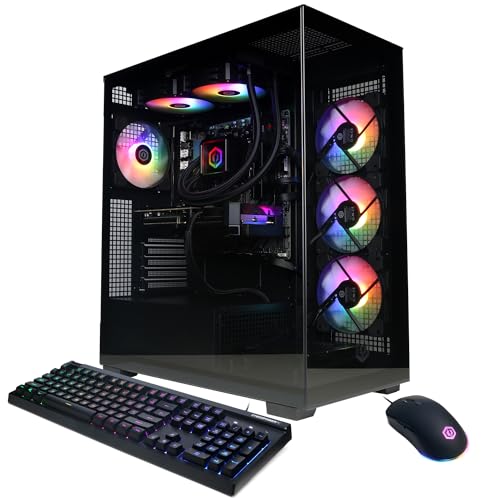
This CyberPowerPC suits a streamer who wants a balanced machine for play and broadcast without stepping up to the most powerful tier in this guide. Its twelve-core Ryzen 9 processor gives the streaming software and background apps room to run while the game uses the graphics card, and the RTX 5070 brings a current-generation encoder for the broadcast itself. With thirty-two gigabytes of memory and a fast one-terabyte drive, it covers a regular streaming setup, a chat overlay and a handful of installed games, and the liquid-cooled processor should hold its pace through long sessions.
Specs
- CPU: AMD Ryzen 9 9900X, 4.4GHz, 12 cores
- GPU: NVIDIA GeForce RTX 5070, 12GB
- Memory: 32GB DDR5
- Storage: 1TB PCIe 4.0 NVMe SSD
- Chipset: AMD B850
- Cooling: Liquid Cool CPU
- Connectivity: WiFi 6, Bluetooth 5.3, 1x HDMI, 3x DisplayPort
- Operating system: Windows 11 Home
- Included: Keyboard and mouse
Best for: Streamers who want a strong multicore CPU and a current encoder in a balanced single-PC setup.
Watch out for: Confirm the exact GXiVR8080A41 model at checkout, and check that the one-terabyte drive leaves enough room for your game library and recordings.
iBUYPOWER Element Pro White EPWI9N57T01

This white iBUYPOWER tower fits a streamer who plays at high refresh rates and wants extra graphics memory for detailed settings. Its Core i9 processor and RTX 5070 Ti pairing gives the game plenty of headroom, while the sixteen gigabytes of graphics memory helps with higher resolutions and texture-heavy titles. The 360mm liquid cooler is a clear fit for long broadcasts, since it keeps the processor cool while the game, the encoder and chat tools all run together, and the thirty-two gigabytes of RGB DDR5 memory leaves room for a browser and recording software beside the stream.
Specs
- CPU: Intel Core i9 14900KF
- GPU: NVIDIA GeForce RTX 5070 Ti, 16GB
- Memory: 32GB DDR5 RGB RAM
- Storage: 1TB NVMe SSD
- Cooling: 360mm liquid CPU cooling system, iBUYPOWER AW4
- Case: iBUYPOWER Element Pro White case with RGB fans
- Operating system: Windows 11 Home
- Included: Keyboard and mouse
Best for: High-refresh streaming where extra graphics memory and a large liquid cooler matter most.
Watch out for: Check the white case dimensions against your desk space, and confirm the exact EPWI9N57T01 configuration before ordering.
Skytech Gaming Chronos 3 ST-CHRONOS3-1763-B-AM

This Skytech Chronos 3 is the pick for a streamer who plays demanding games and wants a large, fast drive for a growing library. Its Ryzen 7 7800X3D processor is built around gaming performance, and the RTX 5080 gives the stream a strong graphics card and a modern encoder for high-resolution play. Thirty-two gigabytes of DDR5 memory running at 6000 speed and a two-terabyte Gen4 drive mean fewer compromises between installed games, recorded footage and editing files, while the 360mm ARGB liquid cooler and the 850W Gold power supply support sustained load during a long broadcast.
Specs
- CPU: AMD Ryzen 7 7800X3D, 4.2 GHz, up to 5.0 GHz Turbo Boost
- GPU: NVIDIA GeForce RTX 5080, 16GB GDDR7
- Memory: 32GB DDR5 RAM 6000 RGB
- Storage: 2TB Gen4 NVMe SSD
- Motherboard: X670 Board
- Power supply: 850W Gold ATX 3 PSU
- Cooling: 360mm ARGB AIO liquid cooler
- Connectivity: Wi-Fi
- Operating system: Windows 11
Best for: Demanding games and a large library, with two terabytes of fast storage on one drive.
Watch out for: The listing notes the graphics card brand may vary, so confirm the exact ST-CHRONOS3-1763-B-AM model and its stated parts at checkout.
HP OMEN 45L GT22-3090

This HP OMEN 45L is the most powerful desktop in this guide, built for a streamer who also edits video, runs several creative apps, or broadcasts at the highest settings. Its Core Ultra 9 processor and RTX 5090 graphics card give the machine far more headroom than a game and a stream need on their own, and sixty-four gigabytes of memory means editing, a virtual camera and a full browser session can run beside the broadcast. The patented OMEN CRYO CHAMBER cooling system is the liquid-cooled centrepiece here, designed to keep the processor cool under sustained load, and the two-terabyte drive holds a large library and project files.
Specs
- CPU: Intel Core Ultra 9 285K
- GPU: NVIDIA GeForce RTX 5090, 32GB GDDR7 dedicated
- Memory: 64GB RAM
- Storage: 2TB SSD
- Cooling: Patented OMEN CRYO CHAMBER cooling system, liquid-cooled
- Case: Tempered glass
- Operating system: Windows 11 Pro
- Extras: Microsoft Copilot
- Model: OMEN by HP 45L Gaming Desktop GT22-3090
Best for: Top-tier streaming combined with video editing and heavy multitasking in one tower.
Watch out for: This is a large, high-end tower, so check desk space, ventilation and the exact GT22-3090 configuration before ordering.
Which One Fits Your Situation
You stream most nights from a single PC
Choose the CyberPowerPC Gamer Xtreme GXiVR8080A41. Its twelve-core Ryzen 9 processor leaves room for streaming software, chat and a browser while the RTX 5070 handles the game and the encode, and thirty-two gigabytes of memory covers a regular nightly setup. Liquid cooling helps the processor hold its pace through a long broadcast, and the one-terabyte drive is enough for a focused rotation of games.
You play fast games at high refresh rates
Choose the iBUYPOWER Element Pro White EPWI9N57T01. Its RTX 5070 Ti carries sixteen gigabytes of graphics memory for detailed settings, and the Core i9 processor keeps frame pacing steady when a match gets busy. The 360mm liquid cooler is built for the sustained load of a long competitive session, and the white tower with RGB fans suits a streaming desk that stays on camera.
You want demanding games and a big library installed
Choose the Skytech Gaming Chronos 3 ST-CHRONOS3-1763-B-AM. Its RTX 5080 and Ryzen 7 7800X3D pairing handles demanding titles, while the two-terabyte Gen4 drive holds far more games and recordings than a one-terabyte drive. Thirty-two gigabytes of fast DDR5 memory and a 360mm liquid cooler support a full streaming workflow without forcing you to uninstall games between sessions.
You stream, edit and multitask on one machine
Choose the HP OMEN 45L GT22-3090. Its sixty-four gigabytes of memory and two-terabyte drive give editing software, a virtual camera and a browser room to run beside the game and the stream, while the RTX 5090 and Core Ultra 9 processor provide headroom for the heaviest days. The liquid-cooled CRYO CHAMBER system is designed to keep that hardware cool through long sessions that mix play, recording and editing.
Common Mistakes
- Buying a desktop for its graphics card alone and ignoring the processor, memory and cooler that have to support a live encode at the same time.
- Assuming every gaming desktop is liquid-cooled, when many towers use air cooling and only some listings state a liquid cooler or a named liquid cooling system.
- Filling a one-terabyte drive with games and recordings, then finding no room left for the next title or for stream archives.
- Placing a tower inside a closed cabinet or against a wall, which blocks airflow and undermines the liquid cooler inside.
- Skipping the exact model number at checkout, so the delivered configuration differs from the one compared in the guide.
Frequently Asked Questions
Does liquid cooling actually help a game stream?
Yes, it helps by keeping the processor cooler for longer, which lets the system hold its speed through a broadcast that lasts for hours. A stream adds encoding, chat tools and recording to the game itself, so sustained load matters more than a short burst of speed. Liquid cooling moves heat away from the processor steadily, and that steadiness keeps frame pacing and encode quality consistent late in a session.
Can one PC handle gaming and streaming at the same time?
Yes, a single PC can handle both when the graphics card carries the encode and the processor has spare cores for the streaming software and background apps. The desktops in this guide pair a current graphics card with a strong processor and at least thirty-two gigabytes of memory, which is the combination that makes single-PC streaming practical. Keep background apps light and give the tower room to breathe.
How much memory does a streaming desktop need?
Thirty-two gigabytes of DDR5 memory is a sensible starting point for a streamer who runs a game, streaming software, a browser and chat tools together. That amount leaves room for overlays, alerts and a recording tool without forcing the system to slow down. Sixty-four gigabytes, as in the HP OMEN 45L in this guide, gives extra headroom for video editing and a virtual camera beside the broadcast.
What should I check before ordering a liquid-cooled desktop?
Check the exact model number, the cooler stated in the listing, the processor and graphics card, the memory and storage sizes, and the operating system. Confirm the tower dimensions against your desk, check that the case has room for airflow, and read the listing for what is included. If the listing says the graphics card brand may vary, confirm the stated model before you order.
More from Amazon
Programs that pair well with the guide above. Offers and eligibility are set by Amazon and may change.
Free shipping on eligible items, Prime Video and more. Eligible new members can start with a free trial.
Start a Prime free trialAd-free music streaming. Eligible new subscribers can start with a free trial.
Try Music Unlimited freeA Prime membership for ages 18-24 with a trial period. Eligibility is set by Amazon.
See Prime for Young AdultsAudiobooks and podcasts to listen to on the go. Eligible new members can start with a free trial.
Try Audible freeAs an Amazon Associate we earn from qualifying purchases.