
Our Short List of 3
All 5 Picks at a Glance
| Product | Specs | Action |
|---|---|---|
 NexiGo StreamCam N930E | Check price on Amazon | |
 NexiGo N680E | Check price on Amazon | |
 ToLuLu Webcam With Ring Light and Tripod | Check price on Amazon | |
 Angetube 862Pro Streaming Webcam | Check price on Amazon | |
 Angetube 866Max 4K Webcam With Light | Check price on Amazon |
Key takeaways
- Compare the best webcams with ring lights for streaming and video calls, from 1080p touch-light models to a 4K option with TOF autofocus and dual mics.
A webcam with a built-in ring light solves two problems at once. The camera handles the picture, and the ring of light around the lens lifts shadows from your face, evens out skin tone, and keeps you visible when the room behind you is brighter than you are. That matters for live streams, recorded lessons, job interviews, and everyday video calls, where a dim or unevenly lit face reads as unprofessional long before anyone notices the resolution number in the settings menu.
The five models in this guide all combine a camera and an adjustable ring light in a single USB device, so there is no separate lamp to position, power, or keep out of the frame. They range from straightforward 1080p cameras with three-step touch lighting to a 60 frames per second streaming model with a remote control and a 4K model with fast TOF autofocus. The sections below explain how to choose between them, then cover each camera in turn with its listed specifications and the kind of user it suits best.
As an Amazon Associate, we earn from qualifying purchases.
How to Choose a Webcam With a Ring Light
Start with the light itself, because that is the reason this category exists. Most built-in ring lights offer three brightness levels changed with a touch control on the camera body. That is enough for a desk that goes from daylight to evening use. More flexible models add color temperature control, usually warm, natural, and white settings, plus stepless dimming through a rotating ring or knob. Color temperature matters when your room lighting is warm and yellow or cool and blue, because matching the ring light to the room avoids a face that looks orange on one side and gray on the other.
Next, match resolution and frame rate to what you actually do. Full HD 1080p at 30 frames per second is the standard for video calls, online classes, and most meeting platforms, and it looks clean on laptop and monitor sized windows. Streamers who show a face camera over gameplay often prefer 1080p at 60 frames per second, because motion stays smoother when the camera window sits beside fast moving game footage. A 4K option adds detail for recording, cropping, and digital zoom, although most live platforms still receive a 1080p feed, so treat 4K as a recording and future proofing benefit rather than a live call requirement.
Field of view decides how much of the room appears behind you. A lens around 75 to 80 degrees frames one person at a desk with a modest amount of background. A wider lens near 90 degrees fits two people or a presenter who moves and gestures, at the cost of showing more of the room. If you stream from a bedroom or a shared space, the narrower framing is usually the safer choice, and a privacy cover becomes more important as well.
Focus type affects how forgiving the camera is when you lean in, hold up a product, or shift in your chair. Autofocus models adjust continuously and suit presenters and streamers. Fixed focus models are simpler and keep a typical desk distance sharp, but they are less flexible if you move closer to show detail. Also check the microphone setup. Dual microphones with noise reduction help in a home office with a fan, a keyboard, or family noise nearby, while any built-in microphone is still a convenience feature rather than a replacement for a dedicated microphone in a treated recording setup.
Finally, confirm the practical details. Plug and play USB models need no driver installation and work with Zoom, Teams, Skype, OBS, and similar software on Windows and macOS. A longer cable and a tripod thread or included tripod give you placement options beyond the top of a monitor, which helps because a ring light works best when it sits close to eye level and reasonably close to your face. A built-in privacy cover or shutter is worth having on any camera that points at you all day.
NexiGo StreamCam N930E
The NexiGo StreamCam N930E is the balanced everyday pick in this group. It records in Full HD 1080p at 30 frames per second through a 75 degree lens, a field of view that frames a single person at a desk without pulling in too much of the room. Its ring light uses 12 white LEDs with three brightness levels selected by touch, so a quick tap raises or lowers the light as daylight changes through the day. Autofocus keeps the image sharp as you lean forward or sit back, and automatic low light correction and auto white balance work alongside the ring light.
NexiGo also includes its webcam software with this model, which gives more control over the picture than the default settings in most meeting apps. A built-in privacy cover closes over the lens when the camera is idle. Connection is a simple USB 2.0 plug and play setup with no separate driver step for Windows or Mac computers.
Who It Suits
The N930E suits remote workers, teachers, and students who want one dependable camera and light for daily calls without extra desk gear. Choose it if your framing is one person at a desk and you value autofocus and a privacy cover over higher frame rates or color temperature control.
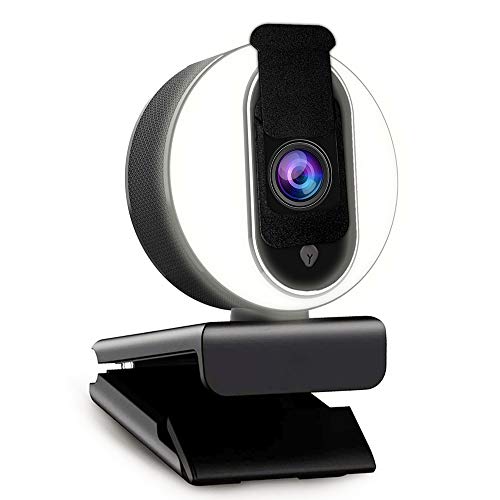
NexiGo N680E
The NexiGo N680E takes a slightly wider view and adds encoding aimed at streaming. Its 80 degree lens captures 1080p at 30 frames per second, and the listing highlights H.264 encoding alongside MJPG and YUY2 formats, which helps compatible software move high definition video efficiently. The ring light again offers three levels with touch control, intended as lighting compensation in dim rooms rather than a full studio light, and the camera adds autofocus for presenters who move while they talk.
Audio comes from dual microphones, and the package includes privacy covers for the lens. The mounting clip fits a monitor, laptop, or tripod, and the camera works over USB 2.0 and USB 3.0 ports with no additional drivers. For buyers comparing the two NexiGo models, the N680E is the wider, dual microphone option, while the N930E is the narrower, software bundled option.
Who It Suits
The N680E suits streamers and presenters who want a little more room in the frame and dual microphone pickup from the camera itself. It is a sensible pick for a home office where a second person occasionally joins the frame or where you stand and present rather than sitting still.
ToLuLu Webcam With Ring Light and Tripod
The ToLuLu webcam is the widest and most placement friendly option here. Its 90 degree lens records 1080p at 30 frames per second, and the built-in ring light provides three touch controlled levels, described as high, medium, and low. Automatic low light correction and auto white balance support the light when a room is unevenly lit. Unlike the autofocus models above, listings describe this camera with fixed focus, which keeps a normal desk distance in focus and keeps the setup simple.
What sets the ToLuLu apart is the hardware around the camera. The clip swivels a full circle and tilts, a flexible tripod is included for desk placement away from the monitor, and the USB cable runs about six feet, which makes that tripod placement realistic. Dual noise reduction microphones are listed with pickup suited to meeting rooms, and a privacy cover is included in the box.
Who It Suits
The ToLuLu suits small meeting setups, tutors, and anyone who cannot mount a camera on a monitor and needs the included tripod instead. Its wide lens also fits two people sharing a call. Skip it if you rely on autofocus for close up product demonstrations, because the fixed focus design favors a steady seated distance.
Angetube 862Pro Streaming Webcam
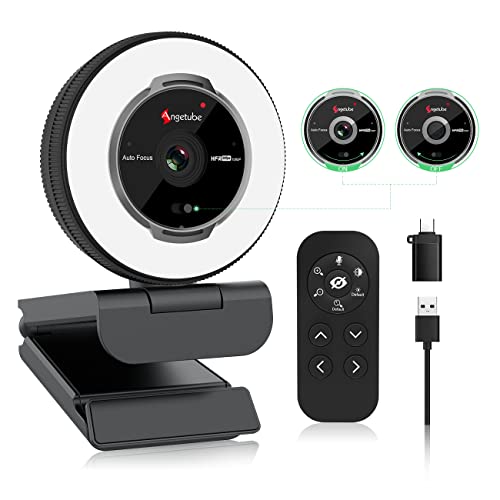
The Angetube 862Pro is built for live streamers who want smoother motion and more control from the chair. It delivers 1080p at 60 frames per second, double the frame rate of the 30 frame models above, with real time autofocus and automatic low light correction. The ring light uses three LED color options with stepless brightness adjustment, so instead of jumping between three fixed steps you can dial the light to the level the room needs and choose a warmer or cooler tone to match it.
The standout extra is the included remote control. From across the desk it adjusts digital zoom up to five times at lower resolutions, along with field of view, exposure, and microphone mute, so a streamer can reframe or mute without reaching for the camera or opening software menus mid stream. Dual omnidirectional microphones with noise cancellation, a built-in privacy cover, and a USB-C adapter in the box round out a package clearly aimed at creators rather than meeting only users.
Who It Suits
The 862Pro suits game streamers and live hosts who run a face camera over fast moving content and want the 60 frame smoothness, plus anyone who adjusts framing during a session and would use a remote. If your use is static meetings only, its streaming extras are more than the job requires.
Angetube 866Max 4K Webcam With Light
The Angetube 866Max is the high resolution option in this guide. It records 4K at 30 frames per second or 1080p at 60 frames per second, giving both a detailed recording mode and a smooth live mode in one camera. Focusing uses TOF autofocus, a time of flight system designed to lock on quickly and hold focus through fast movement or scene changes, which helps presenters who hold objects up to the lens.
Its ring fill light offers three color temperature settings, described as warm, mixed, and white, with stepless brightness adjusted by turning a ring knob on the camera, and a touch button on the back cycles the color temperature. Dual microphones use AI noise cancellation to focus on your voice, and the privacy cover is integrated into the front of the lens so it cannot be lost. The camera connects by USB-A or USB-C with the included adapter and needs no driver installation.
Who It Suits
The 866Max suits creators who record as well as stream, teachers who demonstrate objects up close, and buyers who want one camera that covers both detailed 4K recording and smooth 1080p live video. It is the natural upgrade pick in this list when resolution headroom and fast autofocus matter more than keeping the setup as simple as possible.
FAQ
Do webcams with ring lights work with Zoom, Teams, and OBS?
Yes. All five cameras in this guide are plug and play USB models listed as compatible with common platforms including Zoom, Microsoft Teams, Skype, and OBS. In most cases you connect the cable, select the camera and microphone in the app settings, and turn the ring light on from the camera itself rather than from inside the software.
Is a built-in ring light bright enough to replace a separate lamp?
For a single person at a desk, a built-in ring light is usually enough to lift shadows and even out facial lighting, especially in a dim room. It is a small light close to the lens, so it cannot light a whole room or a wide group shot the way a larger separate panel can. If you record in a very dark space or sit far from the camera, plan on some room light as well.
Should you choose 1080p at 30 frames or 60 frames per second?
Choose 30 frames per second for meetings, classes, and interviews, where platforms and viewers expect that standard and the picture stays smooth for a seated speaker. Choose 60 frames per second for game streaming and fast moving presentations, where the higher rate keeps motion in a small face camera window looking natural next to high frame rate content.
How should you position a webcam with a ring light?
Place the camera at or slightly above eye level and within a comfortable arm length of your face, because ring light output falls off quickly with distance. Look toward the lens rather than the screen image of the other person, set the lowest brightness level that removes shadows, and avoid a bright window directly behind you, which no small ring light can fully overcome.
Final Verdict
For most buyers, the NexiGo StreamCam N930E is the easiest recommendation: clean 1080p video, autofocus, a three level ring light, and a privacy cover in a simple plug and play package. The NexiGo N680E adds a wider view and dual microphones for presenters, while the ToLuLu brings the widest lens and an included tripod for flexible placement. Streamers should look first at the Angetube 862Pro for its 60 frame video, stepless three color light, and remote control. Anyone who records in high detail should choose the Angetube 866Max, the only 4K model here, with TOF autofocus and an integrated privacy cover. Whichever model fits your desk, the shared advantage is the same: camera and light in one device, ready for the next call or stream without extra gear.
Product and ASIN Reference
| Product | ASIN |
|---|---|
| NexiGo StreamCam N930E | B08J896MYT |
| NexiGo N680E | B08FT7Y53Y |
| ToLuLu Webcam with Ring Light | B0BDQBPWCJ |
| Angetube 862Pro Streaming Webcam | B09QKR8P6T |
| Angetube 866Max 4K Webcam with Light | B0DDCJBZWQ |
More from Amazon
Programs that pair well with the guide above. Offers and eligibility are set by Amazon and may change.
Free shipping on eligible items, Prime Video and more. Eligible new members can start with a free trial.
Start a Prime free trialAd-free music streaming. Eligible new subscribers can start with a free trial.
Try Music Unlimited freeA Prime membership for ages 18-24 with a trial period. Eligibility is set by Amazon.
See Prime for Young AdultsAudiobooks and podcasts to listen to on the go. Eligible new members can start with a free trial.
Try Audible freeAs an Amazon Associate we earn from qualifying purchases.









