
Key takeaways
- Slot-powered PCIe x16 graphics cards that upgrade older PCs without a new power supply, including low-profile picks for slim small-form-factor cases.
Every discrete graphics card sold today uses a PCI Express x16 connector, so the connector alone does not narrow the field. What actually decides an upgrade for an older PC is everything around that slot: whether the card can run on the 75 watts the slot itself supplies, whether its bracket and length fit the case, and how many lanes it really uses once it drops into a PCIe 3.0 board. The cards below are picked for exactly those constraints.

This roundup is for owners of prebuilt office desktops, slim small-form-factor machines, and older gaming rigs whose power supplies have no spare graphics-card cable. Every pick runs entirely on slot power, works in PCIe 3.0 and 4.0 x16 slots, and was chosen from its Amazon listing for the details that decide fit: bracket height, card length, lane count, and display outputs. If your case takes full-height cards, start with the ASUS; if it is a slim box, look at the two low-profile models.
Quick Picks
As an Amazon Associate we earn from qualifying purchases
| Product | Best for | Key spec from title |
|---|---|---|
| ASUS Dual GeForce RTX 3050 6GB OC Edition | Standard towers with no spare power cable | 6GB GDDR6, PCIe 4.0 |
| GIGABYTE GeForce RTX 3050 OC Low Profile 6G | Slim cases that need several monitors | Low profile, 6GB GDDR6 |
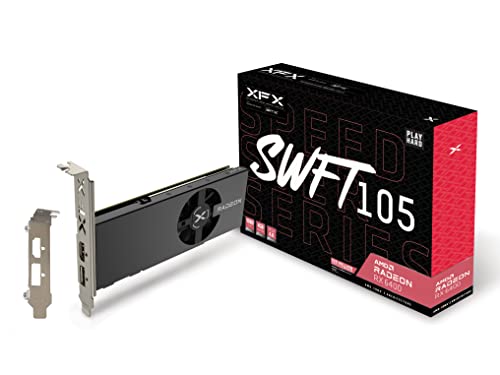
| XFX Speedster SWFT105 Radeon RX 6400 | The tightest single-slot small-form-factor builds | Low profile, 4GB GDDR6 |
How to Choose
Slot power, not a bigger power supply
An x16 slot supplies up to 75 watts on its own. Cards designed around that limit skip the 6-pin and 8-pin power connectors entirely, which is what makes them drop-in upgrades for prebuilt desktops: many office PCs ship with no spare PCIe power lead at all, and their proprietary supplies cannot be swapped for a standard unit. All three cards here are slot-powered. Still check the listing’s recommended power supply figure, because makers rate it against a whole system, and confirm your supply clears it before ordering, especially in older machines with small 180 to 250 watt units.
Lane width matters more than the connector
An x16 connector only describes the physical slot. The RTX 3050 6GB cards below are wired for eight lanes, and the Radeon RX 6400 for just four, even though all three plug into the same full-size slot. On a PCIe 4.0 motherboard that is rarely a problem. On the PCIe 3.0 boards found in older PCs, each lane carries half the data, so a four-lane card gives up more performance than an eight-lane one. If your machine predates PCIe 4.0, favour the eight-lane RTX 3050 models; the RX 6400 makes the most sense when the board is newer or the case leaves no other choice.
Bracket height and card length
Slim desktops from the big office brands use half-height expansion slots, so a full-height card physically cannot close the case. Low-profile models solve this with a short bracket, and both low-profile picks here include the bracket in the box. Measure length as well as height: the GIGABYTE card is 181 millimetres long, the XFX about 155 millimetres, and both need a clear run from the slot to the front of the case. Also count slots. The XFX takes a single slot, the GIGABYTE two, and the full-height ASUS two, which matters when a neighbouring slot is already occupied.
Outputs for the monitors you already own
An upgrade card is only useful if it connects to your screens. The ASUS keeps a DVI-D port alongside HDMI 2.1 and DisplayPort 1.4a, which suits older monitors that predate DisplayPort. The GIGABYTE is the multi-monitor pick, with two HDMI 2.1 and two DisplayPort 1.4a outputs driving up to four displays. The XFX carries one HDMI and one DisplayPort, enough for a desk with two screens and nothing more. Check the listing’s output list against your monitor inputs before buying, and budget for a cable or adapter if your display only has VGA, which none of these cards supports natively.
The 3 Best Options
ASUS Dual GeForce RTX 3050 6GB OC Edition
The ASUS Dual is the pick for a standard tower that simply lacks a spare power cable. Its RTX 3050 chip runs at a 1537 megahertz boost clock in OC mode, it carries 6 gigabytes of GDDR6 memory, and ASUS rates it for no power connector at all, so installation is one card in the slot and a driver download. The dual-fan cooler uses 0dB technology to stop the fans at light loads, and the output set keeps a DVI-D port for older monitors next to HDMI 2.1 and DisplayPort 1.4a.
Specs
- Graphics processor: NVIDIA GeForce RTX 3050
- CUDA cores: 2304
- Boost clock: 1537 MHz in OC mode
- Memory: 6GB GDDR6, 96-bit, 14 Gbps
- Interface: PCI Express 4.0 x16
- Outputs: 1x DisplayPort 1.4a, 1x HDMI 2.1, 1x DVI-D
- Displays supported: up to 3
- Power connector: none, slot power only
- Form factor: 2-slot, 201 x 120 x 37 mm
Best for: Full-height towers and older gaming PCs whose power supply has no free graphics-card cable.
Watch out for: It is a full-height card, so it will not fit slim low-profile cases, and its two-slot width can crowd a neighbouring expansion card.
GIGABYTE GeForce RTX 3050 OC Low Profile 6G
The GIGABYTE OC Low Profile 6G is built for slim prebuilt desktops that need more than two screens. It pairs the RTX 3050 with 6 gigabytes of GDDR6 in a low-profile body 181 millimetres long, includes the low-profile bracket in the box, and needs no power connector, with GIGABYTE recommending a 300 watt power supply. Its four outputs, two DisplayPort 1.4a and two HDMI 2.1, are the widest set in this roundup, which makes it the natural fit for a compact office machine driving a wall of monitors.
Specs
- Graphics processor: NVIDIA GeForce RTX 3050
- Core clock: 1477 MHz
- CUDA cores: 2304
- Memory: 6GB GDDR6, 96-bit, 14 Gbps
- Interface: PCI Express 4.0 x16
- Outputs: 2x DisplayPort 1.4a, 2x HDMI 2.1
- Displays supported: up to 4
- Power connector: none; recommended power supply 300W
- Size: 181 x 69 x 36 mm, low profile, bracket included
Best for: Slim office desktops that need three or four monitors from a single slot-powered card.
Watch out for: It occupies two slots despite the low-profile bracket, so a case with only one free slot should take the XFX instead.
XFX Speedster SWFT105 Radeon RX 6400
The XFX Speedster SWFT105 is the smallest card here: a single-slot, low-profile Radeon RX 6400 roughly 155 millimetres long that runs entirely on slot power and ships with a low-profile bracket. Its 4 gigabytes of GDDR6 and boost clock up to 2321 megahertz are aimed at 1080p play in esports and older titles, and the single fan keeps the design simple for cramped cases. One HDMI and one DisplayPort cover a typical two-screen desk, and because it uses only four PCIe lanes, it pairs best with a PCIe 4.0 motherboard.
Specs
- Graphics processor: AMD Radeon RX 6400
- Stream processors: 768
- Boost clock: up to 2321 MHz; game clock 2039 MHz
- Memory: 4GB GDDR6, 16 Gbps
- Interface: PCI Express x16 connector, PCIe 4.0 x4 lanes
- Outputs: 1x HDMI, 1x DisplayPort
- Power connector: none, slot power only
- Form factor: single-slot low profile, about 155 mm long, bracket included
Best for: Single-slot small-form-factor cases where no dual-slot card can fit.
Watch out for: The RX 6400 has no hardware video encoder, so it is a poor pick for recording or streaming gameplay, and its four lanes lose the most speed in a PCIe 3.0 slot.
Which One Fits Your Situation
Your tower has room, but the power supply has no spare cable
Choose the ASUS Dual GeForce RTX 3050 6GB OC Edition. It is a full-height, two-slot card, so it needs a normal tower case, but it draws all its power from the slot and keeps a DVI-D output for an older monitor. It is the strongest all-round upgrade here for a standard desktop that was never built with gaming in mind.
Your slim prebuilt drives three or four monitors
Choose the GIGABYTE GeForce RTX 3050 OC Low Profile 6G. The low-profile bracket fits half-height slots, the card runs on slot power alone, and its two HDMI 2.1 plus two DisplayPort 1.4a outputs are the only four-display set in this group. That combination suits a compact office PC feeding a multi-screen desk.
Your case accepts only a single-slot card
Choose the XFX Speedster SWFT105 Radeon RX 6400. At one slot wide and about 155 millimetres long, it fits the tight small-form-factor cases the other two cannot, and it still covers two displays. Pick it when physical fit is the hard limit, ideally with a PCIe 4.0 board underneath.
Your motherboard is PCIe 3.0 only
Choose one of the RTX 3050 cards, the ASUS for a tower or the GIGABYTE for a slim case. Both are wired for eight lanes, so moving from PCIe 4.0 to 3.0 costs them less than it costs the four-lane RX 6400. On an older board, that lane count is the difference between a small penalty and a noticeable one.
Common Mistakes
- Assuming an x16 connector means sixteen working lanes, when several slot-powered cards are wired for eight lanes or even four.
- Ordering a card that needs an 8-pin power connector for a prebuilt desktop whose power supply has no such cable and cannot be replaced with a standard unit.
- Measuring card length but not bracket height, then discovering that a full-height card cannot fit a half-height slim case.
- Skipping the maker’s documentation for your exact prebuilt model, even though some slim machines route less than the standard slot power or place the x16 slot against the case wall.
- Picking the RX 6400 to record or stream gameplay, when that chip has no hardware video encoder for the job.
Frequently Asked Questions
Will a PCIe 4.0 card work in an older PCIe 3.0 x16 slot?
Yes. PCIe generations are backward compatible, so each card here installs and runs in a 3.0 slot at 3.0 speeds. The practical difference is lane width: the eight-lane RTX 3050 models lose less than the four-lane RX 6400, which is why the 3050 cards are the safer choice for older boards.
Do any of these cards need a cable from the power supply?
No. All three draw their power from the x16 slot itself, which supplies up to 75 watts, and none has a 6-pin or 8-pin connector. You should still compare your power supply against the wattage the listing recommends for a complete system, because the processor and drives draw from the same unit.
How many monitors can I run from one of these cards?
The GIGABYTE leads with four displays across two HDMI 2.1 and two DisplayPort 1.4a outputs. The ASUS supports three displays and keeps a DVI-D port for older screens. The XFX supports two, one over HDMI and one over DisplayPort, which suits most desks but leaves no room for a third screen later.
Can these cards handle 1080p gaming?
They are aimed at 1080p in esports titles and older or lighter games, with settings adjusted to the card. The 6 gigabyte RTX 3050 models have more memory headroom for textures than the 4 gigabyte RX 6400. None of them is a substitute for a full-size gaming card in demanding new releases.
More from Amazon
Programs that pair well with the guide above. Offers and eligibility are set by Amazon and may change.
Free shipping on eligible items, Prime Video and more. Eligible new members can start with a free trial.
Start a Prime free trialAd-free music streaming. Eligible new subscribers can start with a free trial.
Try Music Unlimited freeA Prime membership for ages 18-24 with a trial period. Eligibility is set by Amazon.
See Prime for Young AdultsAudiobooks and podcasts to listen to on the go. Eligible new members can start with a free trial.
Try Audible freeAs an Amazon Associate we earn from qualifying purchases.









