
Our Short List of 3
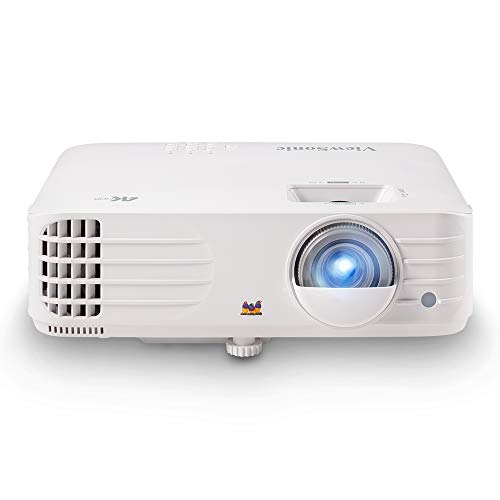
- Best for: Movie watchers who want true 4K sharpness and a bright picture in a living room.
- Resolution: 3840 x 2160 (True 4K UHD)
- Brightness: 3200 lumens
- Refresh rate: 240Hz
- Response time: 4.2ms

- Best for: Gamers and movie watchers in rooms that are never fully dark.
- Resolution: True 4K UHD
- Brightness: 4000 lumens
- Refresh rate: 240Hz
- Response time: 4.2ms at 1080p

- Best for: Streamers who want apps, sound and a sharp picture from one box.
- Resolution: 4K PRO-UHD
- Display: 3-chip 3LCD
- Brightness: 2800 lumens
- Smart TV: Android TV built in
All 4 Picks at a Glance
| Product | Specs | Action |
|---|---|---|
| ViewSonic PX701-4K |
| Check price on Amazon |
| Optoma UHD38x |
| Check price on Amazon |
| Epson Home Cinema 2350 |
| Check price on Amazon |
 Epson Home Cinema 3800 |
| Check price on Amazon |
Our Top Picks
Buying an affordable 4K projector means sorting real resolution from marketing labels, because some models accept a 4K signal yet display a lower native resolution, while others use pixel shifting to reach the full frame. Brightness matters just as much: a dim projector looks washed out in a living room with lamps on, no matter how sharp its chip, and a weak speaker can leave movie night sounding thin. The buyer who checks resolution type, lumens, throw distance and input lag before ordering ends up with a big screen that actually feels like an upgrade.
This guide is for movie watchers setting up a first home theater, for gamers who want a huge screen without a huge spend, and for renters who need a projector that works on a shelf or a small table. Every projector below was chosen from the name and specifications shown on its Amazon page, with resolution, brightness, refresh rate and connections taken from the listing itself.
Quick Picks
As an Amazon Associate we earn from qualifying purchases
| Product | Best for | Key spec from title |
|---|---|---|
| ViewSonic PX701-4K | Sharp movies on a budget | 3200 lumens, 240Hz refresh |
| Optoma UHD38x | Bright gaming projector | True 4K UHD, 4000 lumens |
| Epson Home Cinema 2350 | Smart streaming built in | 4K PRO-UHD, Android TV |
| Epson Home Cinema 3800 | Dedicated theater rooms | 4K PRO-UHD, 3-chip design |
How to Choose
True 4K Resolution and Pixel Shifting
A projector earns the 4K label in two ways: a native 4K chip that shows every pixel at once, or a lower-resolution chip that shifts pixels rapidly to build a 4K image. Pixel shifting looks sharp from a normal seat, and most viewers cannot tell it from native 4K during a movie, though a trained eye may spot the difference on fine text up close. The listing should name the approach plainly, so check whether it says true 4K, native 4K or 4K PRO-UHD, and treat a model that only says 4K supported as a lower-resolution machine. Resolution decides how crisp small text and fine detail look at large screen sizes.
Brightness and Room Light
Brightness, measured in lumens, decides whether the picture survives daylight and lamps. A projector rated near 3,000 lumens or above holds up in a living room with curtains drawn, while a dimmer model needs a dark room to look its best. Lamp and laser light sources differ in lifespan and color stability, so check what the listing states about the light source and its expected hours. A bright projector also forgives a light-colored wall, though a proper screen still gives the cleanest image. Match the lumen rating to the room you actually have.
Throw Distance and Placement
Throw distance is the space between the projector and the wall, and it decides how large the image can get in your room. A standard-throw model needs roughly ten to twelve feet for a 100-inch image, while a short-throw model fills the same screen from much closer and suits small rooms. Check the zoom range and lens shift on the listing, because they let you fine-tune the picture without moving furniture or remounting the projector. Auto keystone helps when the projector sits off-center, though optical adjustment always beats digital correction, which crops the image. Measure the room before you buy.
Gaming Lag and Built-in Sound
Input lag decides whether a projector feels right for games, and a model with a low-lag mode near 4 milliseconds at 1080p keeps fast play responsive. A 240Hz refresh rate helps motion stay smooth, though most games still run at 60 frames per second. Built-in speakers are handy for a quick setup, yet a single small speaker cannot match a soundbar or a pair of bookshelf speakers for movie night. Check the HDMI version and the audio output on the listing so you know what else the projector can connect to.
The 4 Best Options
ViewSonic PX701-4K
- Best for: Movie watchers who want true 4K sharpness and a bright picture in a living room.
- Resolution: 3840 x 2160 (True 4K UHD)
- Brightness: 3200 lumens
- Refresh rate: 240Hz
- Response time: 4.2ms
Movie watchers who want true 4K sharpness and a bright picture in a living room.
The 1.1x zoom is modest, so measure the throw distance before ordering.
The ViewSonic PX701-4K is the value pick here, pairing a true 4K DLP chip with 3,200 lumens of brightness, which keeps the picture visible in a living room with the curtains drawn. Its 240Hz refresh rate and 4.2ms response time suit fast games as well as movies, and HDR support adds depth to bright and dark scenes. Auto keystone and dual HDMI inputs make setup simple on a shelf or a table, and the 1.1x optical zoom gives a little placement freedom when the shelf is not perfectly centered. This is the projector to pick when you want genuine 4K sharpness without paying for a premium brand name.
Optoma UHD38x
- Best for: Gamers and movie watchers in rooms that are never fully dark.
- Resolution: True 4K UHD
- Brightness: 4000 lumens
- Refresh rate: 240Hz
- Response time: 4.2ms at 1080p
Gamers and movie watchers in rooms that are never fully dark.
The lamp needs replacement eventually, so check the listed lamp life before ordering.
The Optoma UHD38x is the brightness pick in this group, with 4,000 lumens that hold up better than any other model here when the room is not fully dark. Its true 4K UHD image pairs with a 240Hz refresh rate and a 4.2ms response time at 1080p, plus an enhanced gaming mode that keeps input lag low for fast titles. HDR10 and HLG support widen the color range for movies and streaming, and the lamp-based design keeps the machine simple to live with and service. This is the projector to pick when the room has ambient light and gaming matters as much as movies.
Epson Home Cinema 2350
- Best for: Streamers who want apps, sound and a sharp picture from one box.
- Resolution: 4K PRO-UHD
- Display: 3-chip 3LCD
- Brightness: 2800 lumens
- Smart TV: Android TV built in
Streamers who want apps, sound and a sharp picture from one box.
The 4K image uses pixel shifting rather than a native 4K chip.
The Epson Home Cinema 2350 is the smart pick here, with Android TV built in so streaming apps run on the projector itself without a separate stick. Its 4K PRO-UHD pixel-shifting engine and 3-chip 3LCD design deliver 2,800 lumens of color and white brightness, with HDR10 and HLG support for streaming content. Low latency keeps casual gaming responsive, a 10W speaker covers a small room, and Bluetooth lets you send sound to a speaker or headphones. This is the projector to pick when you want the simplest all-in-one setup for movies and shows.
Epson Home Cinema 3800
- Best for: Dedicated home theater rooms with a large screen and controlled light.
- Resolution: 4K PRO-UHD
- Display: 3-chip 3LCD
- Brightness: 3000 lumens
- HDR: HDR support
Dedicated home theater rooms with a large screen and controlled light.
This is an older model line, so confirm the listing matches the 3800 name.
The Epson Home Cinema 3800 is the dedicated-room pick, with a 4K PRO-UHD 3-chip design and HDR support that suits a dark theater space better than a bright living room. Its 3,000 lumens give the image punch on a large screen, while the 2.1x zoom and lens shift make ceiling or shelf placement far easier than a fixed-lens model. The 3800 also handles bright highlights well, which helps sports and action scenes look vivid. The 3LCD engine keeps color brightness equal to white brightness, which helps saturated scenes stay vivid. This is the projector to pick when the room is dark, the screen is large, and placement flexibility matters most.
Which One Fits Your Situation
You Watch Movies in a Bright Living Room
Pick the Optoma UHD38x if lamps and daylight are part of the room, because its 4,000 lumens keep the picture readable where dimmer models wash out. The true 4K image stays sharp at large sizes, and the gaming mode suits casual play after the movie ends. Pair it with a light-rejecting screen if the windows stay uncovered, and keep the projector near the center of the wall for the cleanest geometry.
You Want the Simplest Streaming Setup
Choose the Epson Home Cinema 2350 if you want to skip the streaming stick entirely, because Android TV runs the apps on the projector itself. The 10W speaker covers a bedroom or a small living room, and Bluetooth sends sound to headphones for late-night viewing. It suits renters and anyone who moves the projector between rooms, since one box and a power cable are all the setup needs.
You Built a Dark Theater Room
Choose the Epson Home Cinema 3800 if the room is dark and the screen is large, because its lens shift and 2.1x zoom make ceiling mounting straightforward and forgive an off-center shelf. The 3-chip design keeps colors rich in dark scenes, and the 3,000 lumens give the image weight on a 120-inch screen. Add a soundbar or surround speakers, since a theater room deserves audio that matches the picture.
Common Mistakes
- Buying a projector that only accepts a 4K signal and expecting a native 4K image.
- Ignoring throw distance and discovering the image is too small or too large for the wall.
- Choosing a dim projector for a bright room and blaming the screen for the washed-out picture.
- Forgetting to check input lag before using a home theater projector for fast games.
- Skipping the audio plan and relying on a small built-in speaker for movie night.
Frequently Asked Questions
Is pixel-shifted 4K as good as native 4K?
Pixel shifting builds a 4K image by moving a lower-resolution chip rapidly, and from a normal seat most viewers cannot tell it from native 4K during movies. Native 4K shows slightly crisper fine text and test patterns up close. For movie watching at typical distances, a good pixel-shifting projector is a sensible way to get a sharp image for less.
How many lumens do I need for a living room?
A projector near 3,000 lumens or above handles a living room with curtains drawn and a lamp on. Dimmer models need a dark room to look their best, and a light-colored wall makes the problem worse. If the room has large windows, favor the brightest model you can find and consider a screen that rejects ambient light.
Can I use a 4K projector for gaming?
Yes, provided the input lag is low and the refresh rate is high enough for your games. Models with a gaming mode near 4 milliseconds at 1080p feel responsive in fast titles, and a 240Hz refresh rate keeps motion smooth. Check the lag figure on the listing, since a projector without a gaming mode can feel sluggish with a controller.
Does an affordable 4K projector need a screen?
A screen is not required, but a smooth white or light-gray wall gives a far better image than a textured wall. A dedicated screen improves contrast and brightness uniformity, especially in rooms with some light. Start with a plain wall if the budget is tight, then add a screen later once you know the throw distance and image size.
More from Amazon
Programs that pair well with the guide above. Offers and eligibility are set by Amazon and may change.
Free shipping on eligible items, Prime Video and more. Eligible new members can start with a free trial.
Start a Prime free trialAd-free music streaming. Eligible new subscribers can start with a free trial.
Try Music Unlimited freeA Prime membership for ages 18-24 with a trial period. Eligibility is set by Amazon.
See Prime for Young AdultsAudiobooks and podcasts to listen to on the go. Eligible new members can start with a free trial.
Try Audible freeAs an Amazon Associate we earn from qualifying purchases.









