Key takeaways
- The best cad graphics cards for professional CAD work, from compact single-slot cards to 16GB workstation GPUs with certified drivers and ECC memory.
As an Amazon Associate I earn from qualifying purchases.
The Short Answer
The best cad graphics cards are professional workstation cards, not gaming cards. CAD work depends on stable professional drivers, accurate viewport rendering, and enough video memory to hold large assemblies, and workstation cards are built for exactly that job. For most CAD users, the PNY NVIDIA RTX A4000 16GB is the strongest all-around pick in this guide, with 16GB of GDDR6 memory with error-correction code, 6,144 CUDA cores, and four DisplayPort outputs in a single-slot design. If your models are smaller or your workstation is compact, the PNY NVIDIA RTX A2000 12GB gives you 12GB of memory in a low-profile card that draws only 70W. For entry-level CAD seats and small form factor machines, the NVIDIA RTX A1000 8GB and the PNY NVIDIA T400 4GB cover lighter 2D drafting and multi-display office work.
That distinction matters, and this guide states it openly: every card below is a professional workstation graphics card from the NVIDIA RTX or Quadro family, chosen for CAD use. None of them is a gaming graphics card. Gaming cards are tuned for high frame rates in games, while CAD cards are tuned for viewport accuracy, driver stability in professional applications, and long sessions with large models. If you mainly play games and only open a CAD file now and then, a gaming card may serve you better, and this guide is not written for that buyer.
Our Top Picks
- Best overall for CAD work: PNY NVIDIA RTX A4000 16GB — 16GB GDDR6 memory with ECC, 6,144 CUDA cores, single-slot design, four DisplayPort outputs.
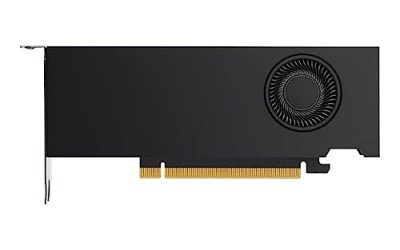
- Best for compact workstations: PNY NVIDIA RTX A2000 12GB — 12GB GDDR6 memory with ECC, 3,328 CUDA cores, low-profile dual-slot design, 70W board power.
- Best entry-level professional card: NVIDIA RTX A1000 8GB — 8GB GDDR6 memory, 2,304 CUDA cores, single-slot low-profile design, 50W board power.
- Best for light 2D CAD and multi-display desks: PNY NVIDIA T400 4GB — 4GB GDDR6 memory, 384 CUDA cores, single-slot design, 30W board power, three Mini DisplayPort outputs.
Quick Comparison
| Card | Memory | CUDA Cores | Display Outputs | Board Power | Form Factor |
|---|---|---|---|---|---|
| PNY NVIDIA RTX A4000 16GB | 16GB GDDR6 with ECC | 6,144 | 4x DisplayPort 1.4 | 140W | Single slot |
| PNY NVIDIA RTX A2000 12GB | 12GB GDDR6 with ECC | 3,328 | 4x Mini DisplayPort 1.4 | 70W | Low-profile, dual slot |
| NVIDIA RTX A1000 8GB | 8GB GDDR6 | 2,304 | 4x Mini DisplayPort | 50W | Single slot, low profile |
| PNY NVIDIA T400 4GB | 4GB GDDR6 | 384 | 3x Mini DisplayPort | 30W | Single slot, low profile |
How to Choose the Best CAD Graphics Card
Start with your models, not with the card
CAD performance follows the size and complexity of the files you open every day. A 2D floor plan, a small bracket, or a single-part model places almost no load on a graphics card. A large assembly with hundreds of parts, a building model with detailed geometry, or a rendered scene with ray-traced lighting places a heavy load on video memory and on the graphics processor. Before comparing cards, look at the largest assembly you work with regularly and how it behaves today: slow orbiting, laggy zooming, and long redraws after every edit are signs that the graphics card is the bottleneck.
Video memory decides how large a model you can hold
Video memory, usually called VRAM, is the memory on the graphics card itself. CAD applications load model geometry, textures, and viewport data into this memory, and when it fills up, the application must swap data back and forth, which slows everything down. For 2D drafting and small 3D parts, 4GB is workable. For medium assemblies and regular 3D modeling, 8GB is a sensible floor. For large assemblies, complex surfaces, and rendering, 12GB or 16GB gives the headroom that keeps the viewport responsive. Buy the memory your largest current project needs, with room for the next project to grow.
Professional drivers are the point of a CAD card
The main difference between a CAD graphics card and a gaming card with similar hardware is the driver. Professional drivers are built and validated for CAD applications, so viewport features such as hidden-line removal, shaded views, and hardware anti-aliasing behave as the application expects. When a CAD application crashes or renders a model incorrectly, the driver is often the cause, and professional drivers exist to reduce that risk. If your work depends on a CAD application running correctly all day, the driver is not a minor detail; it is the reason to buy a workstation card.
ECC memory protects long sessions
Error-correction code memory, known as ECC, detects and corrects single-bit memory errors before they can corrupt a calculation or a render. Two of the cards in this guide, the RTX A4000 and the RTX A2000, carry GDDR6 memory with ECC support. ECC matters most for long renders, simulations, and compute work, where a single flipped bit can waste hours of processing. For interactive modeling alone it is less critical, but it is a genuine advantage of the higher-tier workstation cards.
Check the slot, the power supply, and the displays
A graphics card that does not fit your workstation is useless, so measure before you buy. Single-slot cards fit in tight workstations and leave the neighboring slot free, while dual-slot cards need the extra clearance. Low-profile cards fit small form factor machines that full-height cards cannot enter; check whether your case takes a low-profile bracket or a full-height bracket. Board power matters too: the T400 draws 30W from the slot alone, the RTX A1000 draws 50W, the RTX A2000 draws 70W, and the RTX A4000 draws 140W and needs a 6-pin power connector. Finally, count your displays and their connectors. All four cards in this guide drive multiple displays, but they use DisplayPort or Mini DisplayPort outputs, so confirm that your monitors accept those inputs or that you have the right adapters.
Do not judge a CAD card by gaming performance
Gaming benchmarks measure frame rates in games at high settings, and they say almost nothing about CAD viewport performance. A card that is fast in games can still stutter when orbiting a large assembly, and a workstation card that looks slow in a gaming chart can be smooth and stable in a CAD viewport. Judge CAD cards by their professional driver support, their video memory, and their multi-display capability.
The Picks in Detail
1. PNY NVIDIA RTX A4000 16GB — Best Overall for CAD Work
The RTX A4000 is the most capable card in this guide and the right pick for CAD users who work with large assemblies, detailed surfaces, and rendering. It carries 16GB of GDDR6 memory with ECC, 6,144 CUDA cores, 48 RT cores, and 192 Tensor cores, built on the NVIDIA Ampere architecture. It drives up to four displays through four DisplayPort 1.4 connectors at up to 7680 x 4320, in a single-slot form factor.
For CAD work, the combination of 16GB of memory and ECC is the key point. Large assemblies stay in video memory instead of swapping, and long renders gain the protection of error correction. The RT cores accelerate ray-traced rendering, which shortens the wait for realistic previews and final renders in applications that support hardware ray tracing. The single-slot design is also practical: many CAD workstations carry capture cards, network cards, or storage controllers in neighboring slots, and a single-slot graphics card leaves that room free.
The trade-off is power and size. At 140W, the RTX A4000 needs a 6-pin power connector and a power supply with the capacity to feed it, and it is a full-height card, so it does not fit small form factor machines. Confirm your largest assembly genuinely needs 16GB before choosing it over the A2000.
Pros:
– 16GB of GDDR6 memory with ECC for large assemblies and long renders
– 6,144 CUDA cores with RT and Tensor cores for ray-traced rendering
– Single-slot design leaves neighboring slots free
– Four DisplayPort 1.4 outputs for multi-display CAD desks
Cons:
– 140W board power needs a 6-pin connector and a capable power supply
– Full-height card does not fit small form factor workstations
– More capability than small-model CAD work requires
2. PNY NVIDIA RTX A2000 12GB — Best for Compact Workstations
The RTX A2000 12GB is the balanced pick in this guide: a professional card with 12GB of GDDR6 memory with ECC, 3,328 CUDA cores, 104 Tensor cores, and 26 RT cores, in a low-profile design that fits small form factor workstations. It uses a PCIe 4.0 x16 interface, drives up to four displays through four Mini DisplayPort 1.4 connectors at up to 7680 x 4320, and at 70W it draws modest power for its capability.
For CAD users, the A2000 hits the middle of the range well. Twelve gigabytes of memory handles medium to large assemblies without the swapping that slows a smaller card, and ECC memory adds protection for long sessions. The low-profile bracket matters for the many CAD seats that run in small form factor desktops under a desk or in a compact office machine. Ray tracing support is present for rendering work, though it is less powerful than the A4000, so heavy rendering will take longer.
The main limitation is that it occupies two slots despite its low-profile height, so check the neighboring slot in a compact case. For everyday 3D CAD modeling in a compact workstation, it is the most fitting card in this guide.
Pros:
– 12GB of GDDR6 memory with ECC for medium to large assemblies
– Low-profile design fits small form factor workstations
– 70W board power keeps power and cooling demands modest
– Four Mini DisplayPort outputs for multi-display setups
Cons:
– Dual-slot width needs clearance beside the card
– Ray-traced rendering is slower than the RTX A4000
– Mini DisplayPort outputs need adapters for some monitors
3. NVIDIA RTX A1000 8GB — Best Entry-Level Professional Card
The RTX A1000 is the entry point into NVIDIA’s professional Ampere lineup, and it is the right card for CAD users whose models are small to medium and whose workstation is compact. It carries 8GB of GDDR6 memory, 2,304 CUDA cores, and 72 Tensor cores, in a single-slot, low-profile design that draws 50W. It connects through PCIe 4.0 x8 and drives four displays through four Mini DisplayPort connectors.
The limits are honest ones. Eight gigabytes of memory will fill up on large assemblies, and the card has no ECC memory, so long renders lose the error protection of the higher-tier cards. Buy it for everyday modeling and drafting, not for heavy rendering or very large assemblies.
Pros:
– Professional drivers and 8GB of memory at the entry level
– Single-slot, low-profile design fits compact workstations
– 50W board power with no extra power connector needed
– Four Mini DisplayPort outputs for multi-display desks
Cons:
– 8GB of memory is tight for large assemblies
– No ECC memory for long renders
– Rendering throughput is well below the A2000 and A4000
4. PNY NVIDIA T400 4GB — Best for Light 2D CAD and Multi-Display Desks
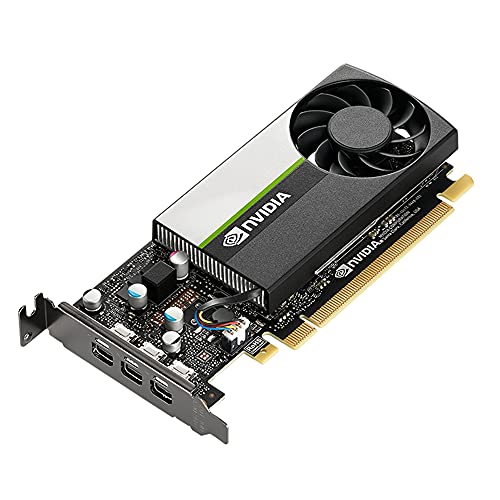
The T400 is the lightest card in this guide, and it earns its place for a specific job: 2D CAD drafting, light 3D work, and desks that need several displays from a small, quiet card. It carries 4GB of GDDR6 memory and 384 CUDA cores on the NVIDIA Turing architecture, in a single-slot, low-profile design that draws only 30W. It connects through PCIe 3.0 x16 and drives up to three displays through three Mini DisplayPort connectors, with support for resolutions up to 8K.
The limits are clear and should decide the purchase. Four gigabytes of memory and 384 CUDA cores are not enough for large 3D assemblies, complex surfaces, or serious rendering, and the card will slow down noticeably when a model grows past its capacity. It also drives three displays rather than four, so a four-monitor desk needs a different card.
Pros:
– 4GB of GDDR6 memory for 2D drafting and light 3D work
– Single-slot, low-profile design fits the smallest workstations
– 30W board power with no extra connector and very low heat
– Three Mini DisplayPort outputs with 8K support
Cons:
– 4GB of memory is too small for large 3D assemblies
– 384 CUDA cores limit rendering and heavy viewport work
– Three display outputs, not four
Who Should Choose What
- Large assemblies and rendering: Choose the PNY NVIDIA RTX A4000 16GB. Its 16GB of ECC memory and 6,144 CUDA cores are built for the heaviest CAD files in this guide.
- Compact workstations with medium to large models: Choose the PNY NVIDIA RTX A2000 12GB. It pairs 12GB of ECC memory with a low-profile design that fits small form factor machines.
- Everyday 3D modeling on a modest workstation: Choose the NVIDIA RTX A1000 8GB. It brings professional drivers and 8GB of memory into a single-slot, low-power card.
- 2D drafting and multi-display office work: Choose the PNY NVIDIA T400 4GB. It is quiet, cool, and small, and it drives three displays from slot power alone.
- Gaming first, CAD second: None of these cards is the right pick. A gaming graphics card will serve that buyer better, and this guide is written for CAD-first workstations.
Common Mistakes When Buying a CAD Graphics Card
Buying a gaming card for CAD work and expecting workstation behavior. Gaming cards are fast in games, but they run consumer drivers that are not validated for CAD applications in the same way. Viewport glitches, missing features in shaded views, and unstable sessions are the usual result. If CAD is your daily work, buy a professional card.
Ignoring the form factor. A full-height card does not fit a small form factor case, and a dual-slot card does not fit a case with a card in the neighboring slot. Measure the case, check the bracket height, and confirm the slot clearance before ordering.
Forgetting the power connector. Cards that draw 70W or less run from slot power, but the RTX A4000 at 140W needs a 6-pin connector. Open the case and check the power supply before the card arrives, not after.
Skipping the display check. Professional cards use DisplayPort and Mini DisplayPort outputs. If your monitors only accept HDMI, you will need adapters, and adapter quality affects the signal. Count the displays and confirm the connectors while you are still choosing the card.
Frequently Asked Questions
Do I need a workstation graphics card for CAD, or will a gaming card work?
A gaming card can display CAD models, and many hobbyists use one without trouble. A workstation card is the better choice when CAD is daily professional work, because its drivers are built and validated for CAD applications, and its viewport behavior is more predictable. The difference shows up in stability and in how large assemblies behave, not in a single benchmark number.
What is ECC memory, and does CAD need it?
ECC memory detects and corrects single-bit errors in video memory. It matters most for long renders, simulations, and compute work, where an undetected error can corrupt a result. For interactive modeling it is less critical, but it is a real advantage of the RTX A4000 and RTX A2000 in this guide.
Can these cards drive four monitors?
The RTX A4000, RTX A2000, and RTX A1000 each drive up to four displays. The T400 drives up to three. All of them use DisplayPort or Mini DisplayPort outputs, so confirm your monitors accept those inputs or have the right adapters before you buy.
Will these cards fit a small form factor workstation?
The RTX A2000, RTX A1000, and T400 are all low-profile cards designed for compact machines, though the A2000 takes two slots of width. The RTX A4000 is a full-height, single-slot card and needs a standard tower workstation. Measure your case and check the bracket height before ordering.
Are professional CAD cards good for gaming?
They can run games, but they are not tuned for gaming performance, and a gaming card at a similar tier will usually run games more smoothly. These cards are built for CAD viewport accuracy, driver stability, and long professional sessions. Buy them for CAD work, not for gaming.
Conclusion
The best cad graphics cards are workstation cards chosen for the work you actually do. The PNY NVIDIA RTX A4000 16GB is the strongest pick for large assemblies and rendering, with 16GB of ECC memory. The PNY NVIDIA RTX A2000 12GB is the balanced choice for compact workstations, pairing 12GB of ECC memory with a low-profile design. The NVIDIA RTX A1000 8GB covers everyday 3D modeling at the entry level, and the PNY NVIDIA T400 4GB handles 2D drafting and multi-display desks with almost no power or noise. Match the card to your largest model, confirm the form factor and the power connector, and choose the professional driver support that keeps CAD work stable all day.
More from Amazon
Programs that pair well with the guide above. Offers and eligibility are set by Amazon and may change.
Free shipping on eligible items, Prime Video and more. Eligible new members can start with a free trial.
Start a Prime free trialAd-free music streaming. Eligible new subscribers can start with a free trial.
Try Music Unlimited freeA Prime membership for ages 18-24 with a trial period. Eligibility is set by Amazon.
See Prime for Young AdultsAudiobooks and podcasts to listen to on the go. Eligible new members can start with a free trial.
Try Audible freeAs an Amazon Associate we earn from qualifying purchases.