Key takeaways
- Our guide to the best gaming computer components covers the CPU, graphics card, motherboard, memory, and storage you need for a balanced gaming PC build.
As an Amazon Associate I earn from qualifying purchases.
The Short Answer
The best gaming computer components are the parts you buy one by one and assemble into a gaming PC yourself: a processor, a graphics card, a motherboard, memory, and storage. This guide covers exactly those parts. It is not a roundup of complete prebuilt desktops. If you want a finished machine that you plug in and switch on, look for a prebuilt gaming desktop guide instead. If you want to choose each part and upgrade piece by piece later, the five components below form a coherent foundation for a modern gaming PC.
A balanced build starts with the processor and the graphics card, because those two parts set the ceiling for how games run. The motherboard ties them together and decides which future upgrades fit. Memory keeps games and background tasks moving without stutter, and fast storage keeps load times short. Pick those five parts to match each other and you avoid the most common beginner error: one strong part held back by a weak partner.
Our Top Picks
- Best gaming processor: AMD Ryzen 7 7800X3D 8-Core, 16-Thread Desktop Processor — View on Amazon
- Best graphics card for 1080p and 1440p gaming: Gigabyte GeForce RTX 4060 WINDFORCE OC 8G Graphics Card — View on Amazon
- Best motherboard for an AMD gaming build: ASUS ROG Strix B650E-F Gaming WiFi Motherboard — View on Amazon
- Best memory kit for gaming: CORSAIR Vengeance DDR5 RAM 32GB (2x16GB) 6000MHz CL36 — View on Amazon
- Best storage for a gaming library: SAMSUNG 990 PRO SSD 2TB NVMe M.2 PCIe Gen4 — View on Amazon
Quick Comparison
| Component | Pick | Why It Fits a Gaming Build |
|---|---|---|
| Processor | AMD Ryzen 7 7800X3D | 8 cores and 16 threads with 96 MB of L3 cache, built for gaming workloads |
| Graphics card | Gigabyte RTX 4060 WINDFORCE OC 8G | 8 GB of GDDR6 memory, dual-fan cooling, and a compact 192 mm length |
| Motherboard | ASUS ROG Strix B650E-F Gaming WiFi | AM5 socket, DDR5 memory support, PCIe 5.0, WiFi 6E, and three M.2 slots |
| Memory | CORSAIR Vengeance DDR5 32GB (2x16GB) 6000MHz CL36 | 32 GB across two matched sticks at DDR5 6000 speeds |
| Storage | SAMSUNG 990 PRO SSD 2TB | 2 TB of NVMe storage with sequential read speeds up to 7,450 MB/s |
How to Choose Gaming Computer Components
Start with the games and the monitor
Before you compare parts, decide what you will play and what monitor you will use. A competitive shooter at 1080p asks far less of a graphics card than an open-world game at 1440p with ray tracing turned on. Let the resolution and refresh rate of your monitor decide how much graphics power you need.
Match the processor to the motherboard
Processors and motherboards are sold as pairs, even when you buy them separately. The AMD Ryzen 7 7800X3D uses the AM5 socket and DDR5 memory, so it needs an AM5 motherboard such as the ASUS ROG Strix B650E-F Gaming WiFi. Check the socket, the memory type, and the M.2 and USB count before you buy.
Balance the processor and the graphics card
A gaming PC is only as strong as its weakest link in the workload you run most. Pairing a flagship processor with an entry-level graphics card wastes the processor, because the graphics card sets the frame rate in most games. The picks in this guide sit in the same performance band, so neither part waits on the other in typical 1080p and 1440p gaming.
Size the power supply for the whole build
Every component draws power, and the graphics card draws the most. Gigabyte recommends a 450 W power supply for the RTX 4060 WINDFORCE OC 8G, and the Ryzen 7 7800X3D carries a 120 W thermal design power figure. Add headroom for the motherboard, storage, fans, and future upgrades, and choose a power supply from a known maker with the connectors your graphics card needs.
Plan the case around the parts
Measure before you buy. The Gigabyte RTX 4060 WINDFORCE OC 8G measures 192 mm long, which fits most mid-tower cases, but longer cards and tall air coolers can clash with compact cases. Check the case maker maximum graphics card length, cooler height, and radiator support, and confirm the motherboard form factor matches the case.
Memory: capacity first, speed second
For gaming in 2026, 32 GB of memory is the sensible baseline. It leaves room for the game, a voice chat app, a browser with a few tabs, and a streaming tool running at the same time. Two matched sticks running in dual channel mode perform better than a single stick of the same total capacity, which is why the CORSAIR kit in this guide is a 2x16GB pair.
Storage: fast NVMe for games, room to grow
Modern games are large, and a 2 TB drive holds a solid library without constant uninstalling. A PCIe Gen4 NVMe drive such as the Samsung 990 PRO loads games quickly and keeps level transitions short.
The Picks in Detail
1. AMD Ryzen 7 7800X3D 8-Core, 16-Thread Desktop Processor
The processor is the heart of the build, and the Ryzen 7 7800X3D is one of the strongest gaming processors on the AM5 platform. It has 8 cores and 16 threads, a base clock of 4.2 GHz, and a maximum boost clock of up to 5.0 GHz. Its defining feature is 3D V-Cache technology, which stacks extra cache onto the chip to give a total of 96 MB of L3 cache plus 8 MB of L2 cache. Games access data from cache far faster than from main memory, so that large cache helps frame rates in many titles, especially at 1080p and 1440p where the processor works hardest.
The chip uses the AM5 socket and DDR5 memory, which puts it on the current AMD platform with a clear upgrade path to later AM5 processors. Its 120 W thermal design power figure is modest for its class, so a capable air cooler or a 240 mm liquid cooler keeps it under control. Note that AMD does not include a cooler with the boxed 7800X3D, so budget for a cooler when you plan the build.
Pros:
- Large 96 MB L3 cache that benefits gaming performance
- 8 cores and 16 threads handle gaming plus streaming and background tasks
- AM5 platform leaves room for future processor upgrades
- Modest 120 W thermal design power for its performance class
Cons:
- No cooler included in the box, so a cooler is a separate purchase
- 8 cores trail higher core count chips in heavy rendering and compile work
- Needs an AM5 motherboard and DDR5 memory, so it does not fit older builds
View the AMD Ryzen 7 7800X3D on Amazon
2. Gigabyte GeForce RTX 4060 WINDFORCE OC 8G Graphics Card
The graphics card does the heaviest work in a gaming PC, and the Gigabyte GeForce RTX 4060 WINDFORCE OC 8G is a sensible match for the processor above. It is built on NVIDIA Ada Lovelace architecture with 3,072 CUDA cores, 8 GB of GDDR6 memory on a 128-bit bus, and a 2,475 MHz core clock. It supports DLSS 3, ray tracing, and 4th generation Tensor Cores, which help newer games run smoothly at 1080p and 1440p.
The card is compact at 192 mm long, 120 mm wide, and 41 mm tall, so it fits most mid-tower cases and many smaller ones. Its dual-fan WINDFORCE cooling system keeps temperatures in check without taking up three slots. The port mix is practical: two HDMI 2.1a outputs and two DisplayPort 1.4a outputs, which cover a monitor and a TV at the same time. It uses a single 8-pin PCIe power connector and a 450 W recommended power supply.
Pros:
- Compact 192 mm length fits most mid-tower cases
- 8 GB of GDDR6 memory with DLSS 3 and ray tracing support
- Two HDMI and two DisplayPort outputs for a monitor plus a TV
- Single 8-pin power connector and a modest power supply requirement
Cons:
- 8 GB of video memory can limit newer titles at maximum texture settings
- Only two native DisplayPort outputs, so triple-monitor setups need planning
- PCIe 4.0 x8 interface rather than a full x16 link
View the Gigabyte RTX 4060 WINDFORCE OC 8G on Amazon
3. ASUS ROG Strix B650E-F Gaming WiFi Motherboard

The motherboard is the part you will live with longest, because swapping it means rebuilding the whole PC. The ASUS ROG Strix B650E-F Gaming WiFi is an ATX board for the AMD AM5 socket, built around the B650E chipset, and it supports Ryzen 7000, 8000, and 9000 series processors. Its 12 + 2 power stages deliver stable power to the processor, and it supports DDR5 memory, which is exactly what the Ryzen 7 7800X3D needs.
Connectivity is a strength. The board has one PCIe 5.0 M.2 slot and two PCIe 4.0 M.2 slots, so you can start with one fast drive and add more later. It includes WiFi 6E and 2.5G LAN, a USB 3.2 Gen 2×2 Type-C port, and ASUS Q-Release for easier graphics card removal.
Pros:
- AM5 socket supports Ryzen 7000, 8000, and 9000 series processors
- Three M.2 slots, including one PCIe 5.0 slot, for storage expansion
- WiFi 6E and 2.5G LAN built in, so no separate network card is needed
- 12 + 2 power stages for stable power delivery to the processor
Cons:
- ATX size needs a case that accepts full-size ATX boards
- B650E chipset lacks some of the extra lanes and ports of flagship X870 boards
- RGB lighting adds cost for builders who do not want it
View the ASUS ROG Strix B650E-F Gaming WiFi on Amazon
4. CORSAIR Vengeance DDR5 RAM 32GB (2x16GB) 6000MHz CL36
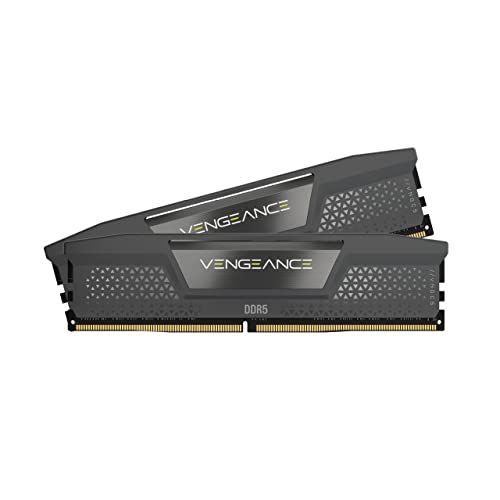
Memory is the part builders most often undersize, and the CORSAIR Vengeance DDR5 kit in this guide gets the fundamentals right. It is a matched pair of 16 GB sticks for a total of 32 GB, running at DDR5 6000 speeds with CL36 latency. Two matched sticks run in dual channel mode, which gives the processor a wider path to memory than a single stick of the same capacity.
The kit supports AMD EXPO and Intel XMP 3.0 profiles, so you enable the listed speed with a single setting in the motherboard firmware instead of tuning timings by hand. It runs at 1.35V and fits the DDR5 slots on the ASUS board above. For a gaming PC that also runs a browser, voice chat, and a streaming tool at the same time, 32 GB is the capacity to aim for.
Pros:
- 32 GB across two matched sticks for dual channel performance
- DDR5 6000 speed with CL36 latency suits AM5 gaming builds
- AMD EXPO and Intel XMP 3.0 support for simple setup
- Low-profile heat spreaders fit under most air coolers
Cons:
- 32 GB is more than a gaming-only machine strictly needs, so light users pay for headroom
- Listed speed needs an EXPO or XMP profile enabled in the firmware
- No RGB lighting on this kit, for builders who want it
View the CORSAIR Vengeance DDR5 32GB Kit on Amazon
5. SAMSUNG 990 PRO SSD 2TB NVMe M.2 PCIe Gen4
Storage is the component you notice every time a game loads, and the Samsung 990 PRO 2TB is a strong choice for a gaming library. It is a PCIe Gen4 NVMe M.2 2280 drive with sequential read speeds up to 7,450 MB/s, which keeps game load times short and large file transfers quick. The 2 TB capacity holds a solid library of modern games without forcing constant uninstalls, and the bare drive model number is MZ-V9P2T0B/AM.
The drive slots straight into one of the three M.2 slots on the ASUS board, with no cables to route and no drive bay needed.
Pros:
- Sequential read speeds up to 7,450 MB/s for fast game loads
- 2 TB capacity holds a large modern game library
- M.2 form factor needs no cables and no drive bay
- Spare M.2 slots on the motherboard allow a second drive later
Cons:
- PCIe Gen4 speeds need a Gen4-capable M.2 slot to reach their full rate
- 2 TB may still fill up for builders with very large libraries
- No heatsink included on the bare drive model, so check case airflow
View the SAMSUNG 990 PRO SSD 2TB on Amazon
Who Should Choose What
If you are building your first gaming PC, start with the processor and graphics card pairing in this guide. The Ryzen 7 7800X3D and the RTX 4060 WINDFORCE OC sit in the same performance band, so neither part holds the other back, and the rest of the parts are chosen to match them.
If you stream while you play, the 8 cores and 16 threads of the Ryzen 7 7800X3D and the 32 GB memory kit matter most. Streaming software, voice chat, and a browser all compete for processor time and memory, and this build has headroom for all of them at once.
If you play mostly competitive shooters at 1080p, the large L3 cache of the 7800X3D is the pick that helps most, because frame rates in those games lean heavily on the processor. If you play cinematic open-world games at 1440p, the graphics card matters more, and the RTX 4060 is the part to upgrade first when you are ready.
Common Mistakes
Buying a prebuilt desktop when you meant to buy parts. Prebuilt desktops and components are different purchases. A prebuilt machine arrives assembled with a warranty on the whole system. Components arrive as separate parts that you assemble yourself. Know which one you want before you buy, because the return and support paths are different.
Mixing sockets and memory types. The most common build error is a processor that does not fit the motherboard socket, or memory that does not match the board. The Ryzen 7 7800X3D needs an AM5 board and DDR5 memory. Check the socket and the memory type on both listings before you buy.
Forgetting the cooler. The boxed Ryzen 7 7800X3D ships without a cooler. Builders who assume one is included discover the gap only when the parts arrive. Add a cooler to the order and check that it clears the memory and the case.
Buying one memory stick instead of two. A single 32 GB stick leaves dual channel performance on the table. Buy a matched pair, such as the 2x16GB kit in this guide, and install the sticks in the slots the motherboard manual recommends.
FAQ
Are gaming computer components the same as a gaming computer?
No. Components are the individual parts: processor, graphics card, motherboard, memory, and storage. A gaming computer is the finished machine, either bought prebuilt or assembled from those parts. This guide covers the parts, not finished machines.
Can I mix AMD and NVIDIA parts in one build?
Yes. An AMD processor works with an NVIDIA graphics card, and the build in this guide pairs exactly that combination. The parts connect through standard sockets and slots, so the brands do not need to match.
Do I need 32 GB of memory for gaming?
For gaming alone, 16 GB is often enough, but 32 GB is the safer choice when you also run voice chat, a browser, and streaming software at the same time. The kit in this guide is a matched 2x16GB pair, which also gives you dual channel performance.
Does the Ryzen 7 7800X3D need a separate cooler?
Yes. AMD does not include a cooler with the boxed 7800X3D, so you need to buy one. A capable air cooler or a 240 mm liquid cooler suits it, and the chip carries a 120 W thermal design power figure.
Will the RTX 4060 fit in a mid-tower case?
In most cases, yes. The Gigabyte WINDFORCE OC 8G measures 192 mm long, which is compact for a modern graphics card. Still, check the maximum graphics card length listed by your case maker before you buy.
Can I add more storage later?
Yes. The ASUS ROG Strix B650E-F Gaming WiFi has three M.2 slots, including one PCIe 5.0 slot. Start with the 2 TB Samsung 990 PRO and add a second drive in a spare slot when your library grows.
Conclusion
The best gaming computer components are the ones that match each other. The Ryzen 7 7800X3D gives the build a gaming-focused processor with a large cache, the Gigabyte RTX 4060 WINDFORCE OC 8G handles 1080p and 1440p gaming in a compact card, the ASUS ROG Strix B650E-F Gaming WiFi ties them together on the AM5 platform with room for more storage, the CORSAIR Vengeance DDR5 32GB kit keeps multitasking smooth, and the Samsung 990 PRO 2TB gives the game library fast, roomy storage.
That is the whole point of buying components instead of a prebuilt machine: every part is chosen for a reason, and every part can be upgraded on its own later.
More from Amazon
Programs that pair well with the guide above. Offers and eligibility are set by Amazon and may change.
Free shipping on eligible items, Prime Video and more. Eligible new members can start with a free trial.
Start a Prime free trialAd-free music streaming. Eligible new subscribers can start with a free trial.
Try Music Unlimited freeA Prime membership for ages 18-24 with a trial period. Eligibility is set by Amazon.
See Prime for Young AdultsAudiobooks and podcasts to listen to on the go. Eligible new members can start with a free trial.
Try Audible freeAs an Amazon Associate we earn from qualifying purchases.