
Key takeaways
- Refresh rate: Gaming models list high refresh rates, and the OLED G9 is stated at a higher figure than most LCD options. Office-focused models list lower rates. If you play competitive shooters, prioritise the higher-refresh models. If you mostly work, the lower rate is not a limit.
- Curvature: A tighter curve increases immersion for games but can distort straight lines in design work. Office-oriented 49-inch models tend to use gentler curves.
- USB-C and KVM: Dell and LG list USB-C connectivity, and Dell lists KVM-style switching so one keyboard and mouse can drive two computers. This matters if you connect a work laptop and a personal PC.
- Video inputs: Full 5120 x 1440 at a high refresh rate needs a recent DisplayPort or HDMI standard. Cable and graphics-card limits can cap the refresh rate, so read the maker’s recommended cable guidance.
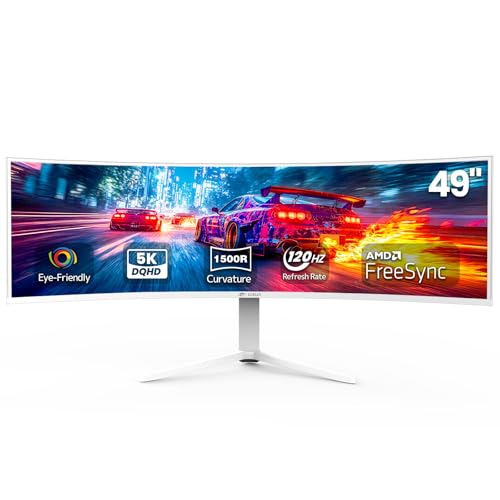
A 49-inch super ultrawide suits a buyer who wants the screen space of two side-by-side monitors without a bezel in the middle: a Samsung Odyssey G9 model fits gamers and sim racers, the Dell UltraSharp U4924DW fits office and multitasking work, and the LG 49WQ95C sits between the two as a productivity panel with a faster refresh rate. Nearly every 49-inch model uses a 32:9 shape at 5120 x 1440, which is the same pixel count as two 2560 x 1440 monitors joined together. The real decisions are panel type, refresh rate, curvature, connectivity and desk space.
Our top picks



As an Amazon Associate we earn from qualifying purchases at no extra cost to you.
At a glance
| Model | Best for | Key stated specs (per the maker) | Limits |
|---|---|---|---|
| Samsung Odyssey OLED G9 (G93SC) | Premium gaming and media | 49-inch 32:9, 5120 x 1440, OLED panel, high refresh rate, curved | Text clarity and burn-in care on an OLED; premium tier |
| Samsung Odyssey G9 (G95C) | Fast, immersive gaming at a lower tier than OLED | 49-inch 32:9, 5120 x 1440, VA-type panel, high refresh rate, strong curve | Black smearing and uniformity vary by unit, reviewers report |
| Dell UltraSharp U4924DW | Office work, spreadsheets, video calls | 49-inch 32:9, 5120 x 1440, IPS Black panel, USB-C hub with KVM features | Lower refresh rate than gaming models; not a gaming-first display |
| LG UltraWide 49WQ95C | Mixed work and play | 49-inch 32:9, 5120 x 1440, Nano IPS, USB-C connectivity, higher refresh rate than office models | Mid-range tier contrast; HDR is modest on IPS |
Product lines change quickly, so check each maker’s product page for the exact current model number and port list before buying. The specs above summarize what the makers list at the product-family level.
What a 49-inch super ultrawide actually gives you
At 49 inches, 32:9 and 5120 x 1440, the pixel density is similar to a 27-inch 1440p monitor, so text looks about as sharp as it does on a common 27-inch screen. That is a point in its favor for work: you can tile two full-size documents, a browser and a reference window with room to spare. It also means that if you expect 4K-level sharpness, this is not that. Higher-resolution 32:9 panels exist but are rarer and demand far more from a graphics card.
For games, 32:9 support is not universal. Many racing, flight and strategy titles handle it well and extend the field of view. Others stretch the image, crop it or add black bars. Check support for the games you play in the game’s settings or the community wiki before assuming it will fill the screen.
Panel type: VA, IPS and OLED
VA
Samsung’s G95C-class Odyssey monitors use a VA-style panel, which generally gives deeper blacks and higher contrast than IPS at the same tier. Reviewers commonly report trade-offs such as slower dark-pixel transitions, which can show up as smearing in fast scenes. Viewing angles matter more on a curved 49-inch screen, because the outer edges sit at an angle to your eyes.
IPS and Nano IPS
The Dell U4924DW uses IPS Black, which the maker describes as offering higher contrast than a standard IPS panel. The LG 49WQ95C uses Nano IPS, which the maker positions for wide colour coverage. Both give consistent colour from edge to edge, which suits photo editing, design and general office use. Contrast is lower than VA or OLED, so dark rooms show the difference.
OLED
The Odyssey OLED G9 trades the contrast limitations of LCD for near-perfect blacks and fast pixel response. The cost is a premium price tier and some care needs. Static elements such as taskbars, toolbars and chat windows can cause image retention or burn-in over long periods. Makers include pixel-shift and panel-care features and publish warranty terms, so read the burn-in language in the warranty before you commit to a work setup that leaves the same windows up all day.
Refresh rate, curve and connectivity
- Refresh rate: Gaming models list high refresh rates, and the OLED G9 is stated at a higher figure than most LCD options. Office-focused models list lower rates. If you play competitive shooters, prioritise the higher-refresh models. If you mostly work, the lower rate is not a limit.
- Curvature: A tighter curve increases immersion for games but can distort straight lines in design work. Office-oriented 49-inch models tend to use gentler curves.
- USB-C and KVM: Dell and LG list USB-C connectivity, and Dell lists KVM-style switching so one keyboard and mouse can drive two computers. This matters if you connect a work laptop and a personal PC.
- Video inputs: Full 5120 x 1440 at a high refresh rate needs a recent DisplayPort or HDMI standard. Cable and graphics-card limits can cap the refresh rate, so read the maker’s recommended cable guidance.
Fit, size and desk notes
A 49-inch 32:9 monitor is roughly 45 inches wide (about 115 cm) including the stand base, which is wider than many desks that are sold as standard. Measure the desk, then allow for the stand footprint and the depth a curved screen needs. Sitting about 30 to 40 inches from the screen is a common viewing distance, so a shallow desk can leave the edges too far outside your vision. Check the maker’s stated weight and the stand’s tilt and height range, and consider a VESA arm only if the maker lists support for it, since these panels are heavy.
Ergonomics deserve thought. Keep the centre of the screen near eye level and avoid turning your head repeatedly to reach the far edges. If you find yourself doing that, a 34-inch ultrawide may suit you better.
Compatibility checklist
- Graphics card: needs a current DisplayPort or HDMI output that supports 5120 x 1440 at your target refresh rate.
- Laptop: confirm that the USB-C port supports DisplayPort video and the power delivery level the monitor lists.
- Operating system: macOS and Windows both support 32:9, but window-management tools help on a screen this wide.
- Consoles: most consoles do not output 32:9, so expect black bars on the sides.
Pick the monitor if…
| Pick… | If you… |
|---|---|
| Samsung Odyssey OLED G9 | want the best contrast and response in this size class and accept premium-tier cost and OLED care |
| Samsung Odyssey G9 (G95C) | want a fast, curved gaming screen and prefer LCD over OLED |
| Dell UltraSharp U4924DW | work in spreadsheets, code or video calls and value a USB-C hub with KVM |
| LG 49WQ95C | split time between work and games and want Nano IPS colour with a higher refresh rate |
Budget tiers
The budget tier for 49-inch screens is thin. Lower-priced 32:9 models do exist from several brands, but they often trim refresh rate, brightness, ergonomics or connectivity. In the mid-range, you find the LG and Dell productivity models and the LCD Samsung G9. The premium tier is where the OLED options sit. Because pricing moves often, compare a current model’s feature list rather than relying on a tier label alone.
Alternatives
- 34-inch ultrawide (21:9): Narrower, cheaper and easier to fit on a desk. A good choice if you do not need the full 32:9 width.
- Two 27-inch monitors: Cheaper per pixel and flexible, but with a bezel in the middle and two cables.
- 38-inch ultrawide (3840 x 1600): Higher text sharpness than 49-inch 1440p, with less width.
Frequently Asked Questions
Is a 49-inch ultrawide the same as two monitors?
The pixel count matches two 27-inch 1440p monitors joined together, and the screen is one continuous surface. There is no bezel to cross, but window snapping and game support work differently from a dual-monitor setup. Many users use window-management software to divide the screen into zones.
Will a 49-inch monitor work for gaming?
Yes, if the game supports 32:9. Many racing and simulation titles do, and others add black bars or stretch the image. Check the game’s settings or community notes before you buy, and make sure your graphics card can drive 5120 x 1440 at your target frame rate.
Is text sharp on a 49-inch 5120 x 1440 screen?
Pixel density is similar to a 27-inch 1440p monitor, so text looks about as crisp as it does there. It is less sharp than a 4K display of similar height, which some buyers notice if they read small text all day.
Should I choose OLED or LCD for a 49-inch monitor?
OLED offers deeper blacks and faster pixel response, but static desktop elements can cause retention over long periods, and it sits in a higher price tier. LCD models such as the Dell and LG are better matched to long office sessions with static windows. Read the maker’s warranty terms on burn-in before buying an OLED.
What do I need to connect a laptop?
Look for a USB-C port that supports DisplayPort video and power delivery, as listed by the maker of both the monitor and the laptop. The Dell and LG models list USB-C connectivity. If your laptop lacks it, use a DisplayPort or HDMI cable that supports the resolution and refresh rate you want.
How much desk space do I need?
Plan for a desk at least 47 inches wide and deep enough to sit comfortably 30 to 40 inches from the screen. Check the maker’s listed dimensions and weight for the specific model, and confirm VESA mount support if you plan to use an arm.
More from Amazon
Programs that pair well with the guide above. Offers and eligibility are set by Amazon and may change.
Free shipping on eligible items, Prime Video and more. Eligible new members can start with a free trial.
Start a Prime free trialAd-free music streaming. Eligible new subscribers can start with a free trial.
Try Music Unlimited freeA Prime membership for ages 18-24 with a trial period. Eligibility is set by Amazon.
See Prime for Young AdultsAudiobooks and podcasts to listen to on the go. Eligible new members can start with a free trial.
Try Audible freeAs an Amazon Associate we earn from qualifying purchases.








