
Our Short List of 3

- Best for: Players who want the highest laptop graphics tier in a slim 16-inch chassis.
- GPU: NVIDIA GeForce RTX 5090 Laptop GPU, up to 160 W TGP
- CPU: AMD Ryzen AI 9 HX 370
- Display: 16-inch QHD+ OLED, 240Hz
- Memory: 32GB LPDDR5X
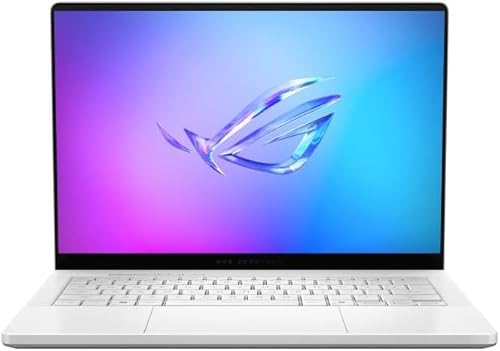
- Best for: Gamers who carry their laptop every day and still want a high-tier GPU.
- GPU: NVIDIA GeForce RTX 5070 Ti, 12GB GDDR7
- CPU: AMD Ryzen AI 9 HX 370, 12 cores
- Display: 14-inch OLED, 2880 x 1800, 120Hz, 500 nits, 100 percent DCI-P3
- Memory: 32GB LPDDR5X

- Best for: A fixed gaming desk that also handles heavy everyday work.
- GPU: NVIDIA GeForce RTX 5070, 8GB GDDR7
- CPU: Intel Core Ultra 9 275HX, up to 5.4 GHz
- Display: 16-inch WQXGA OLED, 2560 x 1600, 165Hz, 500 nits
- Memory: 32GB DDR5-5600, expandable to 64GB
All 4 Picks at a Glance
| Product | Specs | Action |
|---|---|---|
| Razer Blade 16 (2025) |
| Check price on Amazon |
| ASUS ROG Zephyrus G14 (2025) |
| Check price on Amazon |
| Lenovo Legion Pro 5i Gen 10 |
| Check price on Amazon |
 MSI Katana 15 HX |
| Check price on Amazon |
Key takeaways
- Four gaming laptops ranked from flagship to all-rounder: RTX 5090 Blade 16, Zephyrus G14, Legion Pro 5i and Katana 15 HX, ordered by the specs that matter.
Ranking gaming laptops sounds simple until you open the listings: the same graphics chip appears in thin 14-inch machines and heavy 16-inch ones, memory is soldered on some models and socketed on others, and two laptops with near-identical headline specs can behave very differently once the cooling system and power limits enter the picture. The real decision is which tier of graphics power you actually need, and what you give up in size, screen and upgrade room to get it.
This ranked list is for buyers who want one clear order instead of a pile of options: flagship hunters at the top, players who travel with their machine in the middle, and value-focused gamers near the bottom. Every pick comes from current Amazon listings, and the order follows the graphics tier, processor class and display listed on each product page, not outside benchmark scores.
Quick Picks
As an Amazon Associate we earn from qualifying purchases
| Product | Best for | Key spec from title |
|---|---|---|
| Razer Blade 16 (2025) | Maximum power in a slim body | GeForce RTX 5090, QHD+ 240Hz OLED |
| ASUS ROG Zephyrus G14 (2025) | Gaming that travels daily | GeForce RTX 5070 Ti, 14-inch 3K OLED |
| Lenovo Legion Pro 5i Gen 10 | Desk-based 16-inch gaming | Core Ultra 9 275HX, RTX 5070, OLED 165Hz |
| MSI Katana 15 HX | High-refresh QHD on a mainstream pick | Core i9-14900HX, RTX 5070, 165Hz QHD |
How to Choose
Start With the Graphics Tier, Not the Brand
The graphics chip sets the ceiling for everything else. In this ranking the RTX 5090 sits alone at the top, the RTX 5070 Ti forms the high tier in a smaller body, and the RTX 5070 is the mainstream tier where most buyers land. Video memory matters alongside the chip name: 12GB on the 5070 Ti gives more headroom for high textures than the 8GB fitted to the 5070 models here. Match the tier to the resolution you play at, because a flagship GPU pushing a modest panel wastes the part of the machine you paid most for.
Check the Wattage Behind the Chip Name
Two laptops can list the same GPU and still feed it very different amounts of power. Razer’s listing states up to 160 W TGP for the Blade 16’s RTX 5090, which is the kind of detail worth hunting for on any product page before you buy. Thin machines often run their graphics at lower wattage to control heat and noise, and that trade is fine as long as you choose it knowingly. If a listing hides the wattage entirely, treat the chip name as only half the story and compare the chassis size and cooling description as well.
Decide Whether RAM and Storage Can Grow
Upgrade room separates machines you keep for years from machines you replace. The Legion Pro 5i lists DDR5 memory expandable to 64GB, so a later upgrade stays possible. The Zephyrus G14 and Blade 16 use LPDDR5X memory that is fitted at the factory, which means the 32GB on the listing is the 32GB you live with. Storage follows the same logic: 2TB in the Blade removes early anxiety, while 1TB models fill quickly once several large games are installed. Buy the fixed configuration as if it were permanent, because on the soldered machines it is.
Match the Screen to How You Actually Play
Each display here makes a different compromise. The Blade’s QHD+ OLED refreshes at 240Hz for fast competitive play, the Legion’s 16-inch OLED runs 165Hz with a taller 2560 x 1600 shape that suits mixed gaming and work, the Zephyrus squeezes a sharp 2880 x 1800 OLED into 14 inches, and the Katana uses a QHD IPS panel at 165Hz. OLED models bring deep contrast and fast response, while the IPS panel avoids any worry about static interface elements. Pick the screen you will enjoy daily, not the one with the biggest number.
The 4 Best Options
Razer Blade 16 (2025)
- Best for: Players who want the highest laptop graphics tier in a slim 16-inch chassis.
- GPU: NVIDIA GeForce RTX 5090 Laptop GPU, up to 160 W TGP
- CPU: AMD Ryzen AI 9 HX 370
- Display: 16-inch QHD+ OLED, 240Hz
- Memory: 32GB LPDDR5X
Players who want the highest laptop graphics tier in a slim 16-inch chassis.
The LPDDR5X memory is not user-upgradeable, so the factory configuration is final.
The Blade 16 takes the top rank because it pairs the strongest graphics chip in this list with the fastest display, and does it in what Razer calls the thinnest Blade it has made. The RTX 5090 with up to 160 W TGP is flagship laptop power, the Ryzen AI 9 HX 370 handles the CPU side, and the QHD+ OLED at 240Hz is the panel competitive players ask for by name. With 32GB of memory and a 2TB drive fitted as standard, nothing about the configuration needs an early upgrade, which suits a buyer who wants the best single machine rather than a project.
ASUS ROG Zephyrus G14 (2025)
- Best for: Gamers who carry their laptop every day and still want a high-tier GPU.
- GPU: NVIDIA GeForce RTX 5070 Ti, 12GB GDDR7
- CPU: AMD Ryzen AI 9 HX 370, 12 cores
- Display: 14-inch OLED, 2880 x 1800, 120Hz, 500 nits, 100 percent DCI-P3
- Memory: 32GB LPDDR5X
Gamers who carry their laptop every day and still want a high-tier GPU.
The 120Hz panel is slower than the 165Hz and 240Hz screens elsewhere in this list.
Second place goes to the machine that gives up the least while shrinking the most. The Zephyrus G14 fits an RTX 5070 Ti with 12GB of GDDR7 memory into a 14-inch body that weighs 3.31 pounds, so it moves between a desk, a lecture hall and a carry-on without drama. The 2880 x 1800 OLED is sharper per inch than the bigger panels here and covers the full DCI-P3 range listed by ASUS, which flatters both games and photo work. The Ryzen AI 9 HX 370 keeps twelve cores on tap for the moments when the laptop stops being a game machine and starts being your only computer.
Lenovo Legion Pro 5i Gen 10
- Best for: A fixed gaming desk that also handles heavy everyday work.
- GPU: NVIDIA GeForce RTX 5070, 8GB GDDR7
- CPU: Intel Core Ultra 9 275HX, up to 5.4 GHz
- Display: 16-inch WQXGA OLED, 2560 x 1600, 165Hz, 500 nits
- Memory: 32GB DDR5-5600, expandable to 64GB
A fixed gaming desk that also handles heavy everyday work.
At 5.65 pounds plus its adapter, this is a poor choice for daily commuting.
The Legion Pro 5i is the desk anchor of the ranking: a 16-inch machine built around Intel’s Core Ultra 9 275HX and an RTX 5070, with a 2560 x 1600 OLED running at 165Hz and 500 nits. What lifts it above the Katana below is the platform around the chip. Memory is DDR5 rated to expand to 64GB, the port count runs to eight with Thunderbolt, HDMI and Ethernet included, and Wi-Fi 7 covers wireless. At 5.65 pounds it is clearly happiest living on one desk, but for a fixed setup that rarely moves, that weight buys cooling room and connections the thin machines cannot match.
MSI Katana 15 HX
- Best for: QHD high-refresh gaming without paying for OLED or a flagship chip.
- GPU: NVIDIA GeForce RTX 5070, 8GB GDDR7
- CPU: Intel Core i9-14900HX, 24 cores, up to 5.8 GHz
- Display: 15.6-inch QHD, 2560 x 1440, 165Hz, 100 percent DCI-P3
- Memory: 32GB DDR5
QHD high-refresh gaming without paying for OLED or a flagship chip.
The listing mixes configurations from different sellers, so confirm the exact CPU, memory and drive on the variant you select.
The Katana 15 HX closes the ranking as the straightforward QHD option. Its Core i9-14900HX is a 24-core processor from Intel’s previous flagship line, the RTX 5070 matches the Legion’s graphics tier, and the 15.6-inch QHD panel runs at 165Hz with full DCI-P3 coverage according to MSI’s listing. You get 32GB of DDR5 memory and a 1TB NVMe drive, a four-zone RGB keyboard and Cooler Boost 5 cooling. What you trade away against the machines above is the OLED screen and the newest platform features such as Wi-Fi 7, which is exactly the sort of compromise a value-first buyer should accept knowingly.
Which One Fits Your Situation
You Play Competitive Titles and Want Every Frame
Choose the Razer Blade 16. Its 240Hz OLED is the fastest panel in this ranking and the RTX 5090 is the strongest graphics chip listed, so the machine targets high frame rates at QHD+ rather than merely reaching playable ones. The Zephyrus and its 120Hz screen cannot match that refresh ceiling, and the 165Hz models sit a clear step below.
Your Laptop Leaves the House Every Day
Choose the ASUS ROG Zephyrus G14. At 3.31 pounds it is nearly half the Legion’s weight, the 14-inch OLED keeps text and games sharp on the move, and the RTX 5070 Ti still belongs to the high tier once you sit down to play. Nothing else in this ranking balances carry weight against graphics power as evenly.
The Machine Lives on One Desk and Does Everything
Choose the Lenovo Legion Pro 5i. The 16-inch 2560 x 1600 OLED suits long workdays as well as gaming sessions, memory can grow to 64GB later, and the full port selection with Ethernet and Thunderbolt means docks and dongles stay in the drawer. It is the only pick here designed to anchor a permanent setup.
You Want QHD Gaming and Simple Priorities
Choose the MSI Katana 15 HX. It keeps the essentials strong, with an RTX 5070, a 165Hz QHD screen and 32GB of memory, and skips the flagship extras. If your games live at 1440p and the laptop mostly stays home, the Katana covers the experience without asking you to fund an OLED panel or a top-tier GPU.
Common Mistakes
- Assuming two laptops with the same GPU name perform alike, when wattage limits and cooling differ between chassis.
- Buying a soldered-memory model with too little RAM, then discovering the configuration can never be upgraded.
- Paying for a flagship graphics tier while playing on a low-refresh external monitor that cannot show the extra frames.
- Ignoring total carry weight, including the power adapter, on a machine bought for daily travel.
- Selecting a variant on a shared listing without checking that the CPU, memory and storage match the configuration described.
Frequently Asked Questions
Why is the order based on specs instead of benchmark scores?
The ranking follows the graphics tier, processor class, display and upgrade room printed on each Amazon listing, which are facts any buyer can verify on the product page. Published benchmark results vary with drivers, wattage settings and test conditions, so this list uses the order the hardware itself implies and explains the reasoning at every step.
Is the RTX 5070 enough, or should I stretch for the 5070 Ti or 5090?
For QHD gaming, the RTX 5070 models here are complete machines with modern features and 8GB of memory. The 5070 Ti adds 12GB of video memory and a higher tier of performance in a smaller laptop, while the 5090 in the Blade targets buyers who want the maximum available tier and a 240Hz panel to go with it.
Does soldered memory rule out the Zephyrus G14 and Blade 16?
Not if you buy the right configuration at the start. Both ship with 32GB fitted, which covers gaming and heavy multitasking comfortably today. The risk only appears if your workload grows sharply over the machine’s life. Buyers who already know they will need more later should look at the Legion Pro 5i, which lists expansion to 64GB.
Which of these is best if I also edit video?
The Zephyrus G14 and Legion Pro 5i both suit mixed work: each pairs a strong processor with a color-rich OLED, the G14 covering the full DCI-P3 range in a portable body and the Legion offering the larger 2560 x 1600 canvas and more ports. The Blade adds the strongest GPU for rendering, if the budget stretches that far.
More from Amazon
Programs that pair well with the guide above. Offers and eligibility are set by Amazon and may change.
Free shipping on eligible items, Prime Video and more. Eligible new members can start with a free trial.
Start a Prime free trialAd-free music streaming. Eligible new subscribers can start with a free trial.
Try Music Unlimited freeA Prime membership for ages 18-24 with a trial period. Eligibility is set by Amazon.
See Prime for Young AdultsAudiobooks and podcasts to listen to on the go. Eligible new members can start with a free trial.
Try Audible freeAs an Amazon Associate we earn from qualifying purchases.









