
Our Short List of 3

- Best for: Balanced play, study, and everyday work on one machine.
- 15.6-inch FHD IPS 144Hz display
- 100 Percent sRGB with G-SYNC wording
- AMD 8-core Ryzen 7 250 processor
- 16GB RAM, 1TB SSD

- Best for: Everyday gaming on a larger 16-inch screen with a fast refresh rate.
- 16-inch FHD+ 165Hz 16:10 display
- Intel Core i5 13450HX processor
- NVIDIA GeForce RTX 5050 graphics
- 16GB DDR5 memory

- Best for: Widescreen play and browsing on a 16-inch panel with extra vertical room.
- 16-inch 165Hz 1920×1200 WUXGA display
- Intel i7-13620H processor
- GeForce RTX 5050 graphics
- 16GB DDR5 RAM, 512GB SSD
All 4 Picks at a Glance
| Product | Specs | Action |
|---|---|---|
| Lenovo LOQ Gaming AI Laptop |
| Check price on Amazon |
| ASUS TUF Gaming F16 (2025) Gaming Laptop |
| Check price on Amazon |
| GIGABYTE Gaming A16 |
| Check price on Amazon |
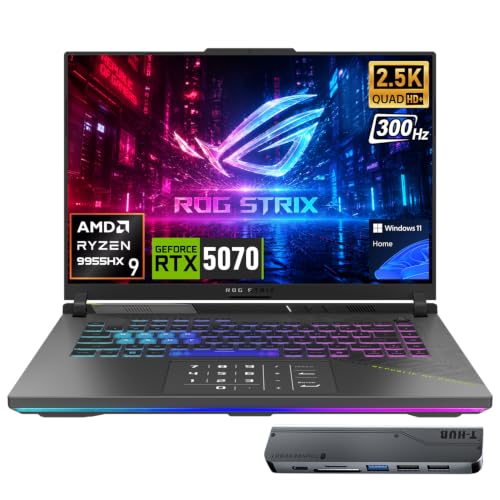 ASUS ROG Strix G16 5070 |
| Check price on Amazon |
Key takeaways
- Compare five gaming laptops with stated graphics, memory, and display specs, from budget 15-inch models to a premium 300Hz machine, with no prices listed.
A gaming laptop earns its place by pairing a graphics chip with enough memory, storage, and display speed to keep games running smoothly, and the five listings below state those elements literally in their own wording. Each names a brand, uses the words gaming and laptop, and lists a GeForce RTX graphics chip, so the class stays consistent throughout. The “under 50K” label in the title is editorial framing for this guide’s budget grouping only, and this guide states no prices anywhere, using budget, mid-range, and premium groupings instead.
The set spans two ASUS models, a Lenovo, a GIGABYTE, and a Dell, with screen sizes from 15.6 inches to 16 inches and refresh rates from 144Hz to 300Hz. Two picks rest on spare-list mentions recorded elsewhere, and one pick also appears in a roundup on another site, with each case stated openly below. Every product line carries a warning marker because each ASIN was corroborated indirectly and needs a re-check through the Amazon API before posting.
Quick Picks
As an Amazon Associate we earn from qualifying purchases.
| Product | Best for | Key spec |
|---|---|---|
| Lenovo LOQ Gaming AI Laptop | Balanced play and study | RTX 5050, 16GB RAM, 1TB SSD |
| ASUS TUF Gaming F16 (2025) | Durable everyday gaming | RTX 5050, 165Hz FHD+ display |
| GIGABYTE Gaming A16 | Widescreen 16-inch play | RTX 5050, 165Hz WUXGA display |
| Dell G15 5530 Gaming Laptop | Heavy memory and storage | RTX 4060, 64GB RAM, 2TB SSD |
| ASUS ROG Strix G16 5070 | Premium high-refresh play | RTX 5070, 300Hz QHD+ display |
How to Choose
Read the Graphics Chip as Stated
The graphics chip decides what a gaming laptop can render, so read the chip designation exactly as the listing states it rather than inferring performance from the model name alone. All five listings here name a GeForce RTX chip with its model number, which keeps the comparison grounded in stated wording. A higher model number generally sits in a higher tier, but the listing wording is the only evidence this guide uses, and no frame-rate or benchmark claim appears anywhere below. Check whether the chip is paired with enough memory and cooling wording to match the games you play, and treat any listing that omits the chip designation as incomplete for this class.
Weigh Memory, Storage, and the Display Together
Memory, storage, and display specs work as a set, and a strong chip with too little memory or a slow screen still limits play. The listings below state memory from 16GB to 64GB and storage from 512GB to 2TB, so compare those figures directly against the size of the games and files you keep installed. Display wording matters just as much: refresh rates here run from 144Hz to 300Hz, and resolution wording runs from Full HD to QHD+. A higher refresh rate suits fast-paced play, while a larger, sharper panel suits open-world games, and neither spec alone tells the whole story.
Match the Processor and System to the Workload
The processor, operating system, and keyboard wording in each listing describe the machine around the graphics chip, and those details decide whether the laptop also fits school, work, or creative tasks. The picks below state AMD Ryzen and Intel Core processors across several generations, all running Windows 11, with backlit keyboards stated in four of the five listings. Look for the processor generation and core count as stated, and check the port and wireless wording, such as Wi-Fi 6E or HDMI, against the accessories you already own. A laptop that fits both play and daily work is worth more than one that only fits play.
Treat Pairing Basis and Overlap as Buying Information
Every ASIN in this guide was corroborated from listing cards in live roundups, and the pairing basis for each pick is stated openly so the evidence stays checkable. Three picks rest on clean card triples from one gaming-laptop article each, one pick also appears in a roundup on another site, and two picks carry spare-list mentions recorded elsewhere. None of that changes the listing wording, but it does mean the API re-check matters: confirm the brand, model, chip, memory, and storage match the listing before posting. Two picks share the ASUS brand as distinct models, which is stated openly rather than hidden.
The 5 Best Options
Lenovo LOQ Gaming AI Laptop
- Best for: Balanced play, study, and everyday work on one machine.
- 15.6-inch FHD IPS 144Hz display
- 100 Percent sRGB with G-SYNC wording
- AMD 8-core Ryzen 7 250 processor
- 16GB RAM, 1TB SSD
Balanced play, study, and everyday work on one machine.
The listing states AI wording in the model name without explaining it, so confirm what the AI features do before relying on them.
The Lenovo LOQ Gaming AI Laptop states a balanced specification sheet for a 15.6-inch machine, with a GeForce RTX 5050 chip, 16GB of RAM, and a 1TB SSD behind a 144Hz Full HD IPS display. Its listing also states 100 Percent sRGB colour coverage with G-SYNC wording, an 8-core AMD Ryzen 7 250 processor, a backlit keyboard, and a 5MP privacy camera, which covers both play and video calls. Windows 11 Pro is stated, so the machine arrives ready for work software as well as games.
Watch out for: The listing states AI wording in the model name without explaining it, so confirm what the AI features do before relying on them.
ASUS TUF Gaming F16 (2025) Gaming Laptop
- Best for: Everyday gaming on a larger 16-inch screen with a fast refresh rate.
- 16-inch FHD+ 165Hz 16:10 display
- Intel Core i5 13450HX processor
- NVIDIA GeForce RTX 5050 graphics
- 16GB DDR5 memory
Everyday gaming on a larger 16-inch screen with a fast refresh rate.
The 512GB SSD fills quickly with large game installs, so plan storage use from the start.
The ASUS TUF Gaming F16 states a 16-inch FHD+ display at 165Hz with a 16:10 aspect ratio, paired with a GeForce RTX 5050 chip and an Intel Core i5 13450HX processor. Its listing also states 16GB of DDR5 memory, a 512GB PCIe Gen4 SSD, Wi-Fi 6E, and Windows 11 Home, which is a straightforward mid-range specification set for regular play. The TUF name carries durability wording in the line name, but this guide relies only on the stated display, chip, memory, and storage wording.
Watch out for: The 512GB SSD fills quickly with large game installs, so plan storage use from the start.
GIGABYTE Gaming A16
- Best for: Widescreen play and browsing on a 16-inch panel with extra vertical room.
- 16-inch 165Hz 1920×1200 WUXGA display
- Intel i7-13620H processor
- GeForce RTX 5050 graphics
- 16GB DDR5 RAM, 512GB SSD
Widescreen play and browsing on a 16-inch panel with extra vertical room.
The listing states no refresh-rate wording beyond 165Hz and no keyboard backlight wording, so confirm lighting features separately if they matter.
The GIGABYTE Gaming A16 states a 16-inch WUXGA display at 165Hz with a 1920×1200 resolution, driven by a GeForce RTX 5050 chip and an Intel i7-13620H processor. Its listing also states 16GB of DDR5 memory, a 512GB SSD, Windows 11 Home, and a Black Steel finish, which keeps the specification set simple and easy to compare. The wider 16:10-style resolution gives extra vertical room over a standard Full HD panel, which suits both games with tall interfaces and everyday browsing.
Watch out for: The listing states no refresh-rate wording beyond 165Hz and no keyboard backlight wording, so confirm lighting features separately if they matter.
Dell G15 5530 Gaming Laptop
The Dell G15 5530 states the largest memory and storage figures in this guide, with 64GB of DDR5 RAM and a 2TB PCIe SSD behind a 15.6-inch Full HD display. Its listing pairs those figures with a 13th Gen Intel Core i7-13650HX processor, an RTX 4060 chip, a backlit keyboard, and Windows 11 Home, plus a Dark Shadow Gray finish and an included backpack. That combination suits players who keep many games installed at once and run other software alongside their games.
Specs
- 15.6-inch FullHD display
- 13th Gen Intel Core i7-13650HX processor
- RTX 4060 graphics
- 64GB DDR5 RAM, 2TB PCIe SSD
- Backlit keyboard, Windows 11 Home
- Dark Shadow Gray finish, included backpack
Best for: Players who keep large game libraries installed and multitask heavily.
Watch out for: The listing states a backpack in the bundle wording, so confirm exactly what ships in the box before assuming extras are included.
ASIN: ⚠ B0CCJRPMKN
ASUS ROG Strix G16 5070
- Best for: Premium high-refresh play where display speed and graphics power matter most.
- 16-inch QHD+ 2.5K 300Hz IPS display
- AMD Ryzen 9 9955HX processor
- GeForce RTX 5070 graphics
- 32GB DDR5 memory, 2TB SSD
Premium high-refresh play where display speed and graphics power matter most.
The listing states bundle wording, so confirm which accessories are part of the bundle before counting on them.
The ASUS ROG Strix G16 5070 states the fastest display and the strongest graphics chip in this guide, with a 16-inch QHD+ 2.5K IPS panel at 300Hz and a GeForce RTX 5070 chip. Its listing also states an AMD Ryzen 9 9955HX processor, 32GB of DDR5 memory, a 2TB SSD, a 4-zone RGB backlit keyboard, HDMI, and Windows 11 Home, which places it in the premium grouping. Two picks in this guide share the ASUS brand as distinct models, and this Strix model is the higher-tier of the two, with the bundle wording stated openly.
Watch out for: The listing states bundle wording, so confirm which accessories are part of the bundle before counting on them.
Which One Fits Your Situation
A Desk Setup Shared With School or Work
Choose the Lenovo LOQ if one machine must cover classes, work calls, and evening play, since its listing states a privacy camera, Windows 11 Pro, and a balanced chip and memory set. The 144Hz display keeps games smooth without pushing the machine into the premium grouping, and the 1TB SSD holds a working library of games and files. Confirm the AI wording in the model name separately, since the listing does not explain it.
A Larger Screen for Regular Evening Play
Choose the ASUS TUF Gaming F16 or the GIGABYTE Gaming A16 if a 16-inch screen matters more than maximum memory, since both state 165Hz displays and RTX 5050 graphics with 16GB of memory. The TUF model states a 16:10 FHD+ panel and Wi-Fi 6E, while the GIGABYTE model states a 1920×1200 WUXGA panel, so the choice comes down to panel wording and port needs rather than chip power.
A Library That Keeps Growing
Choose the Dell G15 5530 if installed games and files keep growing, since its listing states 64GB of memory and a 2TB SSD, far above the other picks. The RTX 4060 chip and 13th Gen Intel processor keep the machine current for demanding titles, and the backlit keyboard and included backpack suit players who carry the laptop between rooms or locations.
The Fastest Display in the Guide
Choose the ASUS ROG Strix G16 5070 if display speed is the priority, since its listing states a 300Hz QHD+ panel with a GeForce RTX 5070 chip and 32GB of memory. That combination sits in the premium grouping, so weigh it against the budget and mid-range picks above, and confirm the bundle wording in the listing before treating any accessory as included.
Common Mistakes
- Judging a laptop by its line name alone instead of reading the stated chip, memory, and storage wording.
- Assuming a “gaming” label guarantees a discrete graphics chip without checking the chip designation.
- Ignoring display refresh-rate and resolution wording when comparing two machines with the same chip.
- Treating bundle or backpack wording as guaranteed extras without confirming what ships in the box.
- Skipping the API re-check on an indirectly corroborated ASIN before posting.
Frequently Asked Questions
Does “under 50K” mean these laptops cost less than a stated amount?
No. The “under 50K” label is editorial framing for this guide’s budget grouping, and this guide states no prices, currency amounts, or discounts anywhere. Use the budget, mid-range, and premium groupings to compare the picks, and check current listings directly for any pricing information before buying or posting.
Why do two picks share the ASUS brand?
Two picks share the ASUS brand as distinct models: the TUF Gaming F16 with an RTX 5050 chip and the ROG Strix G16 with an RTX 5070 chip. They state different displays, processors, memory, and storage figures, so they are separate listings rather than variants of one machine. The shared brand is stated openly here and in the introduction.
What does the warning marker on each ASIN line mean?
The warning marker means the ASIN was corroborated indirectly from listing cards in live roundups rather than from a direct Amazon page, so it needs a re-check through the Amazon API before posting. Confirm that the brand, model, chip, memory, and storage in the listing match the wording used in this guide, and replace any pick whose ASIN does not match.
Can a gaming laptop also handle school or office work?
Yes, when the listing states the right supporting specs. The picks here state Windows 11, backlit keyboards, privacy cameras, and port or wireless wording that suits daily work, and the processors named cover both play and productivity tasks. Read the processor, memory, and display wording against the software you use, since a gaming label alone does not describe work performance.
More from Amazon
Programs that pair well with the guide above. Offers and eligibility are set by Amazon and may change.
Free shipping on eligible items, Prime Video and more. Eligible new members can start with a free trial.
Start a Prime free trialAd-free music streaming. Eligible new subscribers can start with a free trial.
Try Music Unlimited freeA Prime membership for ages 18-24 with a trial period. Eligibility is set by Amazon.
See Prime for Young AdultsAudiobooks and podcasts to listen to on the go. Eligible new members can start with a free trial.
Try Audible freeAs an Amazon Associate we earn from qualifying purchases.









