
Our Short List of 3

- Best for: Top-tier tri-band gaming in a busy household with several players.
- Tri-band WiFi 6 with up to 11,000 Mbps combined speed
- 10Gbps port and 2.5Gbps port plus 8x Gigabit LAN
- Triple-Level Game Acceleration
- RangeBoost Plus for extended coverage

- Best for: Ping control with DumaOS for players who pick their servers carefully.
- AX5400 WiFi 6 dual-band wireless
- DumaOS 3.0 with geo-filter and ping heatmap
- Ping reduction of up to 93 percent
- 4x 1 Gigabit Ethernet ports

- Best for: A dedicated gaming band that keeps game traffic separate from household devices.
- AX6600 tri-band WiFi 6, 4804 plus 1201 plus 574 Mbps
- Dedicated 4.8 Gbps gaming band
- 1.5 GHz quad-core processor
- 2.5 Gbps WAN and LAN ports, 1 Gbps WAN and LAN, 3x Gigabit LAN
All 4 Picks at a Glance
| Product | Specs | Action |
|---|---|---|
| ASUS ROG Rapture GT-AX11000 Pro |
| Check price on Amazon |
| NETGEAR Nighthawk Pro Gaming XR1000 |
| Check price on Amazon |
| TP-Link Archer GX90 |
| Check price on Amazon |
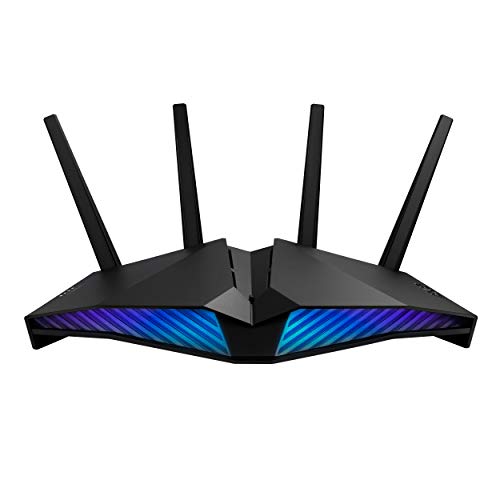 ASUS RT-AX82U |
| Check price on Amazon |
Key takeaways
- Our guide to the best gaming routers compares 4 top WiFi 6 picks for low ping, fast ports and stable play across PC, console and mobile in November 2026.
A gaming router exists for one reason: to keep your connection steady when it matters most. Raw internet speed helps, but ping, jitter and packet loss decide whether your shots register, your character moves when you press a key, and your voice chat stays in sync. A router built for gaming prioritises game traffic over background downloads, gives your console or PC a fast wired path, and spreads strong WiFi across the rooms where you actually play.
This guide is for competitive PC players, console gamers in shared homes, and anyone whose WiFi drops out at the worst moment. Every pick below was chosen from the names and specifications stated on its Amazon product page, so you can compare wireless speed, ports, gaming features and coverage on the same terms before you decide.
Quick Picks
As an Amazon Associate we earn from qualifying purchases
| Product | Best for | Key spec from title |
|---|---|---|
| ASUS ROG Rapture GT-AX11000 Pro | Top-tier tri-band gaming | WiFi 6, up to 11,000 Mbps, 10G port |
| NETGEAR Nighthawk Pro Gaming XR1000 | Ping control with DumaOS | AX5400, DumaOS 3.0, geo-filter |
| TP-Link Archer GX90 | Dedicated gaming band | AX6600 tri-band, 4.8 Gbps gaming band |
| ASUS RT-AX82U | Strong gaming value | AX5400, dedicated gaming port |
How to Choose
WiFi Speed and the Bands That Carry It
WiFi speed figures describe combined throughput across all bands, not the speed of one device, so read them with care. A tri-band router adds a second 5GHz band that can carry gaming traffic alone, away from phones, TVs and smart home devices. WiFi 6 brings better handling of many connected devices through OFDMA and MU-MIMO, which keeps latency low when the whole household is online. A 160MHz channel width widens the pipe further for compatible devices, though walls and distance still reduce real-world speed more than any specification suggests.
Wired Ports and Multi-Gig Support
Wired connections beat wireless for gaming every time, so count the Ethernet ports before you buy. A dedicated gaming port automatically prioritises whatever is plugged into it, which saves setup time and removes guesswork. Multi-gig ports matter if your internet plan exceeds one gigabit or if you run a fast local network with a NAS and several PCs. A 2.5Gbps port covers most fast plans today, while a 10Gbps port future-proofs a serious setup. USB ports let you share a drive or a printer across the network without another device.
Gaming Features That Cut Ping
Gaming routers earn their name through software that shapes traffic. Quality of service lets the router put game packets first, so a download or a video stream cannot spike your ping mid-match. A geo-filter connects you to nearby servers and blocks distant ones that would add latency, while a ping heatmap shows which servers are fastest before you queue. Some routers include a dedicated gaming VPN path or a mobile game mode that prioritises phone traffic. These features help most when several people share one connection.
Coverage, Antennas and Mesh Options
A fast router is useless if its signal cannot reach your gaming room. More antennas and stronger amplifiers extend range, but thick walls and metal shelving still block signals, so placement matters as much as power. Mesh support lets you add satellite nodes later to cover a large or multi-floor home without replacing the router. If your gaming room is far from the modem, a mesh node with an Ethernet port gives your console a wired connection even in a distant room. Check the rated coverage against your home size and add a node rather than hoping one box covers everything.
The 4 Best Options
ASUS ROG Rapture GT-AX11000 Pro
- Best for: Top-tier tri-band gaming in a busy household with several players.
- Tri-band WiFi 6 with up to 11,000 Mbps combined speed
- 10Gbps port and 2.5Gbps port plus 8x Gigabit LAN
- Triple-Level Game Acceleration
- RangeBoost Plus for extended coverage
Top-tier tri-band gaming in a busy household with several players.
The large body and eight antennas need real shelf space, so measure before you buy.
The ASUS ROG Rapture GT-AX11000 Pro is the most powerful router in this group, built for homes where several gamers play at once. Its tri-band WiFi 6 radios combine for up to 11,000 Mbps, and a 10Gbps port plus a 2.5Gbps port give wired devices a genuinely fast path. Triple-Level Game Acceleration prioritises traffic from the device to the game server, while RangeBoost Plus extends coverage across larger homes. Eight Gigabit LAN ports leave room for a PC, several consoles and a NAS, and AiMesh support lets you add nodes later if the house grows.
Watch out for: The large body and eight antennas need real shelf space, so measure before you buy.
NETGEAR Nighthawk Pro Gaming XR1000
- Best for: Ping control with DumaOS for players who pick their servers carefully.
- AX5400 WiFi 6 dual-band wireless
- DumaOS 3.0 with geo-filter and ping heatmap
- Ping reduction of up to 93 percent
- 4x 1 Gigabit Ethernet ports
Ping control with DumaOS for players who pick their servers carefully.
DumaOS has a learning curve, so set aside time to tune the geo-filter and prioritisation.
The NETGEAR Nighthawk Pro Gaming XR1000 is the router for players who want to control exactly which servers they join. Its DumaOS 3.0 software includes a geo-filter that blocks distant servers, a ping heatmap for finding the fastest lobbies, and traffic prioritisation that keeps game packets first. The AX5400 WiFi 6 radios deliver fast wireless to phones and laptops, while four Gigabit Ethernet ports cover a PC and consoles. A triple-core 1.5GHz processor keeps the routing and filtering fast even when the household streams video at the same time.
Watch out for: DumaOS has a learning curve, so set aside time to tune the geo-filter and prioritisation.
TP-Link Archer GX90
- Best for: A dedicated gaming band that keeps game traffic separate from household devices.
- AX6600 tri-band WiFi 6, 4804 plus 1201 plus 574 Mbps
- Dedicated 4.8 Gbps gaming band
- 1.5 GHz quad-core processor
- 2.5 Gbps WAN and LAN ports, 1 Gbps WAN and LAN, 3x Gigabit LAN
A dedicated gaming band that keeps game traffic separate from household devices.
Third-party listings have shown mixed stock signals, so confirm the seller and condition on the listing.
The TP-Link Archer GX90 takes a different approach by giving gaming its own dedicated band. One of its three WiFi 6 bands runs at 4.8 Gbps and is reserved for game traffic, so phones and smart TVs cannot crowd it out. The combined AX6600 speed covers the rest of the household, while a 2.5Gbps WAN and LAN port pair handles fast internet plans and wired consoles. Eight antennas push the signal across larger rooms, and Game Accelerator plus HomeShield add prioritisation and security. OneMesh support lets you extend coverage with compatible extenders later.
Watch out for: Third-party listings have shown mixed stock signals, so confirm the seller and condition on the listing.
ASUS RT-AX82U
- Best for: Strong gaming value with a dedicated port and simple setup.
- AX5400 dual-band WiFi 6 with 160MHz channels
- Dedicated gaming port with automatic prioritisation
- 1.5GHz tri-core processor
- Mobile Game Mode and Aura RGB lighting
Strong gaming value with a dedicated port and simple setup.
The dual-band design has no separate gaming band, so heavy household traffic shares the same 5GHz radio.
The ASUS RT-AX82U brings genuine gaming features to a friendlier size and a simpler setup. Its AX5400 dual-band WiFi 6 radios support 160MHz channels for fast wireless, and a dedicated gaming port prioritises whatever you plug into it without any configuration. Mobile Game Mode boosts phone traffic with one tap in the app, while Aura RGB lighting adds a subtle glow that matches a gaming desk. AiProtection Pro guards the network, and AiMesh support means you can add a node later. It is the sensible pick when you want gaming features without a flagship footprint.
Watch out for: The dual-band design has no separate gaming band, so heavy household traffic shares the same 5GHz radio.
Which One Fits Your Situation
Competitive PC Gaming
Low ping and a stable wired path matter more than anything else for ranked play. The GT-AX11000 Pro leads with its 10Gbps port, eight LAN ports and triple-level acceleration, while the XR1000 suits players who want to filter servers by distance. Plug the PC into the dedicated gaming port, enable quality of service, and keep the router firmware updated so the prioritisation rules stay current. A wired connection will always beat even the best WiFi for consistency.
Console Gaming in a Shared Home
A shared home means someone always streams, downloads or video-calls while you play. The Archer GX90 handles this well because its dedicated gaming band keeps console traffic away from other devices, and the XR1000 works too through its traffic prioritisation. Put the console on a wired connection if the router sits nearby, and use the geo-filter to avoid distant servers.
A Large Home With Dead Spots
Coverage is the first problem in a big or multi-floor home, and mesh support is the answer. The GT-AX11000 Pro and the RT-AX82U both support AiMesh, so you can add a node in the gaming room and plug the console into it by Ethernet. The GX90 extends through OneMesh with compatible extenders. Place the main router centrally and high, away from thick walls.
A First Gaming Router on a Budget
A first gaming router should add real features without overwhelming setup. The RT-AX82U is the natural pick, with a dedicated gaming port, mobile game mode and AiMesh for later expansion in one box. Start with the gaming port for your main device, turn on quality of service, and leave the advanced settings alone until you know what each one does.
Common Mistakes
- Buying the fastest router available while the internet plan itself is the real bottleneck.
- Placing the router behind a TV or inside a cabinet, which blocks the signal it is meant to send.
- Gaming over WiFi from two rooms away when an Ethernet cable would fix the ping.
- Leaving quality of service off, so downloads and streams steal bandwidth mid-match.
- Ignoring firmware updates, which fix bugs and improve prioritisation over time.
Frequently Asked Questions
Does a gaming router lower ping?
A gaming router can lower ping by prioritising game traffic and connecting you to closer servers, but it cannot beat the physical distance to a server or fix a slow internet plan. The biggest gains come from quality of service, a geo-filter and a wired connection. If your ping is already low and stable, a new router will change little.
Do I need WiFi 6 for gaming?
WiFi 6 helps most in busy households, because it handles many connected devices with lower latency than older standards. For a single wired gaming PC, the difference is small. If several people stream, call and play at the same time, WiFi 6 keeps each device responsive, and the routers here all support it.
Should I use wired or wireless for gaming?
Wired is better for gaming whenever you can run a cable, because Ethernet gives lower ping, steadier jitter and no interference from neighbours or appliances. Wireless is fine for casual play and for rooms where a cable is impractical. If you must use WiFi, sit close to the router, use the 5GHz band, and keep the channel clear of other networks.
Can a gaming router help if my internet is slow?
A gaming router helps a slow connection by spending its limited bandwidth wisely, putting game packets first and limiting background downloads. It cannot create speed that the plan does not provide. If your plan is genuinely too slow for gaming, upgrading the plan or switching provider will help more than any router.
More from Amazon
Programs that pair well with the guide above. Offers and eligibility are set by Amazon and may change.
Free shipping on eligible items, Prime Video and more. Eligible new members can start with a free trial.
Start a Prime free trialAd-free music streaming. Eligible new subscribers can start with a free trial.
Try Music Unlimited freeA Prime membership for ages 18-24 with a trial period. Eligibility is set by Amazon.
See Prime for Young AdultsAudiobooks and podcasts to listen to on the go. Eligible new members can start with a free trial.
Try Audible freeAs an Amazon Associate we earn from qualifying purchases.









