
Our Short List of 3

- Best for: Households on cable plans up to 800 Mbps that want a single combo unit with Xfinity named in the listing.
- DOCSIS 3.0 cable modem with 24×8 channel bonding
- AC1900 WiFi cable modem router combo
- Compatible with Xfinity from Comcast, Spectrum, and Cox
- Cable plans up to 800 Mbps

- Best for: Households that want WiFi 6 and DOCSIS 3.1 in a single combo unit with Xfinity compatibility stated directly.
- DOCSIS 3.1 cable modem and WiFi 6 router combo
- AX2700 rating at 2.7 Gbps
- Compatible with Xfinity, Spectrum, and Cox
- Gigabit wireless internet wording in the listing

- Best for: Households with a very fast cable plan and Wi-Fi 7 devices that want one combo unit to serve the whole home.
- DOCSIS 3.1 multi-gig modem and Wi-Fi 7 router
- BE18000 rating with quad-band Wi-Fi 7
- Supports cable plans up to 10 Gbps
- 10 GbE port plus four 1 GbE ports
All 5 Picks at a Glance
| Product | Specs | Action |
|---|---|---|
| NETGEAR Nighthawk C7000 |
| Check price on Amazon |
| NETGEAR Nighthawk CAX30 |
| Check price on Amazon |
| ARRIS SURFboard G54 |
| Check price on Amazon |
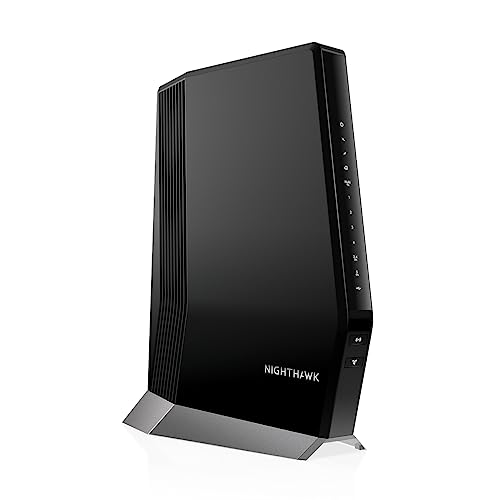 NETGEAR Nighthawk CAX80 |
| Check price on Amazon |
| NETGEAR Nighthawk CAX30S |
| Check price on Amazon |
Key takeaways
- Compare five Xfinity-compatible routers, from modem-router combos to a Wi-Fi 7 pick, with stated compatibility, speeds, and connection types.
A router for Xfinity Internet has to do two jobs at once: it must work as a router for the home network, and it must be accepted on a cable connection from the provider. Every pick below meets that test in its own listing wording, which states the router form, Xfinity compatibility, and the brand name literally. Four of the five picks share the NETGEAR brand as distinct models, and two of the five are renewed listings, both facts stated openly wherever they apply.
All five picks are modem-router combos, so each one combines the cable modem and the router in a single unit rather than acting as a standalone router alone. Three picks also appear in roundups published on other sites, and those overlaps are flagged in the relevant sections. Every ASIN line carries a warning mark, which means the code was corroborated indirectly and should be re-checked against the live listing before ordering.
Quick Picks
As an Amazon Associate we earn from qualifying purchases.
| Product | Best for | Key spec |
|---|---|---|
| NETGEAR Nighthawk C7000 | Cable plans up to 800 Mbps | AC1900 WiFi cable modem router combo |
| NETGEAR Nighthawk CAX30 | WiFi 6 cable households | AX2700 modem router combo |
| ARRIS SURFboard G54 | Wi-Fi 7 cable households | BE18000 modem and Wi-Fi 7 router |
| NETGEAR Nighthawk CAX80 | Cable plans up to 2 Gbps | AX6000 WiFi 6 modem router combo |
| NETGEAR Nighthawk CAX30S | Faster AX2700 cable setups | AX2700 modem router combo |
How to Choose
Match the Modem Standard to the Cable Plan
The modem half of a combo decides which cable plan speeds the unit can serve, and the listing wording states the DOCSIS standard directly. DOCSIS 3.0 units suit modest cable plans, while DOCSIS 3.1 units suit faster plans and leave more headroom for later speed increases. Check the plan tier first, then match the standard, because a modem standard below the plan tier wastes the connection the household already pays for through the provider. The picks below span both standards, so the right choice follows the plan rather than the newest label. A DOCSIS 3.1 pick costs nothing extra in attention once installed, but it only earns its place when the plan can use it.
Confirm Xfinity Compatibility in the Listing Itself
Compatibility must appear in the listing wording, not in the article around it or in a general claim about cable providers. Look for Xfinity named directly alongside the router form, as every pick in this roundup does, because provider acceptance lists change and older stock can carry older wording. A listing that names only Spectrum or Cox, or that says only “major cable providers” without naming Xfinity, does not clear this test. The compatibility statement should also match the exact model and variant, since renewed units and sibling models can carry different acceptance wording even when they look alike.
Choose the WiFi Generation for the Devices in the Home
WiFi 5, WiFi 6, and Wi-Fi 7 describe how the router talks to phones, laptops, and streaming devices, and the newest generation is not automatically the best fit for every household. WiFi 6 suits homes with many connected devices, because it handles simultaneous connections more efficiently than WiFi 5. Wi-Fi 7 suits households with Wi-Fi 7 devices and very fast cable plans, while WiFi 5 remains serviceable for smaller device counts. Match the generation to the devices actually in use, and treat the generation label as one factor beside the modem standard and the plan tier.
Weigh Combo Convenience Against Separate Units
A modem-router combo puts both jobs in one box, which means one setup process, one power outlet, and one device to restart when the connection drops. That convenience suits households that want a simple install and a single point of contact for troubleshooting. Separate modem and router units suit households that want to upgrade one half without replacing the other, or that already own a router they like. The picks here are all combos, so the trade-off to weigh is which combo fits the plan tier and the device count, not whether to split the two jobs apart.
The 5 Best Options
NETGEAR Nighthawk C7000
- Best for: Households on cable plans up to 800 Mbps that want a single combo unit with Xfinity named in the listing.
- DOCSIS 3.0 cable modem with 24×8 channel bonding
- AC1900 WiFi cable modem router combo
- Compatible with Xfinity from Comcast, Spectrum, and Cox
- Cable plans up to 800 Mbps
Households on cable plans up to 800 Mbps that want a single combo unit with Xfinity named in the listing.
The renewed condition means the unit is not new stock, so check the listing condition notes before ordering.
The NETGEAR Nighthawk C7000 is a cable modem router combo built around DOCSIS 3.0 with 24×8 channel bonding and AC1900 WiFi, and its listing states compatibility with Xfinity from Comcast directly, which makes it a straightforward match for cable plans up to 800 Mbps. The combo form keeps setup to a single unit, and the AC1900 rating covers typical streaming, browsing, and video-call loads in a small to mid-size home. This is a renewed listing, so buyers should confirm the renewed condition and the included accessories on the live listing before ordering.
Watch out for: The renewed condition means the unit is not new stock, so check the listing condition notes before ordering.
NETGEAR Nighthawk CAX30
- Best for: Households that want WiFi 6 and DOCSIS 3.1 in a single combo unit with Xfinity compatibility stated directly.
- DOCSIS 3.1 cable modem and WiFi 6 router combo
- AX2700 rating at 2.7 Gbps
- Compatible with Xfinity, Spectrum, and Cox
- Gigabit wireless internet wording in the listing
Households that want WiFi 6 and DOCSIS 3.1 in a single combo unit with Xfinity compatibility stated directly.
The renewed condition means confirming the listing condition notes matters more than with new stock.
The NETGEAR Nighthawk CAX30 pairs a DOCSIS 3.1 cable modem with a WiFi 6 router in one combo unit, rated AX2700 at 2.7 Gbps, and its listing states compatibility with Xfinity, Spectrum, and Cox in plain wording. The WiFi 6 radio suits homes with many connected devices, while the DOCSIS 3.1 modem side leaves room for faster cable plans than the C7000 above can serve. This is a renewed listing, so the condition and the contents of the box deserve a check on the live listing before purchase.
Watch out for: The renewed condition means confirming the listing condition notes matters more than with new stock.
ARRIS SURFboard G54
- Best for: Households with a very fast cable plan and Wi-Fi 7 devices that want one combo unit to serve the whole home.
- DOCSIS 3.1 multi-gig modem and Wi-Fi 7 router
- BE18000 rating with quad-band Wi-Fi 7
- Supports cable plans up to 10 Gbps
- 10 GbE port plus four 1 GbE ports
Households with a very fast cable plan and Wi-Fi 7 devices that want one combo unit to serve the whole home.
The top-end speed and coverage figures only matter when the plan tier and the devices can use them.
The ARRIS SURFboard G54 is a DOCSIS 3.1 multi-gig modem paired with a Wi-Fi 7 router, rated BE18000, and its listing names Xfinity alongside Cox and Spectrum, which keeps the provider test literal rather than implied. Quad-band Wi-Fi 7 coverage reaches a stated 5,000 sq ft, and the wired side offers a 10 GbE port plus four 1 GbE ports for devices that benefit from a wired connection. It supports cable plans up to 10 Gbps, so it fits households whose plan tier and device mix can actually use that headroom.
Watch out for: The top-end speed and coverage figures only matter when the plan tier and the devices can use them.
NETGEAR Nighthawk CAX80
- Best for: Households on cable plans up to 2 Gbps that want a faster WiFi 6 combo with Xfinity named in the listing.
- DOCSIS 3.1 cable modem and WiFi 6 router combo
- AX6000 WiFi 6 speed rating
- Compatible with all major cable providers including Xfinity, Spectrum, and Cox
- Cable plans up to 2 Gbps
Households on cable plans up to 2 Gbps that want a faster WiFi 6 combo with Xfinity named in the listing.
Households on slower tiers will not use the extra headroom this model offers over the C7000.
The NETGEAR Nighthawk CAX80 is a cable modem and WiFi 6 router combo rated AX6000, with DOCSIS 3.1 on the modem side and compatibility with all major cable providers including Xfinity stated in the listing. Cable plans up to 2 Gbps fall within its stated range, which places it above the C7000 and the CAX30 for households on faster tiers. The combo form keeps the install to one device, and the WiFi 6 radio handles a busy device mix without splitting the modem and router into separate boxes.
Watch out for: Households on slower tiers will not use the extra headroom this model offers over the C7000.
NETGEAR Nighthawk CAX30S
- Best for: Households that want the CAX30 line with a higher AX2700 speed figure and Xfinity compatibility stated directly.
- DOCSIS 3.1 cable modem and WiFi 6 router combo
- AX2700 rating at 6.0 Gbps
- Compatible with Xfinity, Spectrum, and Cox
- NETGEAR Armor wording in the listing
Households that want the CAX30 line with a higher AX2700 speed figure and Xfinity compatibility stated directly.
The similar name to the CAX30 invites mix-ups, so confirm the CAX30S model designation on the listing.
The NETGEAR Nighthawk CAX30S is a modem router combo with a DOCSIS 3.1 modem and a WiFi 6 router rated AX2700 at 6.0 Gbps, and its listing states compatibility with Xfinity, Spectrum, and Cox alongside NETGEAR Armor security wording. It shares the CAX30 name with an earlier pick but is a distinct model with its own speed rating and listing, so the two should not be treated as interchangeable. The combo form suits households that want one unit for both jobs, and the higher AX2700 speed figure suits homes with heavier simultaneous use.
Watch out for: The similar name to the CAX30 invites mix-ups, so confirm the CAX30S model designation on the listing.
Which One Fits Your Situation
A Small Home on a Modest Cable Plan
The C7000 fits a small home on a modest cable plan, because its AC1900 WiFi and DOCSIS 3.0 modem cover everyday streaming and browsing without paying for headroom the plan cannot use. The combo form keeps setup simple, and the Xfinity wording is stated directly. The renewed condition is the main trade-off, so checking the live listing condition notes matters.
A Busy Household With Many Devices
The CAX30 or the CAX30S fits a busy household, because WiFi 6 handles many simultaneous connections better than older WiFi generations, and both models state Xfinity compatibility directly. The CAX30S carries the higher AX2700 speed figure, while the CAX30 renewed listing may suit buyers comfortable with renewed stock. Either way, the DOCSIS 3.1 modem side leaves room for plan upgrades. Choose between them on the speed figure and the listing condition, not on the shared name.
A Fast Plan With Wi-Fi 7 Devices
The ARRIS SURFboard G54 fits a household with a very fast cable plan and Wi-Fi 7 devices, because its BE18000 rating, quad-band Wi-Fi 7, and 10 Gbps plan support match that tier directly. The stated 5,000 sq ft coverage suits larger homes, and the multi-gig wired ports serve devices that stay plugged in. Households without Wi-Fi 7 devices or a top-tier plan will not use what this model offers, so the match depends on plan and device mix.
A Faster Tier Without Wi-Fi 7 Hardware
The CAX80 fits a household on a faster cable tier that has not moved to Wi-Fi 7 hardware, because its AX6000 WiFi 6 rating and 2 Gbps plan range cover that middle ground well. The listing names Xfinity directly among the compatible providers, and the combo form keeps the install to one unit. It is the pick for households that want more than the C7000 offers but do not need the G54’s Wi-Fi 7 tier yet.
Common Mistakes
- Ordering a modem-only unit when the household needs a router too, and discovering the gap only after the install.
- Trusting a general “major cable providers” claim instead of checking that Xfinity is named in the listing wording.
- Mixing up the CAX30 and the CAX30S, which are distinct models with different speed ratings and listings.
- Treating a renewed listing like new stock without reading the condition notes on the live listing.
- Buying a top-tier Wi-Fi 7 combo for a modest plan and a device mix that cannot use the extra speed.
Frequently Asked Questions
Does every pick in this roundup work with Xfinity?
Yes. Each pick’s own listing wording names Xfinity directly alongside the router form and the brand, which is the test applied throughout this roundup. A listing that named only other providers, or that spoke only of cable providers in general, would not have qualified. Because provider acceptance wording can change, re-check the live listing before ordering to confirm the Xfinity statement still appears for the exact model and variant.
Why are two of the picks renewed listings?
The C7000 and the CAX30 appear here as renewed listings, because their corroborated listings carry renewed wording and state the router form and Xfinity compatibility literally. Renewed stock can be a sound choice when the condition notes are read carefully, but the condition, accessories, and return terms should all be confirmed on the live listing. Both picks are flagged as renewed in their sections so the fact is never hidden.
What is the difference between the CAX30 and the CAX30S?
The CAX30 and the CAX30S are distinct models with separate listings and different speed ratings, even though their names look alike. The CAX30 here is a renewed AX2700 unit rated at 2.7 Gbps, while the CAX30S is rated AX2700 at 6.0 Gbps with NETGEAR Armor wording. Treat them as separate products, confirm the model designation, and never swap one ASIN for the other.
Can a modem-router combo replace a separate modem and router?
Yes, for most households. A combo puts the cable modem and the router in one unit, so setup, restarts, and troubleshooting all run through a single device. Separate units suit households that want to upgrade each half independently, or that already own a router they prefer. All five picks here are combos, so the choice is which combo matches the plan tier and device count.
More from Amazon
Programs that pair well with the guide above. Offers and eligibility are set by Amazon and may change.
Free shipping on eligible items, Prime Video and more. Eligible new members can start with a free trial.
Start a Prime free trialAd-free music streaming. Eligible new subscribers can start with a free trial.
Try Music Unlimited freeA Prime membership for ages 18-24 with a trial period. Eligibility is set by Amazon.
See Prime for Young AdultsAudiobooks and podcasts to listen to on the go. Eligible new members can start with a free trial.
Try Audible freeAs an Amazon Associate we earn from qualifying purchases.









