
Key takeaways
- Compare the best webcams for telemedicine on low-light clarity, wide field of view, privacy shutters and platform certification for clear remote visits.
A telemedicine visit asks more of a webcam than a team meeting does. The clinician needs steady exposure and honest color so a patient looks the way they actually look, the patient needs to be framed clearly without fussing with settings, and the camera has to behave predictably on the platform the practice already uses. A built-in laptop camera often fails on all three counts, especially in dim home offices and small exam rooms.

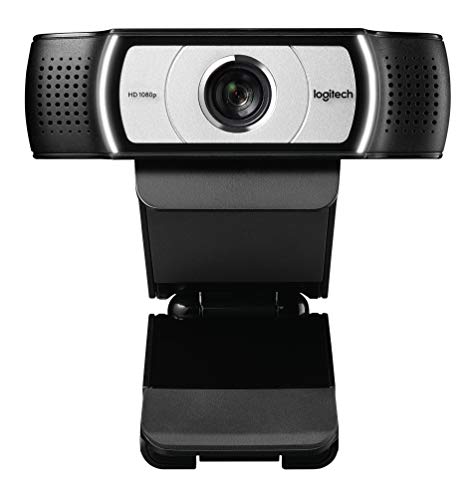
This guide is for clinicians running scheduled video visits from a desk or exam room, and for patients who join from home and want to be seen clearly. Both picks are business webcams chosen from their listing names and stated specs: 1080p imaging, a physical privacy shutter or wide framing, and certification or stated compatibility with the major visit platforms.
Quick Picks
As an Amazon Associate we earn from qualifying purchases
| Product | Best for | Key spec |
|---|---|---|
| Poly Studio P5 Professional Webcam | Clinicians who want a physical privacy shutter | Integrated privacy shutter |
| Logitech C930e Business Webcam | Wide framing in exam rooms and home desks | 90-degree field of view |
How to Choose
Prioritize steady exposure and low-light handling
Video visits happen wherever the patient or clinician happens to be: a dim bedroom, a backlit kitchen, an exam room with mixed overhead light. A webcam that constantly hunts for exposure makes faces flicker brighter and darker mid-sentence, which is distracting and can wash out the skin tones a clinician is trying to read. Look for automatic low-light compensation that brightens a dim room without blowing out highlights, and prefer cameras that hold exposure steady once they settle. Consistent, unglamorous image stability matters more here than sharpness figures, because the whole point of the visit is seeing the other person clearly and naturally.
Match the field of view to the room
Field of view decides how much of the room the camera shows. A wide 90-degree view suits an exam room or a shared desk, where a clinician may sit back, gesture, or bring a model or chart into frame, and it helps patients who cannot position themselves precisely in front of a laptop. A narrower view keeps the frame tighter on one face, which suits a private office and limits how much of a home appears on screen. Neither is better in general; the right choice depends on whether the visit needs context around the person or a close, face-forward framing.
Check platform certification against your visit software
A telemedicine camera is only useful if it behaves on the platform your practice actually runs. Business webcams certified for Microsoft Teams or Zoom have been compared against those applications, so controls like mute sync and image settings tend to work as expected, and stated compatibility with Webex and other unified communications platforms widens the options for practices that mix tools. Certification is about the camera working smoothly with the software. It says nothing by itself about the compliance status of your setup, which depends on the service, its configuration, and your practice policies rather than on any piece of hardware.
Treat privacy as a physical feature, not a setting
Between visits, a camera pointed at an exam room or a home office should be off in a way you can verify at a glance. A built-in privacy shutter that physically covers the lens does exactly that: slide it closed and no software state, indicator light, or driver setting can change what the lens sees. For clinicians moving between patients all day, that mechanical certainty is faster and more reassuring than menu settings. Patients joining from home get the same benefit in reverse, covering the lens the moment a visit ends. When you compare models, check whether the shutter is integrated or a separate cap that can be lost.
The 2 Best Options
Poly Studio P5 Professional Webcam
The Poly Studio P5 is a business webcam built around the two things a clinician’s desk needs most: a 1080p image that stays usable in ordinary room light, and an integrated privacy shutter that closes over the lens between patients. Automatic low-light compensation helps when a visit runs into the evening or the room lighting is uneven, and certification for Microsoft Teams and Zoom means it slots into the platforms many practices already use. It mounts on a monitor or a tripod, so it can sit at eye level in an exam room or on a home desk without extra hardware.
Specs
- Resolution: 1080p HD
- Privacy shutter: integrated
- Mounting: monitor mount and tripod mount
- Platform certification: Microsoft Teams and Zoom
- Low-light handling: automatic low-light compensation
- Digital zoom: not stated
Best for: Clinicians who want a physical shutter and certified platform behavior at a desk or in an exam room.
Watch out for: The standalone webcam is sold separately from headset and speakerphone kit versions, so check that you are ordering the camera alone.
Logitech C930e Business Webcam
The Logitech C930e has been a standard business webcam for years, and its spec sheet still fits telemedicine well. The 90-degree field of view frames a clinician with room to gesture, or a patient who cannot sit in an exact spot, while autofocus keeps the image settled as people shift in their chairs. Dual omnidirectional microphones pick up voices from anywhere around a desk, and H.264 support keeps the video stream efficient on ordinary connections. Stated compatibility covers Microsoft Teams, Cisco Webex, Zoom, and other unified communications platforms, which suits practices whose visit software varies by department or partner.
Specs
- Resolution: 1080p at 30 fps
- Field of view: 90 degrees
- Focus: autofocus
- Microphones: dual omnidirectional
- Video encoding: H.264 support
- Platform compatibility: Microsoft Teams, Cisco Webex, Zoom and other UC platforms
- Digital zoom: not stated
Best for: Exam rooms and home desks where a wide frame and platform flexibility matter more than a tight portrait view.
Watch out for: Renewed listings of this model circulate alongside the new one, so confirm you are buying the new webcam before ordering.
Which One Fits Your Situation
You see patients back to back all day
When visits run one after another, the moments between patients matter. A camera with an integrated privacy shutter lets you close the lens the second a visit ends, with no menu to open and nothing to remember before the next patient joins. Pair that habit with a monitor or tripod mount at eye level and your setup stays consistent from the first appointment to the last, which keeps framing, lighting, and exposure predictable for every patient you see.
You join visits from home as a patient
Most patients join from a laptop at a kitchen table or desk, often in dim light or with a window behind them. A wide field of view forgives imperfect positioning, and autofocus keeps you clear when you lean in or sit back. Sit facing the light rather than with it behind you, raise the camera to eye level on a stack of books if needed, and close the shutter or cover the lens as soon as the visit ends.
Your practice uses more than one visit platform
Some practices take visits on Teams internally, Zoom for one partner clinic, and Webex for another. A webcam with stated compatibility across all three saves the per-platform troubleshooting that wastes the first minutes of a call. Test the camera on each platform before the clinic day starts, confirm the microphone it defaults to, and keep the same camera model at every desk so staff learn one setup instead of three.
You share an exam room with other clinicians
A shared room means a shared camera, and nobody should have to wonder whether it is live. A physical shutter gives every clinician the same obvious answer, and a tripod mount keeps the camera in one agreed position instead of being re-aimed by each user. Agree on a simple routine: shutter closed when the room is empty, camera tested at the start of each clinic session, and the visit platform’s own indicator checked before a patient is admitted.
Common Mistakes
- Assuming a camera purchase settles compliance questions; compliance depends on the platform, its configuration, and practice policy, not on the webcam.
- Leaving the lens uncovered between visits in a shared exam room instead of using a physical shutter or cover every time.
- Buying a renewed or kit listing by mistake when the goal was the new standalone webcam.
- Sitting with a bright window behind you, which silhouettes your face and defeats the camera’s exposure compensation.
- Skipping a test call, then discovering mid-visit that the platform defaulted to the laptop’s microphone or camera instead.
Frequently Asked Questions
Does a certified webcam make my telemedicine setup compliant?
No camera can do that. Certification for Teams or Zoom means the webcam has been tested to work properly with that software. Compliance is a property of the service you use, how it is configured, the agreement you have with the provider, and your practice’s own policies and training. Treat the webcam as one piece of a compliant setup, never as the thing that creates it.
Is 1080p enough for a video visit, or do I need a higher resolution?
For almost every visit, 1080p is plenty. Visit platforms compress video heavily, so a stable 1080p image with good exposure and focus looks clearer in practice than a higher-resolution feed that stutters or hunts for light. Spend your attention on lighting, camera height, and a steady connection before chasing resolution figures, because those are what patients and clinicians actually notice during a conversation.
Why does a physical privacy shutter matter for telemedicine?
A shutter covers the lens mechanically, so the camera cannot show the room no matter what any software setting says. In an exam room that sees patient after patient, and in a home where the desk doubles as private space, that visible, physical off state protects everyone between visits. It also builds trust: patients can see for themselves that the lens is covered when the visit is over.
Can patients use the same webcams as clinicians?
Yes. The same features that help a clinician help a patient joining from home: autofocus, forgiving wide framing, and microphones that pick up a natural speaking voice from a normal sitting distance. A patient does not need platform certification, but a camera that works smoothly with the visit link the practice sends removes friction at the exact moment a visit is supposed to start.
More from Amazon
Programs that pair well with the guide above. Offers and eligibility are set by Amazon and may change.
Free shipping on eligible items, Prime Video and more. Eligible new members can start with a free trial.
Start a Prime free trialAd-free music streaming. Eligible new subscribers can start with a free trial.
Try Music Unlimited freeA Prime membership for ages 18-24 with a trial period. Eligibility is set by Amazon.
See Prime for Young AdultsAudiobooks and podcasts to listen to on the go. Eligible new members can start with a free trial.
Try Audible freeAs an Amazon Associate we earn from qualifying purchases.









