
A dedicated video player solves a specific headache: your TV’s built-in media app chokes on your file format, refuses to mount the drive, or buries playback under five menu layers. The best players in this category strip that friction away — plug in a USB stick or pop in a disc, and video starts. Where buyers go wrong is assuming any device labeled “media player” handles their files, resolutions, and output requirements equally. They do not.
This roundup covers eight devices spanning compact HDMI sticks, region-free DVD units, 4K signage players, and one portable with a built-in screen. We compared published specs, current list prices, and consistent themes from owner feedback to identify where the meaningful gaps sit. The goal is to help you match a player to your actual library and display rather than chase the longest spec sheet.
Our top picks




As an Amazon Associate we earn from qualifying purchases at no extra cost to you.
Quick Picks
| Product | Best for | Price |
|---|---|---|
| HDMI Media Player Black Mini 1080p | Simple plug-and-play on 1080p TVs | $39.99 |
| MEGATEK Region-Free DVD Player | Imported and region-coded discs | $39.99 |
| Micca 4K USB/microSD Media Player | Digital signage and 4K loop playback | $54.99 |
| Boifun 17.5″ Portable DVD Player | Travel and kids’ entertainment on the go | $94.95 |
| NEUMI Atom 4K Lite | 4K USB and SD playback at a mid-range price | $45.99 |
| 4K Full-HD USB/microSD Signage Player | Budget 4K digital signage | $43.99 |
| 2026 Model HDMI DVD Player | Cheapest region-free DVD with USB and CD | $29.95 |
| HDMI Media Player 4K Ultra HD | Widest codec support for mixed-media playback | $42.99 |
How We Picked
We weighted four factors: output resolution and codec breadth (can it actually deliver what your files contain?), disc and media-type flexibility (USB, SD, microSD, DVD, CD), physical form factor relative to the intended setup, and list price. A player that tops out at 1080p is fine for a bedroom TV but irrelevant if your display is 4K. Similarly, a signage-oriented unit with scheduling loops is wasted on someone who just wants to watch a borrowed DVD. Price was used as a tiebreaker, not a primary driver.
The 8 Best Video Player in 2026
HDMI Media Player, Black Mini 1080p Full-HD Ultra HDMI Digital Media Player
This compact black box targets anyone who wants a TV to play MP4, MKV, and similar files straight from a USB drive without navigating a smart-TV interface. Pros: genuinely plug-and-play, skipping menu trees entirely, and its small footprint makes it easy to conceal behind a display. Cons: capped at 1080p output, so paired with a 4K screen you are leaving resolution on the table. Skip it if your library is mostly 4K files or if you need scheduling for signage — this unit is a straightforward playback bridge, nothing more.
MEGATEK Region-Free DVD Player for TV with HDMI & 1080P Upscaling
For collectors of imported discs, this player handles region coding without fuss while upscaling standard-definition DVD video to 1080p over HDMI. Pros: region-free playback removes the import headache that plagues cheaper units, and the HDMI output keeps connections single-cable for modern TVs. Cons: no 4K upscaling, so on large panels the image can look soft next to native high-definition sources. Skip it if your primary media are files rather than physical discs, or if you want anything beyond DVD-era resolution.
Micca 4K Ultra-HD USB and microSD Media Player, 4K HDMI, Digital Signage
Micca’s unit is built for looping and scheduling rather than casual viewing, making it the pick for retail displays, kiosks, and digital signage installations. Pros: 4K HDMI output ensures sharp text and video on modern panels, and microSD support adds a slot for smaller-format media common in signage workflows. Cons: at the highest price in this group, it is overkill for someone who just wants to watch a family movie from a thumb drive. Skip it if you do not need timed loops, auto-start behavior, or unattended operation.
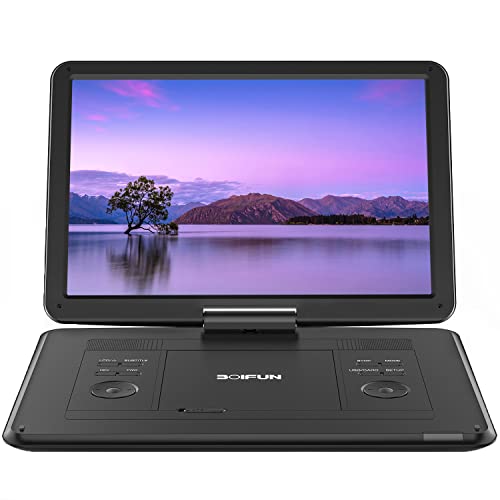
Boifun 17.5″ Portable DVD Player with 15.6″ Large HD Screen, Black
This is the only option in the group with a built-in screen, designed for car trips, flights, and waiting rooms where a TV is unavailable. Pros: the large 15.6-inch display makes shared viewing comfortable for kids without crowding a seatback, and it eliminates the need for an external monitor. Cons: at $94.95 it carries a significant premium over disc-only players, and portability is limited by its physical size compared to a pocket HDMI stick. Skip it if you already have a tablet or laptop for on-the-go playback, or if disc-based media is not your format.
NEUMI Atom 4K Lite Digital Trigger Media Player for USB Drives and SD Cards
The Atom 4K Lite sits in a useful middle ground: 4K output, dual media slots, and a price well under the Micca signage unit. Pros: the “digital trigger” designation suggests auto-start behavior when a drive is inserted, handy for kiosk or home-theater setups where you want playback without remote interaction. Cons: the “Lite” in the name implies a reduced feature set versus full-size 4K players, so expect fewer format options or limited menu controls. Skip it if you need disc playback or signage scheduling, or if your content is 1080p or lower.
4K Full-HD USB and microSD Digital Media Player for TV Digital Signage
At $43.99, this player undercuts the Micca by a clear margin while still targeting signage workloads with 4K HDMI and microSD support. Pros: the price makes it practical to deploy multiple units across several displays without a large per-screen cost. Cons: as a generic-branded device, long-term firmware updates and detailed codec documentation are less certain than with established names. Skip it if you need verified codec lists for unusual file formats or if you expect multi-year software support from the manufacturer.
2026 Model HDMI DVD Player for TV | 1080P Region Free | Mini DVD Player with USB, CD & MP3
At $29.95, this is the lowest-cost option here and it does not omit the essentials — region-free DVD, USB file playback, CD audio, and both HDMI and RCA outputs for older and newer TVs alike. Pros: broad compatibility across disc types and connection standards for under thirty dollars, plus a remote in the box. Cons: 1080p ceiling means no 4K path, and the generic branding limits confidence in long-term reliability. Skip it if your primary source is 4K files or if you need the compact form factor of an HDMI-stick player.
HDMI Media Player, 4K Ultra HD Digital Media Player, Supports USB Drive, SD Card, 4K@30Hz Output
Widest stated codec support of any unit listed: H.265, H.264, AVC, plus container formats from MP4 and MKV to RMVB and MOV, with JPG image playback for advertising loops. Pros: that breadth means fewer “file not supported” surprises with mixed libraries, and 4K at 30Hz is a real output capability rather than a marketing upsell. Cons: 30Hz means no 60fps 4K content at full frame rate, so it is not a home-theater replacement for high-motion video. Skip it if your content is exclusively standard DVD or 1080p files — you are paying for headroom you will not use.
Buying Guide
Output Resolution and Refresh Rate
A player advertising “4K” can mean different things. Look specifically for the frame rate: 4K at 30Hz is common on budget and signage units and fine for static graphics or slideshow content, but if you are playing motion video with camera pans or fast cuts, 60Hz output matters. For 1080p players, confirm the panel you are connecting actually upscales internally — otherwise a small TV viewing distance may still look acceptable.
Media Type and Slot Breadth
Decide upfront whether you need disc spinning, flash drives, or both. Units with a single USB slot force you to swap drives by hand. microSD plus USB (or SD plus USB) gives you two simultaneous sources and lets a signage schedule run from a small card while a promotional file sits on a thumb drive. If you buy discs internationally, region-free status is non-negotiable.
Form Factor and Installation Context
A HDMI-stick player powered by USB from the TV is invisible behind a display but offers limited thermal headroom for sustained 4K playback. A box-style player with its own power supply tolerates long continuous runs and often includes a remote receiver built into the front panel. For portable use, a built-in screen replaces the entire display chain but adds weight and fragility.
Our Verdict
Top pick: the HDMI Media Player 4K Ultra HD ($42.99) earns the spot for the broadest published codec support and genuine 4K output at a price that undercuts most competitors in the group. Budget pick: the 2026 Model HDMI DVD Player ($29.95) delivers region-free discs, USB files, CD audio, and both HDMI and RCA for under thirty dollars. Alternate winner: the Micca 4K ($54.99) takes the top slot specifically if you are deploying signage and need proven scheduling and loop behavior — the $11 premium over the generic 4K signage unit buys a manufacturer with an established product line.
FAQ
Do I need a dedicated video player if my TV has USB ports?
Smart TV USB inputs often restrict supported formats to a handful of codecs and can struggle with large drives or deeply nested folders. A dedicated player handles more formats, boots faster, and does not compete for the TV’s processor, so playback is more consistent across sessions.
What is the difference between region-free and unlocked?
Region-free means the disc drive reads discs from any region code without prompting for a change. Unlocked sometimes refers to a firmware modification that may void warranty or revert after an update. When buying a DVD player, confirm the listing explicitly says “region-free” rather than relying on user reviews that may describe a hack.
Can these players drive a 4K display at 60fps?
Only some. The 4K signage units and the HDMI Media Player 4K Ultra HD list 4K at 30Hz output, which means motion content will appear less smooth than at 60fps. None of the players in this group advertise 4K at 60Hz, so if full-frame-rate 4K video is essential, a Blu-ray player or a streaming box may be more appropriate.
Is a portable DVD player still useful in an era of tablets?
For households with young children and a large physical disc collection, yes. A dedicated player avoids screen-time disputes, does not require internet, and survives car-seat drops better than a tablet. The tradeoff is that it adds a single-purpose device to a home where a tablet already covers the same role.









