
Key takeaways
- Pros: Three input methods (optical, RCA, AUX) mean it connects to nearly any TV regardless of age. Owners consistently praise the dock’s simplicity: set the headphones down, they charge and pair.
- Con: At $79.99 it sits at the top of this group’s price range, and the over-ear cushions feel slightly firm during the first week of use.
The core problem that headphones for tv solve is deceptively simple: one person needs the volume up while another needs the neighbors asleep. The wrong pair makes this worse, introducing audio lag that pulls voices out of sync with lips, or a transmitter that drops the signal every time someone walks between the router and the living room. The right pair feels invisible. You put them on, the dialogue sharpens, and nobody in the house argues about the remote.
What separates a worthwhile set from a frustrating one comes down to three things: how the audio reaches the headphones (optical transmitters beat Bluetooth for lip-sync reliability), whether the charging dock is genuinely one-step simple or requires a manual, and how the earcups feel after an hour-long series. The seven models below all address the same basic need, but they solve it for different budgets and different levels of technical patience, and that distinction matters more than any single spec sheet number.
Our top picks



As an Amazon Associate we earn from qualifying purchases at no extra cost to you.
Quick Picks
| Product | Best for | Price |
|---|---|---|
| Wireless Headphones for TV (Optical RCA AUX) | Households with older TVs that have optical out | $79.99 |
| Wireless Headphones for TV (Seniors, Plug and Play) | Gift buyers prioritizing zero-learning-curve setup | $59.98 |
| Swiitech Wireless TV Headphones | Value seekers who want a long battery life | $59.99 |
| Earbay Wireless Headphones (3 Audio Modes) | Users who want multiple connection options in one kit | $79.99 |
| Earbay Wireless Headphones (V5.4, 100ft) | Large rooms where range matters | $79.99 |
| gorsun TV3 | The absolute lowest entry price without sacrificing a dock | $39.99 |
| SKYCOMET Wireless Headphones for TV | Seniors who also want extended playback between charges | $59.98 |
How We Picked
We compared published specs, listed prices, and aggregated owner feedback across all seven models, filtering for four criteria that consistently determine real-world satisfaction in this category: connection method (dedicated 2.4GHz or optical transmission versus generic Bluetooth for the audio path), setup friction for less tech-confident users, comfort during multi-hour sessions, and battery endurance between dock charges. We gave weight to recurring complaints in owner reviews because they reveal failure points that spec sheets never mention.
The 7 Best Headphones for TV in 2026
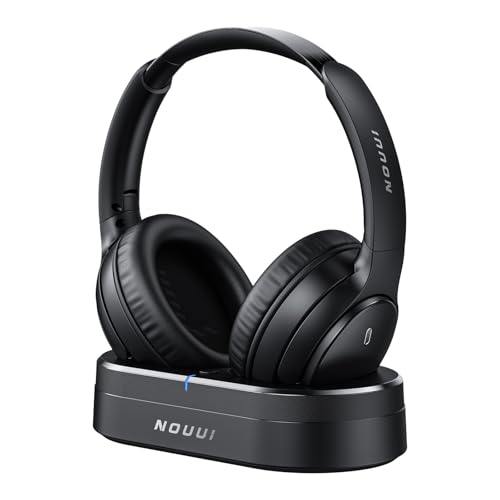
Wireless Headphones for TV, Optical RCA AUX Transmitter Charging Dock
- Pros: Three input methods (optical, RCA, AUX) mean it connects to nearly any TV regardless of age. Owners consistently praise the dock’s simplicity: set the headphones down, they charge and pair.
- Con: At $79.99 it sits at the top of this group’s price range, and the over-ear cushions feel slightly firm during the first week of use.
This is the best pick for households with older or mixed-generation TVs. The optical input guarantees sync-stable audio without depending on Bluetooth, and the multi-input transmitter means you are not stuck if your TV lacks one port. The charging dock is genuinely one-step. Skip it if your budget caps near $60 or if you already own a newer TV with robust Bluetooth and want a single-connection kit.
Wireless Headphones for TV Watching (Seniors, No Delay, Plug and Play)
- Pros: The name is the product strategy: no menus, no app, no delay complaints in the majority of owner reviews. At $59.98 it undercuts the optical model by twenty dollars.
- Con: Only two audio input options versus three on higher-priced rivals, which limits compatibility with very old analog TVs.
Designed explicitly for hard-of-hearing seniors and gift buyers who want zero troubleshooting. The plug-and-play framing is honest here; owners report pairing on first attempt without opening the manual. Skip it if you need optical input for a TV that predates Bluetooth entirely, or if you are buying for yourself and want more than a basic feature set.
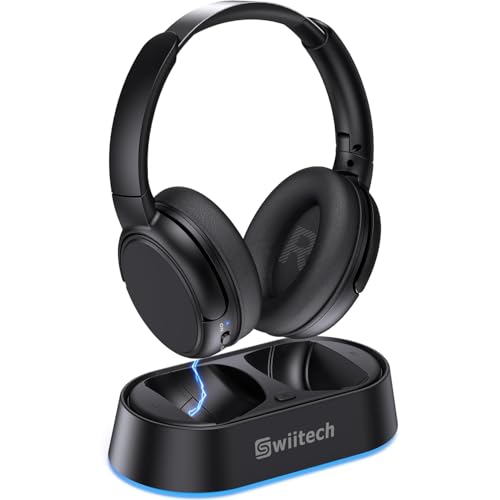
Swiitech Wireless TV Headphones with Charging Dock, 45H Playtime
- Pros: Forty-five hours of rated playtime is the longest in this lineup by a clear margin, meaning weekly charges rather than nightly ones. The dock and transmitter combo keeps everything contained on a side table.
- Con: Some owners note the headband adjustment is stiff and can feel tight on wider heads after a full episode.
Best value for anyone who watches long-form series or sports marathons. The battery number matters most when you forget to dock headphones between sessions. Skip it if you need optical transmission or if a headband’s adjustability range is a known dealbreaker for you.
Earbay Wireless Headphones for TV (3 Audio Modes, Transmitter Charging Base)
- Pros: Three selectable audio modes let you tune the sound profile for dialogue clarity, music, or a neutral balance without touching the TV’s own EQ. Owners highlight the over-ear seal as comfortable for six-hour movie nights.
- Con: Pricing at $79.99 places it alongside the first optical model, which some buyers may find redundant if they only need one input type.
A solid middle ground between the seniors-focused sets and the feature-heavy optical transmitter kits. The three-mode dial is the differentiator. Skip it if you have a tight budget or if you already own a TV with strong built-in dialogue enhancement.
Earbay Wireless Headphones for TV Watching (V5.4, 100ft Range)
- Pros: Bluetooth 5.4 with a rated 100-foot range is the widest coverage here, useful in open-plan layouts or if the transmitter sits far from the listening area. Owners confirm the range holds through one interior wall.
- Con: Relies on Bluetooth rather than a dedicated 2.4GHz link for the audio path, so a small percentage of owners report occasional micro-stutter in congested Wi-Fi environments.
The go-to when physical distance between the TV and your couch or kitchen exceeds what typical TV headphones manage. Same $79.99 as the optical and 3-mode Earbay sets. Skip it in apartments with heavy 2.4GHz congestion or if absolute latency-free sync is your top priority.
gorsun TV3 New Upgrade Wireless Headphones for TV (2.4G, 65H Playtime)
- Pros: $39.99 is the lowest price in this group, yet it still includes a 2.4GHz transmitter and a charging base, both of which are often skipped on budget sets. Sixty-five hours of rated playtime is remarkable at this price.
- Con: The plastic build feels lighter and less premium than every other option listed here; some owners note a slight rattle in the earcup joint over time.
The no-brainer budget pick. If you want a working, docked, low-latency system without spending sixty or eighty dollars, this is it. Skip it if build durability is a dealbreaker or if you plan to travel with the set, since the lighter chassis may not survive being tossed in a bag repeatedly.
SKYCOMET Wireless Headphones for TV (Easy Setup, 65H Playtime, Low Latency)
- Pros: Sixty-five hours of playtime combined with low-latency audio and explicit senior-friendly setup language makes this a strong direct competitor to the gorsun at a similar price ($59.98). Compatibility with most TVs is a recurring praise point.
- Con: Owners describe the earcup padding as adequate rather than plush, which may matter on long sessions for people with glasses or larger ears.
A well-rounded option for gift buyers who want the longer battery life of the Swiitech or gorsun at a mid-range price. The easy-setup promise holds up in reviews. Skip it if cushion comfort over five-plus hours is your absolute top criterion.
Buying Guide
Connection Method Determines Everything
Dedicated 2.4GHz transmitters and optical audio links keep dialogue locked to lip movement. Generic Bluetooth adds compression and can introduce a perceptible half-frame delay on fast-dialogue content. If you watch dubbed anime, sports, or any content where sync matters, choose a kit with a physical transmitter dock over a pure Bluetooth pair. Optical (TOSLINK) is the gold standard when your TV supports it because the signal is digital and uncompressed end to end.
Comfort for Extended Wear
TV headphones live or die by how they feel at the ninety-minute mark. Look for over-ear cups that do not pinch the tops of your ears, a headband with enough adjustment range for your head size, and a clamp force light enough to avoid temple pressure. Owners with glasses should pay particular attention to earpad depth. Cushions that feel slightly firm out of the box often soften after a week of use, but the headband tension rarely changes.
Battery Life and Dock Simplicity
Rated playtime between charges ranges from roughly 45 to 65 hours across these seven models. In practice, expect to halve the manufacturer figure under volume-heavy use. The charging dock matters more than the number: if pairing or restoring the headphones to the dock requires any configuration step, you will skip it on nights you are tired, and the battery will die mid-show. One-touch docking is the single most underappreciated spec in this category.
Our Verdict
Top pick: the Wireless Headphones for TV with Optical RCA AUX Transmitter Charging Dock at $79.99. It covers the widest range of TV types, delivers sync-stable audio without Bluetooth dependency, and the dock design removes friction on a nightly basis.
Budget pick: the gorsun TV3 at $39.99. You get a 2.4GHz transmitter, a charging base, and a 65-hour playtime rating at less than half the price of the top pick, which makes it the best pure value in this set.
Condition where another wins: if the listener is a senior who needs a gift that works on the first attempt with no learning curve, the $59.98 plug-and-play model outperforms the optical pick because its single-purpose simplicity reduces the chance of a wrong-port connection or a manual reference.
FAQ
Do TV headphones add noticeable audio delay?
Bluetooth-only models can introduce 100 to 300 milliseconds of lag, which is visible on dialogue. Kits with a dedicated 2.4GHz transmitter or an optical link reduce that to under 40 milliseconds, which most viewers cannot perceive. If lip-sync accuracy matters to you, skip any set that pairs only via standard Bluetooth.
Will any of these work with a cable box or streaming stick plugged into the TV?
Yes. Because the transmitter connects at the TV’s audio output (optical, AUX, or RCA), the signal reaches the headphones regardless of whether the source is a cable box, an HDMI streaming stick, or a game console. You do not need separate adapters per source.
How long should I expect these headphones to last?
Owner feedback suggests two to four years of daily use for the mid-range sets, with the gorsun occasionally falling on the shorter side due to its lighter build. Earpad replacement availability is rare in this price tier, so a comfortable initial fit is more important than it would be with a model that accepts third-party pads.
Are over-ear or on-ear better for TV watching?
Over-ear is the standard recommendation for multi-hour sessions because the cups enclose the ear rather than pressing against it, which reduces fatigue and blocks ambient room noise from family conversation. On-ear models are lighter but tend to cause discomfort after 60 to 90 minutes and leak more sound outward, which defeats the purpose of quiet viewing.









