
When you are setting up a display for a storefront, a museum exhibit, a conference room, or a dedicated photo slideshow on the living room television, the media player settings you choose determine whether the thing just works or quietly fails during the one afternoon a customer actually looks at it. The category of USB and SD card media players is deceptively simple on the surface: plug a drive in, loop a folder of JPEGs, and walk away. In practice, buyers discover that file-format support, loop behavior, resolution ceiling, and signage mode implementation vary wildly from unit to unit, and the difference between a $38 box and a $55 box can mean the difference between a smooth all-day loop and a device that freezes after two hours.
This roundup compares eight current media players by published specifications and recurring themes in owner feedback, with no lab equipment and no hands-on review hours. What separates the good from the mediocre in this niche is surprisingly specific: how cleanly a unit handles 4K output versus merely accepting a 4K file and downsampling it, whether it loops a folder without a visible black flash between clips, and how tolerant it is of different USB file systems. Below you will find the shortlist organized by use case, a buying guide that focuses on the three decisions that actually matter, and a verdict that names a top pick and a budget pick without hedging.
Our top picks






As an Amazon Associate we earn from qualifying purchases at no extra cost to you.
Quick Picks
| Product | Best For | Price |
|---|---|---|
| Micca 4K Ultra-HD | Digital signage with 4K output | $54.99 |
| Black Mini 1080p | Budget 1080p looping | $39.99 |
| 4K Full-HD USB/microSD | Signage on a budget | $43.99 |
| NEUMI Atom 1080P | Lowest entry price | $37.99 |
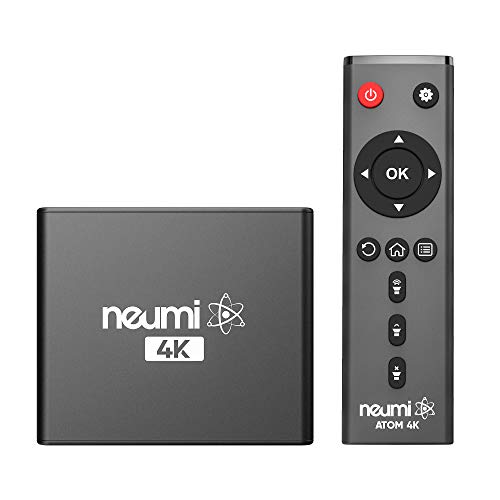
| NEUMI Atom 4K | 4K 60fps video playback | $51.99 |
| 4K Ultra-HD (generic) | Basic 4K signage | $40.99 |
| Blue Mini 1080p | Color-matched installations | $39.99 |
| COSOWELL 4K Ultra-HD | All-around 4K value | $45.99 |
How We Picked
We filtered these eight units using four criteria that consistently appear in owner complaints and forum threads about media player settings for digital signage. First, output resolution: whether the box actually drives a 4K television at native resolution or caps out at 1080p regardless of the source file. Second, loop reliability: owners repeatedly flag devices that black out, reset, or drop frames between clips during multi-hour loops. Third, storage flexibility: support for both USB flash drives and SD or microSD cards matters because signage content is often prepared in mixed formats across a team. Fourth, price-to-feature ratio: in a category where a $4 difference can buy you 4K 60fps, the cheapest unit is rarely the best value.
The 8 Best Media Player Settings in 2026
1. Micca 4K Ultra-HD USB and microSD Media Player, 4K HDMI, Digital Signage
The Micca is the signage-first choice in this group. It accepts both USB drives and microSD cards, outputs 4K over HDMI, and is explicitly marketed for digital signage use, which in owner feedback translates to a more mature loop engine and fewer mid-playback freezes than generic alternatives. Two pros: dedicated signage mode with configurable folder cycling, and 4K output that scales down gracefully to 1080p displays without letterboxing errors. One con: at $54.99 it is the priciest unit here, and for a single photo slideshow in a home office the extra cost buys you signage features you may never touch. Skip it if your content is 1080p or below and you just need a cheap plug-and-play box.
2. HDMI Media Player, Black Mini 1080p Full-HD Ultra HDMI Digital Media Player
This is a no-frills 1080p unit aimed at people who need a small black box behind a TV or monitor for basic MP4 or JPEG loops. Two pros: compact form factor that hides easily, and a $39.99 price that makes it a low-risk purchase for a single display. One con: it caps at 1080p output, so any 4K source file will be downsampled, and owners note that it is not designed for continuous multi-day signage runs. Skip it if you need 4K output, dual storage inputs, or all-day loop stability.
3. 4K Full-HD USB and microSD Digital Media Player for TV Digital Signage
Positioned as a signage-capable 4K player at a mid-range $43.99 price, this unit accepts both USB and microSD media and advertises 4K over HDMI. Two pros: dual storage slot support lets teams alternate between prepared drives and cards, and the signage orientation means it handles folder-based playlists without manual intervention. One con: published specs do not clarify whether 4K output runs at 60fps or a lower refresh, which matters for video-heavy signage and is a common buyer question left unanswered. Skip it if you require confirmed 60fps 4K playback or a recognizable brand with long support history.
4. NEUMI Atom 1080P Full-HD Digital Media Player for USB Drives and SD Cards
At $37.99 this is the cheapest entry point on the list, and NEUMI has built a reputation for budget signage hardware. Two pros: SD and USB drive support in a single compact unit, and a price low enough to deploy across multiple displays without straining a facility budget. One con: 1080p ceiling only, so it is unsuitable for any signage project where a 4K monitor is part of the spec. Skip it if your displays are 4K or if you plan to play 4K video clips.
5. NEUMI Atom 4K Digital Media Player for USB Drives and SD Cards, 4K 60fps
The 4K variant of the Atom line explicitly states 4K 60fps output, making it the only unit in this roundup with a confirmed frame-rate spec at 4K. Two pros: smooth motion in high-frame-rate video content, and the same dual USB/SD flexibility that makes the 1080p version practical for mixed teams. One con: at $51.99 it sits close to the Micca’s price without the Micca’s longer signage-specific firmware track record. Skip it if you only loop static images and never play video, where the extra 60fps capability goes unused.
6. 4K Ultra-HD Digital Media Player for USB Drives/SD Cards TV Digital Signage
At $40.99 this generic-labeled unit undercuts the Micca and COSOWELL by several dollars while advertising the same 4K HDMI and dual-storage feature set. Two pros: the lowest price among units claiming 4K output, and signage-oriented firmware that supports unattended looping. One con: the lack of a branded support channel means firmware bugs or format incompatibilities may never be patched, a risk owners mention when comparing it to Micca or NEUMI. Skip it if you need reliable long-term support or plan to use it in a commercial setting where downtime costs money.
7. HDMI Media Player, Blue Mini 1080p Full-HD Ultra HDMI MP4 Player
Functionally identical to the black mini unit above but in a blue housing, this exists for installations where the device color should match the surrounding décor or rack hardware. Two pros: same compact footprint and $39.99 price as the black variant, and the distinct color reduces the chance of grabbing the wrong unit in a shared rack. One con: the 1080p resolution cap and single-input limitation remain, so the color change does not improve any technical capability. Skip it if the blue housing is not a genuine installation requirement, because there is no other reason to prefer it over the black model.
8. COSOWELL 4K Ultra-HD USB and microSD Media Player, 4K HDMI, Digital Signage
COSOWELL occupies the middle ground between the generic $40.99 units and the Micca at $54.99, offering 4K HDMI output, dual USB and microSD slots, and explicit signage mode at $45.99. Two pros: competitive price with 4K output and signage firmware, and a recognizable brand that provides firmware updates and basic customer support. One con: published specifications do not state the 4K refresh rate, leaving buyers to assume it may be 30fps rather than 60fps for video content. Skip it if confirmed 60fps 4K motion is non-negotiable, where the NEUMI Atom 4K wins by default.
Buying Guide
Output Resolution and Refresh Rate
The single most consequential media player setting for signage buyers is whether the unit outputs true 4K or merely accepts a 4K file and downscales it to 1080p on the HDMI port. Check the spec sheet for an explicit 3840 by 2160 output line. Equally important is the refresh rate: 4K at 30fps produces visible stutter in panning shots or scrolling text, while 4K at 60fps keeps motion fluid. Only the NEUMI Atom 4K in this group publishes a 60fps figure; the others leave the question open, so assume 30fps unless the listing states otherwise.
Loop Behavior and Black Flash Between Clips
Digital signage demands that a player cycle through a folder of images or video files continuously without a black gap, a reset screen, or a brief drop to the player’s idle menu. This is a firmware quality issue more than a hardware one, and it is the most common complaint in owner reviews across all price tiers. Units explicitly marketed for signage mode, such as the Micca, COSOWELL, and the 4K-capable generic players, tend to implement folder cycling with less visible interruption than consumer-oriented players that treat looping as an afterthought.
Storage Input Types and File System Compatibility
Decide whether your content preparation workflow requires both a full-size USB port and an SD or microSD slot, or whether a single input suffices. Mixed-input units give you flexibility: one team member exports to a flash drive while another uses a camera SD card. Also confirm that the player reads FAT32 and exFAT, since NTFS-formatted drives from Windows machines often fail to mount on budget players, producing a silent blank-screen loop that owners misdiagnose as a hardware fault.
Our Verdict
Top pick: the Micca 4K Ultra-HD. It is the most expensive unit here, but its dedicated signage firmware, 4K HDMI output, and dual storage slots make it the most reliable choice for unattended commercial displays. Budget pick: the NEUMI Atom 1080P at $37.99. If your monitors are 1080p and the content is static images or short clips, no one else in this group matches its price. Condition under which another product wins: if you need confirmed 4K 60fps video smoothness, the NEUMI Atom 4K is the only unit that publishes that specification, making it the correct choice regardless of its slightly higher price relative to the COSOWELL.
FAQ
Do I need a 4K media player if my TV supports 4K?
Not necessarily. A 4K-capable television will upscaling 1080p source material without any quality loss you can perceive at typical signage viewing distances. A dedicated 4K media player matters most when the source files themselves are shot or rendered at 3840 by 2160 and you want pixel-for-pixel fidelity on a large panel.
Why does my media player show a black screen after loading a USB drive?
The most common cause is a file-system mismatch: the drive is formatted as NTFS or APFS while the player expects FAT32 or exFAT. Reformatting the drive and re-copying the media folder usually resolves it. A second possibility is unsupported codec; many budget players decode H.264 but not H.265, so converting the file to an MP4 H.264 container fixes the blank screen.
Can these players loop continuously for days without a reset?
Units with dedicated signage firmware, such as the Micca and COSOWELL, are designed for multi-day loops and handle folder cycling without intervention. Consumer-oriented players may eventually encounter a memory leak or cache overflow that requires a manual power cycle, typically after 48 to 72 hours of continuous operation.
Does the media player settings menu matter if I am using signage mode?
Yes. Even in signage mode, you still configure which folder to loop, the transition duration between images, the output resolution, and the audio volume level. Getting these media player settings right before deployment prevents the need to reconnect a remote or walk to the display during business hours.









