Key takeaways
- Pick from the best HDMI switches for TV inputs: 2, 4 and 5 port models, HDMI 2.1 gaming switches and a composite converter, compared by specs.
The Anker 4-in-1-out HDMI switch is the best overall pick here for most living rooms, because it turns one TV input into four, includes a remote, and supports 4K at 60Hz with HDR, which covers streaming boxes, Blu-ray players and most game consoles. An HDMI switch lets several source devices share a single HDMI input on your TV; you pick which device is displayed with a button or remote. If you game on a PS5 or Xbox Series X at 4K 120Hz, step up to one of the HDMI 2.1 models, and if you have older composite gear, the Y.D.F converter switch is the specialist choice.
Six switches are covered here, ranging from simple 2-port models to a five-input unit and two that claim HDMI 2.1 bandwidth.
Quick List
- Anker 4-in-1-Out HDMI Switch – best for a straightforward 4K 60Hz home theater setup with a remote
- Anker 2-in-1-Out HDMI Switch – best for a small setup or a monitor shared by two computers
- HDMI 2.1 4-in-1-Out Switch (48Gbps) – best for PS5 and Xbox Series X at 4K 120Hz
- 4-in-1-Out 8K Switcher with 4K 240Hz Claims – best for high-refresh gaming rigs, with specs to double-check
- acer 5-in-1-Out HDMI Switch – best for crowded entertainment centers that need five inputs
- Y.D.F 3-Way HDMI plus 2 RCA Converter Switch – best for mixing modern HDMI gear with old composite devices
Which One Is Right for You?
| If you… | Choose |
|---|---|
| need four inputs for a streamer, Blu-ray player, console and cable box at 4K 60Hz | Anker 4-in-1-Out HDMI Switch |
| have two sources and one display | Anker 2-in-1-Out HDMI Switch |
| want to run a PS5 or Xbox Series X at 4K 120Hz through a switch | HDMI 2.1 4-in-1-Out Switch (48Gbps) |
| chase the highest refresh rates on a gaming PC and accept less certain specs | 4-in-1-Out 8K Switcher |
| have five devices fighting over one input | acer 5-in-1-Out HDMI Switch |
| own a VCR, retro console or camcorder with yellow-red-white outputs | Y.D.F 3-Way HDMI plus 2 RCA Converter Switch |
Start by counting the devices you actually want connected and then check whether any need more than 4K 60Hz. If every device tops out at 4K 60Hz, an HDMI 2.0 switch is enough and usually the simplest option. If a console or PC can output 4K 120Hz, you need an HDMI 2.1 switch and a TV input that supports it, or the extra bandwidth is wasted.
All 6 Picks in Detail
1. Anker 4-in-1-Out HDMI Switch – Best for a Straightforward 4K 60Hz Setup
As an Amazon Associate we earn from qualifying purchases at no extra cost to you.

This is the model most people should buy. Anker’s product information describes four HDMI inputs and one output, HDMI 2.0, 4K at 60Hz, 3D support and HDCP 2.2, with a remote selector. It suits a living room where a streaming box, a Blu-ray player, a console and a cable box share one TV input, and it is simple enough for anyone in the household to use.
- 4 HDMI inputs, 1 output, per the listing name
- 4K at 60Hz, HDR, 3D, Dolby and DTS audio support named in the listing
- HDMI 2.0 with HDCP 2.2, per Anker’s product information
- Remote control included; remote batteries and a wall charger are not included, according to the product information
- Manufacturer guidance suggests keeping input and output cables to about 5 meters for 4K 60Hz
Pros
- Recognizable brand with clear specs
- Four inputs cover most home theaters
- Remote makes switching easy
Cons
- HDMI 2.0 limits it to 4K at 60Hz and no 120Hz gaming
- Published sources disagree on CEC support, so confirm if you rely on it
Its simple layout also makes it easy to explain to guests and kids, since the remote has one button per input. Compared with the acer 5-in-1 switch, the Anker has one fewer input but a more established brand and more complete published specifications.
2. Anker 2-in-1-Out HDMI Switch – Best for a Small Setup or a Shared Monitor

This smaller Anker model fits desks and bedrooms. The listing describes a 2-in-1-out switcher that also works as a monitor switch, supports 4K at 60Hz, HDR, 3D and Dolby formats, and names laptops, PCs, Xbox, PS5 and PS4 as compatible sources. It is ideal for sharing a monitor between a work laptop and a gaming console, or for a TV with a streaming stick and one other device.
- 2 HDMI inputs, 1 output, per the listing name
- 4K at 60Hz according to the listing name
- HDR, 3D and Dolby support named in the listing
- Retailer information describes bi-directional use; confirm on the listing if you need it
- Compact body with a smooth finish
Pros
- Compact and easy to hide behind a monitor
- Works with laptops, consoles and PCs
- Same brand reliability as the larger model
Cons
- Only two ports, so it is easy to outgrow
- No 4K 120Hz support
It also draws little power and can be tucked behind a monitor stand, which keeps a desk tidy. Next to the 4-in-1 Anker, this one saves space and is the better pick if two sources are all you will ever connect.
3. HDMI 2.1 4-in-1-Out Switch (48Gbps) – Best for PS5 and Xbox Series X at 4K 120Hz

This unbranded switch is aimed at gamers. The listing claims HDMI 2.1 bandwidth of 48Gbps, 8K at 60Hz, 4K at 120Hz, HDCP 2.3 and Dolby Atmos pass-through, and it names PS5, Xbox, Apple TV and PC as sources. That makes it the sensible choice if you want to run a current console and other devices through one TV input and still use 4K 120Hz modes.
- 4 inputs, 1 output, per the listing name
- 48Gbps HDMI 2.1 bandwidth as claimed in the listing
- 8K at 60Hz and 4K at 120Hz as claimed in the listing
- HDCP 2.3 and Dolby Atmos support named in the listing
- Variable refresh rate and auto low-latency mode support is not stated in the title, so confirm on the listing
Pros
- Headroom for 4K 120Hz consoles
- Four inputs for a full gaming setup
- HDCP 2.3 for newer protected content
Cons
- Unbranded, so documentation and support may be thinner
- Claims come from the seller, so confirm VRR and other features
Compared with the Anker 4-in-1, this switch gives up brand familiarity but adds the bandwidth needed for 120Hz gaming.
4. 4-in-1-Out 8K Switcher with 4K 240Hz Claims – Best for High-Refresh Gaming Rigs

This model pushes the specs even higher on paper. The listing describes a 4-in-1-out switcher with 8K at 60Hz, 4K at 240Hz, 144Hz and 120Hz, a remote, 3D and HDR support, HDCP 2.3, and compatibility with PS5, PS4, Xbox and Nintendo Switch. The listing also uses the word “splitter,” which is a different device from a switch, so confirm that this unit selects among four inputs. It suits PC gamers with high-refresh monitors, but the strongest claims deserve a careful read.
- 4 inputs, 1 output, according to the listing name
- 8K at 60Hz and 4K at 120Hz, 144Hz and 240Hz claimed in the listing
- HDCP 2.3 and HDR support named in the listing
- Remote included, according to the listing name
- Note that 4K at 240Hz exceeds what a 48Gbps HDMI 2.1 link carries without compression, so treat that figure as a claim to verify
Pros
- Broad refresh-rate claims for high-end monitors
- Remote and four inputs
- Compatible with current consoles per the title
Cons
- Ambitious specs that need confirming
- Confusing “splitter” wording in the title
Compared with the other HDMI 2.1 switch, this one makes bigger claims, so choose it only if the exact refresh rate matters and you have confirmed it with the seller.
5. acer 5-in-1-Out HDMI Switch – Best for Crowded Entertainment Centers
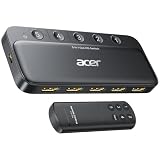
Acer’s switch offers the most inputs on the list. The listing describes five inputs and one output, 4K at 60Hz on HDMI 2.0, a remote, HDR, HDCP 2.3, DTS and Dolby support and low-latency signal switching for PS5, Xbox and TV sources. It suits a TV cabinet with a streamer, console, Blu-ray player, cable box and a PC all competing for one port.
- 5 inputs, 1 output, per the listing name
- HDMI 2.0 with 4K at 60Hz, according to the listing
- HDCP 2.3 and HDR support
- Remote included; retailer information also describes physical buttons
- Retailer information says it does not auto-switch; confirm on the listing
- Total HDMI cable length for 4K 60Hz should stay short, per the listing guidance
Pros
- Fifth input avoids a second switch
- Physical buttons plus remote
- Good fit for streaming and console setups
Cons
- No 4K 120Hz or variable refresh rate
- Manual switching only, per retailer information
If your devices are all 4K at 60Hz, the extra port is the main reason to choose it. Next to the Anker 4-in-1, the acer adds an input but gives up some brand documentation.
6. Y.D.F 3-Way HDMI plus 2 RCA Converter Switch – Best for Mixing Modern and Legacy Gear

This one is a specialist and sits last as a runner-up for most buyers. The listing describes a 3-way HDMI 2.0 switcher combined with a 2-way composite (CVBS) AV to HDMI converter, with 4:3 and 16:9 switching. In plain terms, it lets you connect up to three HDMI sources plus two older devices with yellow, red and white RCA cables to one HDMI input. It suits retro game consoles, VCRs and older camcorders, and it is not designed for modern 4K gaming.
- 3 HDMI 2.0 inputs plus 2 composite AV inputs, per the listing name
- Converts composite video to HDMI output
- 4:3 and 16:9 aspect ratio switching named in the listing
- Composite sources are standard definition, so the picture will not look 4K
- Confirm HDMI resolution, HDCP and remote details on the listing
Pros
- Rare ability to combine HDMI and composite sources
- Good for retro gaming and legacy video
- Handles aspect ratio options
Cons
- Composite output is low resolution
- Not a fit for HDMI 2.1 gaming
Compared with the standard Anker switches, this model solves a different problem, so buy it only if you actually own composite devices.
Specs Compared
| Switch | Inputs / outputs | HDMI version | Max resolution and refresh | HDCP | Remote |
|---|---|---|---|---|---|
| Anker 4-in-1-Out | 4 in / 1 out | HDMI 2.0 | 4K at 60Hz | 2.2 per published information | Yes |
| Anker 2-in-1-Out | 2 in / 1 out | Confirm on listing | 4K at 60Hz | Confirm on listing | Confirm on listing |
| HDMI 2.1 4-in-1-Out (48Gbps) | 4 in / 1 out | HDMI 2.1 claimed | 8K at 60Hz, 4K at 120Hz (claimed) | 2.3 | Confirm on listing |
| 4-in-1-Out 8K Switcher | 4 in / 1 out | HDMI 2.1 claimed | 8K at 60Hz; 4K up to 240Hz claimed | 2.3 | Yes |
| acer 5-in-1-Out | 5 in / 1 out | HDMI 2.0 | 4K at 60Hz | 2.3 | Yes |
| Y.D.F 3-Way HDMI plus 2 RCA | 3 HDMI plus 2 composite in / 1 out | HDMI 2.0 | Confirm on listing | Confirm on listing | Confirm on listing |
How We Chose These
We started with the six switches supplied for this topic and examined each listing’s title, manufacturer information where it exists and retailer specification fields. We compared input counts, HDMI version, resolution and refresh rate, HDCP level, remote support and special functions such as composite conversion. Because HDMI 2.1 claims on unbranded switches come from the seller, we marked them as claims and explained which features to confirm. We also flagged where published sources disagree, such as CEC support on one switch. We rely on documented specifications rather than personal impressions, and we do not state results that the listings do not support.
What to Look For
Match the HDMI version to your devices
HDMI 2.0 carries up to 18 gigabits per second, enough for 4K at 60Hz with HDR, which covers streaming boxes, Blu-ray players and many consoles. HDMI 2.1 raises the limit to 48 gigabits per second, which allows 4K at 120Hz and features such as variable refresh rate and auto low-latency mode. A switch only passes what its weakest link supports, so the source, cable, switch and TV port must all meet the spec. If none of your devices exceeds 4K at 60Hz, paying for HDMI 2.1 gives you nothing today.
Count inputs and plan for growth
List every device you want on the TV: streaming box, console, Blu-ray, cable or satellite, PC, soundbar. Buy a switch with at least one spare input, because adding a device later is common. A 4-port model suits most homes, a 5-port model suits a crowded cabinet, and a 2-port model suits a desk. Worked example: a TV with three HDMI ports, a soundbar on eARC and four sources needs a switch so that all four sources can share the remaining port.
Auto-switching, remotes and CEC
Some switches change to the newest powered-on device automatically, while others require a button press or remote. Manual switching is more predictable, while auto-switching is convenient but can jump unexpectedly when a device wakes from standby. CEC lets one remote power devices on and off over HDMI, but implementation varies, and some switches do not pass CEC commands. If you rely on CEC to turn your TV on with a console, confirm support on the listing before buying.
Cables, length and power
Cable quality and length matter more at higher bandwidth. For 4K at 60Hz, keep cables short, with some manufacturers suggesting about 3 to 5 meters per segment, and use cables certified for the speed you need. Ultra High Speed cables are the right class for 48-gigabit HDMI 2.1 links. Most switches draw power over USB, which can come from a TV USB port or a small adapter, so check that a power source is available. A weak USB port can cause flicker or dropouts.
HDCP and compatibility
HDCP is the copy protection used by streaming and disc players. Mismatched HDCP versions are a common cause of a black screen, and HDCP 2.2 or 2.3 is required for most 4K protected content. If you see a blank picture, try powering devices on in a different order and use the shortest cable run. Check each product page for the HDCP version and whether the switch is described as passing Dolby Atmos or DTS audio.
Gaming specifics: 4K 120Hz, VRR and your TV’s ports
Gaming through a switch has one extra catch: the TV itself. Many televisions support 4K at 120Hz and variable refresh rate on only one or two of their HDMI ports, usually labeled HDMI 2.1 or 4K 120. The switch’s single output must connect to one of those ports, otherwise the signal falls back to 60Hz. Variable refresh rate and auto low-latency mode are features that the switch must pass through, and they are not guaranteed by the words “HDMI 2.1” in a title, so look for them in the description. Remember also that consoles support 4K at 120Hz in selected games only, so the gain depends on what you play.
Routing audio through a switch to a soundbar
There are two common layouts. In the first, every source connects to the switch, the switch connects to the TV, and the TV sends sound to a soundbar over ARC or eARC. This keeps cabling simple and works with most pass-through formats, although the TV’s ARC port may limit you to compressed formats. In the second, the switch sits after the soundbar, so sources go to the switch, the switch to the soundbar, and the soundbar to the TV. That layout can preserve higher-quality formats such as Dolby Atmos but requires a soundbar with enough HDMI inputs and pass-through of the video format you want. Choose the layout based on which devices matter most.
Placement, heat and cable management
Most switches are small plastic or metal boxes that run warm at most. Keep them in open air behind or beside the TV rather than stacked under a console, and keep the remote’s infrared window clear so it receives commands. Label each cable at both ends before pushing the cabinet back against the wall, and keep power cables away from HDMI cables to reduce interference. Leave a few extra centimeters of slack so connectors are not under stress, which prevents intermittent signal loss caused by bent plugs.
Switch, splitter, extender and matrix: a quick glossary
A switch selects one of several inputs for a single output. A splitter copies one input to several outputs. An extender sends HDMI over longer distances using Ethernet cable or wireless links. A matrix switch can route any input to any output, which is more than most homes need. Keeping these terms straight helps you read listings that mix them, such as one that describes a four-input switcher as a “splitter” in its title.
Questions
What is the difference between an HDMI switch and a splitter?
A switch connects several sources to one display and lets you choose which one is shown. A splitter does the opposite and sends one source to multiple displays, so check the product description if a listing uses both words.
Does an HDMI switch reduce picture quality?
A properly specified switch passes the signal without changing the picture. Problems usually come from an under-specified switch, long or low-grade cables or HDCP mismatches rather than from the switching itself.
Can I use an HDMI switch with a soundbar?
Yes, but route it carefully. Many people connect sources to the switch, the switch to the TV and the TV to the soundbar over ARC or eARC, which keeps the setup simple.
Do I need an HDMI 2.1 switch for the PS5?
Only if you want 4K at 120Hz or variable refresh rate. For 4K at 60Hz, an HDMI 2.0 switch works well.
Why does my screen go black when I switch inputs?
A brief black screen is normal while the TV and source renegotiate HDCP. A longer blackout usually points to a loose cable, a weak USB power source or an HDCP version mismatch.
Are bidirectional switches useful?
They let one source feed two displays or two sources feed one display, depending on the setup. That is handy for sharing a laptop between two monitors or two devices on one monitor, but check that the listing describes this mode.
Will a switch add input lag for gaming?
A well-designed pass-through switch adds very little delay, but cheap or poorly specified models can interfere with variable refresh rate or low-latency features. For fast-paced games, choose a switch that explicitly names those features and make sure your TV is in game mode.
How many HDMI cables will I need?
One cable per source device plus one from the switch to the TV. Buy cables rated for the bandwidth you plan to use, and keep each run as short as is practical.
Update History
- October 20, 2026 – Initial publication; product set drawn from current catalog listings.
- Check the product page for current specifications and availability before buying.
Sources
- Anker product and specification pages for the 4-in-1-out HDMI switch
- Retailer listing titles and specification fields for all six switches
- Consumer-electronics guides summarizing HDMI 2.0 and HDMI 2.1 bandwidth limits
- Gaming and consumer-electronics guidance on 4K 120Hz switch requirements