Our Short List of 3

- Best for: A dedicated theater or gaming room where the projector goes on the ceiling once and stays there.
- Native resolution: 3840 x 2160 (True 4K UHD)
- Brightness: 4,000 lumens
- Contrast ratio: 1,000,000:1
- Mounting type: Ceiling Mount, Tabletop Mount, Tripod Mount

- Best for: Classrooms, meeting rooms and multi-use spaces getting a permanent ceiling install that runs with the lights on.
- Native resolution: 1080p (1920 x 1080)
- Light source: Laser
- Brightness: 5,000 lumens
- Zoom: 1.3x optical zoom
- Best for: Living-room ceiling installs that need 4K detail plus automatic help squaring the picture after mounting.
- Resolution: 3840 x 2160 (4K UHD)
- Brightness: 3,200 lumens
- Refresh rate: 240Hz
- Input lag: 4.2ms
All 5 Picks at a Glance
| Product | Specs | Action |
|---|---|---|
| Optoma UHD38 |
| Check price on Amazon |
| ViewSonic LS740HD |
| Check price on Amazon |
| ViewSonic PX701-4K |
| Check price on Amazon |
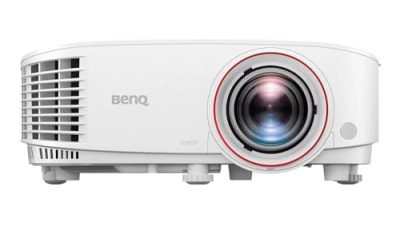
 BenQ TH575 |
| Check price on Amazon |
 Optoma HD146X |
| Check price on Amazon |
Our Top Picks
- ViewSonic LS740HD 1080P Laser Projector5.1" x 11.3" x 8.5"11.3 x 8.5 x 5 inches6.6 poundsCheck on Amazon
The real decision with a ceiling projector is geometry, not picture quality. Once a mount is bolted to a joist, the projector’s position is fixed for years, so its throw range and zoom decide whether the image lands exactly on your screen, and its keystone correction decides how much sharpness you give up fixing any misalignment. A model that looks perfect on a coffee table can be the wrong buy overhead if its zoom is too narrow for the one spot your ceiling allows.
This roundup is for home theater builders fixing a projector above the seating, living-room installers who want the table back, and classroom or meeting-room buyers mounting a unit permanently. Every pick below was chosen from its Amazon listing for installation traits first: mounting type, zoom range, keystone correction, brightness and light-source life, with the listing’s own specifications quoted in each section.
Quick Picks
As an Amazon Associate we earn from qualifying purchases
| Product | Best for | Key spec from title |
|---|---|---|
| Optoma UHD38 | Ceiling-mounted 4K theater and gaming rooms | True 4K UHD, 4,000 lumens, ceiling mount listed |
| ViewSonic LS740HD | Permanent installs in bright rooms | 5,000-lumen laser, 1.3x zoom, H/V keystone |
| ViewSonic PX701-4K | 4K installs that need placement forgiveness | 4K UHD, 3,200 lumens, auto keystone |
| BenQ TH575 | 1080p gaming rooms on a fixed mount | 1080p, 3,800 lumens, auto vertical keystone |
| Optoma HD146X | Light, simple installs in smaller rooms | 1080p, 3,600 lumens, ±40-degree keystone |
How to Choose
Throw Distance and Zoom Decide Where the Mount Can Go
A tabletop projector can slide forward or back until the image fits. A ceiling projector cannot. Your mount position is set by the joist above and the screen on the wall, so the projector’s throw range has to bridge that exact distance. Zoom is your slack: the ViewSonic LS740HD’s 1.3x optical zoom tolerates a mount placed a foot or two off the ideal spot, while a 1.1x zoom like the BenQ TH575’s demands you measure first and drill second. Before ordering, divide your ceiling-to-screen distance by the screen width and confirm the result sits inside the throw range the listing states.
Keystone Correction Is What Fixes an Inverted Image
Hanging upside down flips the image, and every projector here handles that with a ceiling projection setting. The harder problem is alignment: a mount that sits slightly off the screen’s center axis produces a trapezoid, and keystone correction is the tool that squares it. The Optoma HD146X corrects plus or minus 40 degrees vertically, the PX701-4K does it automatically, and the LS740HD adds horizontal correction and four-corner adjustment for mounts that are off in two directions. Keystone is digital, though, so it trims resolution. Treat it as a fine-tuning tool, not a substitute for a well-placed mount.
Mount Compatibility, Weight and the Ceiling Itself
Check the listing’s mounting type before anything else: the Optoma UHD38’s specification table names Ceiling Mount outright, which removes the guesswork. Weight matters just as much, because the mount, the ceiling plate and the fixings all carry it permanently. The UHD38 weighs 9.25 pounds and the HD146X only 6.2 pounds, and both need a mount rated comfortably above those figures, fixed into a joist or blocking rather than drywall alone. Remember that mounts are sold separately, and a high ceiling may also need an extension pole to bring the lens level with the top of the screen.
Brightness and Light Source for a Unit You Rarely Touch
A ceiling install is awkward to service, so light-source life belongs on your shortlist next to brightness. The lamp-based picks here quote up to 15,000 hours, which stretches to years of evening viewing, while the LS740HD’s laser removes lamp changes from the equation entirely and suits rooms where the projector runs all day. Brightness should match the room rather than the spec sheet: 3,200 to 3,800 lumens covers a darkened theater or bedroom, while a lights-on classroom or living room argues for the 4,000 to 5,000 lumen end of this list.
The 5 Best Options
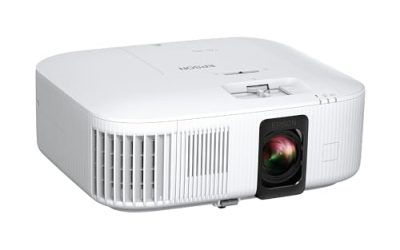
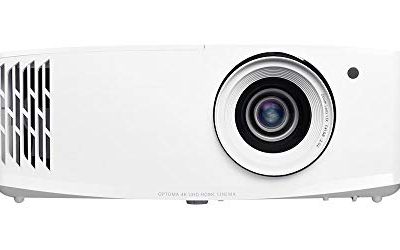
Optoma UHD38
- Best for: A dedicated theater or gaming room where the projector goes on the ceiling once and stays there.
- Native resolution: 3840 x 2160 (True 4K UHD)
- Brightness: 4,000 lumens
- Contrast ratio: 1,000,000:1
- Mounting type: Ceiling Mount, Tabletop Mount, Tripod Mount
A dedicated theater or gaming room where the projector goes on the ceiling once and stays there.
The listing gives a throw distance range of roughly 4 to 32 feet, so confirm your ceiling position falls inside it for your screen size before drilling, and note that no lens shift is listed, which makes mount placement accuracy important.
The UHD38 earns the top spot because its Amazon specification table lists Ceiling Mount as a mounting type, so there is no ambiguity about whether it belongs overhead. From that fixed position it delivers true 4K resolution and 4,000 lumens, enough for a lights-dimmed theater that still hosts daytime sports. Gamers mounting in a media room also get the listing’s Enhanced Gaming Mode figures. At 9.25 pounds it needs a properly rated mount and a joist fixing, but once aligned it covers screens up to 300 inches.
Watch out for: The listing gives a throw distance range of roughly 4 to 32 feet, so confirm your ceiling position falls inside it for your screen size before drilling, and note that no lens shift is listed, which makes mount placement accuracy important.
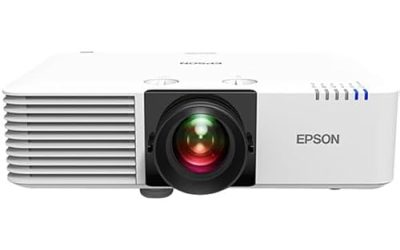
ViewSonic LS740HD
- Best for: Classrooms, meeting rooms and multi-use spaces getting a permanent ceiling install that runs with the lights on.
- Native resolution: 1080p (1920 x 1080)
- Light source: Laser
- Brightness: 5,000 lumens
- Zoom: 1.3x optical zoom
Classrooms, meeting rooms and multi-use spaces getting a permanent ceiling install that runs with the lights on.
The listing leads with brightness and geometry correction rather than built-in streaming, so plan on feeding it from a separate source device, and confirm your mount’s weight rating against an installation-class chassis before ordering.
The LS740HD comes from ViewSonic’s laser installation line, and it is built for the mount-it-and-forget-it brief. Its 5,000 lumens suit rooms that never fully darken, and the laser light source means no lamp swaps on a ladder years from now. The installation toolkit is the strongest here: a 1.3x optical zoom for placement slack, horizontal and vertical keystone, four-corner adjustment for awkward mount positions, and 360-degree projection capability. It is a 1080p unit aimed at auditoriums, conference rooms and classrooms rather than a 4K cinema, so buy it for permanence and brightness, not resolution.
Watch out for: The listing leads with brightness and geometry correction rather than built-in streaming, so plan on feeding it from a separate source device, and confirm your mount’s weight rating against an installation-class chassis before ordering.
ViewSonic PX701-4K
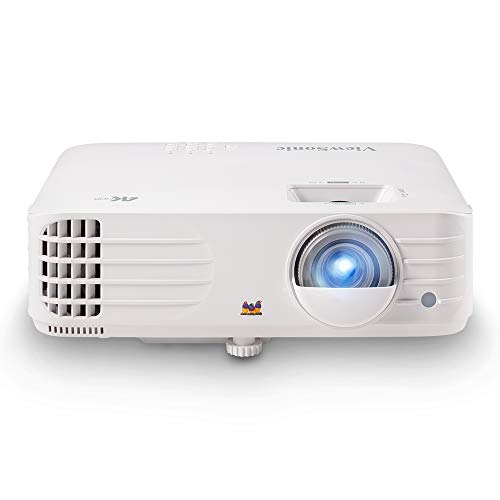
- Best for: Living-room ceiling installs that need 4K detail plus automatic help squaring the picture after mounting.
- Resolution: 3840 x 2160 (4K UHD)
- Brightness: 3,200 lumens
- Refresh rate: 240Hz
- Input lag: 4.2ms
Living-room ceiling installs that need 4K detail plus automatic help squaring the picture after mounting.
The same Amazon listing family also offers the PX748-4K variant, so double-check that the model name selected at checkout is the PX701-4K before ordering.
The PX701-4K is the forgiving 4K option. Its auto keystone squares the image after mounting, which matters because small errors in mount angle are hard to judge from a ladder and tedious to correct by hand. The listing pairs that convenience with 3,200 lumens, HDR support and dual HDMI inputs, so a receiver and a streaming stick can both live at the equipment rack while a single unit hangs overhead. Console and PC players also get the quoted 240Hz refresh and 4.2ms response figures. For a living-room install where the mount cannot sit in the theoretically perfect spot, this is the practical 4K pick.
Watch out for: The same Amazon listing family also offers the PX748-4K variant, so double-check that the model name selected at checkout is the PX701-4K before ordering.
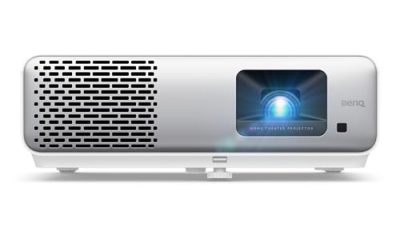
BenQ TH575
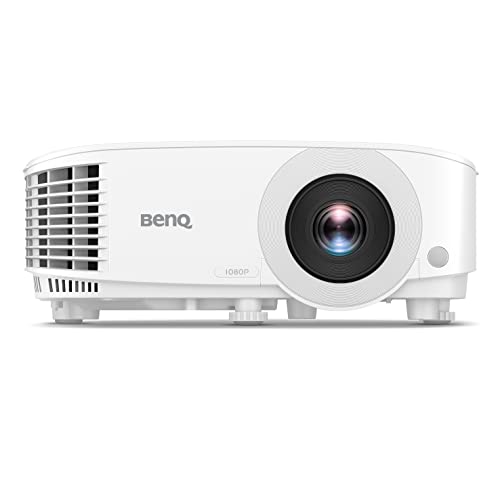
- Best for: A gaming or sports room where a bright 1080p image matters more than 4K detail, on a mount you measured twice.
- Native resolution: 1920 x 1080 (1080p)
- Brightness: 3,800 lumens
- Contrast ratio: 15,000:1
- Zoom: 1.1x, standard throw
A gaming or sports room where a bright 1080p image matters more than 4K detail, on a mount you measured twice.
The 1.1x zoom leaves very little placement flexibility, so the ceiling position has to be calculated from your screen size before the mount goes up, not adjusted afterward.
The TH575 is the 1080p gaming-room pick, and its ceiling case rests on correction and brightness rather than exotic optics. Auto vertical keystone handles the trapezoid an inverted mount usually creates, 3,800 lumens keep sports and games watchable with some light in the room, and the listing’s 16.7ms input lag at 1080p suits console play. The lamp is rated up to 15,000 hours, so a fixed install should not need attention for a long time. What it does not give you is placement slack, which makes it a projector for careful measurers rather than improvisers.
Watch out for: The 1.1x zoom leaves very little placement flexibility, so the ceiling position has to be calculated from your screen size before the mount goes up, not adjusted afterward.
Optoma HD146X
- Best for: Bedrooms and smaller media rooms that need a light unit and generous keystone range on an imperfectly placed mount.
- Native resolution: 1920 x 1080 (1080p)
- Brightness: 3,600 lumens
- Contrast ratio: 25,000:1
- Zoom: 1.1x
Bedrooms and smaller media rooms that need a light unit and generous keystone range on an imperfectly placed mount.
There is a single HDMI 1.4 input, so a multi-source setup needs an HDMI switch or receiver at the other end of the ceiling cable run.
The HD146X is the lightest projector here at 6.2 pounds, and that makes it the easiest ceiling install of the five, especially on mounts with modest ratings or ceilings where a heavy chassis feels risky. Its vertical keystone range of plus or minus 40 degrees is the widest quoted in this roundup, which helps when the only available joist sits noticeably off the screen’s center line. The picture specification is honest 1080p with 3,600 lumens and a 25,000:1 contrast ratio, and the listing quotes a quiet 26dB in eco mode, a real consideration when the unit hangs above a bed or sofa.
Watch out for: There is a single HDMI 1.4 input, so a multi-source setup needs an HDMI switch or receiver at the other end of the ceiling cable run.
Which One Fits Your Situation
A Dedicated Theater Room With a Fixed Screen
Choose the Optoma UHD38. Its listing states ceiling mounting directly, its 4,000 lumens and true 4K resolution suit a screen that never moves, and the wide throw range gives a long room plenty of mounting positions to work with. Fix it into a joist, align it once, and the install disappears into the room.
A Classroom or Meeting Room That Runs All Day
Choose the ViewSonic LS740HD. The laser light source removes lamp changes from a ceiling nobody wants to reach, 5,000 lumens hold up under fluorescent light, and four-corner adjustment rescues mounts that cannot sit dead center. It is the only pick here designed from the start as a permanent installation projector.
A Living Room Where the Coffee Table Has to Stay Clear
Choose the ViewSonic PX701-4K. Mounting over the seating area frees the room, and auto keystone forgives the small aiming errors that living-room joists and ceiling angles tend to force on you. You still get 4K resolution and dual HDMI inputs for a receiver and a streamer, so nothing about the setup feels like a compromise.
A Bedroom or Small Room With an Awkward Ceiling
Choose the Optoma HD146X. At 6.2 pounds it is gentle on mounts and ceilings, and its plus or minus 40 degrees of vertical keystone is the safety net when the mount lands closer, further or higher than the ideal geometry. The BenQ TH575 is the alternative if the room doubles for gaming and you can measure its position precisely.
Common Mistakes
- Drilling the mount before checking that the projector’s throw range and zoom can fill the screen from that exact distance.
- Using heavy keystone correction to rescue a badly off-center mount, then wondering why the picture looks soft at the edges.
- Forgetting the ceiling needs a power outlet and an HDMI run, not just four screws and a mounting plate.
- Hanging a projector from drywall anchors alone instead of fixing the mount into a joist or solid blocking.
- Choosing a short-lived lamp model for a high, hard-to-reach ceiling, then facing a lamp change on a ladder within a couple of years.
Frequently Asked Questions
Can any home projector be ceiling mounted?
Most home projectors have mounting points and an inverted ceiling projection mode, but it is not universal, so check the listing before buying. The Optoma UHD38’s specification table names Ceiling Mount explicitly, which is the clearest confirmation you can get. Lifestyle models built around gimbal stands often lack proper mounting holes entirely.
Is lens shift better than keystone correction for a ceiling install?
Lens shift moves the image optically, so it corrects placement without touching resolution, and it is the better tool when a mount cannot sit on the screen’s axis. None of the five listings in this roundup includes lens shift, however, so these picks rely on accurate placement first and keystone only for fine adjustments afterward.
How bright should a ceiling projector be?
Match brightness to the room rather than chasing the biggest number. A darkened theater or bedroom works well at the 3,200 to 3,800 lumens of the PX701-4K and TH575. A living room with lamps on, or a classroom under fluorescents, needs the 4,000 lumens of the UHD38 or the 5,000 lumens of the LS740HD to keep the image from washing out.
Should a hard-to-reach ceiling projector use a lamp or a laser?
A laser model like the LS740HD avoids lamp replacement altogether, which is valuable when the projector hangs somewhere awkward. The lamp-based picks here quote up to 15,000 hours of lamp life, though, so at a few hours of viewing a day a lamp change is still years away. Either way, leave access space around the unit for ventilation and the occasional filter clean.
More from Amazon
Programs that pair well with the guide above. Offers and eligibility are set by Amazon and may change.
Free shipping on eligible items, Prime Video and more. Eligible new members can start with a free trial.
Start a Prime free trialAd-free music streaming. Eligible new subscribers can start with a free trial.
Try Music Unlimited freeA Prime membership for ages 18-24 with a trial period. Eligibility is set by Amazon.
See Prime for Young AdultsAudiobooks and podcasts to listen to on the go. Eligible new members can start with a free trial.
Try Audible freeAs an Amazon Associate we earn from qualifying purchases.