Key takeaways
- Check that your lights, plugs and thermostat list Alexa compatibility on their product pages.
- Some Echo models include a built-in Zigbee or Matter and Thread capability, as listed by the maker, which can simplify pairing for supported devices.
- Wi-Fi connectivity is required for most features; Bluetooth lets you stream from a phone when the internet is down.
- Privacy controls include a microphone off button and the option to review and delete voice history in the app.
- If you plan to use speakers in a multi-room group, mixing Echo and Sonos models can limit grouping features, so confirm supported combinations.
For most people, an Echo Dot is the sensible entry point to Alexa, an Echo or Echo Studio suits anyone who cares about music quality, an Echo Show suits kitchens and bedside tables where a screen helps, and Sonos models such as the Era 100 or Era 300 suit buyers who want Alexa on a speaker built mainly for sound. Which one fits depends on room size, how much you listen to music, whether you want a display, and which smart-home devices you plan to control.
Our top picks


As an Amazon Associate we earn from qualifying purchases at no extra cost to you.
What Alexa speakers do
A smart speaker with Alexa listens for a wake word and responds to voice commands: playing music, setting timers, answering questions, controlling compatible lights, plugs, thermostats and locks, and making announcements across a home. The Echo line from Alexa’s maker is the most direct way to get the assistant, while third-party speakers from Sonos, Bose and others offer Alexa built in alongside their own audio engineering. Microphone controls, usually a physical mute button, let you disconnect the microphones electronically.
Product names and generations change often. Where a model is called out below, confirm the generation on the maker’s current page, and treat older versions as previous generation.
At a glance: Alexa speakers compared
| Speaker | Best for | Key stated features | Limits |
|---|---|---|---|
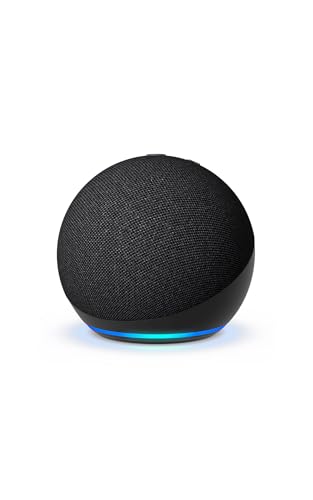
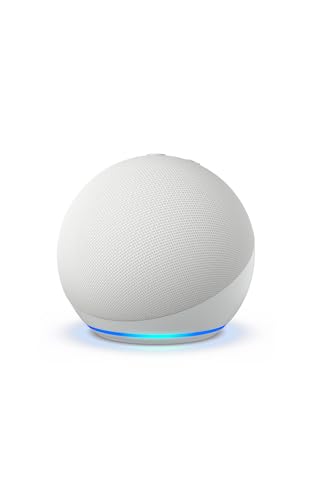
| Echo Dot | Bedrooms, offices, first-time buyers | The maker lists a compact spherical design, voice control and smart-home support, with temperature sensing on some versions | Small speaker; not for large rooms |
| Echo (standard) | Living rooms and everyday music | The maker lists a larger driver setup than the Dot and smart-home hub capability on selected models | Not a hi-fi speaker |
| Echo Studio | Music lovers who want fuller sound | The maker lists multi-driver audio and support for spatial audio formats | Larger and more costly; needs shelf space |
| Echo Show 5 and Echo Show 8 | Kitchens and nightstands needing a screen | The maker lists a touchscreen for recipes, video calls and cameras feeds; camera with a privacy shutter | Camera and screen may not suit every room |
| Sonos Era 100 and Era 300 | Buyers prioritizing sound and multi-room | The maker lists Alexa built in alongside Wi-Fi, Bluetooth and multi-room features | No built-in screen; premium tier |
| Echo Pop | Small spaces and low-cost multi-room | The maker lists a semicircle design with a compact driver | Modest sound |
Echo Dot: the default pick
The Echo Dot is the model most reviewers point newcomers toward. It does what the larger Echo models do on the voice side, and it is small enough to put in several rooms. Sound is acceptable for podcasts, news and background music, but reviewers report that bass is limited. The Dot also works as a hub for linking other speakers or as a controller for smart-home gear.
Echo and Echo Studio: more sound
The standard Echo has a larger speaker assembly than the Dot and suits a living room or open-plan kitchen. Echo Studio sits at the top of the range for audio and is the one to consider if you want a single speaker that can play music at decent volume with more bass. Several reviewers also note that placement matters: speakers do best near a wall with some space around them, rather than in a cabinet.
Echo Show: when a screen helps
Echo Show models add a touchscreen. This is handy for timers in the kitchen, recipe steps, video calls, photo display and viewing compatible cameras. Smaller screens like the Show 5 suit bedside use, while the Show 8 gives a larger display for the kitchen. The camera has a physical shutter on the models that include one, according to the maker; if a camera in a bedroom is uncomfortable, choose the Dot or a Studio instead.
Sonos: Alexa with a stronger audio focus
Sonos Era 100 and Era 300 include Alexa built in, according to the maker, and slot into a multi-room Sonos system. This suits buyers who already own Sonos or who prioritize sound quality and plan to expand later, such as pairing two for stereo or adding a soundbar. The trade-off is a higher price tier and no display.
Smart home and compatibility notes
- Check that your lights, plugs and thermostat list Alexa compatibility on their product pages.
- Some Echo models include a built-in Zigbee or Matter and Thread capability, as listed by the maker, which can simplify pairing for supported devices.
- Wi-Fi connectivity is required for most features; Bluetooth lets you stream from a phone when the internet is down.
- Privacy controls include a microphone off button and the option to review and delete voice history in the app.
- If you plan to use speakers in a multi-room group, mixing Echo and Sonos models can limit grouping features, so confirm supported combinations.
Size and placement
- Keep speakers away from corners that boom, and give them a little space from walls.
- Place microphones away from noisy appliances so the wake word is picked up reliably.
- Avoid steam and heat sources near the speaker, and use the supplied power adapter.
Budget, mid-range and premium tiers
- Budget: Echo Pop and Echo Dot.
- Mid-range: standard Echo and Echo Show 5 or 8.
- Premium: Echo Studio and Sonos Era models.
Pick X if…
| Pick this | If |
|---|---|
| Echo Dot | You want Alexa cheaply in a bedroom or office |
| Echo | You want better sound in the main room without going premium |
| Echo Studio | Music is the main use and the room is medium to large |
| Echo Show | You want visuals for recipes, calls or smart-home views |
| Sonos Era | You value audio quality and a multi-room speaker system |
Alternatives
- Google Nest speakers: use Google Assistant rather than Alexa, and suit households built around Google services.
- Apple HomePod and HomePod mini: deeply tied to Apple devices and Siri, without Alexa.
- Bose and other third-party speakers with Alexa built in: offer a different sound signature; confirm the specific model lists Alexa support.
Everyday uses worth knowing
- Routines: Alexa routines can chain actions, such as turning on lights, reading the weather and starting a playlist from a single phrase or at a set time.
- Intercom and announcements: Echo speakers and Echo Show displays can broadcast messages between rooms, which is useful in larger homes.
- Timers and cooking: Voice timers are among the most common uses, and a screen adds visible countdowns.
- Music services: Alexa supports several major streaming services, though availability depends on your country. Choose a default service in the app.
- Kids and family: Parental controls and content filters are available in the app, and some Echo models are sold in kid-oriented versions with their own terms.
Privacy and setup tips
Review the microphone and voice history settings in the Alexa app during setup. You can mute the microphones with the physical button, set voice history to auto-delete, and turn off features you do not use. Place speakers where they can hear you but away from windows if you are concerned about voice commands from outside. If you share a household, set up voice profiles so each person gets their own music and calendar responses.
Finally, consider what happens when you change platforms. Smart-home devices that support Matter can often be moved between ecosystems with less effort than devices tied to one brand, so look for that label when buying plugs, lights and sensors to pair with your speaker.
If you live in a small apartment, one Echo Dot or Sonos speaker may be all you need. In a larger house, several inexpensive speakers placed in the rooms you use most, tied together with a group in the app, often serve better than one expensive speaker in the living room.
Before buying, count the rooms where you want voice control and decide whether one screen device, such as an Echo Show, would replace a separate clock, photo frame and kitchen timer. Households with young children or guests may also prefer models with a clear microphone mute light, so everyone can see when listening is off. Software updates arrive automatically over Wi-Fi, and makers publish how long they plan to support each generation, so older models can eventually lose some features.
Frequently Asked Questions
Which Echo is best for music?
Echo Studio is aimed at music with a multi-driver design, and the maker lists spatial audio support. The Sonos Era 300 is another strong choice for buyers prioritizing sound. A standard Echo is a more modest step up from the Dot.
Do I need an Echo Show to control smart-home devices?
No. Any Alexa speaker can control compatible devices by voice. A screen only adds visual controls, camera feeds and recipe or video features.
Can I use Alexa without an Echo?
Yes. Alexa is built into speakers from other brands such as Sonos and into the phone app, and some televisions and soundbars also include it.
Are Alexa speakers always listening?
They continuously listen locally for the wake word and, according to the maker, only send audio to the cloud after detecting it. A microphone off button disconnects the microphones, and the app lets you review and delete voice history.
Can I pair two speakers for stereo sound?
Many Echo models support stereo pairing of the same model, and Sonos supports stereo pairs of compatible speakers. Check the maker’s instructions for supported combinations.
Do these speakers work if the internet is down?
Voice features need a connection. Bluetooth playback from a phone can still work for music in many cases, and some smart-home functions can run locally on supported devices.
More from Amazon
Programs that pair well with the guide above. Offers and eligibility are set by Amazon and may change.
Free shipping on eligible items, Prime Video and more. Eligible new members can start with a free trial.
Start a Prime free trialAd-free music streaming. Eligible new subscribers can start with a free trial.
Try Music Unlimited freeA Prime membership for ages 18-24 with a trial period. Eligibility is set by Amazon.
See Prime for Young AdultsAudiobooks and podcasts to listen to on the go. Eligible new members can start with a free trial.
Try Audible freeAs an Amazon Associate we earn from qualifying purchases.