Key takeaways
- Five vertical laptop stands for clamshell setups, from a wide-slot aluminum holder to a self-gripping flex stand, with fit, cooling and placement notes.
A vertical laptop stand parks a closed laptop upright, the way a book sits on a shelf. The machine’s footprint shrinks from its full length and width down to a slot a few inches wide, which matters on a streaming desk already claimed by monitors, a microphone arm, an audio interface and a keyboard. Run the laptop closed, in clamshell mode, and the desk gets its space back while the external display does the visual work.
One point needs stating plainly: a vertical stand is furniture, not a dock. It adds no ports, no charging and no connectivity. A clamshell setup still needs a USB-C hub or docking station for the display and peripherals, plus an external keyboard and mouse, because the built-in ones are folded away inside the closed machine. This guide covers only the physical holder; electronic docks are a separate purchase. Open risers for a working screen are a different tool, covered elsewhere on this site.
The five stands below span the main designs: a single slot with the widest adjustment range in the group, a dual-slot holder for two machines, a self-gripping flex design with no adjustment at all, a fixed cradle tuned with swappable rubber adapters, and a screw-set single slot between the extremes. Every dimension, slot range and weight quoted is the maker’s figure from its listing.
Disclosure: As an Amazon Associate, I earn from qualifying purchases.
How to Choose
Measure thickness first, because the slot decides fit
Slot width is the spec that rules this category. An ultrabook can be under half an inch thick; a gaming laptop can approach an inch and a half, and some exceed it. A stand whose slot tops out below your machine’s thickness is useless, and a slot left far too wide is nearly as bad: the laptop leans, resting its weight against the slot wall and, in the worst arrangement, against the ports along its edge. Measure your laptop closed, including any hard shell, and choose a slot range that brackets that number with room to spare.
One slot or two
A second slot earns its footprint if you genuinely park two machines — a work laptop beside a personal one — or a laptop beside a tablet. If only one machine ever sits there, a dual stand takes up more of the space the stand was bought to save. Be honest about the second machine before paying for its slot.
How the width is set
Stands set their width four ways. A screw underneath is set-and-forget: solid once dialed in, annoying if you swap machines of different thicknesses daily. A twist knob adjusts by hand in seconds. A flex design skips adjustment entirely — the arms grip under the laptop’s own weight and release when you lift it out. A fixed cradle uses interchangeable rubber adapters, which fit one known machine beautifully and anything else not at all. Match the mechanism to how often the machine in the slot changes.
Cooling while closed
A stand does not cool a laptop; at best it stays out of the way. Whether clamshell running stays cool depends on where your machine vents. Laptops that exhaust through the rear hinge generally tolerate closed running well. Machines that breathe through the keyboard deck or hinge line can run hotter closed, because the lid covers part of the path. Check your model’s vent layout before all-day closed use, and treat any stand marketed as a cooling device with suspicion — a passive aluminum slot moves no air.
Placement and stability
A laptop standing on edge is a tall object on a narrow base, and gravity is not negotiable. Put the stand at the back of the desk, against a wall or rear edge, out of elbow traffic. Route the dock cable with slack: a taut cable is a trip line, and one tug can topple a mid-desk stand. Heavier bases help, but placement is the real stability feature.
The 5 Best Vertical Laptop Stands
1. OMOTON Vertical Laptop Stand — the widest slot here

Specs
– Slots: 1
– Slot width: 0.55 to 2.71 in (14 to 69 mm), maker figure
– Footprint: 5.9 x 3.7 x 1.9 in, maker figure
– Material: anodized aluminum alloy, silicone mats
– Adjustment: screw, set with a screwdriver
– Fits laptops up to 17.3 in, maker figure
The OMOTON single-slot stand is the default answer for thick machines. Its slot opens to 2.71 inches, the widest range in this roundup, swallowing gaming laptops and workstation notebooks the flex and fixed designs below cannot accept, and it closes down to 0.55 inches for slim ultrabooks. The body is sandblasted, CNC-machined anodized aluminum, with silicone mats lining the slot so the laptop’s finish never meets bare metal.
The trade-off is the adjustment: width is set by a screw, so you dial it in once and leave it alone. For a single docked machine — the common streaming-desk case — that permanence is a virtue: nothing creeps, nothing loosens, and the wide base keeps a tall 17-inch machine planted.
2. UGREEN 2-Slot Vertical Laptop Stand — two machines, one footprint

Specs
– Slots: 2
– Slot width: 0.47 to 1.0 in per slot, maker figure
– Material: aluminum alloy, silicone lining and base pads
– Adjustment: base screws, twisted by hand, no tools
– Fits laptops up to 17.3 in, maker figure
UGREEN’s 2-slot holder is built for the two-laptop desk: a work machine and a personal machine parked side by side in one aluminum block, instead of two separate stands drifting around the desk. Each slot adjusts independently via base screws you twist by hand — the maker calls it tool-free, the easiest screw design to live with.
Read the slot range before ordering. Each slot runs from 0.47 to 1.0 inch, covering ultrabooks, MacBooks and mainstream notebooks comfortably, and excluding almost every gaming laptop ever made. This is a stand for thin machines, two at a time. Silicone lining protects the finish, and silicone pads under the base keep the block from skating. For a streamer whose laptops are a MacBook and a work ultrabook, this is the tidiest arrangement in the group.
3. Twelve South BookArc Flex — no adjustment at all

Specs
– Slots: 1, self-gripping flex design
– Fits thickness: up to 1 in, maker figure
– Fits screens: up to 16 in; maker advises 14 in and below
– Dimensions: 8.43 x 3.6 x 2.2 in, maker figure
– Weight: 0.53 lb, maker figure
– Material: aluminum
The BookArc Flex takes the opposite approach to every screw on this page: there is nothing to set. Its two ends flex outward as you lower the laptop in and grip it under its own weight; lift the machine straight up and the stand lets go. Swapping machines within its limit costs no tools and no time, making it the pick for a desk where the laptop comes and goes daily.
The limit is real: the Flex accepts laptops up to 1 inch thick, and Twelve South itself notes it is best suited to laptops of 14 inches and below. That rules out gaming laptops entirely. Within its world it is the smallest and lightest holder here, a low metal arc that nearly disappears under the machine.
4. Rain Design mTower — the fixed cradle, tuned by adapters

Specs
– Slots: 1, fixed width, interchangeable rubber adapters
– Dimensions: 9.8 x 4.5 x 3.5 in, maker figure
– Weight: 1.44 lb, maker figure
– Material: single-piece anodized aluminum
– Fits: adapters supplied for a range of thicknesses, maker figure
The mTower is the oldest design philosophy in the group: one solid piece of anodized aluminum, with no moving parts at all. Fit comes from rubber adapters that slot into the cradle, each sized to a band of laptop thicknesses, so the adapter matching your machine makes the stand, in effect, custom-fitted. The long, low footprint — nearly ten inches front to back — gives it a planted feel the compact blocks cannot match.
The corollary is commitment. An adapter-tuned cradle is the wrong tool for a desk hosting a different laptop every day, because each new machine means fitting a different adapter, if one matches at all. It is the right tool for the machine you own and expect to keep: set it once, and the stand asks nothing of you again. Its single-piece construction has nothing to wear out or loosen.
5. JARLINK Vertical Laptop Stand — the middle path
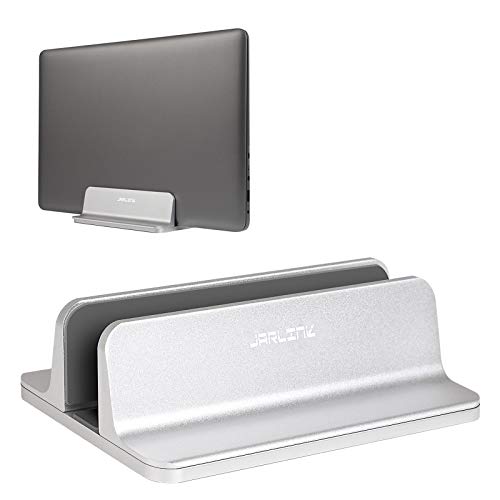
Specs
– Slots: 1
– Slot width: 0.55 to 2.55 in, maker figure
– Dimensions: 6.0 x 3.7 x 1.9 in, maker figure
– Weight: 18 oz, maker figure
– Material: anodized aluminum, silicone pads
– Adjustment: screw, Allen key included
JARLINK’s single-slot stand covers nearly the OMOTON’s range — 0.55 to 2.55 inches, enough for most gaming laptops — in a similar compact aluminum block, and it includes the Allen key its screw needs. Silicone pads line the slot and the base. At 18 ounces it is light, which cuts both ways: easy to reposition, and easier to drag if a cable pulls on the parked machine.
That is why the placement advice above applies to this pick most of all. Park it at the back edge with the cable slack, and it is a sound wide-slot holder; leave it mid-desk with a taut cable, and you are relying on friction against physics.
Comparison Table
| Product | Slots | Slot width (maker figure) | How width is set | Footprint (maker figure) |
|---|---|---|---|---|
| OMOTON Vertical Laptop Stand | 1 | 0.55–2.71 in | Screw, screwdriver | 5.9 x 3.7 in |
| UGREEN 2-Slot Vertical Laptop Stand | 2 | 0.47–1.0 in per slot | Base screws, by hand | Compact dual block |
| Twelve South BookArc Flex | 1 | Up to 1 in thick | Self-gripping flex, none | 8.43 x 3.6 in |
| Rain Design mTower | 1 | Adapter-dependent | Swappable rubber adapters | 9.8 x 4.5 in |
| JARLINK Vertical Laptop Stand | 1 | 0.55–2.55 in | Screw, Allen key included | 6.0 x 3.7 in |
FAQ
Can I run my laptop closed in a vertical stand all day?
Generally yes, provided two things hold. First, your operating system and power settings must support clamshell mode with an external display — most do when connected to power and a dock, but check your model’s requirements. Second, the cooling question applies with full force: a machine that vents through the rear hinge will be fine, while one that breathes through the keyboard deck may run hot under sustained loads like streaming and encoding. If the fans run constantly at full speed in the stand, use an open riser instead.
Will a vertical stand scratch my laptop?
The stands here line their slots with silicone or rubber, and in normal use they do not scratch. The realistic scratch source is grit: dust collects in any slot over time, and sliding a laptop across trapped grit is what marks a lid. Wipe the lining out every so often, and lift the machine straight up rather than dragging it along the slot.
My gaming laptop is thick. Which of these will actually fit it?
Measure first, then shop. A gaming laptop around an inch thick fits the UGREEN’s slots and the BookArc Flex only at their limits. The honest picks for thick machines are the OMOTON, whose slot opens to 2.71 inches, and the JARLINK at 2.55 inches — both list gaming laptops in their stated fit range. Measure with any protective shell fitted, since a shell adds thickness on both faces.
Where on the desk should a vertical stand go?
At the back, against a wall or along the rear edge, every time. A laptop on edge has a high center of gravity over a narrow base, and a mid-desk stand is one elbow or taut cable from a fall. Route the dock cable so it hangs with slack rather than pulling sideways. Rear placement also keeps the parked machine out of the camera frame’s clutter on a streaming desk.
Conclusion
A vertical stand is the simplest upgrade on a crowded desk: one block of aluminum that turns a closed laptop into a sliver of upright storage. Choose by thickness before anything else. Thick gaming machines belong in the OMOTON or the JARLINK; two thin laptops belong in the UGREEN; a MacBook that docks and undocks daily belongs in the BookArc Flex; one machine kept for years belongs in the mTower. And remember what the stand is not — the hub, keyboard, mouse and display that complete a clamshell setup are separate decisions.
More from Amazon
Programs that pair well with the guide above. Offers and eligibility are set by Amazon and may change.
Free shipping on eligible items, Prime Video and more. Eligible new members can start with a free trial.
Start a Prime free trialAd-free music streaming. Eligible new subscribers can start with a free trial.
Try Music Unlimited freeA Prime membership for ages 18-24 with a trial period. Eligibility is set by Amazon.
See Prime for Young AdultsAudiobooks and podcasts to listen to on the go. Eligible new members can start with a free trial.
Try Audible freeAs an Amazon Associate we earn from qualifying purchases.