Our Top Picks
 SUNMORY Floor Lamps for Living Room,LED Standing LampBase9.8 x 9.8 x 69 Inches8.93 poundsCheck on Amazon

A streaming room floor lamp does two jobs at once. It fills the dark corners behind a camera so a face does not sit in shadow, and it paints the wall behind a desk with color that makes a stream look finished instead of improvised. A ceiling light alone throws harsh light from above and leaves the background flat. A desk lamp lights a small patch and nothing else. A tall floor lamp reaches the wall, spreads light wide, and stays out of the frame, which is why it has become a standard piece of streaming room furniture.
The best streaming room floor lamps for most setups are smart corner lamps with color control, because they switch from a clean white work light to a colored background glow without moving any hardware. The Philips Hue Signe Gradient Floor Lamp leads for viewers who already use Hue gear, while the Govee Floor Lamp Pro leads for viewers who want a speaker built into the lamp. The Govee Lyra Floor Lamp is the strongest mid-range smart pick, the Brightech Sky LED Torchiere Floor Lamp is the best choice for a simple bright white uplight, and the SUNMORY 32W Torchiere Floor Lamp is the budget pick for a bright, dimmable white light with a remote.
As an Amazon Associate, we earn from qualifying purchases.
Table of Contents
- Quick Answer
- At a Glance
- The 5 Best Streaming Room Floor Lamps
- Philips Hue Signe Gradient Floor Lamp
- Govee Floor Lamp Pro
- Govee Lyra Floor Lamp
- Brightech Sky LED Torchiere Floor Lamp
- SUNMORY 32W Torchiere Floor Lamp
- How to Choose a Streaming Room Floor Lamp
- Where to Place a Floor Lamp in a Streaming Room
- Who Should Skip a Floor Lamp
- Frequently Asked Questions
- Conclusion
- Product and ASIN Reference
Quick Answer
For a streaming room, buy a tall lamp that can throw light up a wall and across a corner. Smart RGBIC or gradient lamps are the most flexible because one lamp can serve as a white work light during the day and a colored accent light on stream. If the room already runs on Hue, the Signe Gradient Floor Lamp fits straight in. If a built-in speaker and white noise sound useful, the Govee Floor Lamp Pro covers both. For a lower spend, the Govee Lyra Floor Lamp gives the same corner-glow idea with fewer extras. Viewers who want no app and no color at all should look at a torchiere instead: the Brightech Sky gives a clean dimmable white uplight, and the SUNMORY 32W torchiere gives a bright remote-controlled white light at a budget tier.
At a Glance
| Product | Tier | Light Style | Brightness | Control |
|---|---|---|---|---|
| Philips Hue Signe Gradient Floor Lamp | Premium | Gradient color pole | 2550 lumens | Hue app, Bluetooth, voice |
| Govee Floor Lamp Pro | Premium | RGBICWW with speaker | 2100 lumens | App, voice, Matter |
| Govee Lyra Floor Lamp | Mid-range | RGBIC corner lamp | 1500 lumens | App, remote |
| Brightech Sky LED Torchiere Floor Lamp | Mid-range | White torchiere uplight | 30-watt LED | Built-in dimmer |
| SUNMORY 32W Torchiere Floor Lamp | Budget | White torchiere uplight | 3000 lumens | Remote |
The 5 Best Streaming Room Floor Lamps
The five lamps below cover the three shapes that work best on camera: a gradient color pole, a smart RGBIC corner lamp, and a classic torchiere uplight. Each one stands on the floor, throws light toward a wall or ceiling, and keeps the light source itself out of the camera frame. The smart lamps add color scenes and music sync for a background glow. The torchieres add simple, bright, even white light for rooms that need fill rather than color. Read the full guide to match a lamp to the size of the room, the color of the walls, and the gear already on the desk.
Philips Hue Signe Gradient Floor Lamp
The Philips Hue Signe Gradient Floor Lamp is the premium pick for a streaming room that already runs on Hue, and it is also the most polished color lamp in this roundup. It is a slim vertical pole that stands in a corner or beside a desk and washes the wall behind it with a smooth gradient of color. Unlike a single-color lamp, the Signe can show several colors along its length at once, so the wall behind a streamer can shift from deep blue at the bottom to warm amber at the top, or run a single calm tone across the whole pole. That gradient effect reads well on camera because it looks like deliberate set lighting rather than a single glowing stick.
Brightness is a genuine strength here. The lamp is listed at 2550 lumens, which is brighter than most color floor lamps and bright enough to matter in a room with a window or a key light already running. At full output it can lift a dark corner and keep the background from going muddy on camera. Turned down through the Hue app, it becomes a soft accent that sits behind a monitor without competing with the screen. The white light covers a wide range, so the same lamp can give a cool daylight white for a daytime work session and a warm white for an evening stream.
Control is where the Hue system earns its keep. The lamp works over Bluetooth for direct control from a phone, and it pairs with a Hue Bridge for whole-home routines, timers, and control away from home. Voice control works through Alexa, Google Assistant, and Apple HomeKit, so the lamp can join a routine that turns on the stream lights, dims the room lights, and sets the background color with one command. Scenes in the Hue app can store a favorite streaming look and recall it in one tap, which removes the nightly fiddling with sliders before going live.
Build quality is quiet and simple. The pole is slim, the base is flat and stable, and the lamp reads as furniture rather than studio gear, which matters in a room that doubles as a living space. The black finish suits a dark desk setup, and the light itself is diffused along the pole so there is no harsh point of glare in the corner of a camera frame. Placement is flexible: a corner behind the desk gives the widest wall wash, while a spot beside a bookshelf or a poster wall gives a narrower band of color that frames the shot.
There are trade-offs. The Signe is a premium-tier lamp, and the Hue Bridge is a separate purchase for anyone who wants the full routine and remote-control features, although Bluetooth control works without it. The lamp is also a color-first design, so viewers who want a plain bright white work light may find a torchiere simpler. For a streamer who already owns Hue bulbs or a Hue Bridge, though, none of that matters much: the Signe drops into the existing setup, joins existing scenes, and gives the most refined background glow in this guide.
Specs
- Type: Gradient color floor lamp with a slim vertical pole
- Brightness: 2550 lumens
- Color: White and Color Ambiance with gradient color along the pole
- White light: Adjustable white from warm to daylight tones
- Control: Hue app, Bluetooth, and voice through Alexa, Google Assistant, and Apple HomeKit
- Finish: Black
- Best for: Hue households and gradient background color on stream
Govee Floor Lamp Pro

The Govee Floor Lamp Pro is the premium pick for a streamer who wants one tall lamp to handle light, sound, and mood at the same time. It is a smart RGBICWW floor lamp with a built-in Bluetooth speaker and white noise, which makes it the only lamp in this roundup that can also play background audio or a sleep sound in the room. On stream, the lamp itself is a tall column of color that can run a single tone, a gradient, or a music-synced pattern that reacts to sound in the room.
Light output is strong for a smart lamp. The listing gives 2100 lumens, which is enough to wash a wall with color that stays visible even when a key light is running, and enough white light to fill a corner during a daytime session. The RGBICWW design means the lamp can show several colors along its length at once while still producing a clean white, so a streamer can run a cool white for work and switch to a colored scene for a live session without swapping any hardware. The white range covers warm and cool tones, which helps when the lamp has to match the color temperature of a key light or a monitor.
The speaker is the feature that sets this lamp apart. A Bluetooth speaker in the base plays music or ambient sound, and the white noise option is useful in a room that doubles as a bedroom or a relaxation space between streams. Music sync ties the light to the audio, so the column can pulse gently with a track during a just-chatting segment or a pre-stream countdown. That is a small touch, but it makes a waiting screen feel alive without any extra gear on the desk.
Control runs through the Govee app, with voice control through Alexa and Matter support for wider smart-home use. The app holds scene modes, timers, and DIY color settings, so a favorite streaming look can be saved and recalled in one tap. Matter compatibility matters for a household that mixes brands, because the lamp can join routines built around other Matter gear instead of living in a separate app.
The lamp suits a corner behind or beside a desk, where its full height can throw color up the wall. It also suits a room where the desk faces into the space, because the speaker and the light both work from a single floor position. The trade-off is complexity: a streamer who wants a lamp that simply turns on and off may find the app, the speaker, and the scene library more than needed. The lamp is also a premium-tier pick. For a setup where one device should cover background light and background audio, it is the most capable option here.
Specs
- Type: Smart RGBICWW floor lamp with a built-in Bluetooth speaker
- Brightness: 2100 lumens
- Color: 16 million colors with RGBIC multi-color effects and white light
- Sound: Built-in Bluetooth speaker with white noise
- Control: Govee app, voice through Alexa, and Matter support
- Effects: Music sync and scene modes
- Best for: A single lamp for background color and audio in a streaming room
Govee Lyra Floor Lamp
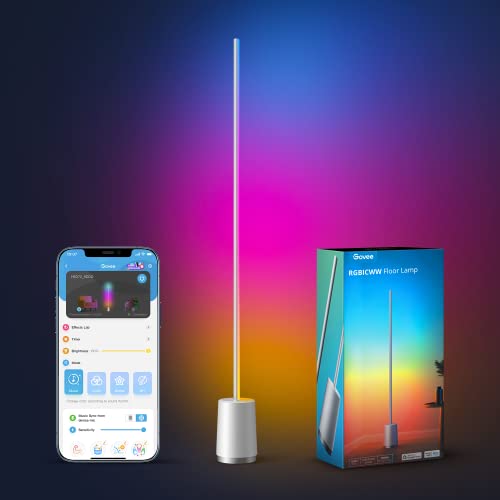
The Govee Lyra Floor Lamp is the mid-range smart pick, and it is the simplest way to get the corner-glow look that defines a modern streaming background. It is a slim RGBIC floor lamp that stands in a corner and throws color up the wall, with a clean modern profile that fits beside a desk, a shelf, or a gaming chair without drawing attention to itself. On camera, it reads as a soft column of color behind the streamer, which adds depth to a shot that would otherwise end at a flat wall.
The Lyra is listed at 1500 lumens, which is enough for a colored accent in a dim room and enough to keep a corner from falling to black on camera. It is not as bright as the premium lamps in this guide, so it works best as a background light rather than the main light in a bright room. In a typical streaming room with curtains drawn and a key light on the face, that is exactly the right role: the Lyra handles the background while a key light handles the subject. The RGBIC design shows more than one color along the lamp at once, so a streamer can run a two-tone gradient or a slow flowing pattern instead of a single flat hue.
Control is straightforward. The lamp comes with a remote control for quick changes, and the Govee app adds scene modes, timers, and DIY color settings. The listing gives 64 scene modes plus music modes, which covers the usual streaming looks: a calm blue for a late-night session, a warm amber for a cozy talk stream, a purple and teal split for a gaming setup, and a soft white for a work call. Music sync lets the light react to sound in the room, which suits a music stream or a countdown screen.
The Lyra is a good match for a first smart lamp because it does the core job well without the extra hardware of a speaker or a hub. It pairs naturally with a second Lyra or a matching Govee light bar on the opposite side of a desk, since the app can group lamps and run the same scene across them. Two lamps in opposite corners give a balanced frame, with color on both sides of the shot instead of a single bright column on one side.
The limits are modest. At 1500 lumens, the Lyra will not overpower daylight from a large window, and it has no built-in speaker or white noise, so audio still needs a separate speaker. The remote is handy, but the best scenes live in the app, so a phone stays part of the setup. None of that hurts its core job. For a mid-range spend, the Lyra gives the most recognizable streaming-room look in this guide: a tall, slim column of color that makes a plain corner look deliberate.
Specs
- Type: Smart RGBIC corner floor lamp with a slim vertical profile
- Brightness: 1500 lumens
- Color: RGBIC multi-color effects with DIY color settings
- Scenes: 64 scene modes plus music modes
- Control: Govee app and included remote control
- Effects: Music sync
- Best for: A first smart corner lamp for a streaming background
Brightech Sky LED Torchiere Floor Lamp

The Brightech Sky LED Torchiere Floor Lamp is the mid-range pick for a streamer who wants bright, clean white light with no app, no color settings, and no learning curve. A torchiere points its light upward, so the ceiling becomes a large soft reflector that fills the room with even light instead of throwing a hard beam at a face or a monitor. That indirect light is kind to cameras: it lifts the whole room, softens shadows on a face, and keeps the background from going dark, all without a visible light source in the frame.
The Sky uses a 30-watt LED and is listed as a dimmable super-bright torchiere. The dimmer is the key control, because a streaming room needs different light levels at different times: full brightness for a daytime work session, a lower level for an evening stream where the key light does the main work, and a soft glow for a late-night session. The white light is a daylight tone, which matches the look of a monitor and a daylight-balanced key light, so the room does not pick up a warm yellow cast on camera.
Simplicity is the point. There is no app to open, no Wi-Fi to set up, and no scene library to manage. The lamp turns on, dims, and turns off from its built-in control, which makes it a reliable choice for a shared room or a household where other people use the same space. It also works as a plain room light when the stream is off, so it earns its floor space every day rather than only during a live session.
Placement is easy. A torchiere works best a short distance from a wall, where the upward light can spread across the ceiling and fall back down evenly. Behind a desk, it lifts the background. Beside a sofa or an armchair, it lights a reading corner. In a corner, it fills the darkest part of the room. The slim pole takes up little floor space, which matters in a small streaming room where a desk, a chair, a microphone stand, and a camera tripod already compete for room.
The trade-off is the absence of color. The Sky cannot paint a wall blue or purple, and it cannot sync with music or join a smart routine. A streamer who wants a colored background will need a second lamp for that job, or a smart lamp instead. For a room that needs bright, even, flattering white light above all else, the Sky is the most straightforward option in this guide, and its dimmer gives enough control to tune the room for the camera.
Specs
- Type: LED torchiere floor lamp with upward-facing light
- Power: 30-watt LED
- Light: Dimmable super-bright daylight-white uplight
- Control: Built-in dimmer
- Design: Slim pole with a stable base for corners and beside-desk placement
- Best for: Simple, bright, even white fill light with no app
SUNMORY 32W Torchiere Floor Lamp
The SUNMORY 32W Torchiere Floor Lamp is the budget pick, and it proves that a streaming room does not need a smart lamp to look good on camera. It is a tall torchiere that throws a bright white light upward, using the ceiling to spread the light across the room. The listing gives 32 watts and 3000 lumens, which is the brightest white output in this roundup on paper, and it makes this lamp a strong choice for a dark room, a basement setup, or a room with dark walls that swallow light.
The headline feature at this tier is the remote control. The lamp is stepless dimmable, so brightness can be tuned smoothly rather than jumping between a few fixed levels, and the remote means the level can be changed from the desk chair without standing up mid-stream. That matters during a live session, when leaving the frame to adjust a lamp breaks the flow. A streamer can start bright for a camera check, then ease the level down once the key light is set, all from the chair.
Height is part of the value. The lamp stands 69 inches tall, so the light source sits high enough to clear a desk and a monitor and reach the ceiling without a harsh hotspot. A tall torchiere also stays out of the camera frame more easily than a short lamp, because the glowing head sits above the usual shot. The design is a simple modern pole with a heavy-feeling base, and it fits the same corners and beside-desk spots as the other lamps in this guide.
The light is white rather than color, so this lamp fills a different role from the smart lamps. It is a fill light and a room light: it lifts the background, softens shadows, and keeps the camera from struggling with a dark room. It pairs well with a single smart lamp on the opposite side of the desk, where the smart lamp supplies color and the SUNMORY supplies the even white base. On its own, it gives a clean, bright, neutral room that suits talk streams, work calls, and any setup where the streamer, rather than the background, should hold attention.
The budget tier shows in the extras rather than the light. There is no app, no voice control, and no music sync, and the design is plain rather than decorative. Those are fair trade-offs at this tier. For a streamer who needs bright white light, a remote, and smooth dimming at the lowest spend in this guide, the SUNMORY torchiere is the pick.
Specs
- Type: LED torchiere floor lamp with upward-facing light
- Power: 32 watts
- Brightness: 3000 lumens
- Height: 69 inches tall
- Control: Remote control with stepless dimming
- Best for: Bright budget white fill light with remote dimming
How to Choose a Streaming Room Floor Lamp
Start with the role the lamp has to play. A background lamp paints the wall behind a desk and gives the camera something to see beyond a flat surface. A fill lamp lifts the whole room so the camera sensor does not struggle with darkness. A smart lamp does the first job best, because color and scenes are built in. A torchiere does the second job best, because it throws a wide, even wash of white light. Many rooms need both, which is why a smart corner lamp on one side and a torchiere on the other is a common pairing.
Brightness matters, but it matters in context. A lamp listed at 1500 lumens is enough for a colored accent in a dim room. A lamp at 2100 or 2550 lumens can hold its own against a key light and a window. A torchiere at 3000 lumens can lift a dark basement. The mistake is to buy the brightest lamp and run it at full output on stream, which washes out the background and competes with the face light. A dimmer, whether in an app or on a remote, is more useful than extra lumens, because it lets the lamp sit at the right level for the camera rather than the brightest level on the box.
Color control decides how flexible the lamp is. RGBIC and gradient lamps can show several colors at once, which gives a richer background than a single-color lamp. A white range matters too: a lamp that can shift from warm white to daylight white can match a key light, a monitor, and the time of day. A lamp with only color and no decent white is a poor work light, so check the white range before buying a color-first lamp for a room that also serves as an office.
Control should match the way the room is used. App control suits a streamer who already manages lights from a phone and wants scenes and timers. A remote suits a streamer who wants to change brightness without looking at a phone mid-stream. Voice control suits a room with a smart speaker and a routine that sets the whole scene at once. Matter support suits a household that mixes brands. There is no best control method, only the one that gets used instead of ignored.
Size and placement decide whether the lamp helps or hurts the shot. A tall lamp throws light higher up the wall and stays out of the frame. A slim pole fits a tight corner. A heavy base matters in a room with cables, a chair on wheels, and a microphone stand, because a lamp that tips easily is a hazard to the desk. Measure the corner before buying, and leave space for the lamp to stand a short distance from the wall so the light can spread.
Power and wiring deserve a quick check. A floor lamp needs an outlet near its corner, and the cable should run along a wall or under a cable cover rather than across a walkway. A smart lamp also needs a stable Wi-Fi signal in its corner, since a weak signal makes app control slow and scenes unreliable. A lamp with a built-in speaker needs a Bluetooth connection as well. None of this is difficult, but it is easier to plan before the lamp arrives than to move furniture after it does.
Finally, think about the rest of the room. A floor lamp works with a key light, not instead of one. The key light shapes the face, the floor lamp shapes the background, and the two together make a shot look finished. A room with dark walls needs more brightness than a room with white walls, because dark paint absorbs light. A room with a window needs a lamp that can hold its own in daylight or a curtain that can tame the window. Match the lamp to the room, not to a picture of someone else’s setup.
Where to Place a Floor Lamp in a Streaming Room
The best spot for a streaming room floor lamp is usually a corner behind the desk, a short distance from the wall. From there, the lamp throws light up the wall and across the ceiling, which gives the camera a bright, even background with no visible light source in the frame. A corner placement also keeps the lamp out of the walkway and away from the chair, which reduces the chance of a bump mid-stream.
A second strong spot is beside the desk, on the side away from the key light. The key light shapes one side of the face, and a floor lamp on the other side lifts the background on that side, which balances the shot. This placement also works for a torchiere, because the upward light fills the room without shining into the camera lens.
Avoid placing a floor lamp directly behind the camera or directly behind the streamer in the center of the frame. A lamp behind the camera lights the streamer from the front and can create glare on a monitor. A lamp dead center behind the streamer becomes a bright pole in the middle of the shot and pulls attention away from the face. Corners and sides are better than centers.
For a two-lamp setup, put the lamps in opposite corners. One smart lamp can run a color scene while a torchiere on the other side supplies even white fill, or two smart lamps can run the same scene for a symmetrical frame. Symmetry reads well on camera because the eye is not pulled to one bright side. If only one lamp is in the budget, put it in the corner that looks darkest on camera, which is usually the corner farthest from the window.
Check the shot after placing the lamp. Record a short test clip, watch it back, and look at the background: is one side much brighter than the other, is there a harsh hotspot on the wall, is the lamp itself visible in the frame. Move the lamp a short distance, dim it a step, or angle it slightly, and test again. Small moves make a large difference on camera, and a few minutes of testing saves a stream where the background distracts from the content.
Cable runs matter as much as placement. Run the lamp cable along the wall to the nearest outlet, and keep it clear of chair wheels and feet. A cable cover or a clip keeps the run tidy and removes a trip hazard. In a room with a rug, the cable can run under the rug edge, but it should not run under a chair mat where wheels will press on it every day.
Who Should Skip a Floor Lamp
A floor lamp is not the right buy for every streaming room. A very small room may not have a free corner, and a lamp squeezed between a desk and a wall will throw a harsh hotspot on one patch of wall instead of a soft wash. In that case, a wall light or a light bar on the desk gives the same background effect in less space.
A room that already has strong, even ceiling light may not need a floor lamp for fill. If the camera exposure is already balanced and the background is already bright, a floor lamp adds clutter rather than quality. A single smart bulb in an existing ceiling fixture, or a light bar behind the monitor, may be the cheaper fix.
A streamer who moves the setup often should also think twice. A tall floor lamp is awkward to pack and slow to set up again, while a clamp light or a small panel light travels in a bag. A permanent room rewards a floor lamp; a portable setup does not.
Finally, a room with a low ceiling limits what a torchiere can do. A torchiere needs ceiling height to spread its light, and a low ceiling turns the wash into a bright patch overhead. A smart corner lamp, which throws light sideways onto a wall rather than straight up, copes better with a low ceiling. Match the lamp type to the ceiling as well as to the floor space.
Frequently Asked Questions
What is the best type of floor lamp for a streaming room?
A smart RGBIC or gradient floor lamp is the best type for most streaming rooms, because one lamp can serve as a white work light and a colored background light. A torchiere is the best type for a room that needs bright, even white fill light without color or an app.
Where should a floor lamp go in a streaming room?
Put the lamp in a corner behind the desk, a short distance from the wall, so it washes the wall and ceiling with light without appearing in the frame. Opposite corners work best for two lamps, and the lamp should sit on the side away from the key light for a balanced shot.
How bright should a streaming room floor lamp be?
A colored accent lamp works well at 1500 lumens in a dim room, while a lamp that must compete with a key light or a window benefits from 2100 lumens or more. A torchiere used as the main fill light in a dark room benefits from 3000 lumens. A dimmer matters more than the top brightness number, because the lamp usually runs below full output on stream.
Do I need a smart floor lamp, or will a plain torchiere work?
A plain torchiere works well when the goal is bright, even white light and a simple setup with no app. A smart floor lamp is worth it when the goal is a colored background, saved scenes, music sync, or voice control. Many rooms end up with one of each: a torchiere for fill and a smart lamp for color.
Conclusion
A streaming room floor lamp is a small purchase that changes how a stream looks. It lifts dark corners, gives the camera a background with depth, and keeps the light source out of the frame. The right pick depends on the room: the Philips Hue Signe Gradient Floor Lamp suits a Hue household that wants the most refined gradient color, the Govee Floor Lamp Pro suits a setup that wants light and audio from one tall device, the Govee Lyra Floor Lamp suits a mid-range budget and a first smart lamp, the Brightech Sky LED Torchiere Floor Lamp suits a simple bright white uplight, and the SUNMORY 32W Torchiere Floor Lamp suits a tight budget with remote dimming. Place the lamp in a corner, dim it to the level the camera likes, and test the shot before going live. The background will look deliberate, and the stream will look finished.
Product and ASIN Reference
| Product | ASIN |
|---|---|
| Philips Hue Signe Gradient Floor Lamp | B09BDLV9BV |
| Govee Floor Lamp Pro | B0C7KZPP2B |
| Govee Lyra Floor Lamp | B08V8GS7PF |
| Brightech Sky LED Torchiere Floor Lamp | B01E6D0W90 |
| SUNMORY 32W Torchiere Floor Lamp | B0CQY5RK52 |
More from Amazon
Programs that pair well with the guide above. Offers and eligibility are set by Amazon and may change.
Free shipping on eligible items, Prime Video and more. Eligible new members can start with a free trial.
Start a Prime free trialAd-free music streaming. Eligible new subscribers can start with a free trial.
Try Music Unlimited freeA Prime membership for ages 18-24 with a trial period. Eligibility is set by Amazon.
See Prime for Young AdultsAudiobooks and podcasts to listen to on the go. Eligible new members can start with a free trial.
Try Audible freeAs an Amazon Associate we earn from qualifying purchases.