Our Short List of 3

- Platform: Vega OS with VoiceView screen reader
- Processor: Quad-core 1.7 GHz
- Storage / memory: 8 GB / 1 GB
- Video: 4K, HDR10, HDR10+, HLG, AV1 (no Dolby Vision)
- Platform: Android TV with TalkBack screen reader
- Processor: NVIDIA Tegra X1+
- Memory / storage: 2 GB / 8 GB plus microSD slot
- Video: 4K, Dolby Vision, HDR10, AI-enhanced upscaling

- Platform: Fire OS with VoiceView screen reader
- Voice input: Built-in far-field microphone array (8 microphones) plus Alexa Voice Remote (2nd Gen)
- Processor: Hexa-core, up to 2.2 GHz
- Storage / memory: 16 GB / 2 GB
All 3 Picks at a Glance
| Product | Specs | Action |
|---|---|---|
| 1. Amazon Fire TV Stick 4K (Newest Model) |
| Check price on Amazon |
| 2. NVIDIA Shield TV (2019) |
| Check price on Amazon |
| 3. Amazon Fire TV Cube (2nd Gen) |
| Check price on Amazon |
Our Top Picks

Disclosure: As an Amazon Associate, I earn from qualifying purchases.
This site already has a guide to streaming devices for seniors, built around simple remotes and tidy menus. This guide is narrower and different: it is for viewers whose main barrier is eyesight itself, whether that is low vision that makes small text unreadable or blindness that rules out menus altogether; the filter here is whether a device can be driven by ear and by voice.
Every pick below was chosen on published accessibility features: a screen reader that speaks the interface aloud (VoiceView on Fire TV, TalkBack on Android TV and Google TV), voice search that replaces typing, and a remote workable by touch. Two honest limits apply to the whole list. First, no streaming device is truly one-button, and none of these sets itself up: Wi-Fi passwords, account sign-in, and switching the screen reader on are visual tasks, so plan on a family member, a friend, or an installer for day one. After that setup, daily use can be voice-led. Second, screen readers speak system menus and settings reliably, but third-party apps vary, and audio description is a per-title feature inside each app, not something a box can guarantee.
How to Choose a Streaming Device for Low Vision
Start with the screen reader, not the remote. VoiceView (Fire TV) and TalkBack (Android TV and Google TV) read menu items, settings, and many app screens aloud, and both can be turned on during or right after setup. Fire TV remotes also carry a published shortcut: holding the Back and Menu buttons together toggles VoiceView. For a viewer with no usable vision, it matters more than any other feature here.
Decide how voice input should work. Most devices use push-to-talk: hold the remote, press its microphone button, speak. That works well, but it means the remote must be found first. Only one pick here, the Fire TV Cube, listens hands-free through its own microphone array, so the viewer can ask for a show from the sofa with the remote nowhere in reach. Households that misplace remotes daily should weigh that heavily.
Judge the remote by touch. Raised, well-spaced buttons, a shape the hand can orient without looking, and backlit keys for viewers with partial sight all beat a flat slab of identical buttons. A locator feature helps too: the Shield TV below can make its own remote beep from a button on the device. On the other platforms, the free phone app is the practical backup remote.
Keep the text settings in view. Viewers with partial sight often combine listening with looking. Larger text, bold text, and high-contrast options live in the same accessibility menus on Fire TV and Google TV, and setting them up once, with help, pays off every evening.
Treat audio description and hearing features as separate layers. A box can pass an audio description track through, but the track itself comes from the app and the title, so check the audio menu inside Netflix, Prime Video, or whichever service the household uses. Bluetooth pairing for headphones is common across this list, and one pick can stream audio directly to select compatible hearing aids.
Plan the setup honestly. Someone sighted should handle unboxing, cables, passwords, updates, and turning accessibility on, then run one practice session of voice searches. That hour of help makes the difference between a device that empowers and one that frustrates.
The 5 Best Voice-First Streaming Devices for Low-Vision Viewers
1. Amazon Fire TV Stick 4K (Newest Model)
- Platform: Vega OS with VoiceView screen reader
- Processor: Quad-core 1.7 GHz
- Storage / memory: 8 GB / 1 GB
- Video: 4K, HDR10, HDR10+, HLG, AV1 (no Dolby Vision)
Amazon’s current 4K stick, launched in September 2026, earns the lead slot because its redesigned remote is built to be read by fingers: flat on top, curved and weighted at the base, so the hand knows which way it points before a button is pressed. VoiceView, Fire TV’s screen reader, runs on this stick and speaks menus, settings, and supported app screens, and Alexa+ voice search handles follow-up requests in plain language, so a viewer can ask for a show, then ask what else its lead actor appears in, without typing.
See the Fire TV Stick 4K (newest model) on Amazon
Vega OS carries a smaller app catalog than the older Fire OS, sideloading is not supported, and there is no Dolby Vision. The missing adapter means setup needs a TV USB port with enough power or a spare USB-C adapter on hand.
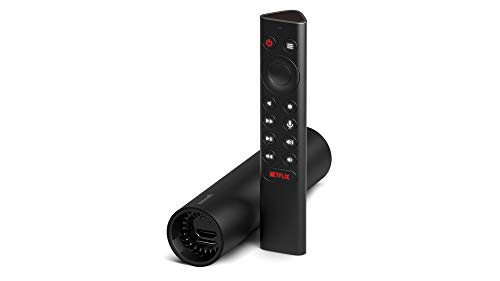
2. NVIDIA Shield TV (2019)
- Platform: Android TV with TalkBack screen reader
- Processor: NVIDIA Tegra X1+
- Memory / storage: 2 GB / 8 GB plus microSD slot
- Video: 4K, Dolby Vision, HDR10, AI-enhanced upscaling
The Shield TV tube hides behind the television, but its remote is the easiest on this list to recover and to use in the dark. Its buttons are backlit, which serves viewers with partial sight, and a locator button on the end of the device itself makes the remote beep when it has slid into the sofa, a small feature that solves a daily problem. TalkBack speaks the interface, Google Assistant voice search is built in, and the box also works with Alexa through a linked speaker.
See the NVIDIA Shield TV on Amazon
Caveats: this is 2019 hardware running Android TV rather than the newer Google TV interface, updates have slowed, and no HDMI cable is included. The wired Ethernet option does remove Wi-Fi password re-entry after router changes, one less visual task to redo.
3. Amazon Fire TV Cube (2nd Gen)
- Platform: Fire OS with VoiceView screen reader
- Voice input: Built-in far-field microphone array (8 microphones) plus Alexa Voice Remote (2nd Gen)
- Processor: Hexa-core, up to 2.2 GHz
- Storage / memory: 16 GB / 2 GB
The Cube is the only fully hands-free pick here. Eight far-field microphones hear requests from across the room, and a built-in speaker lets Alexa answer even with the television off. A viewer can ask it to play a show, pause, raise the volume, or switch inputs without touching a remote at all. VoiceView covers the screens that do need reading, the included remote is there when wanted, and the box can also control a TV, soundbar, and many cable boxes by infrared, which means fewer remotes to identify by touch.
See the Fire TV Cube (2nd Gen) on Amazon
The catch is availability: this generation is discontinued, Amazon’s listing has shown new units as currently unavailable, and the current third-generation Cube is the one covered in this site’s earlier guides. Remaining 2nd Gen offers are renewed or marketplace units, so check the seller and condition before ordering.
4. MECOOL KM7 Plus
The KM7 Plus is a Google-certified Google TV box, which means it carries the same TalkBack screen reader and accessibility menu as Google’s own hardware, plus a Bluetooth voice remote with a Google Assistant button for spoken search. Unlike the sticks here, it is a small box with wired Ethernet and USB ports, so a helper can hard-wire it once and leave the network settings alone. Netflix certification means the main app works at full quality, not through a workaround.
Specs
- Platform: Google TV (Android 11) with TalkBack screen reader
- Processor: Amlogic S905Y4 with AV1 decoding
- Memory / storage: 2 GB / 16 GB
- Video: 4K, HDR10+, AV1
- Audio: Dolby Atmos support
- Connectivity: Dual-band Wi-Fi, Bluetooth 5.0, Ethernet port, USB ports
- Remote: Bluetooth voice remote with Google Assistant button
- Certification: Google certified, Netflix certified
See the MECOOL KM7 Plus on Amazon
Support is the trade-off: help runs through MECOOL rather than through a platform owner with a large support network, and software updates arrive on the maker’s schedule. For a household comfortable with Google TV, the accessibility stack itself is the genuine article.
5. onn Google TV 4K Plus
Walmart’s onn 4K Plus runs the same Google TV platform as the KM7 Plus, with TalkBack in the accessibility settings and a voice remote for Google Assistant search. It doubles the storage of the plainer onn 4K box, adds Wi-Fi 6, and supports Dolby Vision and Dolby Atmos, making it the most current Google TV option here for a viewer who wants menus and search results spoken aloud.
Specs
- Platform: Google TV with TalkBack screen reader
- Storage / memory: 16 GB / 2 GB
- Video: 4K, Dolby Vision, HDR10+
- Audio: Dolby Atmos
- Connectivity: Wi-Fi 6, Bluetooth; USB-C port accepts hubs for wired networking
- Remote: Voice remote with Google Assistant button
- Model: 36233631
See the onn Google TV 4K Plus on Amazon
Two buying notes. onn is Walmart’s house brand, so the Amazon listing comes from third-party sellers rather than the brand’s home shelf; confirm the listing names the 4K Plus model, not the plainer 4K box, and expect support to run through onn and Walmart channels.
Comparison Table
| Device | Screen reader | Voice input | Remote recovery | Top resolution |
|---|---|---|---|---|
| Fire TV Stick 4K (newest model) | VoiceView | Remote button, Alexa+ | Fire TV phone app | 4K |
| NVIDIA Shield TV (2019) | TalkBack | Remote button, Google Assistant | Locator button makes remote beep | 4K |
| Fire TV Cube (2nd Gen) | VoiceView | Hands-free far-field microphones | Remote included; voice works without it | 4K |
| MECOOL KM7 Plus | TalkBack | Remote button, Google Assistant | Google Home phone app | 4K |
| onn Google TV 4K Plus | TalkBack | Remote button, Google Assistant | Google Home phone app | 4K |
FAQ
Can a blind viewer set one of these up alone?
Plan on help. Unboxing, cable seating, Wi-Fi passwords, account sign-in, and updates are visual tasks on every platform here, and the screen reader itself has to be switched on in settings. A family member, friend, or installer should run that first session; from then on, finding and playing shows can be handled by voice.
Which pick works without holding the remote?
The Fire TV Cube (2nd Gen). Its built-in far-field microphones take requests from across the room, so play, pause, volume, and input switching all work with the remote in another room. Every other pick needs its remote’s microphone button pressed, although the Fire TV and Google TV phone apps can stand in as backup remotes.
Will the screen reader read every app aloud?
No. VoiceView and TalkBack read system menus, settings, and home screens reliably, and many major apps expose their controls well, but support varies by app and can change with app updates. Audio description is separate again: it is a track supplied per title by each service, found in the app’s audio or subtitle menu, and no box can add it to a title that lacks one.
What happens when the remote gets lost in the sofa?
On the Shield TV, press the locator button on the device and the remote beeps until found, provided it is in range with charge left. On Fire TV and Google TV devices, the free phone apps work as full remotes, which covers the gap while the physical remote is missing. A brightly colored remote case, chosen at setup, also helps viewers with partial sight spot it at a glance.
Conclusion
Match the device to the household’s routine. The newest Fire TV Stick 4K suits anyone wanting a current model with a remote shaped for fingers and VoiceView throughout. The Shield TV suits homes where the remote keeps vanishing and backlit buttons still help. The Fire TV Cube (2nd Gen) is the genuine hands-free option, with renewed or marketplace stock. The KM7 Plus and onn 4K Plus bring Google TV with TalkBack and wired networking. Whichever box arrives, book that one helped setup session first: passwords in, screen reader on, a few practice searches done. After that, the television answers to a voice, which is the whole point.
More from Amazon
Programs that pair well with the guide above. Offers and eligibility are set by Amazon and may change.
Free shipping on eligible items, Prime Video and more. Eligible new members can start with a free trial.
Start a Prime free trialAd-free music streaming. Eligible new subscribers can start with a free trial.
Try Music Unlimited freeA Prime membership for ages 18-24 with a trial period. Eligibility is set by Amazon.
See Prime for Young AdultsAudiobooks and podcasts to listen to on the go. Eligible new members can start with a free trial.
Try Audible freeAs an Amazon Associate we earn from qualifying purchases.